
Suddenly getting brief black screen

Gwaihir

Member
Member
VIP
Local time
10:25 PM
Messages
135
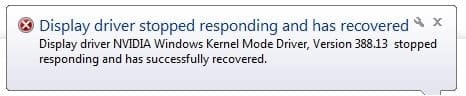
In the last few days I've started getting a sudden black screen that lasts for about a second or two then recovers and pops up the attached message. There's no pattern to it, it just happens randomly. Is this likely to be an incipient hardware problem or a software glitch?

If anyone's seen anything like this before and can point me in the right direction I'd be most grateful.
 

Attachments
  • Glitch.jpg
    Glitch.jpg
    19.8 KB · Views: 7

My Computer

Computer type
PC/Desktop
Computer Manufacturer/Model Number
Home build
OS
Windows 7 Professional 64-bit SP1
CPU
Pentium Core i5-2500 3.3GHz
Motherboard
Gigabyte P61-USB3-B3
Memory
2 x 4GB DDR3 1333MHz
Graphics Card(s)
Asus GT440 1GB GDDR5
Sound Card
Realtek integrated sound
Monitor(s) Displays
LG L1942PE
Screen Resolution
1280 x 1024 @ 60Hz
Hard Drives
2 x 1TB Western Digital WD10EARS, 1 x 1TB Seagate ST1000DM010
PSU
EVGA 450BR
Case
Novatech Panther ATX
Cooling
Sharkoon Silent Eagle 1000 120mm in case rear extracting
Keyboard
Logitech K120
Try updating nvidia drivers from their site
 

My Computer

Computer type
PC/Desktop
OS
win 8 32 bit
Thanks for the reply. I will do as you suggest although I don't think it's anything to do with the current drivers being out of date. Since Micro$oft stopped supporting Windows 7 there have been no changes to the system for a long time and I haven't installed any new software lately.
 

My Computer

Computer type
PC/Desktop
Computer Manufacturer/Model Number
Home build
OS
Windows 7 Professional 64-bit SP1
CPU
Pentium Core i5-2500 3.3GHz
Motherboard
Gigabyte P61-USB3-B3
Memory
2 x 4GB DDR3 1333MHz
Graphics Card(s)
Asus GT440 1GB GDDR5
Sound Card
Realtek integrated sound
Monitor(s) Displays
LG L1942PE
Screen Resolution
1280 x 1024 @ 60Hz
Hard Drives
2 x 1TB Western Digital WD10EARS, 1 x 1TB Seagate ST1000DM010
PSU
EVGA 450BR
Case
Novatech Panther ATX
Cooling
Sharkoon Silent Eagle 1000 120mm in case rear extracting
Keyboard
Logitech K120

My Computer

Computer type
PC/Desktop
Computer Manufacturer/Model Number
Dell OptiPlex 9020
OS
Windows 7 Professional SP1 64-bit
CPU
Intel Core i7-4790 3.60 GHz
Memory
32 GB DDR3-1600 MHz
Graphics Card(s)
Integrated Intel HD Graphics 4600
Monitor(s) Displays
Viewsonic 32" LCD
Hard Drives
Kingston SATA 3 240 GB SSD
Internet Speed
Spectrum Internet 1000 Mbps
Thanks, but I've already found and dowloaded that one. I noticed they don't offer the Studio version.

Before I install I'm going to create a restore point and also make a backup image using Macrium Reflect. Belt and braces!
 

My Computer

Computer type
PC/Desktop
Computer Manufacturer/Model Number
Home build
OS
Windows 7 Professional 64-bit SP1
CPU
Pentium Core i5-2500 3.3GHz
Motherboard
Gigabyte P61-USB3-B3
Memory
2 x 4GB DDR3 1333MHz
Graphics Card(s)
Asus GT440 1GB GDDR5
Sound Card
Realtek integrated sound
Monitor(s) Displays
LG L1942PE
Screen Resolution
1280 x 1024 @ 60Hz
Hard Drives
2 x 1TB Western Digital WD10EARS, 1 x 1TB Seagate ST1000DM010
PSU
EVGA 450BR
Case
Novatech Panther ATX
Cooling
Sharkoon Silent Eagle 1000 120mm in case rear extracting
Keyboard
Logitech K120
Try seeing if your drivers are out of date.

If they are not out of date, try reinstalling Windows. If you reinstall Windows, be sure to back up your files and get the latest drivers on an external disk, like a CD, USB flash drive, or SD Card, floppy disk, or whatever you would use.
 

My Computers

System One System Two

  • Computer type
    PC/Desktop
    Computer Manufacturer/Model Number
    DELL
    OS
    Windows 7 Professional SP1 64 bit
    Memory
    8 GB RAM
    Graphics Card(s)
    Integrated Intel® HD Graphics 4600
    Sound Card
    High Definition Audio Device
    Monitor(s) Displays
    Dell™ E1910
    Screen Resolution
    1440 x 900
    Hard Drives
    1
    Keyboard
    HP KU-3016
    Mouse
    ione LYNX-M9 Optical Mouse
    Antivirus
    Microsoft Security Essentials
    Browser
    Mypal, Internet Explorer 8
    Other Info
    DELL™ Optiplex 9020
  • Computer type
    Laptop
    System Manufacturer/Model Number
    HP
    OS
    Windows 7 Ultimate SP1 64 bit
    Graphics Card(s)
    Intel HD Graphics
    Sound Card
    High Definition Audio Device
    Screen Resolution
    1440 x 900
    Keyboard
    Built in G72 Laptop Keyboard
    Mouse
    HP G72 Laptop Built in Touchpad
    Browser
    Mypal, Internet Explorer 8
    Other Info
    HP G72 C55DX Notebook PC
They were out of date. As stated above I've created a restore point, imaged the boot partition and installed the new drivers. I opted for a custom install and chose a clean install, only installing the graphics driver. I'm not a gamer so I don't need all the other fancy stuff. I noticed the installer removed a lot of this stuff from the earlier installation.

I do need to do a repair install of Windows at some point because System File Checker reports corrupted files it can't repair because the cached copies are also damaged. For now, unless I have major problems, I'm going to soldier on with it. I haven't had any repetition of the original problem so far so hopefully the new driver has fixed it.

Edit: One week on and no repetition of the problem so it's looking good.
 
Last edited:

My Computer

Computer type
PC/Desktop
Computer Manufacturer/Model Number
Home build
OS
Windows 7 Professional 64-bit SP1
CPU
Pentium Core i5-2500 3.3GHz
Motherboard
Gigabyte P61-USB3-B3
Memory
2 x 4GB DDR3 1333MHz
Graphics Card(s)
Asus GT440 1GB GDDR5
Sound Card
Realtek integrated sound
Monitor(s) Displays
LG L1942PE
Screen Resolution
1280 x 1024 @ 60Hz
Hard Drives
2 x 1TB Western Digital WD10EARS, 1 x 1TB Seagate ST1000DM010
PSU
EVGA 450BR
Case
Novatech Panther ATX
Cooling
Sharkoon Silent Eagle 1000 120mm in case rear extracting
Keyboard
Logitech K120
Back
Top