Suddenly getting sounds when I click links in IE10 and Outlook 2010

Memshaib

New member
Local time
9:02 PM
Messages
4
Location
Perth Western Australia
I have had this laptop for three years and suddenly it has started making "boing" sounds when I open IE10 and each time I click a link. Different sound also now made when I open Outlook 2010. These started after recent Windows updates so I have restored to a point before they were downloaded and I am still getting the annoying sounds. I have changed all the sounds to NONE wherever there is an option in control panel. I even activated Sound Sentry in ease of access to 'no sounds'. I have read a few other forum members with a similar problem and have tried all the suggested solutions but I still get the sounds. The only way I can stop them is if I mute my speakers. I uninstalled Malwarebytes because one tip was that this may cause the sounds - otherwise no new hardware and no new software. Help!!!! please!
 

My Computer My Computer

At a glance

Window 7 Pro 64bitIntel Core 17 262om 2.7ghz4gbIntel(R) HD Graphics 3000
Computer type
Laptop
Computer Manufacturer/Model Number
Asus U36S
OS
Window 7 Pro 64bit
CPU
Intel Core 17 262om 2.7ghz
Memory
4gb
Graphics Card(s)
Intel(R) HD Graphics 3000
Hard Drives
HDD750GB
Antivirus
Microsoft Essentials
Browser
IE10
Malwarebytes does not cause any extraneous sounds. I have Malwarebytes installed (and running) in my Recording studio PC. When I record, I disable the internet but do not touch Malwarebytes and it does not cause any sounds or interfere with recording.

What do you have listed under Sound in the Device Manager? You should have your specific sound module (e.g. RealTek, IDT, etc) and possibly Intel HD Audio (for HDMI sound). If you have something else, such as "HD Audio Codec" that MAY be what is causing it.

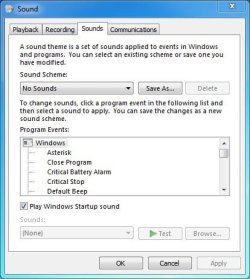
This is what my Sound panel looks like, I can't have any system sounds when recording.
 

Attachments

  • System Sound Capture.JPG
    System Sound Capture.JPG
    38.1 KB · Views: 11

My Computer My Computer

At a glance

Windows 10 64 bitIntel i7 6700K16GB Corsair DominatorIntel CPU Graphics
Computer type
PC/Desktop
Computer Manufacturer/Model Number
My Own Build
OS
Windows 10 64 bit
CPU
Intel i7 6700K
Motherboard
ASUS ROG Maximus VIII Hero
Memory
16GB Corsair Dominator
Graphics Card(s)
Intel CPU Graphics
Sound Card
RealTek
Monitor(s) Displays
27" Dell S2719dgf
Screen Resolution
2560X1440
Hard Drives
1 TB Samsung 850 EVO SSD for Win 10 Pro
500GB Samsung 850 EVO SSD for Win 10 Insider
2 TB drive for backup
PSU
EVGA Supernova 750G2
Case
BeQuiet Silent Base 600
Cooling
Deepcool Captain 120EX
Keyboard
Microsoft Wireless 2000
Mouse
Microsoft wireless
Internet Speed
100 MB/sec (Cable)
Antivirus
Microsoft Defender and Malwarebytes
Browser
Edge/Firefox
Other Info
Cakewalk (Sonar) by BandLab and Studio One 4.1 Pro recording studio software. MOTU 896Mk3 Hybrid recording interface, Frontier Tranzport wireless control unit, Behringer X-Touch Control Surface.
Five USB connected optical drives for CD Audio production using Nero BurningROM
Thanks for the reply - I only mentioned MB as it was something someone else had suggested had stopped the sounds for them on a different forum. Uninstalling didn't help me. My sound panel looks exactly the same as yours. I am attaching my Device Manager and Sound snips. The strange thing is that today I am not getting the sounds. Yet all I have done since posting my problem (which had annoyed me for two days) is a standard Win 7 backup to an external hard drive. I didn't even reboot as I left the backup running overnight! Prior to posting I used CCleaner, Malwarebytes and Advanced System Care Pro and did a full virus scan and rebooted. The sounds continued. And now they have gone .... will I ever really understand computers? Will they return?
 
Last edited:

My Computer My Computer

At a glance

Window 7 Pro 64bitIntel Core 17 262om 2.7ghz4gbIntel(R) HD Graphics 3000
Computer type
Laptop
Computer Manufacturer/Model Number
Asus U36S
OS
Window 7 Pro 64bit
CPU
Intel Core 17 262om 2.7ghz
Memory
4gb
Graphics Card(s)
Intel(R) HD Graphics 3000
Hard Drives
HDD750GB
Antivirus
Microsoft Essentials
Browser
IE10
As this is a recent problem and you apparently do periodic hard drive backups, do you have a recent backup for when it worked correctly? You could try that and see what happens.

Another thought, before you do the backup, uninstall the sound in the Device Manager (DO NOT also uninstall the drivers) then restart the PC and when Windows starts it will detect and reinstall the sound. If there were some type of corruption between Windows and the sound this will fix it.
 

My Computer My Computer

At a glance

Windows 10 64 bitIntel i7 6700K16GB Corsair DominatorIntel CPU Graphics
Computer type
PC/Desktop
Computer Manufacturer/Model Number
My Own Build
OS
Windows 10 64 bit
CPU
Intel i7 6700K
Motherboard
ASUS ROG Maximus VIII Hero
Memory
16GB Corsair Dominator
Graphics Card(s)
Intel CPU Graphics
Sound Card
RealTek
Monitor(s) Displays
27" Dell S2719dgf
Screen Resolution
2560X1440
Hard Drives
1 TB Samsung 850 EVO SSD for Win 10 Pro
500GB Samsung 850 EVO SSD for Win 10 Insider
2 TB drive for backup
PSU
EVGA Supernova 750G2
Case
BeQuiet Silent Base 600
Cooling
Deepcool Captain 120EX
Keyboard
Microsoft Wireless 2000
Mouse
Microsoft wireless
Internet Speed
100 MB/sec (Cable)
Antivirus
Microsoft Defender and Malwarebytes
Browser
Edge/Firefox
Other Info
Cakewalk (Sonar) by BandLab and Studio One 4.1 Pro recording studio software. MOTU 896Mk3 Hybrid recording interface, Frontier Tranzport wireless control unit, Behringer X-Touch Control Surface.
Five USB connected optical drives for CD Audio production using Nero BurningROM
Thanks again firebird - I like to think I am reasonably capable on my computer but not really sure what you mean 'uninstall sound in Device Manager but do not uninstall the drivers." I do a weekly backup to an external hard drive but also have an ongoing backup to Carbonite (cloud)- how would I know what files to restore from either? Also my external HD backup was done after the problem started!
 

My Computer My Computer

At a glance

Window 7 Pro 64bitIntel Core 17 262om 2.7ghz4gbIntel(R) HD Graphics 3000
Computer type
Laptop
Computer Manufacturer/Model Number
Asus U36S
OS
Window 7 Pro 64bit
CPU
Intel Core 17 262om 2.7ghz
Memory
4gb
Graphics Card(s)
Intel(R) HD Graphics 3000
Hard Drives
HDD750GB
Antivirus
Microsoft Essentials
Browser
IE10
Go to the Device Manager, RIGHT click on the entry for your sound device to highlight it and then LEFT click "Uninstall" There will be another panel come up and ask if you want to uninstall the drivers. DO NOT uninstall the drivers. Restart the PC and when Windows starts it will detect and reinstall the sound.

You would need a full hard drive backup, not just one with selected files, or user files. I only do full hard drive backups, (all partitions including any vendor recovery partitions). Then if I have a problem I can recreate the entire hard drive contents. I use Macrium Reflect backup software. I don't do any cloud backups (e.g. Carbonite), I only want my personal data on my local backup drive(s).
 

My Computer My Computer

At a glance

Windows 10 64 bitIntel i7 6700K16GB Corsair DominatorIntel CPU Graphics
Computer type
PC/Desktop
Computer Manufacturer/Model Number
My Own Build
OS
Windows 10 64 bit
CPU
Intel i7 6700K
Motherboard
ASUS ROG Maximus VIII Hero
Memory
16GB Corsair Dominator
Graphics Card(s)
Intel CPU Graphics
Sound Card
RealTek
Monitor(s) Displays
27" Dell S2719dgf
Screen Resolution
2560X1440
Hard Drives
1 TB Samsung 850 EVO SSD for Win 10 Pro
500GB Samsung 850 EVO SSD for Win 10 Insider
2 TB drive for backup
PSU
EVGA Supernova 750G2
Case
BeQuiet Silent Base 600
Cooling
Deepcool Captain 120EX
Keyboard
Microsoft Wireless 2000
Mouse
Microsoft wireless
Internet Speed
100 MB/sec (Cable)
Antivirus
Microsoft Defender and Malwarebytes
Browser
Edge/Firefox
Other Info
Cakewalk (Sonar) by BandLab and Studio One 4.1 Pro recording studio software. MOTU 896Mk3 Hybrid recording interface, Frontier Tranzport wireless control unit, Behringer X-Touch Control Surface.
Five USB connected optical drives for CD Audio production using Nero BurningROM
Thanks again - I did as suggested and uninstalled the sound card - but no luck. Rather than try a restore from back-up I kept search various forums and found this:
[SOLVED] Annoying boing sound - Open Forum - SpywareInfo Forum

As a committed fan of Clipmate for many years I checked - and found that there had been a recent Clipmate update - so I switched off all sounds and ....the BOING has gone! Amazing who would have thought it was an extended Clipboard program? I hope that helps someone else!

As far as the Cloud backups go - I use it because I have a fear that if our home is destroyed the external HD would be destroyed along with the computer - at least from the Cloud I can retrieve precious photos and documents. And what is precious to me would be of no value or interest to someone in the "cloud" so quite secure.
 
Last edited:

My Computer My Computer

At a glance

Window 7 Pro 64bitIntel Core 17 262om 2.7ghz4gbIntel(R) HD Graphics 3000
Computer type
Laptop
Computer Manufacturer/Model Number
Asus U36S
OS
Window 7 Pro 64bit
CPU
Intel Core 17 262om 2.7ghz
Memory
4gb
Graphics Card(s)
Intel(R) HD Graphics 3000
Hard Drives
HDD750GB
Antivirus
Microsoft Essentials
Browser
IE10
Thanks for the feedback. I'll keep the Clipmate in mind if someone else has this problem. I don't have that program.
 

My Computer My Computer

At a glance

Windows 10 64 bitIntel i7 6700K16GB Corsair DominatorIntel CPU Graphics
Computer type
PC/Desktop
Computer Manufacturer/Model Number
My Own Build
OS
Windows 10 64 bit
CPU
Intel i7 6700K
Motherboard
ASUS ROG Maximus VIII Hero
Memory
16GB Corsair Dominator
Graphics Card(s)
Intel CPU Graphics
Sound Card
RealTek
Monitor(s) Displays
27" Dell S2719dgf
Screen Resolution
2560X1440
Hard Drives
1 TB Samsung 850 EVO SSD for Win 10 Pro
500GB Samsung 850 EVO SSD for Win 10 Insider
2 TB drive for backup
PSU
EVGA Supernova 750G2
Case
BeQuiet Silent Base 600
Cooling
Deepcool Captain 120EX
Keyboard
Microsoft Wireless 2000
Mouse
Microsoft wireless
Internet Speed
100 MB/sec (Cable)
Antivirus
Microsoft Defender and Malwarebytes
Browser
Edge/Firefox
Other Info
Cakewalk (Sonar) by BandLab and Studio One 4.1 Pro recording studio software. MOTU 896Mk3 Hybrid recording interface, Frontier Tranzport wireless control unit, Behringer X-Touch Control Surface.
Five USB connected optical drives for CD Audio production using Nero BurningROM
Back
Top