Suddenly I cannot create any user accounts

Ceira

New member
Local time
3:29 PM
Messages
20
Hi,

Every now and again I have to create a new user accounts for one of my pupils. It is very easy to create a standard account.

But suddenly I cannot do it. The system will not let me. The account is created, I log out then I enter that new account o activate it and then and error message comes up.

I could not copy and paste it, but it said something about cannot create profile. No reason given.

I tried it with administrator account, I did the usual virus scan but most drastically I did about 5 system restores which usually helps, and yet I cannot cannot create them.

I have googled this problem and it seam common, yet nobody as fa as I can see has resolved it.

This is a difficult one. I have spent ages on this could somebody help. I need these separate accounts.

Many thanks, Ceira.
 

My Computer

OS
64
Hi Ceira,

Does the error say anything else? Such as a error code?

Maybe if you make it an Administrator account. Try to access it then, if you can access it just change the settings within that account to standard?
 

My Computer

Computer type
PC/Desktop
Computer Manufacturer/Model Number
Dell / Lenovo g550
OS
Windows 7 Ultimate 64-bit
CPU
Intel Core 2 Duo E6550 @2.33GHz
Motherboard
foxconn g33m02
Memory
4GB DDR"
Graphics Card(s)
NVIDIA GeForce 8600 GS
Hard Drives
HDD 1 = 150GB
HDD 2 = 1.5TB
PSU
450W
Cooling
Stock fan
Internet Speed
12Mb
Antivirus
AVG Internet Security
Thanks,

I did think of this but dismissed it as I needed standard acounts, but I understand what you are saying. Get the thing working first and wonder.

I will do so, and get back to you with the error message.

Something to do with user profiles, but I know it is very vague, and does not give an error code.

Thanks for your help,

Ceira
 

My Computer

OS
64
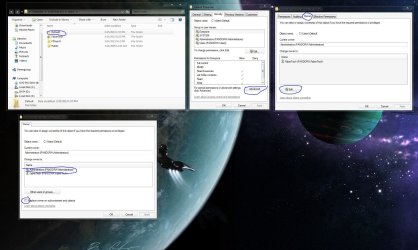
I'm not sure if you have the same problem, but I remember fixing a similar problem by ensuring that all files and folders within the C:\users\default folder had everyone read & execute permissions. I also remember another time that I had to replace the C:\users\default\ntuser.dat file with one from a clean installation of windows 7. But its been years so its all a little blurry. In any case, it may help you in the right direction.

P.S. check the box at the end of the picture and click okay
 

Attachments

  • Capture.JPG
    Capture.JPG
    256.6 KB · Views: 22
Last edited:

My Computer

Computer type
PC/Desktop
Computer Manufacturer/Model Number
Pandora (computer name)
OS
Windows 7 x64 / Windows Server 2008 / Linux (Redhat & Deb distros) / OS X / More
CPU
AMD FX 8150 Eight-Core Processor 4.23 Ghz OC
Motherboard
ASUS SaberTooth 990FX
Memory
G.SKILL Ripjaws X Series 32GB (4 x 8GB) DDR3 SDRAM 1333
Graphics Card(s)
2X Radeon HD 4870 CrossFire X
Sound Card
Onboard and loving it
Monitor(s) Displays
2x HP w2480 Wide LCD
Screen Resolution
1920x1200 each
Hard Drives
RAID (6x0 Seagate Barracuda 7200 rpm 32 MB cache 500Gb SATA)
PSU
Antec 850 Watt
Case
Antec 900
Cooling
Lots of fans
Keyboard
Logitech
Mouse
Rat 9
Internet Speed
40 Mbps Down 5 Mbps Up
Antivirus
AVG
Browser
Chrome, Firefox, IE
Other Info
My main desktop
Hi benjy206

I did what you said. I created two user accounts from an admistrators account.

One a standard account and one an administrator account.


I log off and enter the new accounts as normal, I see a text saying welcome and then the thin problem is says

"The user profile Serviceservice failed the logon.

User profile cannot be loaded"

What is puzzling is that there is nothing to mess up when creating user accounts. Access is being blocked somewhere.

Again, this is cause others problems as I search for a solution. Can you help.

Many thanks,

Ceira
 

My Computer

OS
64
You may also want to run "cmd" as administrator and type "sfc /scannow" to run the system file checker. you may have corrupt system files preventing the new users from loading new profiles.
 

My Computer

Computer type
PC/Desktop
Computer Manufacturer/Model Number
Pandora (computer name)
OS
Windows 7 x64 / Windows Server 2008 / Linux (Redhat & Deb distros) / OS X / More
CPU
AMD FX 8150 Eight-Core Processor 4.23 Ghz OC
Motherboard
ASUS SaberTooth 990FX
Memory
G.SKILL Ripjaws X Series 32GB (4 x 8GB) DDR3 SDRAM 1333
Graphics Card(s)
2X Radeon HD 4870 CrossFire X
Sound Card
Onboard and loving it
Monitor(s) Displays
2x HP w2480 Wide LCD
Screen Resolution
1920x1200 each
Hard Drives
RAID (6x0 Seagate Barracuda 7200 rpm 32 MB cache 500Gb SATA)
PSU
Antec 850 Watt
Case
Antec 900
Cooling
Lots of fans
Keyboard
Logitech
Mouse
Rat 9
Internet Speed
40 Mbps Down 5 Mbps Up
Antivirus
AVG
Browser
Chrome, Firefox, IE
Other Info
My main desktop
Hi FaberTech,

Just as I posted the above, your reply came through.

I though it is was a little drastic or ify but I changed the permissions as you suggest. I was straight forward.

All accounts now work, which is good.


So some program must have changed these permissions. It is either a microsoft update or an AGV. The only other thing I installed was Visual Explorer which worked only on the administrator accounts, it did not work on the standard acconts; but I think we can attribute its non function to the permissions being blocked.

I am very grateful for both of you trying to help, and it has worked.

Thanks again,

Ceira.

PS. This is the third time I have had problems with user accounts in the last month; I have been using user accounts for years with no problems. Curious, it has been such a waste of time!
 

My Computer

OS
64
Hello Ceira,

I am happy this helped. It would seem odd that AVG would be the cause only because I have used it for years and never encountered this problem due to its installation, but anything is possible with software. you may want to uninstall all of those programs and re-install the latest versions. in any case, i wish the best of luck on your further investigation on the cause of this issue.

P.S. the files and folders that you changed permissions on are the default user profile settings that are loaded when creating a new account. it is very important that anyone "new users" can read and execute them, so no worries about ensuring they are set that way. :cool:

Don't forget to mark as solved to help others with this issue.
 

My Computer

Computer type
PC/Desktop
Computer Manufacturer/Model Number
Pandora (computer name)
OS
Windows 7 x64 / Windows Server 2008 / Linux (Redhat & Deb distros) / OS X / More
CPU
AMD FX 8150 Eight-Core Processor 4.23 Ghz OC
Motherboard
ASUS SaberTooth 990FX
Memory
G.SKILL Ripjaws X Series 32GB (4 x 8GB) DDR3 SDRAM 1333
Graphics Card(s)
2X Radeon HD 4870 CrossFire X
Sound Card
Onboard and loving it
Monitor(s) Displays
2x HP w2480 Wide LCD
Screen Resolution
1920x1200 each
Hard Drives
RAID (6x0 Seagate Barracuda 7200 rpm 32 MB cache 500Gb SATA)
PSU
Antec 850 Watt
Case
Antec 900
Cooling
Lots of fans
Keyboard
Logitech
Mouse
Rat 9
Internet Speed
40 Mbps Down 5 Mbps Up
Antivirus
AVG
Browser
Chrome, Firefox, IE
Other Info
My main desktop
Hi,

Can I ask one more question before I mark as solved.

After I changed the permission to include child groups, I later back tracked my steps to check aagin only to find they had reverted to the unchecked position.

I checked visual explorer again and it would not run. Something is has returned this setting. The only program I used was ccleaner in that time. This is bothersome. Could it be windows defender?

Thanks Ceira.
 

My Computer

OS
64
Hi im sorry about not repling till now as my notifications dont work sometimes. Ccleaner I dont think would have caused problems. Unless you changed default settings on the program? Tech here seems to have this under controll. I am writing off my phone so hard to understand what exactly is going on. I will be on a pc in 7 hrs or so if you stil have this problem I will try help you out.
 

My Computer

Computer type
PC/Desktop
Computer Manufacturer/Model Number
Dell / Lenovo g550
OS
Windows 7 Ultimate 64-bit
CPU
Intel Core 2 Duo E6550 @2.33GHz
Motherboard
foxconn g33m02
Memory
4GB DDR"
Graphics Card(s)
NVIDIA GeForce 8600 GS
Hard Drives
HDD 1 = 150GB
HDD 2 = 1.5TB
PSU
450W
Cooling
Stock fan
Internet Speed
12Mb
Antivirus
AVG Internet Security
did you do the procedure from "the" administrator account or "your" administrator account?
 

My Computer

Computer type
PC/Desktop
Computer Manufacturer/Model Number
Pandora (computer name)
OS
Windows 7 x64 / Windows Server 2008 / Linux (Redhat & Deb distros) / OS X / More
CPU
AMD FX 8150 Eight-Core Processor 4.23 Ghz OC
Motherboard
ASUS SaberTooth 990FX
Memory
G.SKILL Ripjaws X Series 32GB (4 x 8GB) DDR3 SDRAM 1333
Graphics Card(s)
2X Radeon HD 4870 CrossFire X
Sound Card
Onboard and loving it
Monitor(s) Displays
2x HP w2480 Wide LCD
Screen Resolution
1920x1200 each
Hard Drives
RAID (6x0 Seagate Barracuda 7200 rpm 32 MB cache 500Gb SATA)
PSU
Antec 850 Watt
Case
Antec 900
Cooling
Lots of fans
Keyboard
Logitech
Mouse
Rat 9
Internet Speed
40 Mbps Down 5 Mbps Up
Antivirus
AVG
Browser
Chrome, Firefox, IE
Other Info
My main desktop
I would log into the hidden administrator account, follow the procedure in the picture to make sure that all sup containers and objects in the default folder are owned by the administrator. then "while in the administrator account" replete the earlier fix from comment #4 giving read $ execute permissions.
 

Attachments

  • Capture1.JPG
    Capture1.JPG
    204.9 KB · Views: 7

My Computer

Computer type
PC/Desktop
Computer Manufacturer/Model Number
Pandora (computer name)
OS
Windows 7 x64 / Windows Server 2008 / Linux (Redhat & Deb distros) / OS X / More
CPU
AMD FX 8150 Eight-Core Processor 4.23 Ghz OC
Motherboard
ASUS SaberTooth 990FX
Memory
G.SKILL Ripjaws X Series 32GB (4 x 8GB) DDR3 SDRAM 1333
Graphics Card(s)
2X Radeon HD 4870 CrossFire X
Sound Card
Onboard and loving it
Monitor(s) Displays
2x HP w2480 Wide LCD
Screen Resolution
1920x1200 each
Hard Drives
RAID (6x0 Seagate Barracuda 7200 rpm 32 MB cache 500Gb SATA)
PSU
Antec 850 Watt
Case
Antec 900
Cooling
Lots of fans
Keyboard
Logitech
Mouse
Rat 9
Internet Speed
40 Mbps Down 5 Mbps Up
Antivirus
AVG
Browser
Chrome, Firefox, IE
Other Info
My main desktop
Hi FaberTech,

I have done what you ask, I did not know about this administrators account; but it did not work. I end up going round in circlles. I have taken notes of what I did and the errors.

After following your instructions which were ok by the way, I then received the message:


You have just taken ownership of this object you will need to close and reopen this objects properties before you can view or change permissions

This will replace explicity defined permissions on all descendants of this object with inheheitable permissions from default. Do you wish to continue?

I say yes, then I get


An error occurred while applying security information to c:\Users\Default\AppData\Local\Microsoft\Internet ...\Active
Access is denied. Continue or cancel

I continue,

same screen continue

It goes away

Then on the permissions screen I get <not inherited>


I then try and replace all child object pernissions

Do you wish to continue

Yes then the same error messgae

An error occurred while applying security information to c:\Users\Default\AppData\Local\Microsoft\Internet ...\Active
Access is denied. Continue or cancel


I have tried logging out, I have tried restarting, I have tried nothing. I am running out of ideas here, however, whatever is causing this error message is blocking access.

I think we are getting closer.

Many thanks
Ceira
 

My Computer

OS
64
Sorry but I am now getting a message, (10 minutes later from nowhere),


Stoping the propagation of permisssions settings leads to an inconsistent state, in which some objects have the settings but others don't. If you makde the change by mistake, you should apply the correct change immediately to achieve a consistant state.

I believe this to mean that because of the mentioed error, this is now unstable.

It made sense to return it to the origonal owner.

I am completely lost.

Ceira.
 

My Computer

OS
64
I would try that same procedure in safe mode to ensure that a program or virus is not preventing you from changing the permissions.
 

My Computer

Computer type
PC/Desktop
Computer Manufacturer/Model Number
Pandora (computer name)
OS
Windows 7 x64 / Windows Server 2008 / Linux (Redhat & Deb distros) / OS X / More
CPU
AMD FX 8150 Eight-Core Processor 4.23 Ghz OC
Motherboard
ASUS SaberTooth 990FX
Memory
G.SKILL Ripjaws X Series 32GB (4 x 8GB) DDR3 SDRAM 1333
Graphics Card(s)
2X Radeon HD 4870 CrossFire X
Sound Card
Onboard and loving it
Monitor(s) Displays
2x HP w2480 Wide LCD
Screen Resolution
1920x1200 each
Hard Drives
RAID (6x0 Seagate Barracuda 7200 rpm 32 MB cache 500Gb SATA)
PSU
Antec 850 Watt
Case
Antec 900
Cooling
Lots of fans
Keyboard
Logitech
Mouse
Rat 9
Internet Speed
40 Mbps Down 5 Mbps Up
Antivirus
AVG
Browser
Chrome, Firefox, IE
Other Info
My main desktop
Thanks, I will do.


I never thought of using safe mode. I am sure a program is blocking it, but which one?

I will try safe mode first.


Ceira
 

My Computer

OS
64
Hello Ceira,

You mentioned "pupils"... is this computer part of a network, possibly at a school? The problems you are encountering sound slightly similar to Active Directory group policy protections, especially if there was a Microsoft Server around. Depending upon its configurations, the server can enforce, and re-apply security settings on a real-time basis if the administrator has told it to do so. Also, some anti-virus programs can do that, too, for that matter. It seems like you're trying to fix it, and then the system fights back, but there could be a perfectly legitimate reason for that!

Just my $0.02.

--Jon
 

My Computer

Computer Manufacturer/Model Number
Dell Inspiron
OS
Win 7 64 bit
CPU
Intel Core i3
Memory
4GB
Thanks Jon,

You are right pupils, but it is purely a stand alone system. It is a simple Fujitsu laptop.

I do work in a school but not with that computer; it is kept at home at all times.

The security system at school is intensive, it has to be.

However what you say suggests the anti virus security AVG full version, or the microsoft which just drains you power when you least want it. you know the msmeng or something.

But as I said for years, I have been using user account without a second thought. I know have four seperate computers, 1 PC 2 laptops and a notebook and for some reason they are all strange behaviours on the user accounts.

For example, Visual explorer works on the administrators account, not on any standard user accounts.

I just don't know. I am very rushed just now, but I will try the safe mode option tonight and report back.

Many thanks for you input, I appreciate it,

Ceira.
 

My Computer

OS
64
Hi,

I have had so much on I had no time to try what you suggest, however I did in safe mode.

Changed permission on default.
Check: the "replace all child obejct permisions ..."

I was asked to confirm, I said yes and it was accepted without error this time. However, the check box remained unchecked. ???

I then tried to create a new account called "sam". It returned user account exists select another name. So I did I called a name "ghjghjkg" same message, account exists.

I logged off only to find these account were created.

I then enetered the system again, created a file "Jim" this was accepted, I logged off, and eneter this new account satisfactorily.

I have no idea what is going on. I am maybe thinking on creating the two account "could I have hit the mouse key twice" that is why the error "account exists" I certainly was noy aware of this.

I just do not know why all this stopped, it was such an easy smooth operation to create and delete user names.

Thanks again,

Ceira.
 

My Computer

OS
64
Back
Top