suggest a graphic card for SAMSUNG SyncMaster SA550

sunnyimran

New member
Local time
3:07 PM
Messages
24
Hi all,

Very Recently (yesterday) added to my system is
SAPPHIRE HD 6570 1GB DDR3
and
SAMSUNG SyncMaster (s23a550h)
interfaced via HDMI <-> HDMI cable.

installed latest Catalyst 11.10

default resolution 1920 x 1080 used.

Overall visual experience is not satifactory for me. didn't got a clear dark crystal sharp visual experience. Colors are washed out, sharpness is not as it should be. Blackiness of fonts is little greyish.

tried many tweaks. Also uninstalled Catalyst and just installed ATI driver.

Graphics I usually use:
high resultion pictures editing/touching/viewing/slideshows...etc
movies, internet media contents view and occassional edit.
HD media contents viewing
occassional light to medium gaming.
occassional 3D rendering needs like autocad and other simulators.

Please suggest a better video card ( ATI and nVIDIA )for this situation OR My monitor is not good enough?

I am searching for SAPPHIRE HD 5750 ( or 5770) as they are very close match in performance to 6750 and similar series and less in price but more in price than my current HD 6570.

Is a 27inch monitor OK to be used as table top monitor? or is it just too big. Max resolution is same as 23inch i-e 1920 x 1080 for 27inch also. so it will show more zoomed image comparatively with same resolution and I guess seeing it from same distance, it will not give same experience as on 23inch because resolution has not increased with size in the case of 27 inch

please suggest soon

thanks
 

My Computer My Computer

At a glance

windows 7 ultimateIntel Core 2 Quad Q6400Corsair DDR2 1GBx2 KitXFX ATI RADEON H4500
Computer Manufacturer/Model Number
ASUS
OS
windows 7 ultimate
CPU
Intel Core 2 Quad Q6400
Motherboard
ASUS P5QL-PRO
Memory
Corsair DDR2 1GBx2 Kit
Graphics Card(s)
XFX ATI RADEON H4500
Sound Card
Realtek ALC1200 integrated
Monitor(s) Displays
Mistubishi Diamond Plus 230SB 22inches
Hard Drives
Seagate 250GB sata
Seagate 40GB IDE
Maxtro 40GB IDE
PSU
DELL-745 ( spare utilized)
Case
Legend
Cooling
Stock cooling
Keyboard
Microsoft Wireless 1000 (combo)
Mouse
Microsoft wireless 1000 (combo)
have you tried to calibrate your monitor?......control panel/display control panel/calibrate.....Try that first....
 

My Computer My Computer

At a glance

windows 10 pro 64 biti5 4690K@4500 COOLER MASTER Seidon 120M water...16gb Kingston HyperX DDR3 1600EVGA GTX 1070 sc
Computer type
PC/Desktop
Computer Manufacturer/Model Number
Custom
OS
windows 10 pro 64 bit
CPU
i5 4690K@4500 COOLER MASTER Seidon 120M water cooler
Motherboard
ASUS SABERTOOTH Z87 LGA 1150 Intel
Memory
16gb Kingston HyperX DDR3 1600
Graphics Card(s)
EVGA GTX 1070 sc
Monitor(s) Displays
BenQ GL2760H Black 27" 2ms HDMI Widescreen LED 1920X1080
Screen Resolution
DSR 2103X1183
Hard Drives
ADATA 256 gig SSD + 4 junk
PSU
EVGA supernova 750
Case
coolermaster
Cooling
many...
Keyboard
z merc
Mouse
Logitech wireless G602
Internet Speed
2.5mbs cable
  • Like
Reactions: JMH
yep, you should calibrate the system before anything else, unless by "tried many tweaks" you mean calibrating? Keep in mind adjustments can be done on the monitor itself and video card/computer so you need to make sure both are set up properly (for example no amount of adjusting Catalyst control center will fix the problem if monitor itself is set to minimum backlight etc.). I don't believe there could be much difference in static pictures between any modern video cards when using digital interface: after all, all they send is bunch of digits for each pixel, so if the given pixel has value of 150,150,150 and all adjustments and gamma correction are neutral, then the card should send 150,150,150 and it would be up to monitor to display this medium gray properly. If no amount of calibration can get the picture right, then possibly there is hardware issue inside monitor, video card or cable.
BTW there is one little problem using HDMI: Computer video levels go from 0-256 for all 3 colors, TV signal uses 7-250 only, so if there is mismatch (for example video card sends TV level signals and monitor expects computer level signals) you'll never see blackest blacks and whitest whites, but I guess that would be part of calibration process??
 

My Computer My Computer

At a glance

win7hp64
OS
win7hp64
Thanks guys for suggestions,

tweaking means I played around monitor menu and catalyst menu items. Finally I left both on DEFAULT settings on monitor menu and in catalyst.

What is pointed by CALIBRATION here.

Catalyst have display options
PC <-many resolution->
and
TV <-many TV standard resolution->

I have tried both. With TV option on HDMI on same monitor, little better quality at the sake of 1inch blank border all around the visual window. Border is not going by any means since underscan/overscan greys out( no selection ). I believe that TV option in catalyst is appropriate when we are plugging a HD TV in place of monitor and there screen will fill whole area since aspect ratio will match

I have few concerns when considering to exchange my monitor with same series 27inch ( paying more bucks )

1) 1920 x 1080 at 23inch and 1920 x 1080 at 27 inch monitor,
I feel 27 inch picture will be bigger at same resoltions so will degrade visual quality but somebody suggests diff will not be noticeable. Does it really not noticeable? I will opt for it then.

2) I am planning to fix monitor on the wall in front of my desk. distance from monitor would be somewhat 2.5 ft to 3.5 ft. good for 27inch monitor?

3) I am already not completely satisfied yet with same series 23inch then going to same series 27inch what would be the result. more dissatisfaction?
 

My Computer My Computer

At a glance

windows 7 ultimateIntel Core 2 Quad Q6400Corsair DDR2 1GBx2 KitXFX ATI RADEON H4500
Computer Manufacturer/Model Number
ASUS
OS
windows 7 ultimate
CPU
Intel Core 2 Quad Q6400
Motherboard
ASUS P5QL-PRO
Memory
Corsair DDR2 1GBx2 Kit
Graphics Card(s)
XFX ATI RADEON H4500
Sound Card
Realtek ALC1200 integrated
Monitor(s) Displays
Mistubishi Diamond Plus 230SB 22inches
Hard Drives
Seagate 250GB sata
Seagate 40GB IDE
Maxtro 40GB IDE
PSU
DELL-745 ( spare utilized)
Case
Legend
Cooling
Stock cooling
Keyboard
Microsoft Wireless 1000 (combo)
Mouse
Microsoft wireless 1000 (combo)

My Computer My Computer

At a glance

windows 10 pro 64 biti5 4690K@4500 COOLER MASTER Seidon 120M water...16gb Kingston HyperX DDR3 1600EVGA GTX 1070 sc
Computer type
PC/Desktop
Computer Manufacturer/Model Number
Custom
OS
windows 10 pro 64 bit
CPU
i5 4690K@4500 COOLER MASTER Seidon 120M water cooler
Motherboard
ASUS SABERTOOTH Z87 LGA 1150 Intel
Memory
16gb Kingston HyperX DDR3 1600
Graphics Card(s)
EVGA GTX 1070 sc
Monitor(s) Displays
BenQ GL2760H Black 27" 2ms HDMI Widescreen LED 1920X1080
Screen Resolution
DSR 2103X1183
Hard Drives
ADATA 256 gig SSD + 4 junk
PSU
EVGA supernova 750
Case
coolermaster
Cooling
many...
Keyboard
z merc
Mouse
Logitech wireless G602
Internet Speed
2.5mbs cable
Thanks, I calibrated that. seems better
but system fonts ( in windows menus etc..) are not smooth and little greyish black. not full black. adjusted windows cleartype also

What is the PIXEL format sttings recommended in Catalyst? and what is the purpose of GPU scaling?
 

My Computer My Computer

At a glance

windows 7 ultimateIntel Core 2 Quad Q6400Corsair DDR2 1GBx2 KitXFX ATI RADEON H4500
Computer Manufacturer/Model Number
ASUS
OS
windows 7 ultimate
CPU
Intel Core 2 Quad Q6400
Motherboard
ASUS P5QL-PRO
Memory
Corsair DDR2 1GBx2 Kit
Graphics Card(s)
XFX ATI RADEON H4500
Sound Card
Realtek ALC1200 integrated
Monitor(s) Displays
Mistubishi Diamond Plus 230SB 22inches
Hard Drives
Seagate 250GB sata
Seagate 40GB IDE
Maxtro 40GB IDE
PSU
DELL-745 ( spare utilized)
Case
Legend
Cooling
Stock cooling
Keyboard
Microsoft Wireless 1000 (combo)
Mouse
Microsoft wireless 1000 (combo)
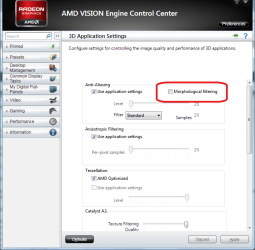
Check in CCC that the following is unchecked,

mlaa.png

as it can have the affect you're describing on just about everything, and not limited to just games.
 

My Computer My Computer

At a glance

Win 7 Ultimate x64FX-8350 @ 4.6 GHz so farADATA XPG V1 Series Black 8GB DDR3 1600Sapphire R9 270x Dual-X
Computer type
PC/Desktop
Computer Manufacturer/Model Number
Me
OS
Win 7 Ultimate x64
CPU
FX-8350 @ 4.6 GHz so far
Motherboard
Asus M5A97 EVO
Memory
ADATA XPG V1 Series Black 8GB DDR3 1600
Graphics Card(s)
Sapphire R9 270x Dual-X
Sound Card
Xonar DGX w/ Corsair Vengence 1300
Monitor(s) Displays
Acer S232HL Abid
Screen Resolution
1920x1080
Hard Drives
120 GB OCZ Vertex 3
500 GB Seagate 7200.12
PSU
Antec Earthwatts 650W Green
Case
Antec Three Hundred
Cooling
Cooler Master 212 EVO
Keyboard
Logitech G510
Mouse
Logitech G500s
Internet Speed
35000/3000
confirmed, it is unchecked
 

My Computer My Computer

At a glance

windows 7 ultimateIntel Core 2 Quad Q6400Corsair DDR2 1GBx2 KitXFX ATI RADEON H4500
Computer Manufacturer/Model Number
ASUS
OS
windows 7 ultimate
CPU
Intel Core 2 Quad Q6400
Motherboard
ASUS P5QL-PRO
Memory
Corsair DDR2 1GBx2 Kit
Graphics Card(s)
XFX ATI RADEON H4500
Sound Card
Realtek ALC1200 integrated
Monitor(s) Displays
Mistubishi Diamond Plus 230SB 22inches
Hard Drives
Seagate 250GB sata
Seagate 40GB IDE
Maxtro 40GB IDE
PSU
DELL-745 ( spare utilized)
Case
Legend
Cooling
Stock cooling
Keyboard
Microsoft Wireless 1000 (combo)
Mouse
Microsoft wireless 1000 (combo)
OK guys, seems better now.

updated Catalyst to latest.
adjusted brightnesss/contrast.
adjusted cleartype font.
Calibrated display from win7 'calibrate'

wishing more better performance. perhaps I need a professional monitor.
Which screen technology is best truely so far? IPL?

upgrading my card will yield same or better result ?
 

My Computer My Computer

At a glance

windows 7 ultimateIntel Core 2 Quad Q6400Corsair DDR2 1GBx2 KitXFX ATI RADEON H4500
Computer Manufacturer/Model Number
ASUS
OS
windows 7 ultimate
CPU
Intel Core 2 Quad Q6400
Motherboard
ASUS P5QL-PRO
Memory
Corsair DDR2 1GBx2 Kit
Graphics Card(s)
XFX ATI RADEON H4500
Sound Card
Realtek ALC1200 integrated
Monitor(s) Displays
Mistubishi Diamond Plus 230SB 22inches
Hard Drives
Seagate 250GB sata
Seagate 40GB IDE
Maxtro 40GB IDE
PSU
DELL-745 ( spare utilized)
Case
Legend
Cooling
Stock cooling
Keyboard
Microsoft Wireless 1000 (combo)
Mouse
Microsoft wireless 1000 (combo)
An upgrade (card) will only help in gaming not so much in video or text....I'm not real particular in what monitor I use....as long as it doesn't flicker......
 

My Computer My Computer

At a glance

windows 10 pro 64 biti5 4690K@4500 COOLER MASTER Seidon 120M water...16gb Kingston HyperX DDR3 1600EVGA GTX 1070 sc
Computer type
PC/Desktop
Computer Manufacturer/Model Number
Custom
OS
windows 10 pro 64 bit
CPU
i5 4690K@4500 COOLER MASTER Seidon 120M water cooler
Motherboard
ASUS SABERTOOTH Z87 LGA 1150 Intel
Memory
16gb Kingston HyperX DDR3 1600
Graphics Card(s)
EVGA GTX 1070 sc
Monitor(s) Displays
BenQ GL2760H Black 27" 2ms HDMI Widescreen LED 1920X1080
Screen Resolution
DSR 2103X1183
Hard Drives
ADATA 256 gig SSD + 4 junk
PSU
EVGA supernova 750
Case
coolermaster
Cooling
many...
Keyboard
z merc
Mouse
Logitech wireless G602
Internet Speed
2.5mbs cable
Back
Top