Suggest Configuration

santro20

New member
Local time
9:06 PM
Messages
13
Hi Everyone
I'm new here & need some advice about configuring a new machine compatible with win 7.
My need is basically for home use , moderate gaming, & will like to configure the machine in near future to play HD movies , so digital audio & video output availability along with eSATA port & good LAN networking ports are essencial for me..... Hope you'll can help in fine tuning my config...

Processor ---Intel E7500
Motherboard ---Gigabyte GA-EP45-UD3R
RAM ---Kingston DDR2 800MHZ 2x2 GB
Graphics ---ATI Shaphire 4670 1GB
Optical Drive ---LG GH22
Hard Disk ---Seagate 500GB SATA HDD
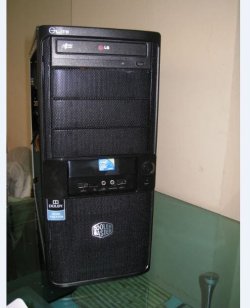
Case Cooler ---Master 335/500w smps


-thanks
 

My Computer

OS
win 7
What is the cost for the parts listed and what is the max amount you want to spend?

Or are you not particularly price-sensitive?

Is that power supply included with the case or have you chosen it?
 

My Computer

Computer type
PC/Desktop
Computer Manufacturer/Model Number
Ignatz Special; 4 speed manual gearbox; factory air conditioning; one of one
OS
Windows 7 Home Premium SP1, 64-bit
CPU
Intel Skylake i5-6600K, not overclocked
Motherboard
AsRock Z170M Extreme 4, micro ATX
Memory
8 GB HyperX DDR4-2666 (2 x 4 GB)
Graphics Card(s)
none; graphics are integrated on CPU
Sound Card
onboard: Realtek ALC1150; external: USB Behringer UF0-202
Monitor(s) Displays
Dell S2340M 23 inch IPS
Screen Resolution
1600 x 900
Hard Drives
System: Crucial MX100 series SSD, 128 GB;
Data: Samsung Spinpoint 103SJ, 1 TB;
Backup: WD Caviar Green WD30EZRX-00D8PB0, 3 TB
PSU
Rosewill SilentNight 500 watt fanless, semi-modular
Case
Antec Solo II
Cooling
Noctua NH-U12S; Noctua F12 intake, Noctua S12A exhaust
Keyboard
Microsoft 200 6JH-00001 USB
Mouse
Dell or Microsoft optical wired; USB
Antivirus
Microsoft Security Essentials and Malwarebytes Premium
Browser
Pale Moon
Other Info
All fans PWM; speeds at idle: CPU circa 500 rpm; intake circa 600 rpm; exhaust circa 600 rpm; CPU temps 27 idle and 47 C load in a warm room (27 C/81 F) when running Intel Extreme Tuning Utility stress test.
My budget is roughly around 25k.
no the SMPS is not part of CCM 335, Atleast thats what I gather from there site.....
 

My Computer

OS
win 7
switch the C2D for a C2Q .....:), the ''dual core'' CPU is now starting to falter (if you dont OC your really gonna notice it)

we are seeing more & more apps optimized for 4 cores & this is only gonna become more prominent as time rolls on IMO.
 

My Computer

Computer Manufacturer/Model Number
myself
OS
SEVEN x64
CPU
Q9450 @ 3.6GHZ 1.34v
Motherboard
ASUS P5K PREMIUM P35
Memory
8GB 1066 buffalo firestix @ 1152mhz CL5
Graphics Card(s)
Sapphire HD 5970 + GTX260 (physX)
Sound Card
Creative X-FI Xtreme Gamer
Monitor(s) Displays
SAMSUNG 20'' & SAMSUNG 23'' (dual screens)
Screen Resolution
2048x1152 & 1680x1050
Hard Drives
1x seagate 160gb IDE & 1x seagate 160gb SATA
PSU
XCILIO 850w (78A)
Case
CM590 1x 120x38mm & 2x92x38mm / 4x 120x25mm
Cooling
AC7 PRO @ 92x38mm blower, Lamptron military bus bay controll
Keyboard
LOGITECH E110
Mouse
logitech NX5
Internet Speed
2MB
Other Info
its a continual ''work in progress''....
If you have a $25,000 budget, you should certainly replace every part listed.

What led you to choose those parts with that budget?
 

My Computer

Computer type
PC/Desktop
Computer Manufacturer/Model Number
Ignatz Special; 4 speed manual gearbox; factory air conditioning; one of one
OS
Windows 7 Home Premium SP1, 64-bit
CPU
Intel Skylake i5-6600K, not overclocked
Motherboard
AsRock Z170M Extreme 4, micro ATX
Memory
8 GB HyperX DDR4-2666 (2 x 4 GB)
Graphics Card(s)
none; graphics are integrated on CPU
Sound Card
onboard: Realtek ALC1150; external: USB Behringer UF0-202
Monitor(s) Displays
Dell S2340M 23 inch IPS
Screen Resolution
1600 x 900
Hard Drives
System: Crucial MX100 series SSD, 128 GB;
Data: Samsung Spinpoint 103SJ, 1 TB;
Backup: WD Caviar Green WD30EZRX-00D8PB0, 3 TB
PSU
Rosewill SilentNight 500 watt fanless, semi-modular
Case
Antec Solo II
Cooling
Noctua NH-U12S; Noctua F12 intake, Noctua S12A exhaust
Keyboard
Microsoft 200 6JH-00001 USB
Mouse
Dell or Microsoft optical wired; USB
Antivirus
Microsoft Security Essentials and Malwarebytes Premium
Browser
Pale Moon
Other Info
All fans PWM; speeds at idle: CPU circa 500 rpm; intake circa 600 rpm; exhaust circa 600 rpm; CPU temps 27 idle and 47 C load in a warm room (27 C/81 F) when running Intel Extreme Tuning Utility stress test.
If you have a $25,000 budget, you should certainly replace every part listed.

What led you to choose those parts with that budget?

lol.....when he said 25k i assumed it must be ''rupees'' :p
 

My Computer

Computer Manufacturer/Model Number
myself
OS
SEVEN x64
CPU
Q9450 @ 3.6GHZ 1.34v
Motherboard
ASUS P5K PREMIUM P35
Memory
8GB 1066 buffalo firestix @ 1152mhz CL5
Graphics Card(s)
Sapphire HD 5970 + GTX260 (physX)
Sound Card
Creative X-FI Xtreme Gamer
Monitor(s) Displays
SAMSUNG 20'' & SAMSUNG 23'' (dual screens)
Screen Resolution
2048x1152 & 1680x1050
Hard Drives
1x seagate 160gb IDE & 1x seagate 160gb SATA
PSU
XCILIO 850w (78A)
Case
CM590 1x 120x38mm & 2x92x38mm / 4x 120x25mm
Cooling
AC7 PRO @ 92x38mm blower, Lamptron military bus bay controll
Keyboard
LOGITECH E110
Mouse
logitech NX5
Internet Speed
2MB
Other Info
its a continual ''work in progress''....
Forgive me for not being clear in the first place , my Budget is 25k in Ind Rupees (around 500-600 USD)

Pl suggest a C2Q , which I can use in my confir,
& any input abt this mobo & GPU.
Also pl suggest if 800 MHz RAM is ok,
will choosing 1066MHz will have substatial difference in performance.
 

My Computer

OS
win 7
Forgive me for not being clear in the first place , my Budget is 25k in Ind Rupees (around 500-600 USD)

Pl suggest a C2Q , which I can use in my confir,
& any input abt this mobo & GPU.
Also pl suggest if 800 MHz RAM is ok,
will choosing 1066MHz will have substatial difference in performance.
I've been using that motherboard now for almost a year, no problems whatsoever with W7 64 bit. Choosing generic 1066mhz DDR2 RAM wil not show a substantial performance increase over generic DDR2 800. However, choosing DDR2 1066 with a low cache latency will show slightly noticeable performance increases.
Nothing wrong with the Core 2 Duo CPU's... In fact, I'd personally go for a higher clocked C2D than a lower clocked Quad for the same money with that configuration, perhaps an e8500 or e8600.
In your price range, you may even get better bang for bucks with an AMD system.

I'm putting my flame retardant suit on now.... :p
 

My Computer

OS
XP Pro/Vista Ultimate (64)/Windows 7 Ultimate Signature Edition(64)
CPU
Core 2 Duo E8500 @ stock
Motherboard
Gigabyte EP45-UD3R
Memory
8Gb (4 X 2Gb) Corsair Dominator 1066Mhz DDR2
Graphics Card(s)
XFX ATI Radeon 4870 1Gb
Sound Card
Onboard 7.1
Monitor(s) Displays
BenQ E2200Hd, Asus VW161D, HP L1506
Screen Resolution
1920 X 1080
Hard Drives
Seagate 7200.12 500Gb
2 X Hitachi 1Tb
PSU
CoolerMaster 650 EPD
Case
Thermaltake
Cooling
2 X Noctua 120mm's, Stock Intel
Keyboard
Logitech
Mouse
Logitech
Forgive me for not being clear in the first place , my Budget is 25k in Ind Rupees (around 500-600 USD)

Pl suggest a C2Q , which I can use in my confir,
& any input abt this mobo & GPU.
Also pl suggest if 800 MHz RAM is ok,
will choosing 1066MHz will have substatial difference in performance.
I've been using that motherboard now for almost a year, no problems whatsoever with W7 64 bit. Choosing generic 1066mhz DDR2 RAM wil not show a substantial performance increase over generic DDR2 800. However, choosing DDR2 1066 with a low cache latency will show slightly noticeable performance increases.
Nothing wrong with the Core 2 Duo CPU's... In fact, I'd personally go for a higher clocked C2D than a lower clocked Quad for the same money with that configuration, perhaps an e8500 or e8600.
In your price range, you may even get better bang for bucks with an AMD system.

I'm putting my flame retardant suit on now.... :p

no no....... all are welcome to their opinions. :p

but if he's looking to game, & not an overclocker.... pointing him to a C2D wont really benefit him, yes it will run games.. but nowhere near as well.

an E8500 costs £100, a Q8200 costs £110........ what would you do..??, the extra 2 cores will be a godsend as time rolls on & C2D becomes more obsolete..

:)
 

My Computer

Computer Manufacturer/Model Number
myself
OS
SEVEN x64
CPU
Q9450 @ 3.6GHZ 1.34v
Motherboard
ASUS P5K PREMIUM P35
Memory
8GB 1066 buffalo firestix @ 1152mhz CL5
Graphics Card(s)
Sapphire HD 5970 + GTX260 (physX)
Sound Card
Creative X-FI Xtreme Gamer
Monitor(s) Displays
SAMSUNG 20'' & SAMSUNG 23'' (dual screens)
Screen Resolution
2048x1152 & 1680x1050
Hard Drives
1x seagate 160gb IDE & 1x seagate 160gb SATA
PSU
XCILIO 850w (78A)
Case
CM590 1x 120x38mm & 2x92x38mm / 4x 120x25mm
Cooling
AC7 PRO @ 92x38mm blower, Lamptron military bus bay controll
Keyboard
LOGITECH E110
Mouse
logitech NX5
Internet Speed
2MB
Other Info
its a continual ''work in progress''....
Are you building this yourself?

If not, must you buy a pre-built package of some kind or do you have complete control over the components?

I have no idea about specific requirements for HD movies, but I assume they aren't particularly high.


That video card may be perfectly adequate if you are using a 20 inch screen and not so adequate if you plan to play back on a 50 inch screen.

I would do more investigation into the power supply. Try to stick with Seasonic, Corsair, FSP Group (Fortron or Sparkle), or maybe Antec. Don't skimp on power supply quality, but you shouldn't be overly concerned about watts. I'd say 500 watts is more than enough for you, but who makes the PSU?

I'd have a slight preference for a Western Digital hard drive, but it's not a big deal as any brand can disappoint you.
 

My Computer

Computer type
PC/Desktop
Computer Manufacturer/Model Number
Ignatz Special; 4 speed manual gearbox; factory air conditioning; one of one
OS
Windows 7 Home Premium SP1, 64-bit
CPU
Intel Skylake i5-6600K, not overclocked
Motherboard
AsRock Z170M Extreme 4, micro ATX
Memory
8 GB HyperX DDR4-2666 (2 x 4 GB)
Graphics Card(s)
none; graphics are integrated on CPU
Sound Card
onboard: Realtek ALC1150; external: USB Behringer UF0-202
Monitor(s) Displays
Dell S2340M 23 inch IPS
Screen Resolution
1600 x 900
Hard Drives
System: Crucial MX100 series SSD, 128 GB;
Data: Samsung Spinpoint 103SJ, 1 TB;
Backup: WD Caviar Green WD30EZRX-00D8PB0, 3 TB
PSU
Rosewill SilentNight 500 watt fanless, semi-modular
Case
Antec Solo II
Cooling
Noctua NH-U12S; Noctua F12 intake, Noctua S12A exhaust
Keyboard
Microsoft 200 6JH-00001 USB
Mouse
Dell or Microsoft optical wired; USB
Antivirus
Microsoft Security Essentials and Malwarebytes Premium
Browser
Pale Moon
Other Info
All fans PWM; speeds at idle: CPU circa 500 rpm; intake circa 600 rpm; exhaust circa 600 rpm; CPU temps 27 idle and 47 C load in a warm room (27 C/81 F) when running Intel Extreme Tuning Utility stress test.
I only based my opinion on what he stated he's planning to use it for, noting that he mentioned media usage first and moderate gaming second. The Q8200 is also a great choice, and depending on the application, it betters the e8500 in quite a few tests. see here for benchmark comparisons:
Tom's Hardware - Benchmark 3DMark Vantage 1.0.2 CPU
Software developers have been slow to optimise their code for multicore use, and I don't think we'll see a huge increase within the next couple of years... I may be wrong though. This is one of the great advantages of the Core i5 & i7 cpu's with their Turbo Boost, ramping up the first core from 2.66 to 3.6Ghz (i5 750).
If multicore optimised apps are were the norm, wouldn't Intel's Turbo Boost be made redundant?

Personally, if I were in the market for a new cpu, I'd go C2Q and overclock it, probably because I'm planning a new i5 anyway, and I've had this current mobo for a while...
Just my 2c :) .... again
 

My Computer

OS
XP Pro/Vista Ultimate (64)/Windows 7 Ultimate Signature Edition(64)
CPU
Core 2 Duo E8500 @ stock
Motherboard
Gigabyte EP45-UD3R
Memory
8Gb (4 X 2Gb) Corsair Dominator 1066Mhz DDR2
Graphics Card(s)
XFX ATI Radeon 4870 1Gb
Sound Card
Onboard 7.1
Monitor(s) Displays
BenQ E2200Hd, Asus VW161D, HP L1506
Screen Resolution
1920 X 1080
Hard Drives
Seagate 7200.12 500Gb
2 X Hitachi 1Tb
PSU
CoolerMaster 650 EPD
Case
Thermaltake
Cooling
2 X Noctua 120mm's, Stock Intel
Keyboard
Logitech
Mouse
Logitech
thanks skunksmash, Orpheous & ignatzatsonic for your valueable input..
800MHZ is done than..., & no I'm not an overclocker, don't know anything abt it but now definately will learn something about it.
& yes I'll be building it myself after buying components from market....
500w power supply is what I'm also interested in,
& hard disk I'm still open for both seagate & wd, any specific speed requirment?? I's planning for a 7200RPM SATA..
LCD 20" to 22" is what I'm looking at....
Will check out on Q8200,,
 

My Computer

OS
win 7
Hi Guys
Got busy on some external project......

one more Q, Will this mobo Gigabyte GA-EP45-UD3R be able to provide graphic output for time being till i buy gpu.
 

My Computer

OS
win 7
Hi Guys
Got busy on some external project......

one more Q, Will this mobo Gigabyte GA-EP45-UD3R be able to provide graphic output for time being till i buy gpu.
There's no onboard graphics on that motherboard....
If you need onboard graphics, you may want to consider one of these:GA-EG45M-DS2H
GA-EG45M-UD2H
They're both Micro ATX boards, so you will get less slots and/or connectors ie. PCI, PCI-E etc.
 

My Computer

OS
XP Pro/Vista Ultimate (64)/Windows 7 Ultimate Signature Edition(64)
CPU
Core 2 Duo E8500 @ stock
Motherboard
Gigabyte EP45-UD3R
Memory
8Gb (4 X 2Gb) Corsair Dominator 1066Mhz DDR2
Graphics Card(s)
XFX ATI Radeon 4870 1Gb
Sound Card
Onboard 7.1
Monitor(s) Displays
BenQ E2200Hd, Asus VW161D, HP L1506
Screen Resolution
1920 X 1080
Hard Drives
Seagate 7200.12 500Gb
2 X Hitachi 1Tb
PSU
CoolerMaster 650 EPD
Case
Thermaltake
Cooling
2 X Noctua 120mm's, Stock Intel
Keyboard
Logitech
Mouse
Logitech
In that can can you suggest a mobo with onboard graphic with ability to add a gpu later with eSATA & digital audio/video outputs....can handle C2Q & ability to add some cards slots later..
 

My Computer

OS
win 7
and one more thing about slots---
PCI Express x16 slot
PCI Express x1 slot
PCI slot

whats the difference between PCI Express x16 & PCI Express x4 slots....
what will I loose if No. of PCI Express x1 & PCI slot are less.
 

My Computer

OS
win 7
GA-EG45M-UD2H has PCI-E X16 for full graphics support. The other board has a "supported graphics card" list, and runs them at PCI-E X4 as you noticed which will reduce a cards performance.
Both boards have 5 X SATA & 1 X eSATA, S/PDIF & 2 X PCI card slots.
The number of available PCI/PCI-EX1 slots will determine the number of add-on cards that you can install. If you think that you may want to install sound, tv, RAID, network, wireless, usb, firewire, eSATA, or any other type of add on cards, then pay close attention to the number of available slots when buying a motherboard.
For this reason alone, I prefer to buy full ATX motherboards so that I'm not inhibited by the number of available slots later on when I want to do more with my system. The downside is that it's quite rare to find a full ATX board with onboard graphics, so unless you can track one down, you'll have to pay extra for a card at build time.
 

My Computer

OS
XP Pro/Vista Ultimate (64)/Windows 7 Ultimate Signature Edition(64)
CPU
Core 2 Duo E8500 @ stock
Motherboard
Gigabyte EP45-UD3R
Memory
8Gb (4 X 2Gb) Corsair Dominator 1066Mhz DDR2
Graphics Card(s)
XFX ATI Radeon 4870 1Gb
Sound Card
Onboard 7.1
Monitor(s) Displays
BenQ E2200Hd, Asus VW161D, HP L1506
Screen Resolution
1920 X 1080
Hard Drives
Seagate 7200.12 500Gb
2 X Hitachi 1Tb
PSU
CoolerMaster 650 EPD
Case
Thermaltake
Cooling
2 X Noctua 120mm's, Stock Intel
Keyboard
Logitech
Mouse
Logitech
hmmm....
Quite clear now. thanks a lot bro..
so in that case is the Gigabyte GA-EP45-UD3R a full ATX board, or there's a better board available for,, say if I choose Q8200.

& if I choose a micro atx board with onboard graphics does the add on cards have the option of USB PORT installation as there'r a lot of USB PORTS available on most of the boards....
 

My Computer

OS
win 7
No problem :)
The Q8200 will work fine with both the ATX and m-ATX boards.
The UD2H has 6 USB on the back panel, and allows for up to 6 more via USB pin headers on the motherboard. These are usually used by front panel USB connectors and/or card readers etc, or by PCI brackets that can be installed at the back of your case.
 

My Computer

OS
XP Pro/Vista Ultimate (64)/Windows 7 Ultimate Signature Edition(64)
CPU
Core 2 Duo E8500 @ stock
Motherboard
Gigabyte EP45-UD3R
Memory
8Gb (4 X 2Gb) Corsair Dominator 1066Mhz DDR2
Graphics Card(s)
XFX ATI Radeon 4870 1Gb
Sound Card
Onboard 7.1
Monitor(s) Displays
BenQ E2200Hd, Asus VW161D, HP L1506
Screen Resolution
1920 X 1080
Hard Drives
Seagate 7200.12 500Gb
2 X Hitachi 1Tb
PSU
CoolerMaster 650 EPD
Case
Thermaltake
Cooling
2 X Noctua 120mm's, Stock Intel
Keyboard
Logitech
Mouse
Logitech
Hi Everyone
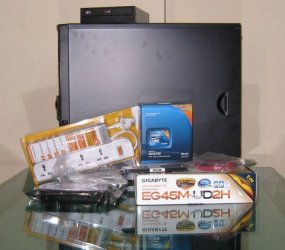
Finally bought everything...
Thanks for you time & input.....
Final Config

Processor ---Intel Q8400
Motherboard ---Gigabyte GA-EG45M-UD32H
RAM ---Kingston DDR2 800MHZ 2 GB
Optical Drive ---LG GH22
Hard Disk ---WD 500GB SATA HDD BLUE
Case Cooler ---Master 335 + 500w smps
 

Attachments

  • Capture1.JPG
    Capture1.JPG
    44.6 KB · Views: 1
  • Capture2.JPG
    Capture2.JPG
    120.6 KB · Views: 3
  • OC1.JPG
    OC1.JPG
    65.5 KB · Views: 1

My Computer

OS
win 7
Back
Top