Suggestions for an Incremental backup program that doesn't duplicate?

AndarielHalo

New member
Member
Local time
5:50 AM
Messages
91
I've been using Windows Backup normally for incremental backups, but it's reached a point where it takes more than 24 hours straight to backup my entire drive, and the constant duplicates being made by the backup means I have to backup the entire drive once every 3-4 months on average.


Are there any backup programs that do incremental backups, only backing up new and changed files? Problem I had with Windows Backup was it would duplicate certain video or music files that I had actually opened and viewed, even if it was just for a brief second.


I tried Macrinum, and immediately dumped it upon being faced with over 9000 options and realizing it had no incremental on the free version
 

My Computer

Computer type
PC/Desktop
Computer Manufacturer/Model Number
custom build
OS
7
CPU
Intel Core i7 3770 3.40 GHz
Motherboard
ASRock Z77 EXTREME4-M
Memory
Corsair 16GB total RAM 4x4GB sticks
Graphics Card(s)
Nvidia GeForce GTX 780
Monitor(s) Displays
ViewSonic LED 1080p Full HD
Screen Resolution
1920x1080
Hard Drives
Two
PSU
Corsair HX 750W
Case
Cooler Master
Cooling
A bunch of fans
Keyboard
Old and busty Dell, with some letters scratched off
Mouse
Logitech trackball
Internet Speed
Xfinity
How big is the partition you image - 24 hours seems to be very much out of the ordinary.

I use free Macrium and my images are usually done in minutes. Either your partition is huge or your disks are slow.

I would highly warn about incrementals. If you lose 1 increment in the chain, you lose it all. Differentials are a bit better but I still prefer full images by far. Those are the easiest t manage.

Free Paragon can do differentials. But that is not as easy to use as Macrium.

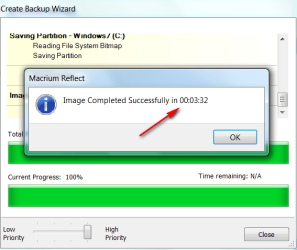
Here is an example of my typical backup time ( three and a half minutes) for the OS partition. But my OS is on a SSD and I image to an internal HDD.
 

Attachments

  • 2010-08-25_144413.png
    2010-08-25_144413.png
    20.4 KB · Views: 29

My Computer

Computer Manufacturer/Model Number
HP, Dell, Gateway, Toshiba - 4 laptops and 2 desktops
OS
Vista, Windows7, Mint Mate, Zorin, Windows 8
CPU
from 1.6GHz Duo to i7
Monitor(s) Displays
2x HP w2207
Hard Drives
5x HDD, 7x SSD, 12x Externals
Keyboard
with trackball - no mices
Mouse
Trackball mice
Internet Speed
DSL 6000
It's definitely huge; my harddrive is 930+ GB large.
 

My Computer

Computer type
PC/Desktop
Computer Manufacturer/Model Number
custom build
OS
7
CPU
Intel Core i7 3770 3.40 GHz
Motherboard
ASRock Z77 EXTREME4-M
Memory
Corsair 16GB total RAM 4x4GB sticks
Graphics Card(s)
Nvidia GeForce GTX 780
Monitor(s) Displays
ViewSonic LED 1080p Full HD
Screen Resolution
1920x1080
Hard Drives
Two
PSU
Corsair HX 750W
Case
Cooler Master
Cooling
A bunch of fans
Keyboard
Old and busty Dell, with some letters scratched off
Mouse
Logitech trackball
Internet Speed
Xfinity
And how much data is on that drive. Maybe you should consider to split the user data into a different partition. Then you could image the OS fast and use a sync program for backing up the data. That is fast.
 

My Computer

Computer Manufacturer/Model Number
HP, Dell, Gateway, Toshiba - 4 laptops and 2 desktops
OS
Vista, Windows7, Mint Mate, Zorin, Windows 8
CPU
from 1.6GHz Duo to i7
Monitor(s) Displays
2x HP w2207
Hard Drives
5x HDD, 7x SSD, 12x Externals
Keyboard
with trackball - no mices
Mouse
Trackball mice
Internet Speed
DSL 6000
930+ GB is how much data I have, I mean. The drive itself is 1.36 TB large.
 

My Computer

Computer type
PC/Desktop
Computer Manufacturer/Model Number
custom build
OS
7
CPU
Intel Core i7 3770 3.40 GHz
Motherboard
ASRock Z77 EXTREME4-M
Memory
Corsair 16GB total RAM 4x4GB sticks
Graphics Card(s)
Nvidia GeForce GTX 780
Monitor(s) Displays
ViewSonic LED 1080p Full HD
Screen Resolution
1920x1080
Hard Drives
Two
PSU
Corsair HX 750W
Case
Cooler Master
Cooling
A bunch of fans
Keyboard
Old and busty Dell, with some letters scratched off
Mouse
Logitech trackball
Internet Speed
Xfinity
I would make a new partition and move the OS there. Then delete the OS from your current partition and use that as data-only partition. That operation is a bit finagle, but it can be done.
 

My Computer

Computer Manufacturer/Model Number
HP, Dell, Gateway, Toshiba - 4 laptops and 2 desktops
OS
Vista, Windows7, Mint Mate, Zorin, Windows 8
CPU
from 1.6GHz Duo to i7
Monitor(s) Displays
2x HP w2207
Hard Drives
5x HDD, 7x SSD, 12x Externals
Keyboard
with trackball - no mices
Mouse
Trackball mice
Internet Speed
DSL 6000
I don't understand... what's that supposed to accomplish? I don't care about separating system components from personal files in my backup
 

My Computer

Computer type
PC/Desktop
Computer Manufacturer/Model Number
custom build
OS
7
CPU
Intel Core i7 3770 3.40 GHz
Motherboard
ASRock Z77 EXTREME4-M
Memory
Corsair 16GB total RAM 4x4GB sticks
Graphics Card(s)
Nvidia GeForce GTX 780
Monitor(s) Displays
ViewSonic LED 1080p Full HD
Screen Resolution
1920x1080
Hard Drives
Two
PSU
Corsair HX 750W
Case
Cooler Master
Cooling
A bunch of fans
Keyboard
Old and busty Dell, with some letters scratched off
Mouse
Logitech trackball
Internet Speed
Xfinity
I don't understand... what's that supposed to accomplish? I don't care about separating system components from personal files in my backup

You should care. System files are the ones that get fouled up the most often. Separating the system files from the data files allows one to image and restore the system files far more quickly. The main advantage with this is one can quickly make an image of the system files before making some kind of change, such as installing a new program or installing updates. Then, if things go pear shaped, you can quickly restore the image you made before the change. If you had to make an image of the entire drive, it would take forever to image and restore.
 

My Computer

Computer type
PC/Desktop
Computer Manufacturer/Model Number
Custom Build
OS
Win 7 Ultimate 64 bit
CPU
Intel i7-3930K
Motherboard
ASUS P9X79 WS
Memory
Kingston HyperX Genesis 32GB Kit (8x4GB Modules) 1600MHz DDR
Graphics Card(s)
MSI R7850 Twin Frozr 2GD5/OC Radeon HD 7850 2GB 256-bit GDDR
Sound Card
Asus Xonar Essence STX
Monitor(s) Displays
3x Asus VG248QE 24", Vizio 32" TV
Screen Resolution
1920 x 1080, ?
Hard Drives
Samsung 128GB 840 Pro SSD (1),
Samsung 4TB 850 EVO SSDs (4)
Samsung 4TB 850 EVO SSDs (16) external backup drives used in 2.5" hot swap bays in the computer.
PSU
Corsair HX750w
Case
Antec Two Hundred v2 (modified)
Cooling
Cooler Master GeminII S524 120mm (fan replaced with a 140mm)
Keyboard
Logitech G510s
Mouse
Logitech M525 (two in use)
Internet Speed
=< 32Mbps down, 8Mbps up
Antivirus
AVAST!, MBAM, SAS, Spybot S&D (all but MBAM free) Glary Util
Browser
IE11
Other Info
LSI 9211-8i HBA card (8 SATA III ports), 2.5" & 3.5" Hot Swap Bays, HooToo HT-CR001 PCI-E to USB 3.0 Internal Hub + 6 Slot Card Reader, and LG Model CH12LS28 BD-ROM Optical Drive. Also, ScanSnap S1500 ADF duplexing scanner, Canon 9000F flat bed scanner, Corsair SP2500 2.1 speakers, Samsung CLP 415nw laser color printer, Cyberpower PP2200SW UPS
Your personal files should be stored on another partition or hard drive, at least I hope that`s where you have them.

If you kept it that way it wouldn`t take forever to do a backup, of windows anyway.
 

My Computer

Computer type
PC/Desktop
Computer Manufacturer/Model Number
Skylake Special #666
OS
Windows 10 Pro x64
CPU
Intel Core i7 6700K
Motherboard
Asus Sabertooth Z170 Mark 1
Memory
GSkill TridentZ RGB 16GB 3600 16-16-16-36
Graphics Card(s)
EVGA GTX 980 Ti SC x2
Sound Card
Realtek High Definition
Monitor(s) Displays
AOC G2460PG
Screen Resolution
1920 x 1080 144Hz
Hard Drives
Samsung 860 Pro 256GB, Seagate Barracuda 4TB x2
PSU
EVGA 1000 P2, EVGA White Custom Braided Cables
Case
Corsair Vengeance C70 Gunmetal Black
Cooling
Corsair H100i v2, Corsair ML120 x2, Thermal Grizzly Kryonaut
Keyboard
Logitech G910 Orion Spectrum
Mouse
Logitech G700s
Internet Speed
Verizon Fios Quantum Gateway 75/75
Antivirus
Windows Defender, Malwarebytes Free 3.8.3
Browser
Chrome
Other Info
Corsair SP120 x4, LG Blu-ray Drive, Durabrand HT-395 100 Watt Dolby Digital Amp, Corsair H2100 Wireless 7.1 Headset
I don't understand... what's that supposed to accomplish? I don't care about separating system components from personal files in my backup
I don't think there is any Guru on this forum that has the data stored in the system partition. Far too dangerous to lose the data. But if you want to take that risk, that's fine with me. You will become part of the long line of people who only learn the hard way.
 

My Computer

Computer Manufacturer/Model Number
HP, Dell, Gateway, Toshiba - 4 laptops and 2 desktops
OS
Vista, Windows7, Mint Mate, Zorin, Windows 8
CPU
from 1.6GHz Duo to i7
Monitor(s) Displays
2x HP w2207
Hard Drives
5x HDD, 7x SSD, 12x Externals
Keyboard
with trackball - no mices
Mouse
Trackball mice
Internet Speed
DSL 6000
I get the feeling this has gone way off topic.


I am asking about a backup program (like Acronis, Ghost, Macrinum) that can do incremental backups and doesn't duplicate video files because I opened them once, or duplicate entire folders because I change a letter in its file name.


Nothing else concerns me with regards to this subject.
 

My Computer

Computer type
PC/Desktop
Computer Manufacturer/Model Number
custom build
OS
7
CPU
Intel Core i7 3770 3.40 GHz
Motherboard
ASRock Z77 EXTREME4-M
Memory
Corsair 16GB total RAM 4x4GB sticks
Graphics Card(s)
Nvidia GeForce GTX 780
Monitor(s) Displays
ViewSonic LED 1080p Full HD
Screen Resolution
1920x1080
Hard Drives
Two
PSU
Corsair HX 750W
Case
Cooler Master
Cooling
A bunch of fans
Keyboard
Old and busty Dell, with some letters scratched off
Mouse
Logitech trackball
Internet Speed
Xfinity
The problem is that the type program that you are asking for does not exist. If you change a file (1 letter or more), it will be regarded as modified.
 

My Computer

Computer Manufacturer/Model Number
HP, Dell, Gateway, Toshiba - 4 laptops and 2 desktops
OS
Vista, Windows7, Mint Mate, Zorin, Windows 8
CPU
from 1.6GHz Duo to i7
Monitor(s) Displays
2x HP w2207
Hard Drives
5x HDD, 7x SSD, 12x Externals
Keyboard
with trackball - no mices
Mouse
Trackball mice
Internet Speed
DSL 6000
Again, it should concern you because the two are very closely related. Incremental images can be iffy because if just one in a set gets corrupted, the entire set is rendered worthless. Also, you don't want to risk losing your data just because the system files went pear shaped. And it's the system files that are most likely to have problems. A full backup image of the system files only takes a few minutes to make and restore and is much safer than dealing with incremental images whereas having to restore an image (or image set) of the entire drive can take forever. Plus, if just one of the incremental images is missing or corrupted, the entire set from that point on is worthless.

Where incremental or differential images can be handy (differentials are safer) is if you frequently add data to your data partition and the amount of data you already have is large but only if you still make frequent full images. An example of such a backup scheme would be to make a full image once a week and an incremental image between full images only when you add critical data (data that can't be easily reproduced or isn't all that important to you, such as the latest joke picture). An average of one incremental image a day would be reasonable as long as the full images weren't more than a week apart.

Before you reject the advice that you keep your system and data files separated, consider the sources of that advice. I've been around on this board for a while, long enough to have learned something and helped numerous people. If I was consistently giving out bad advise and/or was a total idiot, I would have been given the bum's rush quite some time ago. AddRam is more qualified than I am to give out advice. Then there is whse; that man worked IT for a career and has received the Microsoft Community Contributor Award; they don't give that out to just anyone. He has probably forgotten more about computers than the rest of us, combined, in this thread will ever know.
 
Last edited:

My Computer

Computer type
PC/Desktop
Computer Manufacturer/Model Number
Custom Build
OS
Win 7 Ultimate 64 bit
CPU
Intel i7-3930K
Motherboard
ASUS P9X79 WS
Memory
Kingston HyperX Genesis 32GB Kit (8x4GB Modules) 1600MHz DDR
Graphics Card(s)
MSI R7850 Twin Frozr 2GD5/OC Radeon HD 7850 2GB 256-bit GDDR
Sound Card
Asus Xonar Essence STX
Monitor(s) Displays
3x Asus VG248QE 24", Vizio 32" TV
Screen Resolution
1920 x 1080, ?
Hard Drives
Samsung 128GB 840 Pro SSD (1),
Samsung 4TB 850 EVO SSDs (4)
Samsung 4TB 850 EVO SSDs (16) external backup drives used in 2.5" hot swap bays in the computer.
PSU
Corsair HX750w
Case
Antec Two Hundred v2 (modified)
Cooling
Cooler Master GeminII S524 120mm (fan replaced with a 140mm)
Keyboard
Logitech G510s
Mouse
Logitech M525 (two in use)
Internet Speed
=< 32Mbps down, 8Mbps up
Antivirus
AVAST!, MBAM, SAS, Spybot S&D (all but MBAM free) Glary Util
Browser
IE11
Other Info
LSI 9211-8i HBA card (8 SATA III ports), 2.5" & 3.5" Hot Swap Bays, HooToo HT-CR001 PCI-E to USB 3.0 Internal Hub + 6 Slot Card Reader, and LG Model CH12LS28 BD-ROM Optical Drive. Also, ScanSnap S1500 ADF duplexing scanner, Canon 9000F flat bed scanner, Corsair SP2500 2.1 speakers, Samsung CLP 415nw laser color printer, Cyberpower PP2200SW UPS
I figure so with regards to renaming files, but the big problem I had with Windows Backup is that it would backup files that had already been backed up, even if they hadn't changed at all. Further investigating led me to realize it was re-backing up video, music, and Word files that I had opened up but not modified.


So I just wonder if there is some solution to this in other backup programs or if it's just how these file types operate?


Also, I'm pretty sure my OS is already partitioned on a different partition. At least I'm hoping that's what it is---it's reported in Disk Management as only 100 MB total, with only about 33 MB used, as "System Reserved", with "System, Active, Primary Partition" beneath it, along with my normal C Drive, listed as "Boot, Page File, Crash Dump, Primary Partition"


EDIT: Also, I misreported my hard drive as being 1.36 TB total. It's actually 1.81 TB total (2 TB drive)
 

My Computer

Computer type
PC/Desktop
Computer Manufacturer/Model Number
custom build
OS
7
CPU
Intel Core i7 3770 3.40 GHz
Motherboard
ASRock Z77 EXTREME4-M
Memory
Corsair 16GB total RAM 4x4GB sticks
Graphics Card(s)
Nvidia GeForce GTX 780
Monitor(s) Displays
ViewSonic LED 1080p Full HD
Screen Resolution
1920x1080
Hard Drives
Two
PSU
Corsair HX 750W
Case
Cooler Master
Cooling
A bunch of fans
Keyboard
Old and busty Dell, with some letters scratched off
Mouse
Logitech trackball
Internet Speed
Xfinity
The 100MB partition is the boot partition, not the OS partition. That is C.
 

My Computer

Computer Manufacturer/Model Number
HP, Dell, Gateway, Toshiba - 4 laptops and 2 desktops
OS
Vista, Windows7, Mint Mate, Zorin, Windows 8
CPU
from 1.6GHz Duo to i7
Monitor(s) Displays
2x HP w2207
Hard Drives
5x HDD, 7x SSD, 12x Externals
Keyboard
with trackball - no mices
Mouse
Trackball mice
Internet Speed
DSL 6000
Does this mean it's too late to separate my OS into a new partition?
 

My Computer

Computer type
PC/Desktop
Computer Manufacturer/Model Number
custom build
OS
7
CPU
Intel Core i7 3770 3.40 GHz
Motherboard
ASRock Z77 EXTREME4-M
Memory
Corsair 16GB total RAM 4x4GB sticks
Graphics Card(s)
Nvidia GeForce GTX 780
Monitor(s) Displays
ViewSonic LED 1080p Full HD
Screen Resolution
1920x1080
Hard Drives
Two
PSU
Corsair HX 750W
Case
Cooler Master
Cooling
A bunch of fans
Keyboard
Old and busty Dell, with some letters scratched off
Mouse
Logitech trackball
Internet Speed
Xfinity
It can be done in a couple of ways:

1. You move all your user files to another disk (temporarily) until you have only the OS left in C. Then you shrink C and make a new partition for the data. There you define the data folders to which you move the files that were backed up. That will take some time because of the amount of your user data but it is safe.

2. If you have the Windows installation disc, you could define a new OS partition to which you install the OS. Then you delete the OS in the current C partition and are left with the data only. That is a bit finagle and you really have to know what you are doing. You also have to then reinstall all your programs.

In both cases I suggest we discuss the steps in detail before you start.
 

My Computer

Computer Manufacturer/Model Number
HP, Dell, Gateway, Toshiba - 4 laptops and 2 desktops
OS
Vista, Windows7, Mint Mate, Zorin, Windows 8
CPU
from 1.6GHz Duo to i7
Monitor(s) Displays
2x HP w2207
Hard Drives
5x HDD, 7x SSD, 12x Externals
Keyboard
with trackball - no mices
Mouse
Trackball mice
Internet Speed
DSL 6000
Both those options sound like they would take several days given the size of my drive and used space, and there is no real emergency for me to do so to begin with. As well, I've never had a problem that would (potentially) lead to total data loss in over ten years---I tend to shift my programs and files onto new harddrives every four years, as well.
 

My Computer

Computer type
PC/Desktop
Computer Manufacturer/Model Number
custom build
OS
7
CPU
Intel Core i7 3770 3.40 GHz
Motherboard
ASRock Z77 EXTREME4-M
Memory
Corsair 16GB total RAM 4x4GB sticks
Graphics Card(s)
Nvidia GeForce GTX 780
Monitor(s) Displays
ViewSonic LED 1080p Full HD
Screen Resolution
1920x1080
Hard Drives
Two
PSU
Corsair HX 750W
Case
Cooler Master
Cooling
A bunch of fans
Keyboard
Old and busty Dell, with some letters scratched off
Mouse
Logitech trackball
Internet Speed
Xfinity
HDD failure can strike unexpectedly at any time, even on new HDDs.
 

My Computer

Computer type
PC/Desktop
Computer Manufacturer/Model Number
Custom Build
OS
Win 7 Ultimate 64 bit
CPU
Intel i7-3930K
Motherboard
ASUS P9X79 WS
Memory
Kingston HyperX Genesis 32GB Kit (8x4GB Modules) 1600MHz DDR
Graphics Card(s)
MSI R7850 Twin Frozr 2GD5/OC Radeon HD 7850 2GB 256-bit GDDR
Sound Card
Asus Xonar Essence STX
Monitor(s) Displays
3x Asus VG248QE 24", Vizio 32" TV
Screen Resolution
1920 x 1080, ?
Hard Drives
Samsung 128GB 840 Pro SSD (1),
Samsung 4TB 850 EVO SSDs (4)
Samsung 4TB 850 EVO SSDs (16) external backup drives used in 2.5" hot swap bays in the computer.
PSU
Corsair HX750w
Case
Antec Two Hundred v2 (modified)
Cooling
Cooler Master GeminII S524 120mm (fan replaced with a 140mm)
Keyboard
Logitech G510s
Mouse
Logitech M525 (two in use)
Internet Speed
=< 32Mbps down, 8Mbps up
Antivirus
AVAST!, MBAM, SAS, Spybot S&D (all but MBAM free) Glary Util
Browser
IE11
Other Info
LSI 9211-8i HBA card (8 SATA III ports), 2.5" & 3.5" Hot Swap Bays, HooToo HT-CR001 PCI-E to USB 3.0 Internal Hub + 6 Slot Card Reader, and LG Model CH12LS28 BD-ROM Optical Drive. Also, ScanSnap S1500 ADF duplexing scanner, Canon 9000F flat bed scanner, Corsair SP2500 2.1 speakers, Samsung CLP 415nw laser color printer, Cyberpower PP2200SW UPS
I'm well aware of that, much like any disaster can strike unexpectedly at any time on any device. I live with a certain degree of questionably "healthy" paranoia regarding my computer and its components, so I take note of every odd action or unusual error that my hard drives or any other components, plus I still have everything backed up as of yesterday.

I don't mind having to reinstall my OS and reinstall all my programs, so long as my personal files are saved, so this doesn't really concern me. But still, you've made me concerned enough to want to partition my OS again---this OS is a fresh install as of last May, done by others after unrelated computer issues had to have it reinstalled.
 

My Computer

Computer type
PC/Desktop
Computer Manufacturer/Model Number
custom build
OS
7
CPU
Intel Core i7 3770 3.40 GHz
Motherboard
ASRock Z77 EXTREME4-M
Memory
Corsair 16GB total RAM 4x4GB sticks
Graphics Card(s)
Nvidia GeForce GTX 780
Monitor(s) Displays
ViewSonic LED 1080p Full HD
Screen Resolution
1920x1080
Hard Drives
Two
PSU
Corsair HX 750W
Case
Cooler Master
Cooling
A bunch of fans
Keyboard
Old and busty Dell, with some letters scratched off
Mouse
Logitech trackball
Internet Speed
Xfinity
Back
Top