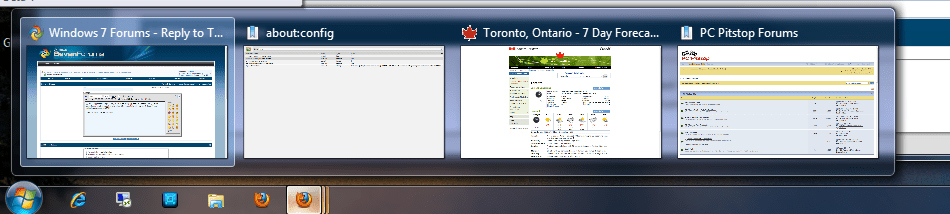
A nice feature of IE8 is Aero Peek for each open tab. IOW hovering the mouse over the IE icon in the taskbar shows a thumbnail for each open tab.
Google Chrome doesn't have this, Firefox 3.5 does not, beta 3.6 does.
Another key feature is browser multiprocess architecture, which uses a separate process per tab. In most cases this isolates a browser crash to a single tab, vs taking down the entire browser. IE8 has this (IF UAC is on), Chrome does, Firefox does not.
I'd personally prefer tab per process, tab Aero Peek, and UAC off. Unfortunately that's not currently possible, at least with these three browsers on Win7. In case anyone's similarly interested, the below table summarizes these features:
Google Chrome doesn't have this, Firefox 3.5 does not, beta 3.6 does.
Another key feature is browser multiprocess architecture, which uses a separate process per tab. In most cases this isolates a browser crash to a single tab, vs taking down the entire browser. IE8 has this (IF UAC is on), Chrome does, Firefox does not.
I'd personally prefer tab per process, tab Aero Peek, and UAC off. Unfortunately that's not currently possible, at least with these three browsers on Win7. In case anyone's similarly interested, the below table summarizes these features:
Code:
[B]Browser   Tab AeroPeek  Proc per tab[/B]

IE8       Yes           Yes (if UAC on)

Chrome    No            Yes

Firefox   Yes (beta)    No
My Computer
- Computer Manufacturer/Model Number
- Digital Storm
- OS
- Windows 7 Home Premium 64 bit
- CPU
- Intel i7-860 @ 3.78 Ghz
- Motherboard
- EVGA P55 FTW
- Memory
- 8GB Mushkin Enhanced DS1600-6G HP3-12800
- Graphics Card(s)
- EVGA GTX275
- Monitor(s) Displays
- LG Flatron W2361VG
- Hard Drives
- 300GB 7200 rpm WD Velociraptor SATA
2 x 1.5TB Seagate ST31500341AS 7200 rpm SATA (non-RAID)
- PSU
- Thermaltake TR2 RX-850 AP (850 watts)
- Case
- HAF922
- Cooling
- Noctua NH-D14
- Internet Speed
- 6 megabit DSL (6 megabit/sec down, 512 kilobit/sec up)
- Other Info
- DSL modem: Westell C90-610030-06 rev G
Router: NetGear WNDR3700