Super Administrator Account

Rockit

Space Cadet
Member
Local time
1:07 AM
Messages
93
Location
Space Station #5
Hello,

I there a way to turn a existing user administrator account into a account that actually has the highest level of allowed control? I have started to have issues after switching from Windows 7 Home premium
32 bit to the 64 bit version. I make changes, reboot, and I'm right back where I stated from.

Also my iespell check will not work anymore? I'm starting to think this 64 bit version is a real pain.

Thank You
 

My Computer

Computer type
PC/Desktop
Computer Manufacturer/Model Number
Master Control (25 plus year old custom build)
OS
Windows 7 Premium 64 Bit
CPU
Opteron 185
Motherboard
DFI Lanparty N4 Ultra-d
Memory
4 gig OCZ High Performance Dual Channel @ 500 Mhz
Graphics Card(s)
ATI Radeon HD 5450 (Direct X11)
Sound Card
Creative SB Audigy Audio 2 ZS
Monitor(s) Displays
Dell 2208WFP (Digital)
Screen Resolution
1680 x 1050
Hard Drives
Plextor M3 Pro 128 Gb Sata 6 SSD (Main)

Western Digital Blue 320 Gb IDE 7200 RPM Internal Daily (Backup Drive)

Western Digital 2 TB RE4 SATA 3 Gb/s 7200 RPM 64 MB Cache Enterprise Hard Drive (External Data & Backup Drive).
PSU
OCZ GameXStream 850 Watt PSU.
Case
Antec Performance Series
Cooling
Working on it.
Keyboard
Saitek Eclipse II
Mouse
Kensington SlimBlade
Internet Speed
50 Gb
Antivirus
Microsoft Security Essentials
Browser
From Netscape to Internet Explorer.
Other Info
Got a mix of old and new hardware. Sound card hooked up to a 250 watt per channel Harman Kardon Amp to a pair of Dak 5 way old school acoustically suspended speakers.
If You do a clean install and make only one account , it will be with full rights.
 

My Computer

OS
Win 7 Ult 64-bit
CPU
AMD Athlon 455 3core
Memory
6 Gb 1333Mhz
Graphics Card(s)
GForce 545 1,5Gb 192-bit
Monitor(s) Displays
LG IPS234
Hard Drives
1tb
Case
Acer Predator
I`ve never had those issues with 64 bit.
 

My Computer

Computer type
PC/Desktop
Computer Manufacturer/Model Number
Skylake Special #666
OS
Windows 10 Pro x64
CPU
Intel Core i7 6700K
Motherboard
Asus Sabertooth Z170 Mark 1
Memory
GSkill TridentZ RGB 16GB 3600 16-16-16-36
Graphics Card(s)
EVGA GTX 980 Ti SC x2
Sound Card
Realtek High Definition
Monitor(s) Displays
AOC G2460PG
Screen Resolution
1920 x 1080 144Hz
Hard Drives
Samsung 860 Pro 256GB, Seagate Barracuda 4TB x2
PSU
EVGA 1000 P2, EVGA White Custom Braided Cables
Case
Corsair Vengeance C70 Gunmetal Black
Cooling
Corsair H100i v2, Corsair ML120 x2, Thermal Grizzly Kryonaut
Keyboard
Logitech G910 Orion Spectrum
Mouse
Logitech G700s
Internet Speed
Verizon Fios Quantum Gateway 75/75
Antivirus
Windows Defender, Malwarebytes Free 3.8.3
Browser
Chrome
Other Info
Corsair SP120 x4, LG Blu-ray Drive, Durabrand HT-395 100 Watt Dolby Digital Amp, Corsair H2100 Wireless 7.1 Headset
To enable built-in administrator account, read these tutorials:


If You do a clean install and make only one account , it will be with full rights.
No, it wont.

The initial user profile created when installing Windows is a normal Administrator account, the same administrator account type that can be selected when creating a new user profile on Control Panel > Users.

An example of different level of user rights on two types of administrator accounts: Log in to Windows using your own administrator account. Open Command Prompt, try to run Windows System File Checker with scan option by giving the following command:
Code:
sfc /scannow
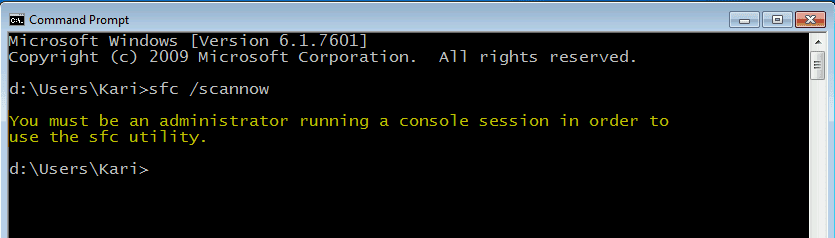
This produces an error message, telling you that only the administrator is allowed to run this command i.e. that you must run this command as built-in administrator:

SFC_no_admin.png

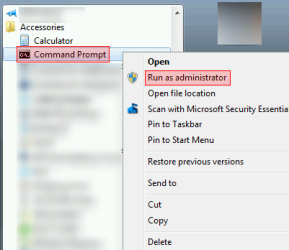
To be able to do sfc scan, you must run Command Prompt elevated (right click Command Prompt in Start Menu > Accessories, select Run as administrator):

SFC_no_admin_2.png

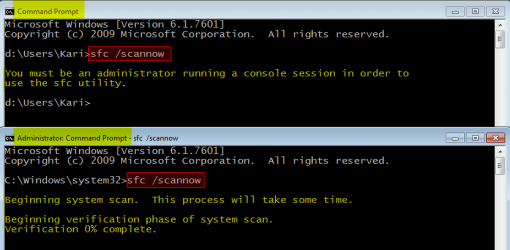
An Elevated Command Prompt has built-in administrator rights. Now when you run the System File Checker command from so called Administrator Command Prompt with scan option as told above, it runs as planned. See the difference:

SFC_no_admin_3.png

A very clear difference between the normal administrator account rights and built-in administrator rights!

Kari
 

My Computer

Computer type
Laptop
Computer Manufacturer/Model Number
HP ENVY 17-1150eg
OS
Windows 10 Pro x64 EN-GB
CPU
1.6 GHz Intel Core i7-720QM Processor
Memory
6 GB
Graphics Card(s)
ATI Mobility Radeon HD 5850 Graphics
Sound Card
Beats sound system with integrated subwoofer
Monitor(s) Displays
17" laptop display, 22" LED and 32" Full HD TV through HDMI
Screen Resolution
1600*900 (1), 1920*1080 (2&3)
Hard Drives
Internal: 2 x 500 GB SATA Hard Disk Drive 7200 rpm
External: 2TB for backups, 3TB USB3 network drive for media
Cooling
As Envy runs a bit warm, I have it on a Cooler Master pad
Keyboard
Logitech diNovo Media Desktop Laser (bluetooth)
Mouse
Logitech Performance Mouse MX
Internet Speed
50/10 Mbps VDSL
Antivirus
Windows Defender 4.3.9431.0
Browser
Maxthon 3.5.2., IE11
Thanks Kari,

You are correct. The iespell problem is well known on the net. I just had to do some more research. I'm now trying speckie.

As far as changing my account to a SuperAdmin, Can this be done to a existing account?

Another thing that was happening was my changes were not being saved. I am not positive but it looks like that was due to not creating any password after a clean install. Time will tell, this is with a newer desktop replacement laptop with the uefi bios.
 

My Computer

Computer type
PC/Desktop
Computer Manufacturer/Model Number
Master Control (25 plus year old custom build)
OS
Windows 7 Premium 64 Bit
CPU
Opteron 185
Motherboard
DFI Lanparty N4 Ultra-d
Memory
4 gig OCZ High Performance Dual Channel @ 500 Mhz
Graphics Card(s)
ATI Radeon HD 5450 (Direct X11)
Sound Card
Creative SB Audigy Audio 2 ZS
Monitor(s) Displays
Dell 2208WFP (Digital)
Screen Resolution
1680 x 1050
Hard Drives
Plextor M3 Pro 128 Gb Sata 6 SSD (Main)

Western Digital Blue 320 Gb IDE 7200 RPM Internal Daily (Backup Drive)

Western Digital 2 TB RE4 SATA 3 Gb/s 7200 RPM 64 MB Cache Enterprise Hard Drive (External Data & Backup Drive).
PSU
OCZ GameXStream 850 Watt PSU.
Case
Antec Performance Series
Cooling
Working on it.
Keyboard
Saitek Eclipse II
Mouse
Kensington SlimBlade
Internet Speed
50 Gb
Antivirus
Microsoft Security Essentials
Browser
From Netscape to Internet Explorer.
Other Info
Got a mix of old and new hardware. Sound card hooked up to a 250 watt per channel Harman Kardon Amp to a pair of Dak 5 way old school acoustically suspended speakers.
No, you can not convert your user profile to built-in administrator. You have to so to say start from scratch if you want to use the built-in account, customize it as you see fit.

What changes are not being saved?

Kari
 

My Computer

Computer type
Laptop
Computer Manufacturer/Model Number
HP ENVY 17-1150eg
OS
Windows 10 Pro x64 EN-GB
CPU
1.6 GHz Intel Core i7-720QM Processor
Memory
6 GB
Graphics Card(s)
ATI Mobility Radeon HD 5850 Graphics
Sound Card
Beats sound system with integrated subwoofer
Monitor(s) Displays
17" laptop display, 22" LED and 32" Full HD TV through HDMI
Screen Resolution
1600*900 (1), 1920*1080 (2&3)
Hard Drives
Internal: 2 x 500 GB SATA Hard Disk Drive 7200 rpm
External: 2TB for backups, 3TB USB3 network drive for media
Cooling
As Envy runs a bit warm, I have it on a Cooler Master pad
Keyboard
Logitech diNovo Media Desktop Laser (bluetooth)
Mouse
Logitech Performance Mouse MX
Internet Speed
50/10 Mbps VDSL
Antivirus
Windows Defender 4.3.9431.0
Browser
Maxthon 3.5.2., IE11
I am not positive but it looks like that was due to not creating any password after a clean install.

I just want to quickly chime in here and say that this is not the case because I've never created a password after a clean install, and I've never had any problems. So, it's something else. I don't know what it could be, but I'm confident that someone here will figure it out.
 

My Computer

Computer type
PC/Desktop
Thanks For The Replys,

There are quite a few but one that comes to mind is stopping a program from starting when the computer is first started up. I have alway's used "whatsinstartup" by Nirsof and never had any problems.

I even opened the registry and deleted the programs entry.

But after reboot it is back.

And I do run whatsinstartup as admin?

Like I said that is just one of many.

Thanks Again
 

My Computer

Computer type
PC/Desktop
Computer Manufacturer/Model Number
Master Control (25 plus year old custom build)
OS
Windows 7 Premium 64 Bit
CPU
Opteron 185
Motherboard
DFI Lanparty N4 Ultra-d
Memory
4 gig OCZ High Performance Dual Channel @ 500 Mhz
Graphics Card(s)
ATI Radeon HD 5450 (Direct X11)
Sound Card
Creative SB Audigy Audio 2 ZS
Monitor(s) Displays
Dell 2208WFP (Digital)
Screen Resolution
1680 x 1050
Hard Drives
Plextor M3 Pro 128 Gb Sata 6 SSD (Main)

Western Digital Blue 320 Gb IDE 7200 RPM Internal Daily (Backup Drive)

Western Digital 2 TB RE4 SATA 3 Gb/s 7200 RPM 64 MB Cache Enterprise Hard Drive (External Data & Backup Drive).
PSU
OCZ GameXStream 850 Watt PSU.
Case
Antec Performance Series
Cooling
Working on it.
Keyboard
Saitek Eclipse II
Mouse
Kensington SlimBlade
Internet Speed
50 Gb
Antivirus
Microsoft Security Essentials
Browser
From Netscape to Internet Explorer.
Other Info
Got a mix of old and new hardware. Sound card hooked up to a 250 watt per channel Harman Kardon Amp to a pair of Dak 5 way old school acoustically suspended speakers.
Back
Top