JavaScript is disabled. For a better experience, please enable JavaScript in your browser before proceeding.
You are using an out of date browser. It may not display this or other websites correctly.
You should upgrade or use an
alternative browser .
SuperFetch - Change Prefetch Data to be Cached
How to Change what Files are Cached by SuperFetch
This tutorial explains how to change what SuperFetch caches.
Open up the Start menu and type regedit in the search bar and press Enter.
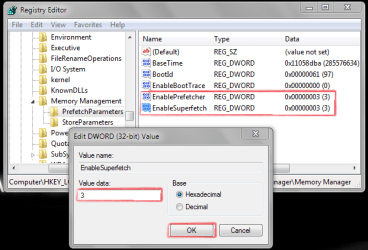
Navigate to: HKEY_LOCAL_MACHINE\SYSTEM\CurrentControlSet\Control\
Double click on "Enable SuperFetch".
Choose the option you want and restart your PC. The first boot might be a bit slower this time round with the changes to SuperFetch.
You could clean out your prefetch folder (C:/Windows/Prefetch) by deleting the contents to start with a new cache after changing an option in your registry.
Last edited by a moderator: Nov 18, 2011
Software developer with a degree in Computer Science from Lancaster University.
Guru Gold Member SF Team
Messages
3,317
Reaction score
143
Points
0
Jack of all Trades
Guru
Gold Member
VIP
Nice tutorial! just one question,
This tutorial explains how to change what SuperFetch caches and how to specifiy which applications to cache.
so how do you do that?
Windows 10 Pro x64 Intel Core i5 7400 @ 3.00GHz 8GB 2133Mhz DDR4 (OEM supplied) Gygabyte Windforce GTX 1050Ti (Factory Overcl... PC/Desktop Medion Erazer (note to self: insert model number) - with custom additions Windows 10 Pro x64 Intel Core i5 7400 @ 3.00GHz OEM supllied with PC 8GB 2133Mhz DDR4 (OEM supplied) Gygabyte Windforce GTX 1050Ti (Factory Overclocked) Realtek Acer Al1980 + HKC 1360*768(HKC) / 1280*1024(Acer) 1TB Toshiba OEM supplied (no power rating on case) OEM Supplied Stock Logitech Wireless Logitect Wireless 40Mb/s Down 10Mb/s Up Defender Firefox
To xor or not to xor
Guru
Gold Member
SF Team
Thread Starter
Nice tutorial! just one question,
This tutorial explains how to change what SuperFetch caches and how to specifiy which applications to cache.
so how do you do that?
I didn't include it. What I was going to add turned out it doesn't actually work. You were too fast replying before I had chance to remove that line
Windows 8.1 Pro x64 Intel Core i7 4790k 8GB Corsair Dominator 1600MHz MSI TwinFrozr GeForce GTX770 PC/Desktop Custom Built Windows 8.1 Pro x64 Intel Core i7 4790k MSI Z97S Krait Edition 8GB Corsair Dominator 1600MHz MSI TwinFrozr GeForce GTX770 ASUS Xonar DX/XD 7.1 Dell 24" S2409W + Dell 20" E207WFP 1920x1080 + 1680x1050 1x 120GB OCZ Agility 3, 1x 750GB Western Digital Caviar Black, 1x 1TB Western Digital Caviar Blue Corsair HX850 modular Fractal Design Define R4 Corsair H60 w/ twin Corsair SP120 fans Logitech G510S Keyboard Logitech G500S Laser Mouse 40Mbps Microsoft Security Essentials Google Chrome LG Blu-Ray player
Jack of all Trades
Guru
Gold Member
VIP
fair enough
shame i liked that idea
Windows 10 Pro x64 Intel Core i5 7400 @ 3.00GHz 8GB 2133Mhz DDR4 (OEM supplied) Gygabyte Windforce GTX 1050Ti (Factory Overcl... PC/Desktop Medion Erazer (note to self: insert model number) - with custom additions Windows 10 Pro x64 Intel Core i5 7400 @ 3.00GHz OEM supllied with PC 8GB 2133Mhz DDR4 (OEM supplied) Gygabyte Windforce GTX 1050Ti (Factory Overclocked) Realtek Acer Al1980 + HKC 1360*768(HKC) / 1280*1024(Acer) 1TB Toshiba OEM supplied (no power rating on case) OEM Supplied Stock Logitech Wireless Logitect Wireless 40Mb/s Down 10Mb/s Up Defender Firefox
New member
Guru
Gold Member
VIP
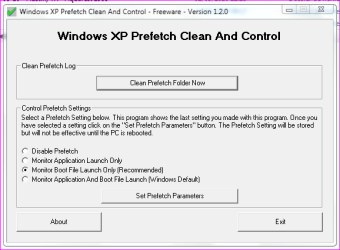
5.You could clean out your prefetch folder (C:/Windows/Prefetch) by deleting the contents to start with a new cache after changing an option in your registry.
Here a small tool to automated the cleaning of the Prefetch folder, i used that since XP and it works fine on 7. Just drop it in the folder:
PS: This will set aswell "EnablePrefetcher" to value 2... just change the value of the "EnableSuperfetch" to 2.
Last edited: Jul 4, 2010
Windows 7 Professional SP1 - x64 [Non-UEFI Boot] Ivy Bridge Core i5 3570K (Delidded) G.Skill "Ares" DDR3 PC3-12800 - 1600MHz (16Gb) Asus Dual-RX480-O4G PC/Desktop Custom Build Windows 7 Professional SP1 - x64 [Non-UEFI Boot] Ivy Bridge Core i5 3570K (Delidded) Asus P8Z77-V LE PLUS G.Skill "Ares" DDR3 PC3-12800 - 1600MHz (16Gb) Asus Dual-RX480-O4G Creative Sound Blaster Z w/5.1 sound system Asus IPS 23" 16/9 Internal: In Win C 900W Series 80+ Platinum Thermaltake Chaser A71 Custom Water Cooling Loop Cooler Master QuickFire XTi Razer Imperator 2012 (4G) MSE IE 11.0.xxx Rtm "Raid0" with Intel Smart Response Technology (HDD/SSD)
Eclectician
Guru
Gold Member
Hmmmmmmm, I'm starting to think these settings are "feel good" settings. I set them each to 2, to 0 with Superfetch on, disabled, whatever. No matter how I set them it uses nearly half my ram as Standby. Not only that, but if I run no swap file, it pops up Out Of Memory dialog when I have 800 MB on Standby. It wants to see that swap file even if it only uses 90 MB of it. So I set it back to 3 each and turned Superfetch on. Gave it a one GB page file to make it happy!! Man it's really weird!!
When I get the Out Of Memory Dialog I just hit cancel since there's really 700 or 800 MB ram available. Really strange.
I just checked resource meter and it has me at 0 free memory but over a GB on Standby. Really crazy(and yes I know the theory of how prefetch works, but isn't it against the theory if it does it when it's shut off?)
edit: hmm, setting Superfetch to 2 made a big difference in Vista. But it looks like W7 wants to prefetch no matter what. Trying it with the default 3 settings seems to be a bit snappier. It doesn't bog like Vista did with that setting. Guess I'll let it do what it wants.
Last edited: Sep 6, 2011
Windows 7 32 bit AMD 5200+ dual core 2 GB NVidia GeForce 6150SE 128 MB HP Media Center Windows 7 32 bit AMD 5200+ dual core 2 GB NVidia GeForce 6150SE 128 MB CRT 1280x1024 500 GB Sata internal : PS/2 PS/2 Wheel Mouse SIIG USB 3.0 PCIexpress card.
What's the best option? have all caching applications and boot files or one doing one thing and the other, other.
Windows 10 Home 64b Intel Core Solo 1.4Ghz 800Mhz FSB Samsung 4GB DDR3 Intel GMA 4500MHD Laptop Acer Aspire 5810T8929 Windows 10 Home 64b Intel Core Solo 1.4Ghz 800Mhz FSB Samsung 4GB DDR3 Intel GMA 4500MHD 1366x768 Seagate Momentus XT (Hybrid HD) 750GB 40 Mbs Kaspersky Free Antivirus Chrome 60.0.3112.113 (Official Build) (64-bit)
Administrator
Staff member
Hello LM,
Unless you are having some sort of issue with superfetch, it's best to leave it set to default (3) for both.
64-bit Windows 11 Pro for Workstations Intel i7-8700K OC'd to 5 GHz 64 GB (4x16GB) G.SKILL TridentZ RGB DDR4 3600... ASUS ROG-STRIX-GTX1080TI-O11G-GAMING PC/Desktop Self built custom 64-bit Windows 11 Pro for Workstations Intel i7-8700K OC'd to 5 GHz ASUS ROG Maximus XI Formula Z390 64 GB (4x16GB) G.SKILL TridentZ RGB DDR4 3600 MHz ASUS ROG-STRIX-GTX1080TI-O11G-GAMING Integrated 2 x Samsung Odyssey G7 27" 2560x1440 1TB Samsung 990 PRO M.2, Seasonic Prime Titanium 850W Thermaltake Core P3 Corsair Hydro H115i Logitech wireless K800 Logitech MX Master 4 2 Gb/s Download and 100 Mb/s Upload Malwarebyte Anti-Malware Premium Google Chrome Logitech Z625 speaker system,
After Windows load up there's hard disk activity for a while i thought Super F was the culprit.
Windows 10 Home 64b Intel Core Solo 1.4Ghz 800Mhz FSB Samsung 4GB DDR3 Intel GMA 4500MHD Laptop Acer Aspire 5810T8929 Windows 10 Home 64b Intel Core Solo 1.4Ghz 800Mhz FSB Samsung 4GB DDR3 Intel GMA 4500MHD 1366x768 Seagate Momentus XT (Hybrid HD) 750GB 40 Mbs Kaspersky Free Antivirus Chrome 60.0.3112.113 (Official Build) (64-bit)
Administrator
Staff member
In that case, you could test the different settings to see if it still does that afterwards. If it does, you could always set it back to default.
64-bit Windows 11 Pro for Workstations Intel i7-8700K OC'd to 5 GHz 64 GB (4x16GB) G.SKILL TridentZ RGB DDR4 3600... ASUS ROG-STRIX-GTX1080TI-O11G-GAMING PC/Desktop Self built custom 64-bit Windows 11 Pro for Workstations Intel i7-8700K OC'd to 5 GHz ASUS ROG Maximus XI Formula Z390 64 GB (4x16GB) G.SKILL TridentZ RGB DDR4 3600 MHz ASUS ROG-STRIX-GTX1080TI-O11G-GAMING Integrated 2 x Samsung Odyssey G7 27" 2560x1440 1TB Samsung 990 PRO M.2, Seasonic Prime Titanium 850W Thermaltake Core P3 Corsair Hydro H115i Logitech wireless K800 Logitech MX Master 4 2 Gb/s Download and 100 Mb/s Upload Malwarebyte Anti-Malware Premium Google Chrome Logitech Z625 speaker system,
It seems bootckcl.etl is being written to much, is this normal? is there anyway to disable it?
Windows 10 Home 64b Intel Core Solo 1.4Ghz 800Mhz FSB Samsung 4GB DDR3 Intel GMA 4500MHD Laptop Acer Aspire 5810T8929 Windows 10 Home 64b Intel Core Solo 1.4Ghz 800Mhz FSB Samsung 4GB DDR3 Intel GMA 4500MHD 1366x768 Seagate Momentus XT (Hybrid HD) 750GB 40 Mbs Kaspersky Free Antivirus Chrome 60.0.3112.113 (Official Build) (64-bit)
prefetch is ok. what is super fetch? whr did i find that?
Windows 7 professional 32 bit Dell 4 GB Dell optiplex 790 Windows 7 professional 32 bit Dell 4 GB Dell 1440x900 300 GB Dell Optiplex 790 Dell Dell
hi
PC/Desktop windows 7 ultimate 64bit



 shame i liked that idea