Solved Superfetch on or off?

Sorry I did realize that. I think updates are important and should not be skipped, I only wanted to point out that every update does something, they make changes to the system. So I urge users to read up on them and known about what they do because If your not having a problem with something like USB support for example, and an update says it will fix USB ports not working correctly then why install that update when everything is already working correctly ? I am not saying to skip them but to be very careful and know what they are doing. I would not take updates lightly, they are powerful system changes that should be applied with care.
 

My Computer

Computer Manufacturer/Model Number
Lenovo Thinkpad R61 / 8935
OS
Windows 7 Ultimate 32bit
CPU
Intel Celeron 1.8 ghz
Memory
1-2 gb
Graphics Card(s)
Intel X3100
Screen Resolution
1280 x 800 / 15.4' widescreen
Hard Drives
20gb Sata
just turned it back on and the ram is ticking around 85% with photoshop and bitorrent open also firefox, it seems to have settled , not sure what is making it slow when it is ,will keep an eye on things.
i do have 104 processes running have stopped a few things like yahoo messenger and win live messenger,

How can one wonder what is happing. I don't get it. Why is everybody puzzled.
 

My Computer

Computer type
PC/Desktop
Computer Manufacturer/Model Number
Home made Desktop
OS
Windows 10 Pro. 64/ version 1709 Windows 7 Pro/64
CPU
Intel i7-6800K @ 4.3
Motherboard
ASUS X-99 Deluxe II
Memory
Corsair Platinum 16 gig @2400
Graphics Card(s)
EVGA GTX 1070 OC
Monitor(s) Displays
Asus 27" LED LCD/VE278Q
Screen Resolution
1920-1080 or 1280-720 HDMI
Hard Drives
INTEL SSD 730-240 Gb Sata 3.0/
PSU
EVGA Platium 1200W
Case
Phanteks Luxe Tempered Glass 8 fans/ one radiator
Cooling
XSPC/ Water Cooled CPU
Keyboard
Das 4 Professional
Mouse
Logitech M705/MX Anywhere 2-S
Internet Speed
100 mbits
Antivirus
Microsoft Security Essentials/ Malwarebytes Premium 3.0/ SAS
Browser
I.E. 11 default/Firefox/ ISP Time Warner Cable/Spectrum
Other Info
LG BluRay Burner/
Sound system-KLipsch-THX/
Icy Dock ssd Hot Swap bays.
I know this is a very old thread, but I think it is good to have to correct answer. I didn't read the entire thread so forgive me if someone already posted this information. The reason superfetch was having such a great impact on the user's computer was because superfetch uses a lot of memory to load executables into memory with executable privilege in order to gather information from the executables. Superfetch loads applications into memory instead of reading them from the disk. If the application has been accessed often then Superfetch will add it to the prefetch to speed the computer up. The key here is that Superfetch actually opens many applications at the same time into memory, and sometimes executables that are not even installed on your system. I have a lot of installers on an external hard drive, and Superfetch actually loads them into memory. I don't know if this is a bug. I will need to check with Microsoft to see if this is intended behavior. This link may give you an ideal of how much memory Superfetch may use. It gives a decent description of the what Superfetch does, but it could have been better. What is Windows SuperFetch
 

My Computer

Computer Manufacturer/Model Number
I build my own machines
OS
Windows 7 Ultimate x64 XP Pro x32.
I was just given a new system by our IT department. My old system worked great: fast and running just the way I like it. But we were bought by a larger company and are being moved onto their domain. So, new laptop. The new system had 4 times the amount of ram and a much bigger hard disk. My old system actually had an SSD.

As soon as I started using the system, it crawled. CPU ran about 20%, memory about 10%. Yet, apps loaded very slow and when I typed in any application including Outlook, any Office product, even Firefox, I would be typing 4 or 5 words ahead of what it showed. You could watch websites be painted on the screen. I updated the BIOS and all drivers. Then I turned services off and on one at a time to see what the issue was. When I got to SuperFetch, as soon as I turned it off, the system became very, very fast. Apps popped up almost instantly, websites were quick. And typing was appearing instantaneously.

Maybe things would get better over time when SuperFetch learned but it's been a week since I received the machine and this is the first time it's actually useable.

OS Name Microsoft Windows 7 Enterprise
Version 6.1.7601 Service Pack 1 Build 7601
System Manufacturer Dell Inc.
System Model Precision M4800
System Type x64-based PC
Processor Intel(R) Core(TM) i7-4810MQ CPU @ 2.80GHz, 2801 Mhz, 4 Core(s), 8 Logical Processor(s)
BIOS Version/Date Dell Inc. A14, 5/19/2015
SMBIOS Version 2.7
Windows Directory C:\WINDOWS
System Directory C:\WINDOWS\system32
Boot Device \Device\HarddiskVolume1
Locale United States
Installed Physical Memory (RAM) 32.0 GB
Total Physical Memory 31.9 GB
Available Physical Memory 20.3 GB
Total Virtual Memory 63.9 GB
Available Virtual Memory 51.8 GB
Page File Space 31.9 GB

Some of the physical memory is being used as a RamDisk. I did that today and loaded some applications there. They are now even faster than ever. Opening an app is almost instantaneous.
 

My Computer

Computer type
PC/Desktop
OS
CentOS 6 and 7, Windows 7 Enterprise 64 bit
Ditto on that. For me - my system is much faster when using a RAMdisk with superfetch disabled. A real noticeable difference in performance. Like you said - programs launch almost instantly and so do any large files like databases or videos.
 

My Computer

Computer type
Laptop
Computer Manufacturer/Model Number
ASUS
OS
Microsoft Windows 7 Home Premium 64-bit 7601 Multiprocessor Free Service Pack 1
CPU
AMD C-60 APU with Radeon(tm) HD Graphics
Motherboard
ASUSTeK COMPUTER INC. X501U
Memory
4.00 GB
Graphics Card(s)
AMD Radeon HD 6290 Graphics
Sound Card
(1) AMD High Definition Audio Device (2) Realtek High Defi
Screen Resolution
1366 x 768 x 32 bits (4294967296 colors) @ 60 Hz
Hard Drives
Hitachi HTS545050A7E380 SATA Disk Device
Antivirus
Comodo CIS & FW, SecureAplus App Whitelisting, Threatfire
Browser
Cyberfox 64bit, Opera 64bit, Airfox
Other Info
Spy-The-Spy, HitmanPro.Alert, Norton Connect Safe, MJRegWatcher, BitDefender TrafficLight, Voodoo Shield, Zemana AntiMalware
SuperFetch is disabled here as per SSD optimizations, however I don't have much knowledge about a RAMdisk. I have 16Gb RAM, 4 GB is used by the OS, I may have 2 Virtual Machines running with 4GB each. That leaves me with 4GB. Considering my usual daily usage is pretty much browsing, would I see any improvements using a RAMdisk and what should I run from it?
 

My Computer

Computer type
PC/Desktop
Computer Manufacturer/Model Number
Custom Build
OS
Windows 7 Ultimate x64 SP1
CPU
AMD Phenom 2 1090T
Motherboard
Gigabyte GA-890FXA-UD5
Memory
2x8GB Kingston HyperX Fury Black 1600Mhz Unganged
Graphics Card(s)
MSI GTX 970 Gaming 4G
Sound Card
Realtek On-Board HD 7.1 Audio / Logitech G35
Monitor(s) Displays
3xAcer GD245HQ
Screen Resolution
1920x1080
Hard Drives
Samsung 850 Pro 512GB SSD - OS /
WD Caviar Black SATA 3 - 1 TBx2 - Dynamic RAID 0 /
WD Caviar Green SATA 2 - 640GBx2 - Dynamic RAID 0 /
WD Caviar Green SATA 2 - 640GB - Internal Backup /
Seagate Barracude SATA 3 - 3TB - External Backup/ Sync
PSU
HighPower 1000W
Case
Cooler Master HAF 932
Cooling
Noctua NH-D14
Keyboard
Logitech G19
Mouse
Logitech G500
Internet Speed
100/4 Mbit Cable (100GB quota)
Antivirus
ZoneAlarm Extreme Security / MBAM Pro / MBAE Free / SAS Free
Browser
IE 11 - Firefox - Chrome
Other Info
Logitech F710/ G27/ G940/ Z5500 // TrackIR 5 // Nvidia 3D Surround Vision
I'm not sure why anyone would resurrect a 3 year old thread to discuss SuperFetch. Are that many people using systems with 1 GB or less in them? It's been pretty well decided that once you go over 1 GB, SuperFetch isn't going to help you out at all. Considering what baseline system are these days, SuperFetch is a thing of the past.
 

My Computer

OS
Windows 7 Ultimate x64 SP1
CPU
Intel Core i7-2600
Motherboard
Gigabyte GA-P67A-UD3P-B3
Memory
12 GB Patriot Extreme DDR3-1333
Graphics Card(s)
Nvidia GTX 470
Monitor(s) Displays
Dell UltraSharp 2209WA
Hard Drives
OCZ Agility3 240 GB, WD5001AALS, WD7501AALS
PSU
OCZ ModStream 700W
Case
CoolerMaster HAF 912 Advanced
Cooling
CoolerMaster Hyper 212 Plus
Using a RAMdisk

SuperFetch is disabled here as per SSD optimizations, however I don't have much knowledge about a RAMdisk. I have 16Gb RAM, 4 GB is used by the OS, I may have 2 Virtual Machines running with 4GB each. That leaves me with 4GB. Considering my usual daily usage is pretty much browsing, would I see any improvements using a RAMdisk and what should I run from it?

Well mostly experienced members here stay away from RAMdisks. My drive is SATA rather than SSD so I'm not the best person to ask. All I can quote is the following reasons to use a RAMdisk:

Higher PC performance. Provided you have got a sufficient amount of RAM, using a fast in-memory disk for temporary data will boost the computer performance.
Reduced file system fragmentation. The file system on your hard disks will be far less fragmented as the temporary files will never be written to the hard disk.
Reduced wear-and-tear of the physical disk. Because the temporarily files are not written to the hard disk, there will be fewer read/write cycles, which is especially important for prolonging the life of Solid State Drives (SSD) often installed in laptops.
Less junk on the hard disk. Many software applications create temporary files that remain undeleted although no longer needed. The contents of RAM disks is cleared every time the computer is restarted or switched off, so the unneeded files won’t clutter your HDD.
Less noise and heat from the hard disk because the system will use the hard disk less intensively.

However setting up a rAMdisk isn't particularly easy. My first attempt left me with a non-booting machine.

What would you put on it?

Mostly temp files. Why? They don't get written to disk and read/ write speeds are signifigantly faster (anywhere up to 50 times faster)
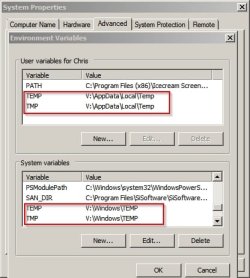
TEMP file locations.jpg

Although I do also run a few portable apps directly from the RAMdisk too.

Some user swear that moving browser caches to RAMdisk speeds up browsing but I don't make use of this.

The big question is whether to make the RAMdisk persitent (save data on shutdown and reload it on next boot) or to clear it's contents on shutdown. Basically if you use a RAMdisk for privacy reasons you'd set it to clear on shutdown. Personally I use a persistent RAMdisk.

The other big question is how much RAM do you need to allocate to it?

Here's my read/ write speeds on my windows partition:

C Windows.jpg

Here's read/ write speeds on the RAMdisk:

V RAMdisk.jpg

So basically if I'm viewing a folder full of High Res images they will load extremely fast or if I want to scroll video from a point near the beginning to a point near the end there's no lag and scrolling is almost instant.

If your machine performs well anyway it's probably pointless but for me there's no way I'm ditching my RAMdisk.

 

My Computer

Computer type
Laptop
Computer Manufacturer/Model Number
ASUS
OS
Microsoft Windows 7 Home Premium 64-bit 7601 Multiprocessor Free Service Pack 1
CPU
AMD C-60 APU with Radeon(tm) HD Graphics
Motherboard
ASUSTeK COMPUTER INC. X501U
Memory
4.00 GB
Graphics Card(s)
AMD Radeon HD 6290 Graphics
Sound Card
(1) AMD High Definition Audio Device (2) Realtek High Defi
Screen Resolution
1366 x 768 x 32 bits (4294967296 colors) @ 60 Hz
Hard Drives
Hitachi HTS545050A7E380 SATA Disk Device
Antivirus
Comodo CIS & FW, SecureAplus App Whitelisting, Threatfire
Browser
Cyberfox 64bit, Opera 64bit, Airfox
Other Info
Spy-The-Spy, HitmanPro.Alert, Norton Connect Safe, MJRegWatcher, BitDefender TrafficLight, Voodoo Shield, Zemana AntiMalware

My Computer

Computer type
PC/Desktop
Computer Manufacturer/Model Number
Custom Build
OS
Windows 7 Ultimate x64 SP1
CPU
AMD Phenom 2 1090T
Motherboard
Gigabyte GA-890FXA-UD5
Memory
2x8GB Kingston HyperX Fury Black 1600Mhz Unganged
Graphics Card(s)
MSI GTX 970 Gaming 4G
Sound Card
Realtek On-Board HD 7.1 Audio / Logitech G35
Monitor(s) Displays
3xAcer GD245HQ
Screen Resolution
1920x1080
Hard Drives
Samsung 850 Pro 512GB SSD - OS /
WD Caviar Black SATA 3 - 1 TBx2 - Dynamic RAID 0 /
WD Caviar Green SATA 2 - 640GBx2 - Dynamic RAID 0 /
WD Caviar Green SATA 2 - 640GB - Internal Backup /
Seagate Barracude SATA 3 - 3TB - External Backup/ Sync
PSU
HighPower 1000W
Case
Cooler Master HAF 932
Cooling
Noctua NH-D14
Keyboard
Logitech G19
Mouse
Logitech G500
Internet Speed
100/4 Mbit Cable (100GB quota)
Antivirus
ZoneAlarm Extreme Security / MBAM Pro / MBAE Free / SAS Free
Browser
IE 11 - Firefox - Chrome
Other Info
Logitech F710/ G27/ G940/ Z5500 // TrackIR 5 // Nvidia 3D Surround Vision
Browser cache move to RAMdisk

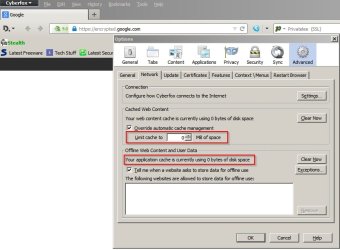
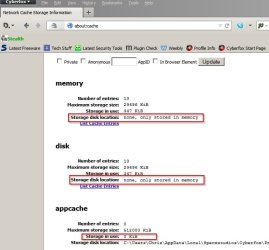
I've seen that tutorial and others but for me it's pointless as my main browser already caches files to RAM only so no need to move the cache from HD to RAMdisk!

Browser Cache.jpg

Browser Cache 2.jpg
 

My Computer

Computer type
Laptop
Computer Manufacturer/Model Number
ASUS
OS
Microsoft Windows 7 Home Premium 64-bit 7601 Multiprocessor Free Service Pack 1
CPU
AMD C-60 APU with Radeon(tm) HD Graphics
Motherboard
ASUSTeK COMPUTER INC. X501U
Memory
4.00 GB
Graphics Card(s)
AMD Radeon HD 6290 Graphics
Sound Card
(1) AMD High Definition Audio Device (2) Realtek High Defi
Screen Resolution
1366 x 768 x 32 bits (4294967296 colors) @ 60 Hz
Hard Drives
Hitachi HTS545050A7E380 SATA Disk Device
Antivirus
Comodo CIS & FW, SecureAplus App Whitelisting, Threatfire
Browser
Cyberfox 64bit, Opera 64bit, Airfox
Other Info
Spy-The-Spy, HitmanPro.Alert, Norton Connect Safe, MJRegWatcher, BitDefender TrafficLight, Voodoo Shield, Zemana AntiMalware
ikeep it on

it maintains System performance when hard disk is being used by system process it will lag a lot it helps me when it is on
 

My Computer

Computer type
PC/Desktop
Computer Manufacturer/Model Number
HP
OS
Windows vista x64 bit Windows 7 x64 bit Windows 8.1 x64 bit
CPU
intel celeron N2940 1.83 GHz Quad core
Motherboard
not sure
Memory
4 GB
Graphics Card(s)
Intel HD
Hard Drives
SDHC Card
ST500LT012-1DG142 500GB
Antivirus
None
Browser
Internet explorer, Firefox, and google chrome
This seems to be a very popular topic surviving the ages. It should go into the history books - LOL.

But seriously: Superfetch can only help. I cannot see where fetching programs from RAM can be beat.
 

My Computer

Computer Manufacturer/Model Number
HP, Dell, Gateway, Toshiba - 4 laptops and 2 desktops
OS
Vista, Windows7, Mint Mate, Zorin, Windows 8
CPU
from 1.6GHz Duo to i7
Monitor(s) Displays
2x HP w2207
Hard Drives
5x HDD, 7x SSD, 12x Externals
Keyboard
with trackball - no mices
Mouse
Trackball mice
Internet Speed
DSL 6000

My Computer

Computer type
PC/Desktop
Computer Manufacturer/Model Number
Custom assembled by me :}
OS
Win-7-Pro64bit 7-H-Prem-64bit
CPU
i7-5930K 2nd i9-9940x both water blocked VRM's too
Motherboard
ASUS SABERTOOTH X99 2nd ASUS x299 Apex
Memory
Trident-z 3200C14 2nd Trident-z 3600C16
Graphics Card(s)
EVGA 1080ti ftw3 2nd Titan Xp both water blocked
Sound Card
Built-in Realtek
Monitor(s) Displays
1-AOC G2460PG 24"G-Sync 144Hz/ 2nd 1-ASUS VG248QE 24" 144Hz
Screen Resolution
1920 x 1080 144Hz
Hard Drives
2-Samsung M.2 Evo & Evo Plus
2-Samsung 850 EVO 500GB SSD's/ 3-2.5 W.D. Black 1tb-&3-1tb/3-3.5 WD Black 1tb hdd's
PSU
EVGA SuperNOVA 1000-P2 2nd 1200-P2
Case
2-Corsair Obsidian Series 450D Black ATX Mid Tower
Cooling
Custom water loops
Keyboard
Logitech G710+/ 2nd Logitech G910
Mouse
2-RedDragon M901 Perdition 16400 dpi Gaming mouse = wired
Internet Speed
Comcast Ping 19ms 89.31mbps download speed 6.12mbps upload
Antivirus
Malwarebytes Pro/ Superantispyware Pro
Browser
FireFox & Pale moon
Other Info
2nd ASUS X299 Apex/Intel i9-9940x with Custom water loop/7H-Prem-x64/Corsair 450D case/Ram Trident-z 3600C16 4x8gb / Samsung970Evo plus 500gb SSD/Dual ssd EZ swap evo/PSU EVGA SuperNova 1200w-P2 80+Platinum/GPU Titan Xp /8-ML-140 on push-pull on 2-280GTX rads
Well since I use a RAMdisk that does essentially the same as Superfetch - I disable it!

Upside: Everything loads very fast.

Downside: Much longer boot and shutdown times.
 

My Computer

Computer type
Laptop
Computer Manufacturer/Model Number
ASUS
OS
Microsoft Windows 7 Home Premium 64-bit 7601 Multiprocessor Free Service Pack 1
CPU
AMD C-60 APU with Radeon(tm) HD Graphics
Motherboard
ASUSTeK COMPUTER INC. X501U
Memory
4.00 GB
Graphics Card(s)
AMD Radeon HD 6290 Graphics
Sound Card
(1) AMD High Definition Audio Device (2) Realtek High Defi
Screen Resolution
1366 x 768 x 32 bits (4294967296 colors) @ 60 Hz
Hard Drives
Hitachi HTS545050A7E380 SATA Disk Device
Antivirus
Comodo CIS & FW, SecureAplus App Whitelisting, Threatfire
Browser
Cyberfox 64bit, Opera 64bit, Airfox
Other Info
Spy-The-Spy, HitmanPro.Alert, Norton Connect Safe, MJRegWatcher, BitDefender TrafficLight, Voodoo Shield, Zemana AntiMalware
Can't win'm all.
 

My Computer

Computer Manufacturer/Model Number
HP, Dell, Gateway, Toshiba - 4 laptops and 2 desktops
OS
Vista, Windows7, Mint Mate, Zorin, Windows 8
CPU
from 1.6GHz Duo to i7
Monitor(s) Displays
2x HP w2207
Hard Drives
5x HDD, 7x SSD, 12x Externals
Keyboard
with trackball - no mices
Mouse
Trackball mice
Internet Speed
DSL 6000
Might be the price you pay for 4gb's of ram :/
8gb's seems like no difference at all might even be a little faster ?
 

My Computer

Computer type
PC/Desktop
Computer Manufacturer/Model Number
Custom assembled by me :}
OS
Win-7-Pro64bit 7-H-Prem-64bit
CPU
i7-5930K 2nd i9-9940x both water blocked VRM's too
Motherboard
ASUS SABERTOOTH X99 2nd ASUS x299 Apex
Memory
Trident-z 3200C14 2nd Trident-z 3600C16
Graphics Card(s)
EVGA 1080ti ftw3 2nd Titan Xp both water blocked
Sound Card
Built-in Realtek
Monitor(s) Displays
1-AOC G2460PG 24"G-Sync 144Hz/ 2nd 1-ASUS VG248QE 24" 144Hz
Screen Resolution
1920 x 1080 144Hz
Hard Drives
2-Samsung M.2 Evo & Evo Plus
2-Samsung 850 EVO 500GB SSD's/ 3-2.5 W.D. Black 1tb-&3-1tb/3-3.5 WD Black 1tb hdd's
PSU
EVGA SuperNOVA 1000-P2 2nd 1200-P2
Case
2-Corsair Obsidian Series 450D Black ATX Mid Tower
Cooling
Custom water loops
Keyboard
Logitech G710+/ 2nd Logitech G910
Mouse
2-RedDragon M901 Perdition 16400 dpi Gaming mouse = wired
Internet Speed
Comcast Ping 19ms 89.31mbps download speed 6.12mbps upload
Antivirus
Malwarebytes Pro/ Superantispyware Pro
Browser
FireFox & Pale moon
Other Info
2nd ASUS X299 Apex/Intel i9-9940x with Custom water loop/7H-Prem-x64/Corsair 450D case/Ram Trident-z 3600C16 4x8gb / Samsung970Evo plus 500gb SSD/Dual ssd EZ swap evo/PSU EVGA SuperNova 1200w-P2 80+Platinum/GPU Titan Xp /8-ML-140 on push-pull on 2-280GTX rads
Back
Top