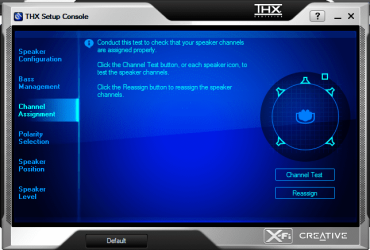
I've a Supreme X-Fi Sound device, that came with my Asus Crosshair III Forumla motherboard, I need to change the Jack assignments for this device , any ideas?
I'm not sure if this will be of ANY help at all, since Supreme X-Fi is not realtek HD... but maybe it will help, or maybe point you in the right direction?
977GB Hitachi Hitachi HDS721010CLA332
244GB Western Digital WDC WD2500AAJS-65B4A0
488GB Western Digital WDC WD5000AAJS-00A8B0
488GB Western Digital WDC WD5000AAKS-00UU3A0
PSU
Antec EarthWatts EA650 650W
Case
ThermalTake Armor A90 Mid Tower
Cooling
3x 120mm in, 1x 120mm & 200mm out, self built hydro-cooler
I'm not sure if this will be of ANY help at all, since Supreme X-Fi is not realtek HD... but maybe it will help, or maybe point you in the right direction?
Yeah I saw that earlier, before posting, I've tried that, yet, I couldn't find the /0000/system folder, I guess it's the difference in the device or whatsoever.
It isn't a X-Fi either. It is nothing more than than a Soundmax/ADI based audio chip (isn't even a sound card, but onboard audio on a riser card) that gets to use some of the X-Fi software (also known as X-Fi MB). If it was a X-Fi changing jack assignments is done in the THX Console,
but from what I can see that doesn't come with the X-Fi MB software. Hopefully someone else with the same setup might have an idea where to look for that sort of thing (if it is even possible) as I have no idea where to look.

 , any ideas?