Suprise with M$ updates

Wandering one

New member
Pro User
Local time
8:28 PM
Messages
259
Location
Osoyoos B.C.
Have always had both my computer and wife's laptop set to NEVER check for updates. I usually manually check perhaps twice a month, and usual time to search was around 30 minutes. Since January times were in the hours and many times I just gave up. :cry:
Since the middle of this month I tried three times on each computer and the longest wait was SEVEN MINUTES to have the update list ready :what: Is this a mistake or are we now allowed server access for W7 ?
Art.
 

My Computer

Computer type
PC/Desktop
Computer Manufacturer/Model Number
Home built
OS
Win7 sp1 Pro 64bit / XP sp2 Pro (games only)
CPU
Intel Core 2 Duo E8400 @ 3.00GHz
Motherboard
Intel Corporation DP35DP (CPU1)
Memory
8.00 GB Dual-Channel DDR2 @ 400MHz (5-5-5-18)
Graphics Card(s)
1024MB GeForce GTX 560
Sound Card
NVIDIA High Definition Audio
Monitor(s) Displays
SyncMaster (2048x1152@60Hz)
Hard Drives
240GB Sandisc Extreme Pro SSD
244GB Seagate ST3250410AS
488GB Seagate ST500DM002-1BD142
931GB Western Digital WDC WD1003FZEX
PSU
Corsair 720
Case
ATX
Keyboard
HID Keyboard Device Logitech
Mouse
HID-compliant mouse Microsoft
Other Info
TSSTcorp CDDVDW SH-S223L

HL-DT-ST BD-RE BH12LS35
Users with problems keep blaming MS Servers. Personally I find that update searches might go slightly faster if avoiding serching on Patch Tuesday but those long waits seem to be down to:

Incorrectly configured machines.
Missing updates.
Old updates (WUC) are installed that don't work too well.
Pending or failed updates that haven't been cleared.
Problems with installed versions of NET Framework.

Many users have been able to fix the slow update search problem. If it just went away on it's own with no changes to your system then who knows why?

Any time I've had problems - and I've had a few including this month - there's always been a fix.
 

My Computer

Computer type
Laptop
Computer Manufacturer/Model Number
ASUS
OS
Microsoft Windows 7 Home Premium 64-bit 7601 Multiprocessor Free Service Pack 1
CPU
AMD C-60 APU with Radeon(tm) HD Graphics
Motherboard
ASUSTeK COMPUTER INC. X501U
Memory
4.00 GB
Graphics Card(s)
AMD Radeon HD 6290 Graphics
Sound Card
(1) AMD High Definition Audio Device (2) Realtek High Defi
Screen Resolution
1366 x 768 x 32 bits (4294967296 colors) @ 60 Hz
Hard Drives
Hitachi HTS545050A7E380 SATA Disk Device
Antivirus
Comodo CIS & FW, SecureAplus App Whitelisting, Threatfire
Browser
Cyberfox 64bit, Opera 64bit, Airfox
Other Info
Spy-The-Spy, HitmanPro.Alert, Norton Connect Safe, MJRegWatcher, BitDefender TrafficLight, Voodoo Shield, Zemana AntiMalware
Hi,
Yea timing sounds about right :)
Lots of workarounds

I'm not a fan of hiding updates or switching to never check for updates yet ;)
But hiding updates if you do I've found that really does freak out the update system lately
I surely wouldn't hide an Important update ever.

As long as you sort the updates accurately meaning in update setting excluding Recommended updates from being installed the same as Important ones
I haven't had many issues with the real Important updates
But I do have 21 or so Recommended and a few Optional updates I stay well away from

Microsoft Net framework wow that is a weird one which I've found Net 4.5.2 is the best to have around
As far as workarounds there has been one every month
Oddly the updates to install first and manually were Kernel mode drivers
These are updates that quite a few people would usually hold off on installing
But installing it brings up quickly the rest of the round of updates for that month and possibly other prior updates :/

Here's this months workaround listed where most workarounds are first posted at
Brink post these every month,
http://www.sevenforums.com/news/397321-microsoft-security-bulletin-summary-june-14th-2016-a.html
 

My Computer

Computer type
PC/Desktop
Computer Manufacturer/Model Number
Custom assembled by me :}
OS
Win-7-Pro64bit 7-H-Prem-64bit
CPU
i7-5930K 2nd i9-9940x both water blocked VRM's too
Motherboard
ASUS SABERTOOTH X99 2nd ASUS x299 Apex
Memory
Trident-z 3200C14 2nd Trident-z 3600C16
Graphics Card(s)
EVGA 1080ti ftw3 2nd Titan Xp both water blocked
Sound Card
Built-in Realtek
Monitor(s) Displays
1-AOC G2460PG 24"G-Sync 144Hz/ 2nd 1-ASUS VG248QE 24" 144Hz
Screen Resolution
1920 x 1080 144Hz
Hard Drives
2-Samsung M.2 Evo & Evo Plus
2-Samsung 850 EVO 500GB SSD's/ 3-2.5 W.D. Black 1tb-&3-1tb/3-3.5 WD Black 1tb hdd's
PSU
EVGA SuperNOVA 1000-P2 2nd 1200-P2
Case
2-Corsair Obsidian Series 450D Black ATX Mid Tower
Cooling
Custom water loops
Keyboard
Logitech G710+/ 2nd Logitech G910
Mouse
2-RedDragon M901 Perdition 16400 dpi Gaming mouse = wired
Internet Speed
Comcast Ping 19ms 89.31mbps download speed 6.12mbps upload
Antivirus
Malwarebytes Pro/ Superantispyware Pro
Browser
FireFox & Pale moon
Other Info
2nd ASUS X299 Apex/Intel i9-9940x with Custom water loop/7H-Prem-x64/Corsair 450D case/Ram Trident-z 3600C16 4x8gb / Samsung970Evo plus 500gb SSD/Dual ssd EZ swap evo/PSU EVGA SuperNova 1200w-P2 80+Platinum/GPU Titan Xp /8-ML-140 on push-pull on 2-280GTX rads
RE: Problems with NET Framework. I mean one of those problems that you'd never notice unless you tried to tried to uninstall/change or repair an existing installation then you might get informed that the program could not be uninstalled or repaired.

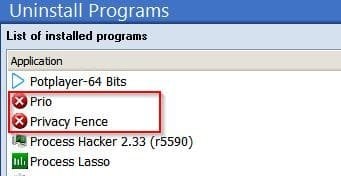
Some uninstallers (including the no longer supported Comodo Programs Manager) indicate problem programs or partial installs with a red X. Windows doesn't give any easy visual indication that there's a problem.

Problem Programs.jpg

Well I had a red X against one of those NET Framework versions some time last year. Removing it using the cleanup tool and reinstalling it also fixed the slow WU problem that I was having at the same timhat'e.

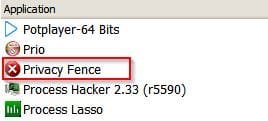
EDIT: That's Prio fixed. (There's no longer a red X against it) - Looks like I'll need to fully remove and reinstall the other program.

Problem Programs 2.jpg

EDIT: Off topic kind of but fixed the other program. The point is that windows does not always show any signs when there's a problem especially with NET Framework.

Problem Programs 3.jpg
 
Last edited:

My Computer

Computer type
Laptop
Computer Manufacturer/Model Number
ASUS
OS
Microsoft Windows 7 Home Premium 64-bit 7601 Multiprocessor Free Service Pack 1
CPU
AMD C-60 APU with Radeon(tm) HD Graphics
Motherboard
ASUSTeK COMPUTER INC. X501U
Memory
4.00 GB
Graphics Card(s)
AMD Radeon HD 6290 Graphics
Sound Card
(1) AMD High Definition Audio Device (2) Realtek High Defi
Screen Resolution
1366 x 768 x 32 bits (4294967296 colors) @ 60 Hz
Hard Drives
Hitachi HTS545050A7E380 SATA Disk Device
Antivirus
Comodo CIS & FW, SecureAplus App Whitelisting, Threatfire
Browser
Cyberfox 64bit, Opera 64bit, Airfox
Other Info
Spy-The-Spy, HitmanPro.Alert, Norton Connect Safe, MJRegWatcher, BitDefender TrafficLight, Voodoo Shield, Zemana AntiMalware
Back
Top