Surround Problems

SuperEmotastix

New member
Member
Local time
6:24 PM
Messages
71
I just re-installed win 7 RTM and I can't get my sound drivers to work right. I have a Creative Soundblaster Extreme Gamer and a set of 5.1 surround speakers. I installed the drivers for win 7 and the console launcher to set up my sub. I clicked on 5.1 surround and bass redirection, the same thing I done with it last time and worked but now there's only sound coming out of the front 2 speakers, no center, rear or sub. If I go into sound properties and test for sound it plays fine through each speaker:confused:. I'm puzzled????
 

My Computer

Computer Manufacturer/Model Number
Custom Built Gaming PC
OS
Windows 7 Ultimate 64-bit
CPU
AMD Phenom II X4 940 BE @ 3.8Ghz
Motherboard
Gigabyte GA-MA790FX-UD5P
Memory
4GB G.Skill DDR2 1066 @ 800Mhz 4-4-4-12
Graphics Card(s)
Sapphire Radeon HD 4890 OC @ 950/1050
Sound Card
Auzen X-Fi Bravura 7.1
Monitor(s) Displays
Acer AL2016W
Screen Resolution
1680x1050
Hard Drives
640GB WD Cavier Black
PSU
Corsair TX-750W
Case
CM HAF 922
Cooling
Cooler Master Hyper 212 Plus Push/Pull
Keyboard
Logitech G15 2ND Gen
Mouse
Razer Deathadder Black Edition
Internet Speed
2 Mbps Down, .5 Mbps UP
I just re-installed win 7 RTM and I can't get my sound drivers to work right. I have a Creative Soundblaster Extreme Gamer and a set of 5.1 surround speakers. I installed the drivers for win 7 and the console launcher to set up my sub. I clicked on 5.1 surround and bass redirection, the same thing I done with it last time and worked but now there's only sound coming out of the front 2 speakers, no center, rear or sub. If I go into sound properties and test for sound it plays fine through each speaker:confused:. I'm puzzled????

SE

Maybe driver, or port redirection (check control panel). we could use some info about your hardware

Ken
 

My Computer

Computer Manufacturer/Model Number
HP Pavillion dv-7 1005 Tx
OS
Win 8 Release candidate 8400
CPU
[email protected]
Memory
4 gigs
Graphics Card(s)
Nvidia 9600M
Sound Card
HD built-in
Monitor(s) Displays
17" Wxga
Screen Resolution
1440x900
Cooling
none
Internet Speed
45Mb down 5Mb up
Everything is under my profile.
 

My Computer

Computer Manufacturer/Model Number
Custom Built Gaming PC
OS
Windows 7 Ultimate 64-bit
CPU
AMD Phenom II X4 940 BE @ 3.8Ghz
Motherboard
Gigabyte GA-MA790FX-UD5P
Memory
4GB G.Skill DDR2 1066 @ 800Mhz 4-4-4-12
Graphics Card(s)
Sapphire Radeon HD 4890 OC @ 950/1050
Sound Card
Auzen X-Fi Bravura 7.1
Monitor(s) Displays
Acer AL2016W
Screen Resolution
1680x1050
Hard Drives
640GB WD Cavier Black
PSU
Corsair TX-750W
Case
CM HAF 922
Cooling
Cooler Master Hyper 212 Plus Push/Pull
Keyboard
Logitech G15 2ND Gen
Mouse
Razer Deathadder Black Edition
Internet Speed
2 Mbps Down, .5 Mbps UP
Nevermind lol ignore me.. I didnt fully read your post..
 
Last edited:

My Computer

Computer Manufacturer/Model Number
Custom Built PC
OS
Windows 7 Ultimate x64
CPU
AMD Athlon II x2 2.8MHz (2 Cores)
Motherboard
ASUS M4A785-M
Memory
6GB DDR2 1600 RAM
Graphics Card(s)
HIS - ATI Radeon HD 4670 1GB DDR3
Sound Card
VIA HD Audio?
Monitor(s) Displays
Acer LCD Monitor 17" + Polyview V17D 17"
Screen Resolution
1280 x 1024 x 60 hertz
Hard Drives
Hitachi HDS721616PLA SCSI Disk Device 160GB Split into C: and D: Partitions

WDC WD32 00AAKS-00L9A SCSI Disk Device 320GB 16MB Cache
PSU
575W Logysys PSU
Case
Sunbeam Transformer
Cooling
6 Fans - 1 x 120mm, 3 x 80mm, 1 x 220mm, 1 x 90mm PCI Slot
Keyboard
Logitech G11 Gaming Keyboard
Mouse
Logitech Trackball (Wired)
Internet Speed
12MB/s Cox Communications
Everything is under my profile.

SE

My apologies I missed them. I guess the first thing is to check device manager (type devmgmt.msc in search. go to the sound video and game tab expand it and check the sound device. Is it listed and deos it have a yellow triangle on it? Are there any other unknown devices (with yellow triangles)

let us know

Ken
 

My Computer

Computer Manufacturer/Model Number
HP Pavillion dv-7 1005 Tx
OS
Win 8 Release candidate 8400
CPU
[email protected]
Memory
4 gigs
Graphics Card(s)
Nvidia 9600M
Sound Card
HD built-in
Monitor(s) Displays
17" Wxga
Screen Resolution
1440x900
Cooling
none
Internet Speed
45Mb down 5Mb up
There's a ATI High Definition Audio Device, Creative SB X-Fi which my speakers are running through and a High Defintion Audio Device which I run my headphones through, no yellow triangles or unknown devices. I'm going to try to install the drivers again and then install the console launcher in vista compatibility mode.
 

My Computer

Computer Manufacturer/Model Number
Custom Built Gaming PC
OS
Windows 7 Ultimate 64-bit
CPU
AMD Phenom II X4 940 BE @ 3.8Ghz
Motherboard
Gigabyte GA-MA790FX-UD5P
Memory
4GB G.Skill DDR2 1066 @ 800Mhz 4-4-4-12
Graphics Card(s)
Sapphire Radeon HD 4890 OC @ 950/1050
Sound Card
Auzen X-Fi Bravura 7.1
Monitor(s) Displays
Acer AL2016W
Screen Resolution
1680x1050
Hard Drives
640GB WD Cavier Black
PSU
Corsair TX-750W
Case
CM HAF 922
Cooling
Cooler Master Hyper 212 Plus Push/Pull
Keyboard
Logitech G15 2ND Gen
Mouse
Razer Deathadder Black Edition
Internet Speed
2 Mbps Down, .5 Mbps UP
SOunds good let us know
 

My Computer

Computer Manufacturer/Model Number
HP Pavillion dv-7 1005 Tx
OS
Win 8 Release candidate 8400
CPU
[email protected]
Memory
4 gigs
Graphics Card(s)
Nvidia 9600M
Sound Card
HD built-in
Monitor(s) Displays
17" Wxga
Screen Resolution
1440x900
Cooling
none
Internet Speed
45Mb down 5Mb up
Nope, just installed the windows 7 driver for my card and the console launcher in vista sp1 compatibility mode and it's still a no go. ARGGGG. Everything is set-up the exact same way but still no center, rear or sub. Something's different because when I click on sound then properties in says that audio enhancement for this device are causing problems, would you like to disable them?
 

My Computer

Computer Manufacturer/Model Number
Custom Built Gaming PC
OS
Windows 7 Ultimate 64-bit
CPU
AMD Phenom II X4 940 BE @ 3.8Ghz
Motherboard
Gigabyte GA-MA790FX-UD5P
Memory
4GB G.Skill DDR2 1066 @ 800Mhz 4-4-4-12
Graphics Card(s)
Sapphire Radeon HD 4890 OC @ 950/1050
Sound Card
Auzen X-Fi Bravura 7.1
Monitor(s) Displays
Acer AL2016W
Screen Resolution
1680x1050
Hard Drives
640GB WD Cavier Black
PSU
Corsair TX-750W
Case
CM HAF 922
Cooling
Cooler Master Hyper 212 Plus Push/Pull
Keyboard
Logitech G15 2ND Gen
Mouse
Razer Deathadder Black Edition
Internet Speed
2 Mbps Down, .5 Mbps UP
Can anyone help me further. The speakers work fine because I downloaded a 5.1 surround test song and it played through all the speakers but only through 2 speakers in a normal song or game. Normally I could enable CMSS-3D and drag the silder to surround or up to front but this does nothing now. It's like the sound card is using windows sound properties and not the Creative ones.
 

My Computer

Computer Manufacturer/Model Number
Custom Built Gaming PC
OS
Windows 7 Ultimate 64-bit
CPU
AMD Phenom II X4 940 BE @ 3.8Ghz
Motherboard
Gigabyte GA-MA790FX-UD5P
Memory
4GB G.Skill DDR2 1066 @ 800Mhz 4-4-4-12
Graphics Card(s)
Sapphire Radeon HD 4890 OC @ 950/1050
Sound Card
Auzen X-Fi Bravura 7.1
Monitor(s) Displays
Acer AL2016W
Screen Resolution
1680x1050
Hard Drives
640GB WD Cavier Black
PSU
Corsair TX-750W
Case
CM HAF 922
Cooling
Cooler Master Hyper 212 Plus Push/Pull
Keyboard
Logitech G15 2ND Gen
Mouse
Razer Deathadder Black Edition
Internet Speed
2 Mbps Down, .5 Mbps UP
when you go to control panel > sound > speakers > configure and click on the individual satellites images (to test audio), does all the satellites AND the subwoofer play ?
 

My Computer

OS
Win 7 RTM
Yes, it play's through them all fine in the test.
 

My Computer

Computer Manufacturer/Model Number
Custom Built Gaming PC
OS
Windows 7 Ultimate 64-bit
CPU
AMD Phenom II X4 940 BE @ 3.8Ghz
Motherboard
Gigabyte GA-MA790FX-UD5P
Memory
4GB G.Skill DDR2 1066 @ 800Mhz 4-4-4-12
Graphics Card(s)
Sapphire Radeon HD 4890 OC @ 950/1050
Sound Card
Auzen X-Fi Bravura 7.1
Monitor(s) Displays
Acer AL2016W
Screen Resolution
1680x1050
Hard Drives
640GB WD Cavier Black
PSU
Corsair TX-750W
Case
CM HAF 922
Cooling
Cooler Master Hyper 212 Plus Push/Pull
Keyboard
Logitech G15 2ND Gen
Mouse
Razer Deathadder Black Edition
Internet Speed
2 Mbps Down, .5 Mbps UP
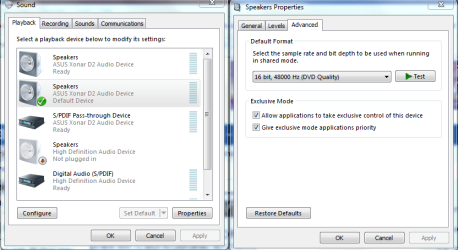
Try doing this. Switching over to DVD quality settings often fixes this type of problem.
 

Attachments

  • application control of this device.PNG
    application control of this device.PNG
    34.8 KB · Views: 26

My Computer

Computer type
PC/Desktop
Computer Manufacturer/Model Number
Home built
OS
Windows 7 Ult, Windows 8.1 Pro,
CPU
Q9650-4.275GHz, E8600 4.5GHz, E6750-3.8GHz
Motherboard
Evga 780i FTW
Memory
G.Skill PC2 9600 1200Mhz 5 5 5 15 2T
Graphics Card(s)
GTX480
Sound Card
Asus Xonar D2
Monitor(s) Displays
HannsG
Screen Resolution
1680X1050
Hard Drives
GSkill Phoenix Pro 120GB SSD
PSU
ThermalTake Toughpower 1000Watt modular
Case
ThermalTake XaserV
Cooling
Xigmatek S1283
Keyboard
Logitech G15
Mouse
Logitech G9
Internet Speed
T1
Tried switching it to that, no luck:(. When I go to control panel then click on sound, it says the following enhancements are causing problems and X-Fi CMSS-3D is listed. That's what I use to get sound to either go to to front speakers or through all speakers. It's obviously not working because moving the slider to either front or surround does nothing. Everything else in the Creative Control Panel works fine except that. Why would it be causing problems, disabling it also does nothing.
 

My Computer

Computer Manufacturer/Model Number
Custom Built Gaming PC
OS
Windows 7 Ultimate 64-bit
CPU
AMD Phenom II X4 940 BE @ 3.8Ghz
Motherboard
Gigabyte GA-MA790FX-UD5P
Memory
4GB G.Skill DDR2 1066 @ 800Mhz 4-4-4-12
Graphics Card(s)
Sapphire Radeon HD 4890 OC @ 950/1050
Sound Card
Auzen X-Fi Bravura 7.1
Monitor(s) Displays
Acer AL2016W
Screen Resolution
1680x1050
Hard Drives
640GB WD Cavier Black
PSU
Corsair TX-750W
Case
CM HAF 922
Cooling
Cooler Master Hyper 212 Plus Push/Pull
Keyboard
Logitech G15 2ND Gen
Mouse
Razer Deathadder Black Edition
Internet Speed
2 Mbps Down, .5 Mbps UP
When it comes to Creative drivers often times it's easier to nuke the drivers and start over again. This also involves digging around in Explorer to get rid of every last remnant of the Creative drivers then reinstalling. The Daniel K drivers often times work better than the Creative ones so those might be worth trying also.
 

My Computer

Computer type
PC/Desktop
Computer Manufacturer/Model Number
Home built
OS
Windows 7 Ult, Windows 8.1 Pro,
CPU
Q9650-4.275GHz, E8600 4.5GHz, E6750-3.8GHz
Motherboard
Evga 780i FTW
Memory
G.Skill PC2 9600 1200Mhz 5 5 5 15 2T
Graphics Card(s)
GTX480
Sound Card
Asus Xonar D2
Monitor(s) Displays
HannsG
Screen Resolution
1680X1050
Hard Drives
GSkill Phoenix Pro 120GB SSD
PSU
ThermalTake Toughpower 1000Watt modular
Case
ThermalTake XaserV
Cooling
Xigmatek S1283
Keyboard
Logitech G15
Mouse
Logitech G9
Internet Speed
T1
Back
Top