
Dear All
I hope someone can help, i am running windows 7 64 bit using a Gigabyte GA-P55-UD5 motherboard.
i have just purchased a new Benq monitor with built in speakers and have connected it up via HDMI, this works perfectly.
The problem i have is that i have just got some Creative surround sound speakers (model T7900), their second hand, but work OK.
Now what i wanted to do is wire them up so that i have 4 speakers and the sub and the sound comes out of them all, I'm not worried about surround sound really.
But no matter what i do when i try and play anything through the speakers i only get sound from the sub and the two front speakers.
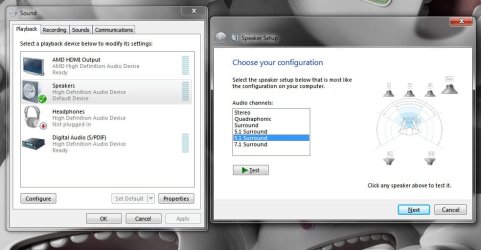
Yet if i click on the speaker set up within windows 7 and click on each speaker they all work as they should!!
i have looked on the gigabyte website and see they have download for...
Please Please can someone help me figure out how to solve what i thought was going to be a straight forward thing.
Thanks in advance
Pete
I hope someone can help, i am running windows 7 64 bit using a Gigabyte GA-P55-UD5 motherboard.
i have just purchased a new Benq monitor with built in speakers and have connected it up via HDMI, this works perfectly.
The problem i have is that i have just got some Creative surround sound speakers (model T7900), their second hand, but work OK.
Now what i wanted to do is wire them up so that i have 4 speakers and the sub and the sound comes out of them all, I'm not worried about surround sound really.
But no matter what i do when i try and play anything through the speakers i only get sound from the sub and the two front speakers.
Yet if i click on the speaker set up within windows 7 and click on each speaker they all work as they should!!
i have looked on the gigabyte website and see they have download for...
But i dont want to install this if its not going to help my cause, i have also seen a lot of people talking about clicking on the HD audio manager in the notification tray but i dont have anything like that?Realtek Function driver for Realtek Azalia audio chip (Including Microsoft UAA Driver in English edition)
Please Please can someone help me figure out how to solve what i thought was going to be a straight forward thing.
Thanks in advance
Pete
Attachments
My Computer
- OS
- Windows 7 64 bit


