
Trying to follow the instructions for new postings, I tried to download the SURT for Windows 7 64 bit, and got an error message 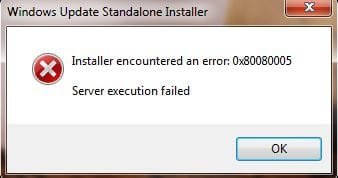 . Where can I go from here? I am running Win 7 Professional on a new HP computer. I am getting no error messages when I try to run Windows updater, but get this when I try to update Windows Security Essentials:
 . Despite the MSE srror message, when I run Speccy, it shows a normal internet connection, and I have no trouble connecting to anything else on the internet - just Windows updates.
. Where can I go from here? I am running Win 7 Professional on a new HP computer. I am getting no error messages when I try to run Windows updater, but get this when I try to update Windows Security Essentials:. Despite the MSE srror message, when I run Speccy, it shows a normal internet connection, and I have no trouble connecting to anything else on the internet - just Windows updates.My Computer
- Computer type
- PC/Desktop
- Computer Manufacturer/Model Number
- HP
- OS
- Windows 7 Profesional 64 bit
