
Suspicious IE pop-up message

Thomas R

New member
Member
Local time
5:11 PM
Messages
69
Location
SF Bay
When I tried to open a link from a Google search I got this pop-up message (see attachment).

It seems the original link was broken and instead of showing a 404 message the link was hijacked and redirected to
[link removed]

I tried to close it by clicking the Windows [X] button but that opened another browser window in full screen showing Computer (where it shows all drives attached to the computer) and it looked like it was performing a scan. I immediately shut it down with Task-Manager. Then I performed full scans with Microsoft Security Essentials and also with Malwarebytes which both could not find any infections. So either I was fast enough to kill it in time or it does something else – in all likelihood nothing good.

So does anyone know what this is and how to protect yourself against it?

Btw. by now I have added this domain to my blocked list
 

Attachments
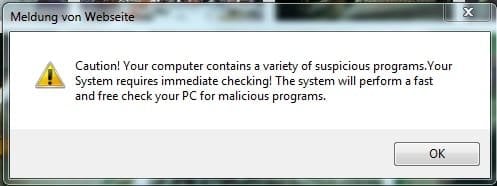
  • Unbenannt.jpg
    Unbenannt.jpg
    14.5 KB · Views: 23

My Computer

Computer type
PC/Desktop
Computer Manufacturer/Model Number
Dell Precision M6300
OS
Windows 7 Ultimate x64 SP1 Ver. 6.1.7601 (Build 7601)
CPU
Intel Core 2 Extreme X9000, 2.80GHz 6MB L2-Cache, 800MHz FSB
Motherboard
Dell JM679
Memory
8 GB - 2x 4GB SODIMM DDR-II
Graphics Card(s)
NVIDIA Quadro FX 3600M (Driver Ver. 8.17.12.6776)
Sound Card
IDT/SigmaTel STAC 92XX C Major HD Audio
Monitor(s) Displays
17'' WUXGA TFT
Screen Resolution
1920 x 1200
Hard Drives
SSD Crucial m4 512GB (CT512M4SSD2)
Case
Laptop
Mouse
Microsoft Wireless Laser Mouse 8000
Browser
IE 10
Looks like this is another form of scareware - trying to trick people into believing their computer is infected and the only way to get rid of the malware is to buy a "special" program only offered by the bad guys.

If MSE and Malwarebytes haven't found anything, that's a good sign you probably closed down the scareware before it could do any damage. But you might want to run one more free product - Norton Power Eraser. Heed the warning: "The tool uses more aggressive techniques than your security product, hence there is a risk that it will flag legitimate programs for removal. You should carefully review the scan results page before removing any files."

Scareware Removal | Norton Power Eraser

You can download from here.
 

My Computer

Computer type
Laptop
Computer Manufacturer/Model Number
Sony Vaio VPCEB47GM Laptop
OS
Win 7 Pro 64-bit
CPU
Intel i5 2.4 Ghz
Memory
8GB DDR3
Graphics Card(s)
Intel HD 3000
Sound Card
IDT High Definition
Monitor(s) Displays
15.6 WGXA Anti-Glare LED
Screen Resolution
1280x800
Hard Drives
640Gb 7200rpm
Antivirus
MSE
Browser
Opera (primary) with IE9 backup

My Computer

Computer Manufacturer/Model Number
CreepinJesus Mk. IV
OS
Windows 7 Ultimate x64
CPU
Intel Core i5-2500 3.3GHz
Motherboard
Asus P8H67-M PRO
Memory
8GB DDR3 1333MHz
Graphics Card(s)
On-board
Sound Card
On-board
Monitor(s) Displays
Samsung SyncMaster BX2250 22.5" LED-backlit LCD
Screen Resolution
1920 * 1080
Hard Drives
OCZ Agility 3 120GB, SATA-III
PSU
Thermaltake Toughpower Grand TPG-650M
Case
Lian-Li PC-A04
Cooling
Standard fans. They blow.
Keyboard
Logitech K360
Mouse
Generic Logitech from the bargain-bin by the checkout
Internet Speed
Over 9000! ...Mbps.
Other Info
Chocolate digestives are my favourite biscuit.
Anytime something pops up saying you have a virus/malware, you need to consider the following:

Did I install this software on my PC at some point?

If you didn't, then the chances are good it's a rouge trying to get you to click on it to either install malware/virus

Is it a real message from any AV/Anti-Malware you have on your PC?

Fake AV authors go through a lot of trouble to craft screens that may look almost exactly like your current AV/Malware detection screens. Along with lots of flashing buttons and red warning screens to get you to panic & push the button.

Know your software and know what the screens look like as well as the typical behavior for it. If something seems "out of the ordinary", best to investigate it before taking any actions.

Hitting the "X" and having it take you to another screen is evidence that you had a persistent program that wouldn't take no for an answer. Unfortunately nowadays, hitting the "X" does not guarantee the program will close and is usually set as "go ahead".

The way I deal with these occasional annoyances is I lock down the firewall and hit alt +F4 (although with today's malware, even that's no guarantee it won't try to redirect to something else, hence the reason I lock the firewall to shut off all traffic)
 

My Computer

Computer type
PC/Desktop
Computer Manufacturer/Model Number
Dell Hell oh Well
OS
Win 7 32 Home Premium, Win 7 64 Pro, Win 8.1, Win 10
CPU
Intel Core 2 Duo 2.93GHz
Memory
Not much with my ADHD
Graphics Card(s)
ATI Radeon HD 4350
Monitor(s) Displays
24" HDTV/Monitor
Screen Resolution
Blurry after a Scotch or 2
Hard Drives
1 HDD 250 GB, 1 HDD 1 TB, 3 - 1 TB Externals
Case
Don't get on my case...man :D
Cooling
I have an Air Conditioner & Diet Pepsi
Keyboard
Saitek Cyborg
Mouse
10 yr old MS optical mouse that still works
Internet Speed
Never fast enough
Antivirus
Various
Browser
Various
The paid version of Malwarebytes' Anti-malware blocks malicious IPs, thereby helping to protect you from that garbage. They charge a one-time fee, there are no annual renewal charges.

I also recommend using the NoScript add-on for Firefox.

WinPatrol is another great addition to your protection programs. It will prevent programs from making changes to your registry without your consent. Very light on resources, very effective. There are free and paid versions available.
 

My Computer

Computer Manufacturer/Model Number
Dell Studio 15
OS
Windows 7 Ultimate 64 bit
Hi, ThomasR.

In addition to the other responses you have received, it would be a good idea to do thorough cleaning of the Temp Files on your computer. I suggest TFC:

Download TFC to your desktop

  • Open the file and close any other windows.
  • It will close all programs itself when run, make sure to let it run uninterrupted.
  • Click the Start button to begin the process. The program should not take long to finish its job
  • Once its finished it should reboot your machine, if not, do this yourself to ensure a complete clean
 

My Computer

OS
Windows 7 & Windows Vista Ultimate
Back
Top