svchost.exe and MsMpEng.exe Hogging Resources

VicVicVic

New member
Member
Local time
2:00 PM
Messages
52
Hello, I hope you are doing well.

Whenever I check my Windows Task Manager's Processes tab, it looks like svchost.exe and MsMpEng.exe are hogging my system's resources. On average, each of those programs are using approximately 50k to 60k of memory.

I know that they are both Windows-related programs (MsMpEng is Windows Defender, right?), but they seem to take up more resources than needed.

Any thoughts on this? Thanks,
Vic
 

My Computer My Computer

At a glance

Windows 7 ProfessionalIntel Core2Duo T52703072MBnVidia GeForce 8400M GS
Computer Manufacturer/Model Number
Dell Vostro 1500
OS
Windows 7 Professional
CPU
Intel Core2Duo T5270
Memory
3072MB
Graphics Card(s)
nVidia GeForce 8400M GS
Hard Drives
Western Digital 320GB Scorpio Blue SATAII
Mouse
Logitech VX Revolution
Internet Speed
Comcast Performance High Speed Internet
...50k to 60k...you call that hogging resources? What are you on 128 MBs of RAM?
 

My Computer My Computer

At a glance

Windows 10 Pro (x64)Intel Core i7-3930K (3.2GHz - 4.5GHz)4x Samsung 4GB PC3-12800 DDR3 (16GB 1600MHz)Nvidia Geforce GTX 690
Computer type
PC/Desktop
Computer Manufacturer/Model Number
Alienware Aurora ALX R4
OS
Windows 10 Pro (x64)
CPU
Intel Core i7-3930K (3.2GHz - 4.5GHz)
Motherboard
Alienware Aurora-R4 x79
Memory
4x Samsung 4GB PC3-12800 DDR3 (16GB 1600MHz)
Graphics Card(s)
Nvidia Geforce GTX 690
Sound Card
SteelSeries Siberia Elite
Monitor(s) Displays
Dell UltraSharp U3011
Screen Resolution
2560x1600
Hard Drives
Samsung 850 Pro 256 GB, Seagate 1TB Desktop Hybrid HDD, 2x Western Digital 4TB Green HDD
PSU
875W Some Dell PSU <.<
Case
Alienware Aurora ALX
Cooling
Custom Liquid Cooling (EK CPU & GPU blocks) dual EK 480RAD
Keyboard
Logitech G710+ Mechanical
Mouse
Logitech G700s
Internet Speed
Verizon Fios (50 mbps average)
Other Info
Server: Intel NUC D54250WYK: i5-4250U, 16GB, 256 GB mSATA, Windows Server 2012 R2
Thanks for replying.

Oh, I'd rather have the programs not use too much system resources if possible. On average, each uses 50k to 60k, which comes out to be 100k to 120k combined. At times, one or both can spike up to 80k to 90k, and if both does that at the same time, it hits about 180k of system resources.

I have since disabled and turned off Windows Defender, as I already have my own anti-virus and anti-malware programs.
 

My Computer My Computer

At a glance

Windows 7 ProfessionalIntel Core2Duo T52703072MBnVidia GeForce 8400M GS
Computer Manufacturer/Model Number
Dell Vostro 1500
OS
Windows 7 Professional
CPU
Intel Core2Duo T5270
Memory
3072MB
Graphics Card(s)
nVidia GeForce 8400M GS
Hard Drives
Western Digital 320GB Scorpio Blue SATAII
Mouse
Logitech VX Revolution
Internet Speed
Comcast Performance High Speed Internet
Are you serious? That is just silly. Are you so afraid to use RAM that you are not using?
 

My Computer My Computer

At a glance

Windows 10 Pro (x64)Intel Core i7-3930K (3.2GHz - 4.5GHz)4x Samsung 4GB PC3-12800 DDR3 (16GB 1600MHz)Nvidia Geforce GTX 690
Computer type
PC/Desktop
Computer Manufacturer/Model Number
Alienware Aurora ALX R4
OS
Windows 10 Pro (x64)
CPU
Intel Core i7-3930K (3.2GHz - 4.5GHz)
Motherboard
Alienware Aurora-R4 x79
Memory
4x Samsung 4GB PC3-12800 DDR3 (16GB 1600MHz)
Graphics Card(s)
Nvidia Geforce GTX 690
Sound Card
SteelSeries Siberia Elite
Monitor(s) Displays
Dell UltraSharp U3011
Screen Resolution
2560x1600
Hard Drives
Samsung 850 Pro 256 GB, Seagate 1TB Desktop Hybrid HDD, 2x Western Digital 4TB Green HDD
PSU
875W Some Dell PSU <.<
Case
Alienware Aurora ALX
Cooling
Custom Liquid Cooling (EK CPU & GPU blocks) dual EK 480RAD
Keyboard
Logitech G710+ Mechanical
Mouse
Logitech G700s
Internet Speed
Verizon Fios (50 mbps average)
Other Info
Server: Intel NUC D54250WYK: i5-4250U, 16GB, 256 GB mSATA, Windows Server 2012 R2
Thanks for replying.

Oh, I'd rather have the programs not use too much system resources if possible. On average, each uses 50k to 60k, which comes out to be 100k to 120k combined. At times, one or both can spike up to 80k to 90k, and if both does that at the same time, it hits about 180k of system resources.

I have since disabled and turned off Windows Defender, as I already have my own anti-virus and anti-malware programs.

Vic

take a look at how much svchost.exe normally uses. I think you meant Mb, right?

enough said
 
Last edited:

My Computer My Computer

At a glance

Win 8 Release candidate 8400[email protected]4 gigsNvidia 9600M
Computer Manufacturer/Model Number
HP Pavillion dv-7 1005 Tx
OS
Win 8 Release candidate 8400
CPU
[email protected]
Memory
4 gigs
Graphics Card(s)
Nvidia 9600M
Sound Card
HD built-in
Monitor(s) Displays
17" Wxga
Screen Resolution
1440x900
Cooling
none
Internet Speed
45Mb down 5Mb up
Could you post a screenshot of all the processes in task manager, click on Show processes from all users, then post a screenshot.

The different instances of Svchost.exe are used by different services, this will show you how to get a better idea as to what services a particular instance of svchost.exe is using. So it's pretty normal usage.

http://www.sevenforums.com/tutorial...services-running-under-svchost-exe.html?ltr=T
 

My Computer My Computer

At a glance

Windows 7 Ultimate x64 SP1Core i7 920 (D0) @ 4Ghz, *26c idle *65c full ...12GB DDR3 Corsair Dominator -CMD12GX3M6A1600C...Zotac Geforce GTX 770
Computer type
PC/Desktop
Computer Manufacturer/Model Number
Airbot 2.0
OS
Windows 7 Ultimate x64 SP1
CPU
Core i7 920 (D0) @ 4Ghz, *26c idle *65c full load on air
Motherboard
Asus P6X58D Premium - Sata 6Gb/s - USB 3.0
Memory
12GB DDR3 Corsair Dominator -CMD12GX3M6A1600C8 at 1600MHz
Graphics Card(s)
Zotac Geforce GTX 770
Sound Card
ASUS Xonar D2X
Monitor(s) Displays
1 LG 24" Flatron W2453V-PF 1 Samsung 24" P2450H both 2ms RT
Screen Resolution
1920x1080@60hz
Hard Drives
1 Samsung 250GB 840 Evo SSD
1 OCZ Vertex2 180GB SSD
1 TB Samsung Spinpoint F1 7200RPM 32MB cache
2 500GB WD Caviar Blacks 7200RPM 32MB cache (WD5001AALS)

Pioneer DVD Burner DVR-S18M
PSU
Corsair HX1000W
Case
Cooler Master HAF 932
Cooling
Case Fans *3 230mm, *1 140mm/CPU - *Tuniq Tower 120 Extreme
Keyboard
Logitech Wireless MK700
Mouse
Logitech Wireless MK700
Internet Speed
DL 15 Mbps UL 0.98 Mbps
Antivirus
None
Browser
Firefox Nightly
Other Info
Processor-7.7 *RAM- 7.9 *Graphics-7.9 *Gaming Graphics- 7.9 *SSD- 7.8 W.E.I final score= 7.7
*Phone- LG Nexus 5
Msmpeng.exe is MSE. Its normal usage is around 50-60 mb.
 

My Computer My Computer

At a glance

Windows® 8 Pro (64-bit)Intel® Core™ i5 Processor 2467M (1.60GHz, 3MB...6GB DDR3 System Memory at 1,333MHz (on BD 4GB...AMD Radeon™ HD7550M 1GB DDR3 (Ext. Graphic)
Computer Manufacturer/Model Number
Samsung NP530U4B-S02IN
OS
Windows® 8 Pro (64-bit)
CPU
Intel® Core™ i5 Processor 2467M (1.60GHz, 3MB L3 Cache)
Motherboard
Samsung Electronics
Memory
6GB DDR3 System Memory at 1,333MHz (on BD 4GB + 2GB x 1)
Graphics Card(s)
AMD Radeon™ HD7550M 1GB DDR3 (Ext. Graphic)
Sound Card
Realtek High Definition Audio
Monitor(s) Displays
35.56cm (14.0) SuperBright 300nit HD LED Display
Screen Resolution
1366x768
Hard Drives
1TB S-ATA II Hard Drive (5400RPM) with ExpressCache 16GB SSD
Internet Speed
sucks
Antivirus
Microsoft Security Essentials
Browser
Google Chrome (Sync enabled)
Msmpeng.exe is MSE. Its normal usage is around 50-60 mb.

This just solved my post i just did. LOL While scanning, i noticed my cpu is around 100% (High Performance)
 

My Computer My Computer

At a glance

Mac OS X Yosemite2.4 GHz Intel Core i78 GB 1600 MHz DDR3NVIDIA GeForce GT 650M
Computer type
PC/Desktop
Computer Manufacturer/Model Number
Macbook Pro Retina
OS
Mac OS X Yosemite
CPU
2.4 GHz Intel Core i7
Memory
8 GB 1600 MHz DDR3
Graphics Card(s)
NVIDIA GeForce GT 650M
Monitor(s) Displays
Retina
Screen Resolution
Retina
Hard Drives
250GB SSD
Other Info
Macbook Pro Retina (2013)
Hello, I hope you are doing well.

Whenever I check my Windows Task Manager's Processes tab, it looks like svchost.exe and MsMpEng.exe are hogging my system's resources. On average, each of those programs are using approximately 50k to 60k of memory.

I know that they are both Windows-related programs (MsMpEng is Windows Defender, right?), but they seem to take up more resources than needed.

Any thoughts on this? Thanks,
Vic

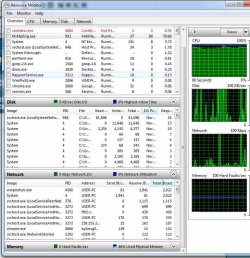
I am having a similar problem only my problem is different in that when the msmpeng is runing, I have to keep waiting for the programme I am using to carry out its commands. This is most inefficient as it is taking over twice as long to do anything. msmpeng seems to be hogging 78-83% of the CPU and with svchost taking 11-15%. This means that the CPU is 85-98% in use the whole time.

I am running the following
Windows 7 ultimate x64
Intel Dual-core i3-560 processor
have 4 gb memory
I am only running MSE as my antivirus

I have tried many suggestions seen already, for example, I have tried to turn it off only to find it wasn't turned on. The Action Centre confirmed that it was off. I have tried opening Defender, and setting the scan times. Listing Defender folder as a folder not to scan. I have tried uninstalling MSE and reloading, but that didn't help. There was a suggestion that there might be a conflict, but with what? I will see if I can attach a screen shot of the resource moniter.
Resource Monitor.JPG
 

My Computer My Computer

At a glance

Windows 7 Ultimate x64Intel Dual-Core i3-5604 gBElsa Gladiac GT220LP
Computer Manufacturer/Model Number
Shop assembled
OS
Windows 7 Ultimate x64
CPU
Intel Dual-Core i3-560
Motherboard
Asus P7P55D-E
Memory
4 gB
Graphics Card(s)
Elsa Gladiac GT220LP
Monitor(s) Displays
Acer
Hard Drives
500 GB Hitachi OSO 2600

My Computer My Computer

At a glance

Vista, Windows7, Mint Mate, Zorin, Windows 8from 1.6GHz Duo to i7
Computer Manufacturer/Model Number
HP, Dell, Gateway, Toshiba - 4 laptops and 2 desktops
OS
Vista, Windows7, Mint Mate, Zorin, Windows 8
CPU
from 1.6GHz Duo to i7
Monitor(s) Displays
2x HP w2207
Hard Drives
5x HDD, 7x SSD, 12x Externals
Keyboard
with trackball - no mices
Mouse
Trackball mice
Internet Speed
DSL 6000
DavidDexter, it would be better if you started your own thread.
 

My Computer My Computer

At a glance

Vista, Windows7, Mint Mate, Zorin, Windows 8from 1.6GHz Duo to i7
Computer Manufacturer/Model Number
HP, Dell, Gateway, Toshiba - 4 laptops and 2 desktops
OS
Vista, Windows7, Mint Mate, Zorin, Windows 8
CPU
from 1.6GHz Duo to i7
Monitor(s) Displays
2x HP w2207
Hard Drives
5x HDD, 7x SSD, 12x Externals
Keyboard
with trackball - no mices
Mouse
Trackball mice
Internet Speed
DSL 6000
Back
Top