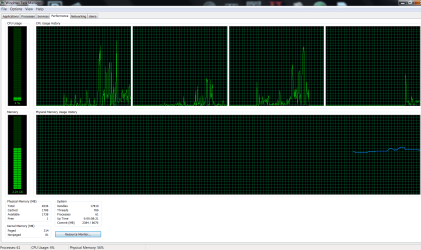
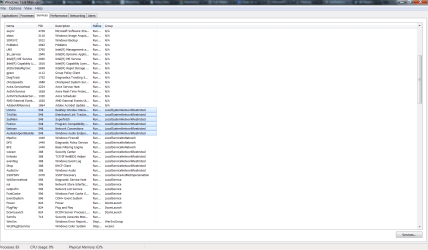
SVCHost.exe and Sched.exe taking up 2 out of 4gbs of RAM.

Olivarious

New member
Local time
6:28 AM
Messages
4
Hi,

Recently, SVCHost.exe is taking up a lot of memory. Did all the necessary scans and removals but it's still the same. (I'm using Avira Anti-virus)

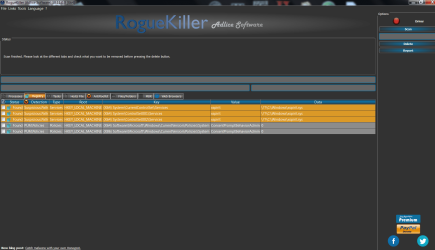
Attached are the Proccesses, Performance and Services tab from Task Manager. And useful text logs from scans. Do let me know if I need to provide anything else.

Thanks in advanced.
 

Attachments
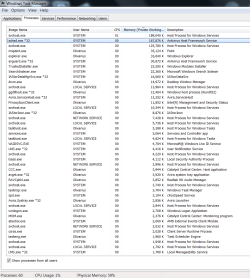
  • 2GB Proccesses.png
    2GB Proccesses.png
    49.4 KB · Views: 0
  • 2GB Performance.png
    2GB Performance.png
    29 KB · Views: 1
  • 2GB Services.png
    2GB Services.png
    64.9 KB · Views: 2
  • RogueKiller Scan Results.png
    RogueKiller Scan Results.png
    59.4 KB · Views: 1
  • Rkill.txt
    Rkill.txt
    2.9 KB · Views: 1
  • TDSSKiller.txt
    TDSSKiller.txt
    192.2 KB · Views: 0
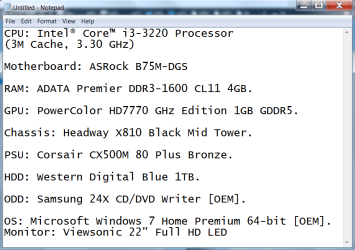
  • Computer Specs(Full).png
    Computer Specs(Full).png
    28.8 KB · Views: 0
Last edited:

My Computer My Computer

At a glance

Windows 7 Home Premium x64Processor Intel(R) Core(TM) i3-3220 CPU @ 3.3...
Computer type
PC/Desktop
Computer Manufacturer/Model Number
Custom Build
OS
Windows 7 Home Premium x64
CPU
Processor Intel(R) Core(TM) i3-3220 CPU @ 3.30GHz, 3300 Mhz,
Antivirus
Avira
Browser
Google Chrome
Bump.
 

My Computer My Computer

At a glance

Windows 7 Home Premium x64Processor Intel(R) Core(TM) i3-3220 CPU @ 3.3...
Computer type
PC/Desktop
Computer Manufacturer/Model Number
Custom Build
OS
Windows 7 Home Premium x64
CPU
Processor Intel(R) Core(TM) i3-3220 CPU @ 3.30GHz, 3300 Mhz,
Antivirus
Avira
Browser
Google Chrome
Hello Olivarious. Firs of all I'll suggest scanning you pc with Malwarebytes Anti-Malware.
From task manager try to kill superfetch service.
From task manager point mouse to svchost, right click and press "Go to service(s)". All services will be highlited. Along with superfatch windows update may cause your problem. So wait for update to finish or just stop the service.
Hope that helps
 

My Computer My Computer

At a glance

Windows 7 UltimateE8400 3.0 GHz6 Gb
Computer type
PC/Desktop
Computer Manufacturer/Model Number
Asus
OS
Windows 7 Ultimate
CPU
E8400 3.0 GHz
Motherboard
Asus P8
Memory
6 Gb
Already done with MBAM scan before posting this thread. Removed multiple malicious files.

You mean it's either Superfetch or Windows Update that is causing the problem?
 

My Computer My Computer

At a glance

Windows 7 Home Premium x64Processor Intel(R) Core(TM) i3-3220 CPU @ 3.3...
Computer type
PC/Desktop
Computer Manufacturer/Model Number
Custom Build
OS
Windows 7 Home Premium x64
CPU
Processor Intel(R) Core(TM) i3-3220 CPU @ 3.30GHz, 3300 Mhz,
Antivirus
Avira
Browser
Google Chrome
In my case this was causing memory leak on more then 100 cases. I just stop superfetch and windows update (in case it's part of svchost process) and everything back to normal again.
 

My Computer My Computer

At a glance

Windows 7 UltimateE8400 3.0 GHz6 Gb
Computer type
PC/Desktop
Computer Manufacturer/Model Number
Asus
OS
Windows 7 Ultimate
CPU
E8400 3.0 GHz
Motherboard
Asus P8
Memory
6 Gb
Hi Gmake, I stopped 'Superfetch' and it went down to 50k-ish. Thank you so much. What other things can I do to bring it down?

Also there's this Sched.exe from Avira Antivirus. Can't seem to stop the service as access is denied. Should I uninstall this Anti-virus and download maybe Avast or BitDefender?

Lastly, how do I disable 'Windows Update'? I tried to but Windows is still searched for updates and is asking me to install it.
 

My Computer My Computer

At a glance

Windows 7 Home Premium x64Processor Intel(R) Core(TM) i3-3220 CPU @ 3.3...
Computer type
PC/Desktop
Computer Manufacturer/Model Number
Custom Build
OS
Windows 7 Home Premium x64
CPU
Processor Intel(R) Core(TM) i3-3220 CPU @ 3.30GHz, 3300 Mhz,
Antivirus
Avira
Browser
Google Chrome
Back
Top