Svchost.exe High memory usage at startup

master12

New member
Local time
6:40 PM
Messages
13
Hello

So I had this problem for a while now and it's really annoying. Just after the "Welcome" message the PC keep loading for few mins and I can hardly open any software due to this high memory/CPU usage.
I already disabled some startup programmes/services but that didn't help

Is there a method to find out what my PC is doing? sometimes I see "trustedinstaller.exe" process, not sure what's getting installed/updated.
Also I think that this problem have something to do with VMware but I'm not sure.
 

My Computer My Computer

Computer type
PC/Desktop
Computer Manufacturer/Model Number
custom build
OS
Microsoft Windows*7 Ultimate x64
CPU
Intel(R) Core(TM) i5 CPU 650 @ 3.20GHz
Motherboard
ASROCK H55M-LE
Memory
2GB, 1GB DDR3
Graphics Card(s)
NVIDIA GeForce 210
Sound Card
custom build
Hard Drives
WDC WD6400AAKS-22A7B2 ATA Device
Antivirus
Eset Smart Security
Browser
FireFox
Hello Master12,

What is svchost.exe? - Windows Help

Svchost.exe is a process on your computer that hosts, or contains, other individual services that Windows uses to perform various functions. For example, Windows Defender uses a service that is hosted by a svchost.exe process.

There can be multiple instances of svchost.exe running on your computer, with each instance containing different services. One instance of svchost.exe might host a single service for a program, and another instance might host several services related to Windows. You can use Task Manager to view which services are running under each instance of svchost.exe.

It's normal for a computer to take a few minutes after booting-up for it to load of all applications.

Thank you,
VinnyBuxton
 

My Computer My Computer

Computer type
PC/Desktop
Can you elaborate on "High memory usage"? This is so subjective that it really means nothing.
 

My Computer My Computer

Computer type
PC/Desktop
Computer Manufacturer/Model Number
HP
OS
Windows 7 Pro 64 bit
CPU
Xeon W3520
Memory
8 GB
Graphics Card(s)
Nvidia Geforce 210

My Computer My Computer

Computer type
PC/Desktop
Computer Manufacturer/Model Number
Home made Desktop
OS
Windows 10 Pro. 64/ version 1709 Windows 7 Pro/64
CPU
Intel i7-6800K @ 4.3
Motherboard
ASUS X-99 Deluxe II
Memory
Corsair Platinum 16 gig @2400
Graphics Card(s)
EVGA GTX 1070 OC
Monitor(s) Displays
Asus 27" LED LCD/VE278Q
Screen Resolution
1920-1080 or 1280-720 HDMI
Hard Drives
INTEL SSD 730-240 Gb Sata 3.0/
PSU
EVGA Platium 1200W
Case
Phanteks Luxe Tempered Glass 8 fans/ one radiator
Cooling
XSPC/ Water Cooled CPU
Keyboard
Das 4 Professional
Mouse
Logitech M705/MX Anywhere 2-S
Internet Speed
100 mbits
Antivirus
Microsoft Security Essentials/ Malwarebytes Premium 3.0/ SAS
Browser
I.E. 11 default/Firefox/ ISP Time Warner Cable/Spectrum
Other Info
LG BluRay Burner/
Sound system-KLipsch-THX/
Icy Dock ssd Hot Swap bays.
The svchost.exe can be anything. I have currently a dozen of those running. You have to find out which processes are the ones that you suspect are giving the problem. Easiest is with Process Explorer.
 

My Computer My Computer

Computer Manufacturer/Model Number
HP, Dell, Gateway, Toshiba - 4 laptops and 2 desktops
OS
Vista, Windows7, Mint Mate, Zorin, Windows 8
CPU
from 1.6GHz Duo to i7
Monitor(s) Displays
2x HP w2207
Hard Drives
5x HDD, 7x SSD, 12x Externals
Keyboard
with trackball - no mices
Mouse
Trackball mice
Internet Speed
DSL 6000
Hello,

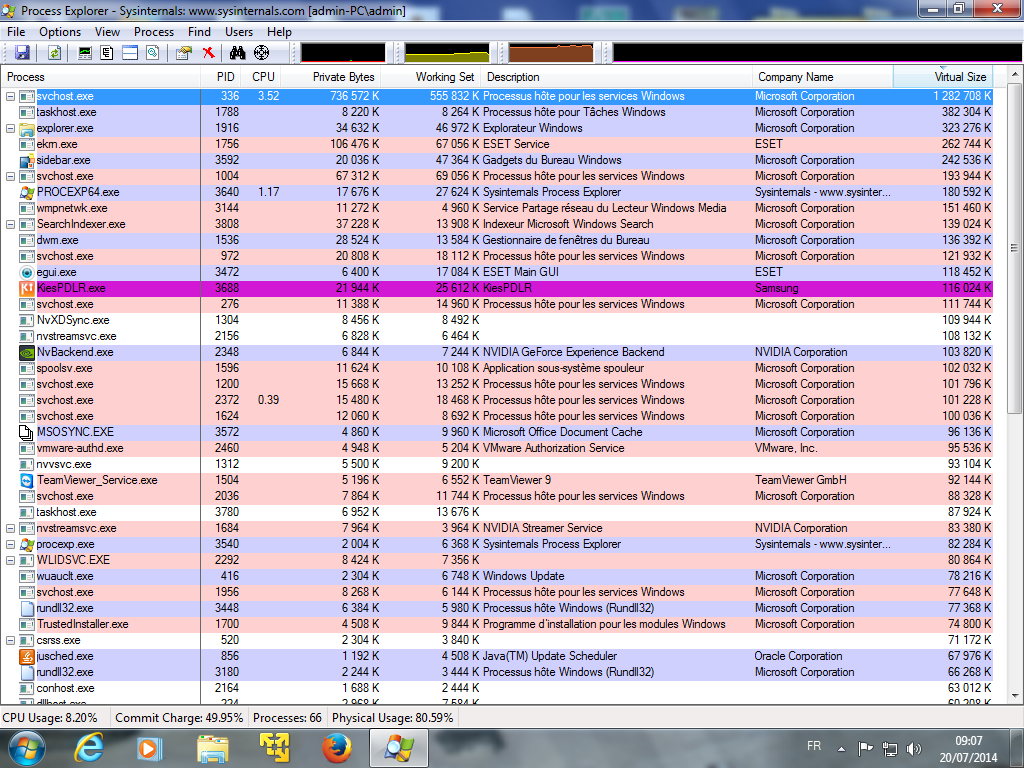
Sorry for late reply, here is a screenshot:
3jyIcoa.png


Physical memory usage was between 78-97%

My PC used to boot in 3-4 mins max but now it takes more than 10 mins...
 

My Computer My Computer

Computer type
PC/Desktop
Computer Manufacturer/Model Number
custom build
OS
Microsoft Windows*7 Ultimate x64
CPU
Intel(R) Core(TM) i5 CPU 650 @ 3.20GHz
Motherboard
ASROCK H55M-LE
Memory
2GB, 1GB DDR3
Graphics Card(s)
NVIDIA GeForce 210
Sound Card
custom build
Hard Drives
WDC WD6400AAKS-22A7B2 ATA Device
Antivirus
Eset Smart Security
Browser
FireFox
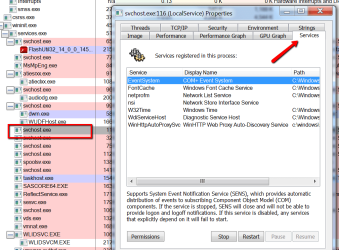
You don't show which processes are running under that svchost.exe. Right click on the exe and go to Properties > Services tab - see picture example.
 

Attachments

  • 2014-07-20_1352.png
    2014-07-20_1352.png
    59.3 KB · Views: 1

My Computer My Computer

Computer Manufacturer/Model Number
HP, Dell, Gateway, Toshiba - 4 laptops and 2 desktops
OS
Vista, Windows7, Mint Mate, Zorin, Windows 8
CPU
from 1.6GHz Duo to i7
Monitor(s) Displays
2x HP w2207
Hard Drives
5x HDD, 7x SSD, 12x Externals
Keyboard
with trackball - no mices
Mouse
Trackball mice
Internet Speed
DSL 6000
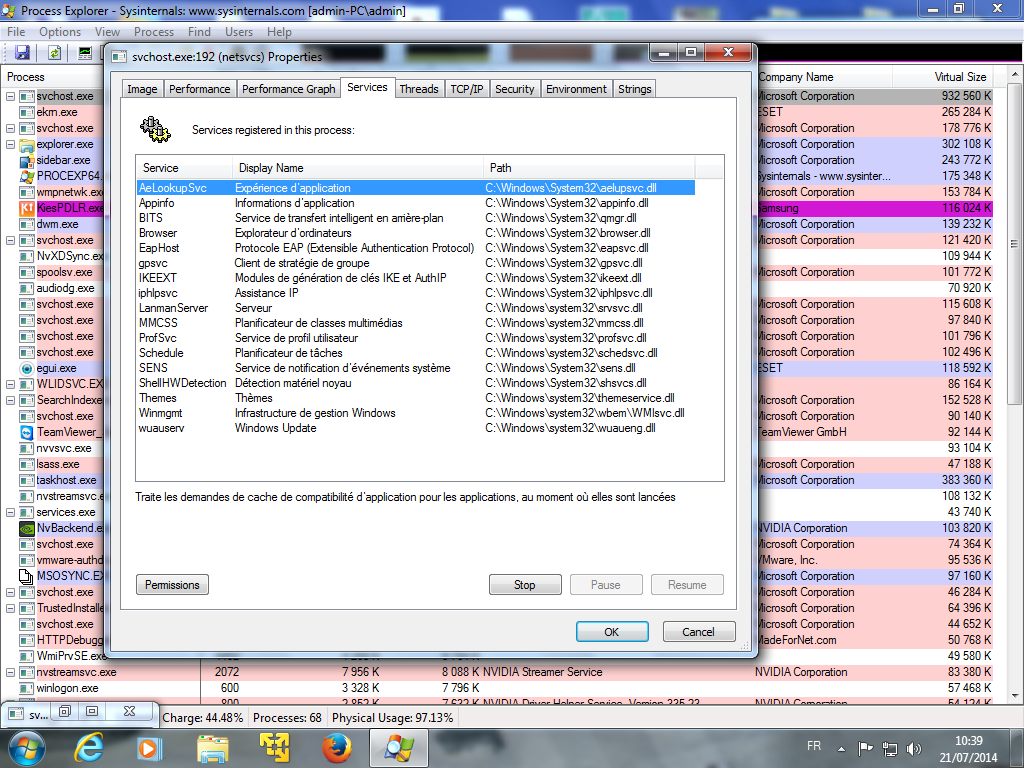
Sorry, here is the pic:

IQVgzd3.png
 

My Computer My Computer

Computer type
PC/Desktop
Computer Manufacturer/Model Number
custom build
OS
Microsoft Windows*7 Ultimate x64
CPU
Intel(R) Core(TM) i5 CPU 650 @ 3.20GHz
Motherboard
ASROCK H55M-LE
Memory
2GB, 1GB DDR3
Graphics Card(s)
NVIDIA GeForce 210
Sound Card
custom build
Hard Drives
WDC WD6400AAKS-22A7B2 ATA Device
Antivirus
Eset Smart Security
Browser
FireFox
Hmm, that's not obvious because there are so many services. The one that looks odd is the 'Lanman server'. Do you know what that is.
 

My Computer My Computer

Computer Manufacturer/Model Number
HP, Dell, Gateway, Toshiba - 4 laptops and 2 desktops
OS
Vista, Windows7, Mint Mate, Zorin, Windows 8
CPU
from 1.6GHz Duo to i7
Monitor(s) Displays
2x HP w2207
Hard Drives
5x HDD, 7x SSD, 12x Externals
Keyboard
with trackball - no mices
Mouse
Trackball mice
Internet Speed
DSL 6000
I have no idea, maybe used by Advanced System Optimizer?
 

My Computer My Computer

Computer type
PC/Desktop
Computer Manufacturer/Model Number
custom build
OS
Microsoft Windows*7 Ultimate x64
CPU
Intel(R) Core(TM) i5 CPU 650 @ 3.20GHz
Motherboard
ASROCK H55M-LE
Memory
2GB, 1GB DDR3
Graphics Card(s)
NVIDIA GeForce 210
Sound Card
custom build
Hard Drives
WDC WD6400AAKS-22A7B2 ATA Device
Antivirus
Eset Smart Security
Browser
FireFox
I too have this problem, but I just kill the process with no real detrimental effect taking place afterward and move on. Otherwise, it takes 10-15 minutes to finish on it's own while the machine is rendered almost useless (i.e. slow interactive response)
 

My Computer My Computer

Computer type
PC/Desktop
Computer Manufacturer/Model Number
HP
OS
Window 7 Professional 64bit SP1
CPU
AMD 4450 B
Memory
2gb
Graphics Card(s)
ATI Radeno Express 1150
Hard Drives
ATA
Antivirus
Security Essentials
Browser
Chrome
Welcome to the forum.

Terminating an instance of svchost.exe (or any system process for that matter) is asking for trouble. It may work in specific cases but this is by no means a recommended procedure.
 

My Computer My Computer

Computer type
PC/Desktop
Computer Manufacturer/Model Number
HP
OS
Windows 7 Pro 64 bit
CPU
Xeon W3520
Memory
8 GB
Graphics Card(s)
Nvidia Geforce 210
Hello folks:

I too am having this same issue and am looking for a technical explanation. I've contacted Microsoft and they seem as dumb as rocks on the issue, no surprise there!

When W7 starts there is an instance of svchost.exe consuming anywhere from 550mb to 700mb RAM. It is directly tied to about a dozen services all related to "netsrvc."

Any technical advice or comment will be appreciated. Happy Holidays and best wishes for a great 2015!

:cool:

Regards,

Robert Goltz

Sys Info---> Acer Aspire desktop, Windows 7 SP1, 1.6 Dual Core processor and 2GB RAM on board.
 

My Computer My Computer

Computer type
PC/Desktop
Computer Manufacturer/Model Number
Acer
OS
W7 Pro, SP1 32-bit
What is the concern with 550 MB of ram.
Their are more things than can be posted where Windows 7 uses that small amount of ram.
You can chase that small amount of ram around on your system forever and accomplish nothing.

Let Windows 7 worry about when and where to use the ram.
 

My Computer My Computer

Computer type
PC/Desktop
Computer Manufacturer/Model Number
Home made Desktop
OS
Windows 10 Pro. 64/ version 1709 Windows 7 Pro/64
CPU
Intel i7-6800K @ 4.3
Motherboard
ASUS X-99 Deluxe II
Memory
Corsair Platinum 16 gig @2400
Graphics Card(s)
EVGA GTX 1070 OC
Monitor(s) Displays
Asus 27" LED LCD/VE278Q
Screen Resolution
1920-1080 or 1280-720 HDMI
Hard Drives
INTEL SSD 730-240 Gb Sata 3.0/
PSU
EVGA Platium 1200W
Case
Phanteks Luxe Tempered Glass 8 fans/ one radiator
Cooling
XSPC/ Water Cooled CPU
Keyboard
Das 4 Professional
Mouse
Logitech M705/MX Anywhere 2-S
Internet Speed
100 mbits
Antivirus
Microsoft Security Essentials/ Malwarebytes Premium 3.0/ SAS
Browser
I.E. 11 default/Firefox/ ISP Time Warner Cable/Spectrum
Other Info
LG BluRay Burner/
Sound system-KLipsch-THX/
Icy Dock ssd Hot Swap bays.
Layback Bear huh?

Sounds more like bear writing than anybody "Laid Back". If YOU wasted YOUR time responding to my post don't flame me!

FYI BEAR - Before I added more RAM recently, this process was using close to 90% of available and taking sometimes 20 minutes to drop back to 30%, it slowed my usage way down.

To sum up, :rolleyes:, don't respond if you don't have anything worthwhile to add or contribute!

Robert

PS - If I trusted W7 to do anything RIGHT, I'd not need this forum!
 

My Computer My Computer

Computer type
PC/Desktop
Computer Manufacturer/Model Number
Acer
OS
W7 Pro, SP1 32-bit
A simple means to cope with this problem ! It works really well

Hello!

I had the same issue and I put a little time to solve it. :)
The svchost service in question is a Windows service host that contains lots of services, it must be done so that you get into it ... Like you, for almost 10 minutes after the computer has started, I couldn't do almost anything...
Then I get the idea "services.msc" (you type that in the Run bar) : there are there full of services that consume a max of memory and are not necessarily always helpful, it depends on your use your desktop.
The main culprit turns out to be the Windows Update service and its two acolytes : the Security Center service and the Windows Modules Installer.

If you have a correct antivirus, you do not need to search for the Windows updates at each startup.
Personally, since I disabled all three services, I haven't the problem at all any more ; I just reactivate the Update service once a month, at night.

Here's the trick :
- In the Window's path (type set path in a prompt window), create a command file "wud.cmd" (wud like Windows UpDate but you can choose any other name) containing the following code:

@echo off
rem script to activate/desactivate WUpdate services
if "%1"=="" (
echo Security Center service activation :
sc config wscsvc start= demand
sc start wscsvc
echo Windows' modules Installation Program service activation :
sc config TrustedInstaller start= demand
sc start TrustedInstaller
echo Windows Update service activation
sc config wuauserv start= demand
sc start wuauserv
call :verif
call :verif
) else (
echo Windows Update service desactivation
sc stop wuauserv
echo Windows' module's installation Program desactivation
sc stop TrustedInstaller
echo Security center service desactivation
sc stop wscsvc
call :verif
call :verif
sc config wuauserv start= disabled
sc config TrustedInstaller start= disabled
sc config wscsvc start= disabled
)
pause
goto :eof
:verif
timeout /T 10
sc query wuauserv
sc query TrustedInstaller
sc query wscsvc
goto :eof

Here it is !

- Now you just need to open a command prompt window as administrator and to type:

wud d

(d like disable) :devil:

And it's good! The concerned services are disabled and let you easy.

- Then, every month, in a command prompt as administrator, type "wud" without any argument. This reactivates Windows Update service, and allows you to make updates. If necessary, schedule a task to remind you.

What a relief, I was also wondering how to get out but this little trick is enough and tested OK ! :party:

Regards,

Guilyou

* to open a prompt window as administrator, just go into the file "All programs" of the main menu, select "Accessories", then right click on Command prompt -> Run as administrator
You may also, for future usage, right-click on the command prompt icon in the taskbar and attach it to this taskbar (then you just have to rightclick directly on it to open as an administrator).

 

My Computer My Computer

Computer type
PC/Desktop
Computer Manufacturer/Model Number
Samsung
OS
Windows 7 Home premium 64bit
CPU
2
Memory
3 Go
Antivirus
avast!
Browser
Google Chrome
Here's a simple means to cope with that trouble...

Hello!

I had the same issue and I put a little time to solve it. :)
The svchost service in question is a Windows service host that contains lots of services, it must be done so that you get into it ... Like you, for almost 10 minutes after the computer has started, I couldn't do almost anything...
Then I get the idea "services.msc" (you type that in the Run bar) : there are there full of services that consume a max of memory and are not necessarily always helpful, it depends on your use your desktop.
The main culprit turns out to be the Windows Update service and its two acolytes : the Security Center service and the Windows Modules Installer.

If you have a correct antivirus, you do not need to search for the Windows updates at each startup.
Personally, since I disabled all three services, I haven't the problem at all any more ; I just reactivate the Update service once a month, at night.

Here's the trick :
- In the Window's path (type set path in a prompt window), create a command file "wud.cmd" (wud like Windows UpDate but you can choose any other name) containing the following code:

@echo off
rem script to activate/desactivate WUpdate services
if "%1"=="" (
echo Security Center service activation :
sc config wscsvc start= demand
sc start wscsvc
echo Windows' modules Installation Program service activation :
sc config TrustedInstaller start= demand
sc start TrustedInstaller
echo Windows Update service activation
sc config wuauserv start= demand
sc start wuauserv
call :verif
call :verif
) else (
echo Windows Update service desactivation
sc stop wuauserv
echo Windows' module's installation Program desactivation
sc stop TrustedInstaller
echo Security center service desactivation
sc stop wscsvc
call :verif
call :verif
sc config wuauserv start= disabled
sc config TrustedInstaller start= disabled
sc config wscsvc start= disabled
)
pause
goto :eof
:verif
timeout /T 10
sc query wuauserv
sc query TrustedInstaller
sc query wscsvc
goto :eof

Here it is !

- Now you just need to open a command prompt window as administrator and to type:

wud d

(d like disable) :devil:

And it's good! The concerned services are disabled and let you easy.

- Then, every month, in a command prompt as administrator, type "wud" without any argument. This reactivates Windows Update service, and allows you to make updates. If necessary, schedule a task to remind you.

What a relief, I was also wondering how to get out but this little trick is enough and tested OK ! :party:

Regards,

Guilyou

* to open a prompt window as administrator, just go into the file "All programs" of the main menu, select "Accessories", then right click on Command prompt -> Run as administrator
You may also, for future usage, right-click on the command prompt icon in the taskbar and attach it to this taskbar (then you just have to rightclick directly on it to open as an administrator).
 

My Computer My Computer

Computer type
PC/Desktop
Computer Manufacturer/Model Number
Samsung
OS
Windows 7 Home premium 64bit
CPU
2
Memory
3 Go
Antivirus
avast!
Browser
Google Chrome
Guilyou,

thanks for the code.
it solved my problem.

sven
 

My Computer My Computer

Computer type
PC/Desktop
Computer Manufacturer/Model Number
Custom Build
OS
windows 7 ultimate x64
CPU
AMD FX 6 CORE PROCESSOR
Memory
16 GB
Graphics Card(s)
on MB
Sound Card
on MB
Monitor(s) Displays
Acer
Screen Resolution
1920x1080
Hard Drives
Seagate ( C:\)
Case
mini tower
Keyboard
Logitech wireless
Mouse
Logitech wireless
Antivirus
MSE
Browser
IE11
I've been having this problem off and on for the past few days. I did exactly what WHS recommended and then highlighted "wuauserv" Windows Update and pressed stop. svchost.exe went from 350 MB down to 48 MB. It had been at 1 GB, but I guess it caught scent of me on its trail and tried to shape up before I hunted it down. Too late. I'm on to you now Windows Update.
 

My Computer My Computer

Computer type
Laptop
OS
Windows 7 Pro SP1
I had a similar problem, although my laptop became unresponsive about 10 to 15 mins after start up.

Having arrived at this thread and installed Process explorer, thanks goes to WHS, I could see that my memory usage went up massively due to svchost(netsvcs) kicking in.

The solution was to use Process explorer, right click on svchost(netsvcs) and lower the priority to:

Background: 4 (Low I/O and Memory Priority)

My laptop is now running smoothly again.
 

My Computer My Computer

Computer type
Laptop
OS
Windows 7 home premium 64bit
Back
Top