svchost.exe (netsvcs) draining all my memory

Stop services BITS and Windows Update, if CPU and RAM get fixed then install Windows Update Agent June 2015 (may need to enable Windows Update at least). Then enable BITS too after installing it. There is one newer version of WU Agent I believe but I don't have experience with it.
 

My Computer My Computer

Computer type
PC/Desktop
Computer Manufacturer/Model Number
Custom Build
OS
Windows 7 Ultimate x64 SP1
CPU
AMD Phenom 2 1090T
Motherboard
Gigabyte GA-890FXA-UD5
Memory
2x8GB Kingston HyperX Fury Black 1600Mhz Unganged
Graphics Card(s)
MSI GTX 970 Gaming 4G
Sound Card
Realtek On-Board HD 7.1 Audio / Logitech G35
Monitor(s) Displays
3xAcer GD245HQ
Screen Resolution
1920x1080
Hard Drives
Samsung 850 Pro 512GB SSD - OS /
WD Caviar Black SATA 3 - 1 TBx2 - Dynamic RAID 0 /
WD Caviar Green SATA 2 - 640GBx2 - Dynamic RAID 0 /
WD Caviar Green SATA 2 - 640GB - Internal Backup /
Seagate Barracude SATA 3 - 3TB - External Backup/ Sync
PSU
HighPower 1000W
Case
Cooler Master HAF 932
Cooling
Noctua NH-D14
Keyboard
Logitech G19
Mouse
Logitech G500
Internet Speed
100/4 Mbit Cable (100GB quota)
Antivirus
ZoneAlarm Extreme Security / MBAM Pro / MBAE Free / SAS Free
Browser
IE 11 - Firefox - Chrome
Other Info
Logitech F710/ G27/ G940/ Z5500 // TrackIR 5 // Nvidia 3D Surround Vision
It took forever for the desktop icons to appear and eventually managed to discover that it runs Windows 7 (x86) but only has 1GB RAM. I had an old laptop 1GB RAM module laying about which I said he could have so we fitted it, but it is hardly any different in performance at all! It takes forever to do anything - I loaded up task manager and it took 5 minutes or so to appear on screen.

Is this a wind up? It has 1Gb RAM and runs Windows 7. Or possibly it has 2Gb if you added another 1GB.

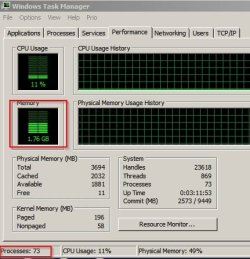
Well here's my memory usage:

1Gb RAM.jpg

1Gb RAM 2.jpg

Note 73 running processes.

Apologies if I don't understand your post but 2Gb RAM is a bare minimum and you can expect a slow machine.
 

My Computer My Computer

Computer type
Laptop
Computer Manufacturer/Model Number
ASUS
OS
Microsoft Windows 7 Home Premium 64-bit 7601 Multiprocessor Free Service Pack 1
CPU
AMD C-60 APU with Radeon(tm) HD Graphics
Motherboard
ASUSTeK COMPUTER INC. X501U
Memory
4.00 GB
Graphics Card(s)
AMD Radeon HD 6290 Graphics
Sound Card
(1) AMD High Definition Audio Device (2) Realtek High Defi
Screen Resolution
1366 x 768 x 32 bits (4294967296 colors) @ 60 Hz
Hard Drives
Hitachi HTS545050A7E380 SATA Disk Device
Antivirus
Comodo CIS & FW, SecureAplus App Whitelisting, Threatfire
Browser
Cyberfox 64bit, Opera 64bit, Airfox
Other Info
Spy-The-Spy, HitmanPro.Alert, Norton Connect Safe, MJRegWatcher, BitDefender TrafficLight, Voodoo Shield, Zemana AntiMalware
Stop services BITS and Windows Update, if CPU and RAM get fixed then install Windows Update Agent June 2015 (may need to enable Windows Update at least). Then enable BITS too after installing it. There is one newer version of WU Agent I believe but I don't have experience with it.

Thanks, GokAy, I will check it out.

It took forever for the desktop icons to appear and eventually managed to discover that it runs Windows 7 (x86) but only has 1GB RAM. I had an old laptop 1GB RAM module laying about which I said he could have so we fitted it, but it is hardly any different in performance at all! It takes forever to do anything - I loaded up task manager and it took 5 minutes or so to appear on screen.

Is this a wind up? It has 1Gb RAM and runs Windows 7. Or possibly it has 2Gb if you added another 1GB.

Well here's my memory usage:


Note 73 running processes.

Apologies if I don't understand your post but 2Gb RAM is a bare minimum and you can expect a slow machine.

No, not a wind up - and nor do I need to see screenshots of your memory usage to back up your somewhat pointless point - I am well aware that 1GB is not sufficient to run Windows 7 well, but it is the minimum requirement and should never be as slow as this laptop is performing. 2GB on the other hand, for the 32-bit version of Windows 7, is more than enough to run the system well and responsively, and the fact that increasing the RAM made no difference when it should have is a point I am making. I have ran Windows 7 on machines with 1.5 and 2GB memory with zero problems. No it won't be the most speediest but to say I can expect a slow machine is a bit different to the problem I have described in my previous post here, whereby the laptop isn't just slow, it just takes forever to do anything at all.
 

My Computer My Computer

OS
Windows 7 x64
CPU
4200 x2
Motherboard
Asus A8N SLI
Memory
3GB
Graphics Card(s)
8800GT
Screen Resolution
1360x768
PSU
550W
If things don't get settled after stopping the services, you may also disable them and restart to see (this would be a better test if former doesn't work).
 

My Computer My Computer

Computer type
PC/Desktop
Computer Manufacturer/Model Number
Custom Build
OS
Windows 7 Ultimate x64 SP1
CPU
AMD Phenom 2 1090T
Motherboard
Gigabyte GA-890FXA-UD5
Memory
2x8GB Kingston HyperX Fury Black 1600Mhz Unganged
Graphics Card(s)
MSI GTX 970 Gaming 4G
Sound Card
Realtek On-Board HD 7.1 Audio / Logitech G35
Monitor(s) Displays
3xAcer GD245HQ
Screen Resolution
1920x1080
Hard Drives
Samsung 850 Pro 512GB SSD - OS /
WD Caviar Black SATA 3 - 1 TBx2 - Dynamic RAID 0 /
WD Caviar Green SATA 2 - 640GBx2 - Dynamic RAID 0 /
WD Caviar Green SATA 2 - 640GB - Internal Backup /
Seagate Barracude SATA 3 - 3TB - External Backup/ Sync
PSU
HighPower 1000W
Case
Cooler Master HAF 932
Cooling
Noctua NH-D14
Keyboard
Logitech G19
Mouse
Logitech G500
Internet Speed
100/4 Mbit Cable (100GB quota)
Antivirus
ZoneAlarm Extreme Security / MBAM Pro / MBAE Free / SAS Free
Browser
IE 11 - Firefox - Chrome
Other Info
Logitech F710/ G27/ G940/ Z5500 // TrackIR 5 // Nvidia 3D Surround Vision

No, not a wind up - and nor do I need to see screenshots of your memory usage to back up your somewhat pointless point - I am well aware that 1GB is not sufficient to run Windows 7 well, but it is the minimum requirement and should never be as slow as this laptop is performing. 2GB on the other hand, for the 32-bit version of Windows 7, is more than enough to run the system well and responsively, and the fact that increasing the RAM made no difference when it should have is a point I am making. I have ran Windows 7 on machines with 1.5 and 2GB memory with zero problems. No it won't be the most speediest but to say I can expect a slow machine is a bit different to the problem I have described in my previous post here, whereby the laptop isn't just slow, it just takes forever to do anything at all.

Okay point taken. I should have read that your are talking about 32bit windows 7.

Suggest getting a copy of RAMMap and working out which files are using the most memory.

Use the "File Summary" tab and sort from highest to lowest. Let us know which files are top of the list.
 

My Computer My Computer

Computer type
Laptop
Computer Manufacturer/Model Number
ASUS
OS
Microsoft Windows 7 Home Premium 64-bit 7601 Multiprocessor Free Service Pack 1
CPU
AMD C-60 APU with Radeon(tm) HD Graphics
Motherboard
ASUSTeK COMPUTER INC. X501U
Memory
4.00 GB
Graphics Card(s)
AMD Radeon HD 6290 Graphics
Sound Card
(1) AMD High Definition Audio Device (2) Realtek High Defi
Screen Resolution
1366 x 768 x 32 bits (4294967296 colors) @ 60 Hz
Hard Drives
Hitachi HTS545050A7E380 SATA Disk Device
Antivirus
Comodo CIS & FW, SecureAplus App Whitelisting, Threatfire
Browser
Cyberfox 64bit, Opera 64bit, Airfox
Other Info
Spy-The-Spy, HitmanPro.Alert, Norton Connect Safe, MJRegWatcher, BitDefender TrafficLight, Voodoo Shield, Zemana AntiMalware
Will Windows 7 32/64 run slow with 1 or 2 gig's of ram. It sure will.
Will it run slooooooow with 1 or 2 gig's of ram. I don't know because I would not put up with the slow to ever get to slooooooow.

I'm on my grandpa computer at the present. With Startups to little of nothing and Services set at default.
Malwarebytes and MSE running and one open page on this forum using Firefox I'm using a little over 2 gig's of ram. If I only had 2 gig's of ram things would be very slow.

Microsoft says Windows 7 will run on 2 gig's of ram and alexncfc computer will verify that. What you don't see Microsoft stating is how well it will run on 2 gig's of ram.

alexncfc we have no need or desire to lie to you. We are here to help other members. A sweat spot for Windows 7/32 is 4 gig's of ram. On a Windows 7/64 most will say 8 gig's is the sweat spot.
I personally have more on my system and seldom ever use more than 6 gig's.
So you don't have to ask. I have more than needed ram just because I want to and maybe I will need it later down the road.
 
Last edited:

My Computer My Computer

Computer type
PC/Desktop
Computer Manufacturer/Model Number
Home made Desktop
OS
Windows 10 Pro. 64/ version 1709 Windows 7 Pro/64
CPU
Intel i7-6800K @ 4.3
Motherboard
ASUS X-99 Deluxe II
Memory
Corsair Platinum 16 gig @2400
Graphics Card(s)
EVGA GTX 1070 OC
Monitor(s) Displays
Asus 27" LED LCD/VE278Q
Screen Resolution
1920-1080 or 1280-720 HDMI
Hard Drives
INTEL SSD 730-240 Gb Sata 3.0/
PSU
EVGA Platium 1200W
Case
Phanteks Luxe Tempered Glass 8 fans/ one radiator
Cooling
XSPC/ Water Cooled CPU
Keyboard
Das 4 Professional
Mouse
Logitech M705/MX Anywhere 2-S
Internet Speed
100 mbits
Antivirus
Microsoft Security Essentials/ Malwarebytes Premium 3.0/ SAS
Browser
I.E. 11 default/Firefox/ ISP Time Warner Cable/Spectrum
Other Info
LG BluRay Burner/
Sound system-KLipsch-THX/
Icy Dock ssd Hot Swap bays.
Hi
The only version of windows I've seen that uses 2gb of ram is 7 starter or basic
7 home premium 32 bit would usually come with 3gb
7 64 bit would come with 4gb
I'm sure some manufactures sold low end/ low powered units but the above is what I've seen that works,

I'm also sure adding a ssd will be the best improvement to adding ram if you have the above minimums 3-4gb.
It also depends on how much crapware is installed on how well or badly a unit will function.
 

My Computer My Computer

Computer type
PC/Desktop
Computer Manufacturer/Model Number
Custom assembled by me :}
OS
Win-7-Pro64bit 7-H-Prem-64bit
CPU
i7-5930K 2nd i9-9940x both water blocked VRM's too
Motherboard
ASUS SABERTOOTH X99 2nd ASUS x299 Apex
Memory
Trident-z 3200C14 2nd Trident-z 3600C16
Graphics Card(s)
EVGA 1080ti ftw3 2nd Titan Xp both water blocked
Sound Card
Built-in Realtek
Monitor(s) Displays
1-AOC G2460PG 24"G-Sync 144Hz/ 2nd 1-ASUS VG248QE 24" 144Hz
Screen Resolution
1920 x 1080 144Hz
Hard Drives
2-Samsung M.2 Evo & Evo Plus
2-Samsung 850 EVO 500GB SSD's/ 3-2.5 W.D. Black 1tb-&3-1tb/3-3.5 WD Black 1tb hdd's
PSU
EVGA SuperNOVA 1000-P2 2nd 1200-P2
Case
2-Corsair Obsidian Series 450D Black ATX Mid Tower
Cooling
Custom water loops
Keyboard
Logitech G710+/ 2nd Logitech G910
Mouse
2-RedDragon M901 Perdition 16400 dpi Gaming mouse = wired
Internet Speed
Comcast Ping 19ms 89.31mbps download speed 6.12mbps upload
Antivirus
Malwarebytes Pro/ Superantispyware Pro
Browser
FireFox & Pale moon
Other Info
2nd ASUS X299 Apex/Intel i9-9940x with Custom water loop/7H-Prem-x64/Corsair 450D case/Ram Trident-z 3600C16 4x8gb / Samsung970Evo plus 500gb SSD/Dual ssd EZ swap evo/PSU EVGA SuperNova 1200w-P2 80+Platinum/GPU Titan Xp /8-ML-140 on push-pull on 2-280GTX rads
Just got this one or at least just noticed it as a Optional
https://support.microsoft.com/en-us/kb/3102810

Issues that are fixed in this update


Issue 1

When you install updates by using System Center Configuration Manager, the installation takes a long time, and System Center Configuration Manager becomes overloaded.
Issue 2

The Svchost.exe process occupies 100 percent of CPU usage when you upgrade a Windows Update client to Windows 10.
 

My Computer My Computer

Computer type
PC/Desktop
Computer Manufacturer/Model Number
Custom assembled by me :}
OS
Win-7-Pro64bit 7-H-Prem-64bit
CPU
i7-5930K 2nd i9-9940x both water blocked VRM's too
Motherboard
ASUS SABERTOOTH X99 2nd ASUS x299 Apex
Memory
Trident-z 3200C14 2nd Trident-z 3600C16
Graphics Card(s)
EVGA 1080ti ftw3 2nd Titan Xp both water blocked
Sound Card
Built-in Realtek
Monitor(s) Displays
1-AOC G2460PG 24"G-Sync 144Hz/ 2nd 1-ASUS VG248QE 24" 144Hz
Screen Resolution
1920 x 1080 144Hz
Hard Drives
2-Samsung M.2 Evo & Evo Plus
2-Samsung 850 EVO 500GB SSD's/ 3-2.5 W.D. Black 1tb-&3-1tb/3-3.5 WD Black 1tb hdd's
PSU
EVGA SuperNOVA 1000-P2 2nd 1200-P2
Case
2-Corsair Obsidian Series 450D Black ATX Mid Tower
Cooling
Custom water loops
Keyboard
Logitech G710+/ 2nd Logitech G910
Mouse
2-RedDragon M901 Perdition 16400 dpi Gaming mouse = wired
Internet Speed
Comcast Ping 19ms 89.31mbps download speed 6.12mbps upload
Antivirus
Malwarebytes Pro/ Superantispyware Pro
Browser
FireFox & Pale moon
Other Info
2nd ASUS X299 Apex/Intel i9-9940x with Custom water loop/7H-Prem-x64/Corsair 450D case/Ram Trident-z 3600C16 4x8gb / Samsung970Evo plus 500gb SSD/Dual ssd EZ swap evo/PSU EVGA SuperNova 1200w-P2 80+Platinum/GPU Titan Xp /8-ML-140 on push-pull on 2-280GTX rads
THE GENERAL SOLUTION FOR THIS!!! (I think, haha)

This solution works only for Windows 7. I don't know if this applies when the problem is caused by computer viruses.

1. Start Task Manager
2. Go to Processes tab. Click Show processes from all users.
It requires admin authentication so you must be the admin or you must have the admin password. The Task Manager will then automatically restart with the new session showing all the processes occurring in your computer.
3. Look for the process that gives you the highest Memory (Private Working Set) value. If you're in this thread then that means that process is svchost.exe (netsvcs). (All types of svchost.exe processes have the same Image Name (that is svchost.exe) and the same Description (that is Host Process for Windows Services), while the User Name designation may be the same for another one or two processes in this tab.) If your problem is the same as the one asked in this thread, then if you arrange the Memory (Private Working Set) value in descending order you'll find the svchost.exe for netsvcs at the top, or if not, nearest to the top. The svchost.exe process for netsvcs has a User Name of SYSTEM.
Right-click on its row and select Go to Service(s). You will be transported to the Services tab and you may find that the selected rows are somehow scattered. (Notice the Group of the selected rows, they should be netsvcs, if not, then the svchost.exe process you selected is not for netsvcs. Try the other svchost.exe processes by going back to the Processes tab and redo Step 3 again.) To work with this at the most efficient way, whether or not the selected rows are scattered, click the Status column header then the Group column header. This would divide the processes according to the Group at the first level then according to the Status at the second level.
4. Stop a service then look at its impact on CPU Usage. Normally you can see this at your notification tray, if not, go to the Performance tab and view the diagram there. In my case, stopping the service wuauserv (it has a Description of Windows Update) dropped my CPU Usage from an all-time 100% to an average of 20%. If this does not give the same effect to you, then you may do this with other services. Just always be conscious of the services you stop by noting the Description of the service then checking its Description on the full list of services by clicking the Services... button (there's another column header for Description in this window, it's not a typo). In addition, verify that the process you're working has the highest Memory (Private Working Set) 'cause if not it might not have an observable effect with the CPU Usage.
 

My Computer My Computer

Computer type
PC/Desktop
OS
Windows 7 Ultimate
Hi every one. This is my first post.

This solution works for Windows 7

I have change my Windows theme to Windows Classic.

It speedup my Computer and can release more memory.
 

My Computer My Computer

OS
Windows 7 Ultimate 32-bit
i believe i know what the issue is

in this case the svchost is waiting on another application and it is stuck in a vicious cycle and that is why you getting high cpu usage (50%) for dual core. i have found if you download all updates at once without restarting, certain updates will pend for their recent updates. this can also happen if you have a third party system care software as it will search for security patches for windows 7 while windows update does the same thing... so if thats the case, make sure that you are 100% updates in windows update and nothing is pending in any third party software.

note if this is like you and you click the windows update and nothing is downloading, check the shutdown button to see if there a install that needs to be finished

in addition, i have found that a update that says it was installed actually was not installed properly, you must find the misplaced update delete it, restart the computer to see if it will automatically install the update in the appropriate place and if not run update again. look in local disk c: first to see is the misplaced file are there, the files will look like a bunch of number and letters mixed, there should only be 3 files like that any more there it is misplaced files. ahh and get rid of any .temp files
 
Last edited:

My Computer My Computer

Computer type
PC/Desktop
Computer Manufacturer/Model Number
custom build
OS
windows 7 (64 bit)
CPU
AMD A8 6600k OCed
Motherboard
Gigabyte A68H
Memory
8 GIG 1866
Graphics Card(s)
R9 380 itx oc
Hard Drives
128 gig SATA3 SSD, 500 gig storage HDD
Antivirus
Kaspersky
Browser
Opera
I'll just add to this thread that I can't bring myself to troubleshoot to the degree some are here, but didn't see this bit of info.

The Win7 Resource Monitor shows svchost.exe netsvcs PID: 1080 began using 500mb of memory for awhile after startup. If you right click on it and select "analyze wait chain" you will see that it is waiting for various other process during this period.

Maybe that helps with troubleshooting.
 

My Computer My Computer

Computer type
PC/Desktop
Computer Manufacturer/Model Number
custom
OS
Win7 Pro 32bit SP1
CPU
i5 2500k 2nd Gen
Motherboard
ASUS p8h67m-evo
Memory
4gb
Graphics Card(s)
GeForce GTX 1050 Ti
Hard Drives
Samsung SSD 840 250gb
Toshiba 1tb HDD
Antivirus
eset nod32 10
Browser
Firefox
Back
Top