
Hi there
I hope this is 'network related', since it's really slowing down my network speed. It is infact making me lag during online games quite a lot.
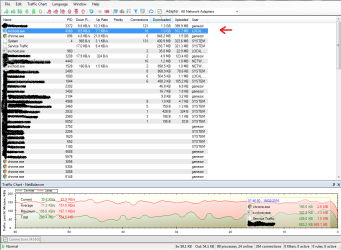
So... I noticed that svchost.exe was constantly using 25% of my CPU (displayed on taskmanager), and so I downloaded a program that monitors certain processes much more in detail, and I was surprised to find that svchost.exe had uploaded and downloaded nearly 2gig worth of data in just a few hours. (Please see attached screenshots).
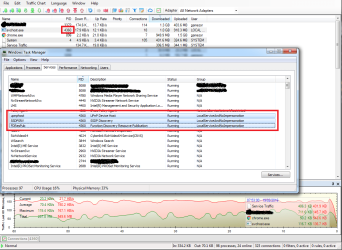
Now... I then went and looked which processes are connected to the PID of the 4360 svchost.exe and saw that it was "upnphost", "SSDPSRV" and "FDResPub". Can anyone please explain to me why those 3 processes would want to upload/download 2gig worth of data in a few hours?
I'm on a monthly data cap of 50gig, so having 2gig consumed by seemingly nothing, is VERY substantial for me. So any help will certainly be appreciated.
Thanks
I hope this is 'network related', since it's really slowing down my network speed. It is infact making me lag during online games quite a lot.
So... I noticed that svchost.exe was constantly using 25% of my CPU (displayed on taskmanager), and so I downloaded a program that monitors certain processes much more in detail, and I was surprised to find that svchost.exe had uploaded and downloaded nearly 2gig worth of data in just a few hours. (Please see attached screenshots).
Now... I then went and looked which processes are connected to the PID of the 4360 svchost.exe and saw that it was "upnphost", "SSDPSRV" and "FDResPub". Can anyone please explain to me why those 3 processes would want to upload/download 2gig worth of data in a few hours?
I'm on a monthly data cap of 50gig, so having 2gig consumed by seemingly nothing, is VERY substantial for me. So any help will certainly be appreciated.
Thanks
Attachments
My Computer
At a glance
64bit
- Computer type
- PC/Desktop
- OS
- 64bit
