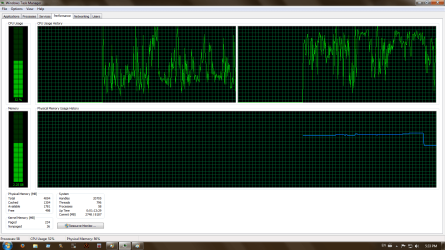
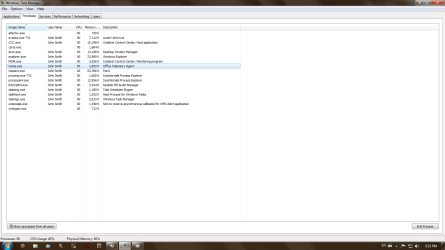
Svchost using 50% CPU when idle

Nefertari648

New member
Local time
5:36 PM
Messages
8
Greetings, this is my first post so i'll try to make it proper.
I didn't know exactly where to place this topic so excuse me if i'm in the wrong section.

My name is Claudiu, i live in Romania and i'm having problems with svchost.
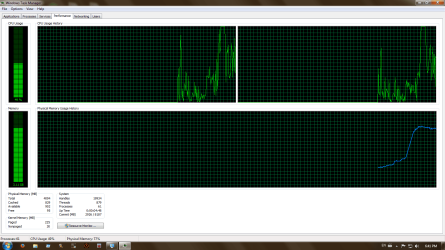
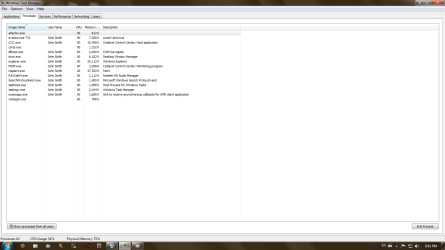
MY Svchost.exe is using 50%+/- CPU and 1gb+ ram when my system is idle, see the pictures.
I don't know what to do.
 

Attachments
  • 1svc.png
    1svc.png
    33.8 KB · Views: 1
  • 2svc.png
    2svc.png
    33.6 KB · Views: 1
  • 3svc.png
    3svc.png
    35.8 KB · Views: 1
  • 4svc.png
    4svc.png
    29.1 KB · Views: 0
  • DxDiag.txt
    DxDiag.txt
    23.9 KB · Views: 0

My Computer

Computer type
PC/Desktop
Computer Manufacturer/Model Number
Gigabyte Technology Co., Ltd.
OS
Windows 7 ultimate 64 bit
CPU
Pentium(R) Dual-Core CPU E5200 @ 2.50GHz (2 CPUs), ~2
Motherboard
Gigabyte EP31-DS3L
Memory
4096MB RAM DDR2
Graphics Card(s)
ATI Radeon HD 4600 Series
Hard Drives
250gb
Antivirus
Avast Home Free
Browser
Opera Mozilla Chrome Avast Safezone etc

My Computer

Computer type
PC/Desktop
Computer Manufacturer/Model Number
Custom assembled by me :}
OS
Win-7-Pro64bit 7-H-Prem-64bit
CPU
i7-5930K 2nd i9-9940x both water blocked VRM's too
Motherboard
ASUS SABERTOOTH X99 2nd ASUS x299 Apex
Memory
Trident-z 3200C14 2nd Trident-z 3600C16
Graphics Card(s)
EVGA 1080ti ftw3 2nd Titan Xp both water blocked
Sound Card
Built-in Realtek
Monitor(s) Displays
1-AOC G2460PG 24"G-Sync 144Hz/ 2nd 1-ASUS VG248QE 24" 144Hz
Screen Resolution
1920 x 1080 144Hz
Hard Drives
2-Samsung M.2 Evo & Evo Plus
2-Samsung 850 EVO 500GB SSD's/ 3-2.5 W.D. Black 1tb-&3-1tb/3-3.5 WD Black 1tb hdd's
PSU
EVGA SuperNOVA 1000-P2 2nd 1200-P2
Case
2-Corsair Obsidian Series 450D Black ATX Mid Tower
Cooling
Custom water loops
Keyboard
Logitech G710+/ 2nd Logitech G910
Mouse
2-RedDragon M901 Perdition 16400 dpi Gaming mouse = wired
Internet Speed
Comcast Ping 19ms 89.31mbps download speed 6.12mbps upload
Antivirus
Malwarebytes Pro/ Superantispyware Pro
Browser
FireFox & Pale moon
Other Info
2nd ASUS X299 Apex/Intel i9-9940x with Custom water loop/7H-Prem-x64/Corsair 450D case/Ram Trident-z 3600C16 4x8gb / Samsung970Evo plus 500gb SSD/Dual ssd EZ swap evo/PSU EVGA SuperNova 1200w-P2 80+Platinum/GPU Titan Xp /8-ML-140 on push-pull on 2-280GTX rads
Thank you very much for your fast reply, i will apply your solution and post the results.
 

My Computer

Computer type
PC/Desktop
Computer Manufacturer/Model Number
Gigabyte Technology Co., Ltd.
OS
Windows 7 ultimate 64 bit
CPU
Pentium(R) Dual-Core CPU E5200 @ 2.50GHz (2 CPUs), ~2
Motherboard
Gigabyte EP31-DS3L
Memory
4096MB RAM DDR2
Graphics Card(s)
ATI Radeon HD 4600 Series
Hard Drives
250gb
Antivirus
Avast Home Free
Browser
Opera Mozilla Chrome Avast Safezone etc
Hi,
If you're not sure how to check to see if Net framework 4.6.1 is installed already it will be listed in Uninstall a program if it is along with which ever version is installed.
 

My Computer

Computer type
PC/Desktop
Computer Manufacturer/Model Number
Custom assembled by me :}
OS
Win-7-Pro64bit 7-H-Prem-64bit
CPU
i7-5930K 2nd i9-9940x both water blocked VRM's too
Motherboard
ASUS SABERTOOTH X99 2nd ASUS x299 Apex
Memory
Trident-z 3200C14 2nd Trident-z 3600C16
Graphics Card(s)
EVGA 1080ti ftw3 2nd Titan Xp both water blocked
Sound Card
Built-in Realtek
Monitor(s) Displays
1-AOC G2460PG 24"G-Sync 144Hz/ 2nd 1-ASUS VG248QE 24" 144Hz
Screen Resolution
1920 x 1080 144Hz
Hard Drives
2-Samsung M.2 Evo & Evo Plus
2-Samsung 850 EVO 500GB SSD's/ 3-2.5 W.D. Black 1tb-&3-1tb/3-3.5 WD Black 1tb hdd's
PSU
EVGA SuperNOVA 1000-P2 2nd 1200-P2
Case
2-Corsair Obsidian Series 450D Black ATX Mid Tower
Cooling
Custom water loops
Keyboard
Logitech G710+/ 2nd Logitech G910
Mouse
2-RedDragon M901 Perdition 16400 dpi Gaming mouse = wired
Internet Speed
Comcast Ping 19ms 89.31mbps download speed 6.12mbps upload
Antivirus
Malwarebytes Pro/ Superantispyware Pro
Browser
FireFox & Pale moon
Other Info
2nd ASUS X299 Apex/Intel i9-9940x with Custom water loop/7H-Prem-x64/Corsair 450D case/Ram Trident-z 3600C16 4x8gb / Samsung970Evo plus 500gb SSD/Dual ssd EZ swap evo/PSU EVGA SuperNova 1200w-P2 80+Platinum/GPU Titan Xp /8-ML-140 on push-pull on 2-280GTX rads
At this point i'm thinking to reinstall windows, something "invisible" is eating CPU and RAM, i can't detect it.

I installed that version of .net framework but i couldn't get the windows update to work.
 

Attachments

  • a12.png
    a12.png
    28.1 KB · Views: 0
  • a13.png
    a13.png
    31.6 KB · Views: 0

My Computer

Computer type
PC/Desktop
Computer Manufacturer/Model Number
Gigabyte Technology Co., Ltd.
OS
Windows 7 ultimate 64 bit
CPU
Pentium(R) Dual-Core CPU E5200 @ 2.50GHz (2 CPUs), ~2
Motherboard
Gigabyte EP31-DS3L
Memory
4096MB RAM DDR2
Graphics Card(s)
ATI Radeon HD 4600 Series
Hard Drives
250gb
Antivirus
Avast Home Free
Browser
Opera Mozilla Chrome Avast Safezone etc
Hi,
Well if you do clean install there is a sort of convoluted process to follow otherwise you won't be any better off than now
Before you start download KB3083710 and KB3102810 in advance, and store them on a flash drive
Start and complete the install without an internet connection
Immediately after install is complete
Manually install KB3083710 and restart.
Manually install KB3102810 and restart.
Change your windows update settings I used Check for updates but let me decide when to download and install
Unchecked Give me recommended updates the same....

Restore the Internet connection and Activate windows
Then launch Windows Update search
After about 5-10 minutes you should have plenty of updates to download and install.

Another thing is if you see this update make sure it is not installed with any other updates
It needs to be installed all by it's self
It was not uncheck automatically which caused many others to fail to install
https://support.microsoft.com/en-us/kb/3020369
 

My Computer

Computer type
PC/Desktop
Computer Manufacturer/Model Number
Custom assembled by me :}
OS
Win-7-Pro64bit 7-H-Prem-64bit
CPU
i7-5930K 2nd i9-9940x both water blocked VRM's too
Motherboard
ASUS SABERTOOTH X99 2nd ASUS x299 Apex
Memory
Trident-z 3200C14 2nd Trident-z 3600C16
Graphics Card(s)
EVGA 1080ti ftw3 2nd Titan Xp both water blocked
Sound Card
Built-in Realtek
Monitor(s) Displays
1-AOC G2460PG 24"G-Sync 144Hz/ 2nd 1-ASUS VG248QE 24" 144Hz
Screen Resolution
1920 x 1080 144Hz
Hard Drives
2-Samsung M.2 Evo & Evo Plus
2-Samsung 850 EVO 500GB SSD's/ 3-2.5 W.D. Black 1tb-&3-1tb/3-3.5 WD Black 1tb hdd's
PSU
EVGA SuperNOVA 1000-P2 2nd 1200-P2
Case
2-Corsair Obsidian Series 450D Black ATX Mid Tower
Cooling
Custom water loops
Keyboard
Logitech G710+/ 2nd Logitech G910
Mouse
2-RedDragon M901 Perdition 16400 dpi Gaming mouse = wired
Internet Speed
Comcast Ping 19ms 89.31mbps download speed 6.12mbps upload
Antivirus
Malwarebytes Pro/ Superantispyware Pro
Browser
FireFox & Pale moon
Other Info
2nd ASUS X299 Apex/Intel i9-9940x with Custom water loop/7H-Prem-x64/Corsair 450D case/Ram Trident-z 3600C16 4x8gb / Samsung970Evo plus 500gb SSD/Dual ssd EZ swap evo/PSU EVGA SuperNova 1200w-P2 80+Platinum/GPU Titan Xp /8-ML-140 on push-pull on 2-280GTX rads
i will keep that in mind :) thanks again :)
Keep this topic open in case i do find a solution, i will post it here.

Reinstall is the easy way out but i won't have any satisfaction if i don't find the cause of the problem and the solution.
 

My Computer

Computer type
PC/Desktop
Computer Manufacturer/Model Number
Gigabyte Technology Co., Ltd.
OS
Windows 7 ultimate 64 bit
CPU
Pentium(R) Dual-Core CPU E5200 @ 2.50GHz (2 CPUs), ~2
Motherboard
Gigabyte EP31-DS3L
Memory
4096MB RAM DDR2
Graphics Card(s)
ATI Radeon HD 4600 Series
Hard Drives
250gb
Antivirus
Avast Home Free
Browser
Opera Mozilla Chrome Avast Safezone etc
Hi,
Yea I had the same thing happening on a dual core 32 bit laptop with the high cpu usage came high temperatures :(
I had no choice
I had a spare ssd same size and just did it = dang if it didn't solve the problem :)

I believe it's a corrupt updates store
Run sfc /scannow three times in a row restarting between each rerun
Click Start and type in the search box
cmd
Right click the suggestion on the top and run as administrator
Then type
sfc /scannow
Then the enter key.
Yes there is a space between the c /
When the scan is done type
exit.
Restart the machine and repeat 2 more times.

Then if you feel up to it as a last resort before a clean install :)
Use winkey+R
Type in the Run box,
eventvwr
Windows logs on the left column and expanded them and right click and click on clear on the 4 entries below,
Applications
Security
Setup
System
Exit and restart the machine again

Make sure the services are running and hurry up and wait
https://support.microsoft.com/en-us/kb/971033

Then click Start and type in the search box
services
Click the suggestion or the enter key
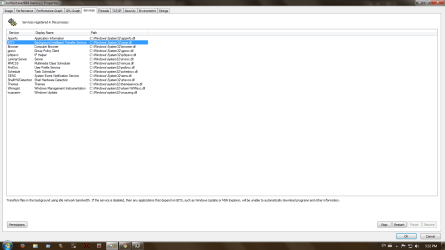
Make sure these services are running and on automatic or delayed start.
Double click the listings to get the options to change them.
Background intelligent transfer services
Cryptographic
Windows installer
Windows update
 

My Computer

Computer type
PC/Desktop
Computer Manufacturer/Model Number
Custom assembled by me :}
OS
Win-7-Pro64bit 7-H-Prem-64bit
CPU
i7-5930K 2nd i9-9940x both water blocked VRM's too
Motherboard
ASUS SABERTOOTH X99 2nd ASUS x299 Apex
Memory
Trident-z 3200C14 2nd Trident-z 3600C16
Graphics Card(s)
EVGA 1080ti ftw3 2nd Titan Xp both water blocked
Sound Card
Built-in Realtek
Monitor(s) Displays
1-AOC G2460PG 24"G-Sync 144Hz/ 2nd 1-ASUS VG248QE 24" 144Hz
Screen Resolution
1920 x 1080 144Hz
Hard Drives
2-Samsung M.2 Evo & Evo Plus
2-Samsung 850 EVO 500GB SSD's/ 3-2.5 W.D. Black 1tb-&3-1tb/3-3.5 WD Black 1tb hdd's
PSU
EVGA SuperNOVA 1000-P2 2nd 1200-P2
Case
2-Corsair Obsidian Series 450D Black ATX Mid Tower
Cooling
Custom water loops
Keyboard
Logitech G710+/ 2nd Logitech G910
Mouse
2-RedDragon M901 Perdition 16400 dpi Gaming mouse = wired
Internet Speed
Comcast Ping 19ms 89.31mbps download speed 6.12mbps upload
Antivirus
Malwarebytes Pro/ Superantispyware Pro
Browser
FireFox & Pale moon
Other Info
2nd ASUS X299 Apex/Intel i9-9940x with Custom water loop/7H-Prem-x64/Corsair 450D case/Ram Trident-z 3600C16 4x8gb / Samsung970Evo plus 500gb SSD/Dual ssd EZ swap evo/PSU EVGA SuperNova 1200w-P2 80+Platinum/GPU Titan Xp /8-ML-140 on push-pull on 2-280GTX rads

My Computer

Computer type
PC/Desktop
Computer Manufacturer/Model Number
Custom assembled by me :}
OS
Win-7-Pro64bit 7-H-Prem-64bit
CPU
i7-5930K 2nd i9-9940x both water blocked VRM's too
Motherboard
ASUS SABERTOOTH X99 2nd ASUS x299 Apex
Memory
Trident-z 3200C14 2nd Trident-z 3600C16
Graphics Card(s)
EVGA 1080ti ftw3 2nd Titan Xp both water blocked
Sound Card
Built-in Realtek
Monitor(s) Displays
1-AOC G2460PG 24"G-Sync 144Hz/ 2nd 1-ASUS VG248QE 24" 144Hz
Screen Resolution
1920 x 1080 144Hz
Hard Drives
2-Samsung M.2 Evo & Evo Plus
2-Samsung 850 EVO 500GB SSD's/ 3-2.5 W.D. Black 1tb-&3-1tb/3-3.5 WD Black 1tb hdd's
PSU
EVGA SuperNOVA 1000-P2 2nd 1200-P2
Case
2-Corsair Obsidian Series 450D Black ATX Mid Tower
Cooling
Custom water loops
Keyboard
Logitech G710+/ 2nd Logitech G910
Mouse
2-RedDragon M901 Perdition 16400 dpi Gaming mouse = wired
Internet Speed
Comcast Ping 19ms 89.31mbps download speed 6.12mbps upload
Antivirus
Malwarebytes Pro/ Superantispyware Pro
Browser
FireFox & Pale moon
Other Info
2nd ASUS X299 Apex/Intel i9-9940x with Custom water loop/7H-Prem-x64/Corsair 450D case/Ram Trident-z 3600C16 4x8gb / Samsung970Evo plus 500gb SSD/Dual ssd EZ swap evo/PSU EVGA SuperNova 1200w-P2 80+Platinum/GPU Titan Xp /8-ML-140 on push-pull on 2-280GTX rads
Also maybe check the posts here and the links mentioned:

http://www.sevenforums.com/windows-...-updates-forever-post3233001.html#post3233001

As for Brink's script also read here:

http://www.sevenforums.com/windows-...es-searching-updates-forever.html#post3185566

ThrashZone's point about "no inteternet connection" is a good one. Personally I have found that it's the windows update check that is the problem. It's better after applying fixes to:

Not allow any connection unless you have disabled Windows Update Service.

Once disabled reboot and connect if you want to.

Wait 24 hours (until after the next scheduled update check) before re-enabling Windows Update Service then re-apply Windows Update setings. Contrlo Panel> Windows Update> Change Settings.

Configure to notify but not download.

Reboot then run an update check. The first one may take a long time as the system is re-scanned. It might take hours.

Subsequent checks should work faster.
 

My Computer

Computer type
Laptop
Computer Manufacturer/Model Number
ASUS
OS
Microsoft Windows 7 Home Premium 64-bit 7601 Multiprocessor Free Service Pack 1
CPU
AMD C-60 APU with Radeon(tm) HD Graphics
Motherboard
ASUSTeK COMPUTER INC. X501U
Memory
4.00 GB
Graphics Card(s)
AMD Radeon HD 6290 Graphics
Sound Card
(1) AMD High Definition Audio Device (2) Realtek High Defi
Screen Resolution
1366 x 768 x 32 bits (4294967296 colors) @ 60 Hz
Hard Drives
Hitachi HTS545050A7E380 SATA Disk Device
Antivirus
Comodo CIS & FW, SecureAplus App Whitelisting, Threatfire
Browser
Cyberfox 64bit, Opera 64bit, Airfox
Other Info
Spy-The-Spy, HitmanPro.Alert, Norton Connect Safe, MJRegWatcher, BitDefender TrafficLight, Voodoo Shield, Zemana AntiMalware
i'm on a fresh windows 7 ultimate 64bit, i blocked updates entirely. Going to install what updates i need by myself when i need them....


I'm thinking that Microsoft sabotaged the update system on purpose to push people towards windows 10, it's very possible.
 

My Computer

Computer type
PC/Desktop
Computer Manufacturer/Model Number
Gigabyte Technology Co., Ltd.
OS
Windows 7 ultimate 64 bit
CPU
Pentium(R) Dual-Core CPU E5200 @ 2.50GHz (2 CPUs), ~2
Motherboard
Gigabyte EP31-DS3L
Memory
4096MB RAM DDR2
Graphics Card(s)
ATI Radeon HD 4600 Series
Hard Drives
250gb
Antivirus
Avast Home Free
Browser
Opera Mozilla Chrome Avast Safezone etc

My Computer

Computer type
PC/Desktop
Computer Manufacturer/Model Number
Custom assembled by me :}
OS
Win-7-Pro64bit 7-H-Prem-64bit
CPU
i7-5930K 2nd i9-9940x both water blocked VRM's too
Motherboard
ASUS SABERTOOTH X99 2nd ASUS x299 Apex
Memory
Trident-z 3200C14 2nd Trident-z 3600C16
Graphics Card(s)
EVGA 1080ti ftw3 2nd Titan Xp both water blocked
Sound Card
Built-in Realtek
Monitor(s) Displays
1-AOC G2460PG 24"G-Sync 144Hz/ 2nd 1-ASUS VG248QE 24" 144Hz
Screen Resolution
1920 x 1080 144Hz
Hard Drives
2-Samsung M.2 Evo & Evo Plus
2-Samsung 850 EVO 500GB SSD's/ 3-2.5 W.D. Black 1tb-&3-1tb/3-3.5 WD Black 1tb hdd's
PSU
EVGA SuperNOVA 1000-P2 2nd 1200-P2
Case
2-Corsair Obsidian Series 450D Black ATX Mid Tower
Cooling
Custom water loops
Keyboard
Logitech G710+/ 2nd Logitech G910
Mouse
2-RedDragon M901 Perdition 16400 dpi Gaming mouse = wired
Internet Speed
Comcast Ping 19ms 89.31mbps download speed 6.12mbps upload
Antivirus
Malwarebytes Pro/ Superantispyware Pro
Browser
FireFox & Pale moon
Other Info
2nd ASUS X299 Apex/Intel i9-9940x with Custom water loop/7H-Prem-x64/Corsair 450D case/Ram Trident-z 3600C16 4x8gb / Samsung970Evo plus 500gb SSD/Dual ssd EZ swap evo/PSU EVGA SuperNova 1200w-P2 80+Platinum/GPU Titan Xp /8-ML-140 on push-pull on 2-280GTX rads
Never know but if the update system does not find anything how could they push win-10's update :D
https://support.microsoft.com/en-us/kb/971033

Windows 10 is pure spyware, most intelligent vertebrates don't like being spied upon. I consider it an insult and in terms of performance - the worst windows in the history of WINDOWS.

I'll stick to win 7 and when it becomes obsolete beyond usability, i'll quit gaming and change to linux.
 

My Computer

Computer type
PC/Desktop
Computer Manufacturer/Model Number
Gigabyte Technology Co., Ltd.
OS
Windows 7 ultimate 64 bit
CPU
Pentium(R) Dual-Core CPU E5200 @ 2.50GHz (2 CPUs), ~2
Motherboard
Gigabyte EP31-DS3L
Memory
4096MB RAM DDR2
Graphics Card(s)
ATI Radeon HD 4600 Series
Hard Drives
250gb
Antivirus
Avast Home Free
Browser
Opera Mozilla Chrome Avast Safezone etc
I'm thinking that Microsoft sabotaged the update system on purpose to push people towards windows 10, it's very possible.

So you are joining the group of people mentioned in the article linked in Post #2 then! :)

Sticking with Windows 7? The forecast calls for pain | ZDNet

   Note

Quote from article.

Trawling through Microsoft's Windows 7 support forums, I found more than one commenter who was convinced that the Windows 7 slow update bug is part of a grand conspiracy to make the management process so painful that people will willingly say "Uncle!" and upgrade to Windows 10.


Also see the suggested workaround.

I've experienced the same high RAM usage by svchost.exe netsvcs a few times over the last year but it has always been fixable.
 

My Computer

Computer type
Laptop
Computer Manufacturer/Model Number
ASUS
OS
Microsoft Windows 7 Home Premium 64-bit 7601 Multiprocessor Free Service Pack 1
CPU
AMD C-60 APU with Radeon(tm) HD Graphics
Motherboard
ASUSTeK COMPUTER INC. X501U
Memory
4.00 GB
Graphics Card(s)
AMD Radeon HD 6290 Graphics
Sound Card
(1) AMD High Definition Audio Device (2) Realtek High Defi
Screen Resolution
1366 x 768 x 32 bits (4294967296 colors) @ 60 Hz
Hard Drives
Hitachi HTS545050A7E380 SATA Disk Device
Antivirus
Comodo CIS & FW, SecureAplus App Whitelisting, Threatfire
Browser
Cyberfox 64bit, Opera 64bit, Airfox
Other Info
Spy-The-Spy, HitmanPro.Alert, Norton Connect Safe, MJRegWatcher, BitDefender TrafficLight, Voodoo Shield, Zemana AntiMalware
about the conspiracy, i'm not saying its a reality, i'm saying its a possibility and nobody can dismiss a possibility unless they bring solid evidence that disproves it.

We're in the cancer stage of capitalism where profit is above human life and this is not a conspiracy. They benefit more if everyone "upgrades" to windows 10, CIA gets what it wants, Microsoft gets to bully people into creating Microsoft/hotmail/skype accounts.
 

My Computer

Computer type
PC/Desktop
Computer Manufacturer/Model Number
Gigabyte Technology Co., Ltd.
OS
Windows 7 ultimate 64 bit
CPU
Pentium(R) Dual-Core CPU E5200 @ 2.50GHz (2 CPUs), ~2
Motherboard
Gigabyte EP31-DS3L
Memory
4096MB RAM DDR2
Graphics Card(s)
ATI Radeon HD 4600 Series
Hard Drives
250gb
Antivirus
Avast Home Free
Browser
Opera Mozilla Chrome Avast Safezone etc
I was also pretty sure that it was a way for Microsoft to get users to upgrade to Windows 10 but actually any hard to fix problem seems to result in users giving up trying to fix their system and installing Windows 10.
 

My Computer

Computer type
Laptop
Computer Manufacturer/Model Number
ASUS
OS
Microsoft Windows 7 Home Premium 64-bit 7601 Multiprocessor Free Service Pack 1
CPU
AMD C-60 APU with Radeon(tm) HD Graphics
Motherboard
ASUSTeK COMPUTER INC. X501U
Memory
4.00 GB
Graphics Card(s)
AMD Radeon HD 6290 Graphics
Sound Card
(1) AMD High Definition Audio Device (2) Realtek High Defi
Screen Resolution
1366 x 768 x 32 bits (4294967296 colors) @ 60 Hz
Hard Drives
Hitachi HTS545050A7E380 SATA Disk Device
Antivirus
Comodo CIS & FW, SecureAplus App Whitelisting, Threatfire
Browser
Cyberfox 64bit, Opera 64bit, Airfox
Other Info
Spy-The-Spy, HitmanPro.Alert, Norton Connect Safe, MJRegWatcher, BitDefender TrafficLight, Voodoo Shield, Zemana AntiMalware
I'm looking at this official page Windows lifecycle fact sheet - Windows Help to put things into perspective.

If i was to make a prediction i would say that in linux is the future for responsible PC owners because ( in the case of Microsoft Windows ) where there is profit there is planned obsolescence.


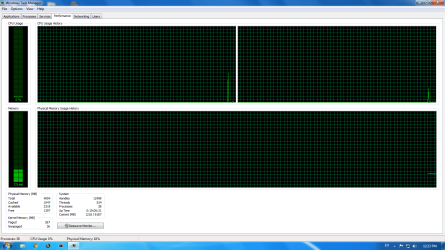
Ontopic - my windows 7 ulti 64 is running at optimal efficiency with updates disabled and i think i'll keep it that way.

Update: Task Manager Print Screen 11.04.2016
 

Attachments

  • asddd.PNG
    asddd.PNG
    29.3 KB · Views: 0
  • 1.png
    1.png
    32.3 KB · Views: 0
Last edited:

My Computer

Computer type
PC/Desktop
Computer Manufacturer/Model Number
Gigabyte Technology Co., Ltd.
OS
Windows 7 ultimate 64 bit
CPU
Pentium(R) Dual-Core CPU E5200 @ 2.50GHz (2 CPUs), ~2
Motherboard
Gigabyte EP31-DS3L
Memory
4096MB RAM DDR2
Graphics Card(s)
ATI Radeon HD 4600 Series
Hard Drives
250gb
Antivirus
Avast Home Free
Browser
Opera Mozilla Chrome Avast Safezone etc
Back
Top