Swapping a hard drive

Tram 1

New member
Member
Local time
11:39 PM
Messages
83
Hi

This is where I'm at.

I am writing this on a new build PC with Win 7 RC installed.

The problem benig I installed a small spare HD, I have got so involved in learning Win 7 and liking what I'm seeing that I got it set up great but the HD is not the one I want to use.

My other internal HD of an other PC is much larger and the one I wish to use.

I don't know how/the procedure in transferring my settings files, folders from the small to the larger HD.

I have every single folder, file, emails and so on backed up on an external HD, so once larger internal HD is up and running I could restore/transfer my files/folders/e-mails/favorites that way but what about settings.

The larger HD as yet does not have Win 7 RC installed and this will have to be done first.

I do not wish to partion the larger HD yet.

There are possible several effective ways to transfer everything, settings and so on from the small to the large but need the procedure explained, simple works best with me.

Or would it simply be best to install Win 7 on big HD and then transfer/restore, files,folders and so from the external back up HD.
 

My Computer

OS
Win7
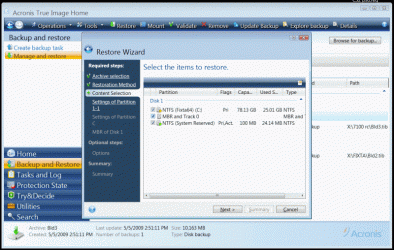
I'm using Acronis True Image and save my systems as a backup image in my external HDDs.

Using Acronis ... I can recover/build a new or spare HDD from my backup images.
I can even partition the HDDs as I build them up.

I haven't tried to Clone a HDD yet in W7
 

My Computer

Computer Manufacturer/Model Number
HP d4996t (upgraded)
OS
XP MCE .... XP Pro 64 .... W7 U x64
CPU
E6750, 2.67GHz C2D
Memory
4GB, PC2 6400
Graphics Card(s)
GeForce 9400GT
Monitor(s) Displays
Twin Samsung 2443BWT
Screen Resolution
1920x1200
Hard Drives
Many .. 3 Installed
PSU
460W
Internet Speed
Cable
You could create a system image and then restore that onto the larger hard drive. You would have to create the system image on your external hd and then restore it on to the new one using the recovery disk. See the tutorials here:

Tutorials - Windows 7 Forums[2]=Backup%20Restore
 

My Computer

Computer Manufacturer/Model Number
Self Build
OS
Win 7 RC
CPU
C2D E6700 2.6Ghz
Motherboard
Asus P5N32-Sli Premium
Memory
4GB
Graphics Card(s)
ATI Radeon X1950 Pro
Monitor(s) Displays
Dell S2309W
Screen Resolution
1920 x 1080
Hard Drives
Maxtor 6V250F0
WDC WD2500JD-00HBB0
WDC WD2500KS-00MJB0
PSU
Xclio 700W Modular
Case
Akasa Mirage
Keyboard
Logitech LX-300
Mouse
Logitech MX Revolution
You could create a system image and then restore that onto the larger hard drive. You would have to create the system image on your external hd and then restore it on to the new one using the recovery disk. See the tutorials here:

Tutorials - Windows 7 Forums[2]=Backup%20Restore

I have several Backup programs, including Acronis True Image but my all time favorite program for doing all backups is Ghost 11.5.
I have it on a Flash Drive and on CD.
I would just do a simple clone of the old drive to the new drive.
Or I could also use the backup and restore routine mentioned above.
I've done it both ways. But for the backup to work for a new HD, the backup and restore would have to be a DISK to DISK or Disk to Image and Restore from Disk Image.

A backup of just a partition won't carry with it all the boot sector info, resulting in a new drive that won't boot. I'm speaking of Ghost here.

Both Ghost 11.5 and Acronis True Image can be had for free, if you look hard enough.;)

Doc :cool:
 

My Computer

Computer Manufacturer/Model Number
Home Made
OS
Windows XP-Pro-SP3, Windows 7
CPU
AMD, 2X, Dual Core 5200+
Motherboard
MSI K9N Platinum
Memory
6 gig DDR2, Super Talent
Graphics Card(s)
Winfast
Sound Card
On Board AC97
Monitor(s) Displays
19" Envision LCD
Screen Resolution
1024x768
Hard Drives
3x , Maxtor/Seagate SATA2 (160, 160, 200gig)
PSU
Antec Earthwatts 650
Case
Pac Man Mid-Tower
Cooling
11 fans
Keyboard
Generic
Mouse
MS digital
Internet Speed
5 Meg Cable
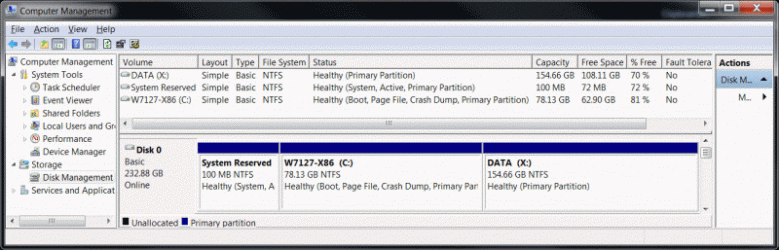
Right .. You'll need to restore, or build, the Boot sector, the C partition and the MBR.

In my case .. I can replace the System .. and my data partition remains unaffected.
 

Attachments

  • Clip1.gif
    Clip1.gif
    98.3 KB · Views: 55
  • Clip2.gif
    Clip2.gif
    60.7 KB · Views: 24

My Computer

Computer Manufacturer/Model Number
HP d4996t (upgraded)
OS
XP MCE .... XP Pro 64 .... W7 U x64
CPU
E6750, 2.67GHz C2D
Memory
4GB, PC2 6400
Graphics Card(s)
GeForce 9400GT
Monitor(s) Displays
Twin Samsung 2443BWT
Screen Resolution
1920x1200
Hard Drives
Many .. 3 Installed
PSU
460W
Internet Speed
Cable
Whoa! I thought I already covered that.
If you do the CLONE or backup and restore properly you won't have to rebuild anything.
A Clone with Acronis True Image or a DISK to DISK copy with Ghost copies everything including all the boot sector, MBR, etc. There's no need to fuss with it.
Just do it right in the first place and you won't have to fuss with it later.

In my business, I clone small HD's to larger ones all the time, either as an upgrade or as a repair. Been doing it for years!
If you do it right, you can just Clone-n-Go.

Doc :cool:
 

My Computer

Computer Manufacturer/Model Number
Home Made
OS
Windows XP-Pro-SP3, Windows 7
CPU
AMD, 2X, Dual Core 5200+
Motherboard
MSI K9N Platinum
Memory
6 gig DDR2, Super Talent
Graphics Card(s)
Winfast
Sound Card
On Board AC97
Monitor(s) Displays
19" Envision LCD
Screen Resolution
1024x768
Hard Drives
3x , Maxtor/Seagate SATA2 (160, 160, 200gig)
PSU
Antec Earthwatts 650
Case
Pac Man Mid-Tower
Cooling
11 fans
Keyboard
Generic
Mouse
MS digital
Internet Speed
5 Meg Cable
One option tried out here was simply using the builtin backup utility to shadow copy the entire drive seen with 7. Once you have a cliean install running on the larger drive you use that to restore the backup. Of course here I saw a recovery partition made for that purpose on each drive to start off with except the main storage drive.
 

Attachments

  • CURRENT PARTITIONS WITHOUT USB FLASH DRIVE.jpg
    CURRENT PARTITIONS WITHOUT USB FLASH DRIVE.jpg
    48.7 KB · Views: 41

My Computers

System One System Two

  • Computer type
    PC/Desktop
    Computer Manufacturer/Model Number
    Custom builds = 2
    OS
    W7 Ultimate x64/W10 Pro x64/W11 Pro Triple Boot - Main PC W7 Remote PC Micro ATX W7 Pro x64/W11 Pro
    CPU
    AMD Phenom II X4 975 Deneb 3.6ghz - 965 2nd remote pc
    Motherboard
    Gigabyte GA-790XTA-UD4-Gigabyte GA-880GM-D2H remote pc
    Memory
    Kingston Hyper X DDR3 1600 1.5v 16gb - Hyper X Fury 8gb 2nd
    Graphics Card(s)
    MSI HD Radeon 5750 1gb - MSI HD Radeon 6450 on mini tower
    Sound Card
    Creative Labs X-Fi Xtreme Audio P - Realtek onooard 2nd case
    Monitor(s) Displays
    ASUS VW199T-P 19" HP 2082a Main-HP 2082a 20" remote pc
    Screen Resolution
    Asus 1440x900 - HP 1600x900
    Hard Drives
    WD Black 1TB HD per OS W7, W10, and pending W11 presently on 500gb OS Drive - Pending Triple 1TB HDs for Spanned Storage/backup volume
    Single 2TB external USB enclosure, single 1TB System 7 Host/Boot drive, Pending 8TB external HD for system image b
    PSU
    Corsair 750TX - primary / Corsair CX600 - second
    Case
    Antec 900-2 - SSD compatible / NZXT Vulcan mini tower
    Cooling
    Zalman CNPS9900A
    Keyboard
    AZIO L70 Backlit Letters Gaming - ONN Cordless/USB
    Mouse
    MSI DS200 Programmable, Logitech Cordless
    Internet Speed
    30mbps upgrade - primary hard wired - mini tower usb WiFi
    Antivirus
    GFI VIPRE Internet Security 2014 on W7 2016 beta on W10,
    Browser
    Cyberfox, WaterFox 64bit FF variants, FireFox x64, Pale Moon
    Other Info
    Accomdata fan cooled usb 2.0 PIDE/Sata II, III external enclosure.
    Sambient usb/eSata PATA/Sata II, III external enclosure.
  • Computer type
    PC/Desktop
    System Manufacturer/Model Number
    CUSTOM ASSEMBLY
    OS
    W7 Pro x64/W11 Pro
    CPU
    AMD Deneb 3.6ghz - 965
    Motherboard
    Gigabyte GA-880GM-D2H remote pc
    Memory
    Kingston Hyper X Fury 8gb
    Graphics Card(s)
    MSI HD Radeon 6450 DVI Output
    Sound Card
    Realtek onooard Creative or Other separate PENDING
    Monitor(s) Displays
    VIZIO 32" LCD TV Separate LCD Pending
    Screen Resolution
    1600x1080
    Hard Drives
    WD 500GB OS Host/Boot WD Green 1TB Storage/Backup
    PSU
    Corsair 600W - THERMALTAKE 600W spare case
    Case
    NZXT Vulcan mini tower
    Cooling
    Twin 120mm Top Fans - 240mm Side Cover
    Keyboard
    ONN Cordless/USB Logitech Cordless
    Mouse
    ONN USB/Cordless - Logitech Cordless
    Internet Speed
    DSL 5G
    Browser
    MS Edge, FireFox, WaterFox x64, FireFox Nightly
    Other Info
    OS Testing-Remote Access to Main TeamViewer

My Computer

Computer Manufacturer/Model Number
HP d4996t (upgraded)
OS
XP MCE .... XP Pro 64 .... W7 U x64
CPU
E6750, 2.67GHz C2D
Memory
4GB, PC2 6400
Graphics Card(s)
GeForce 9400GT
Monitor(s) Displays
Twin Samsung 2443BWT
Screen Resolution
1920x1200
Hard Drives
Many .. 3 Installed
PSU
460W
Internet Speed
Cable
I think one thing everyone is missing out on here so far is the efforts that went into the guides prepared for seeing even the drive imaged as well as restoring the system from an image with the options already included in 7 as well as a free Macruim Reflect tool also available. If you look at how the drives were set up here you can see how I have everything already set up for disaster recover if needed.

For creating a system image, http://www.sevenforums.com/tutorials/663-backup-complete-computer-create-image-backup.html?filter[2]=Backup Restore

For seeing everything brought back to life the way you had it from an image created, http://www.sevenforums.com/tutorials/675-system-image-recovery.html?filter[2]=Backup Restore

The entire section on this is seen at http://www.sevenforums.com/tutorials/?filter[2]=Backup%20Restore
 

My Computers

System One System Two

  • Computer type
    PC/Desktop
    Computer Manufacturer/Model Number
    Custom builds = 2
    OS
    W7 Ultimate x64/W10 Pro x64/W11 Pro Triple Boot - Main PC W7 Remote PC Micro ATX W7 Pro x64/W11 Pro
    CPU
    AMD Phenom II X4 975 Deneb 3.6ghz - 965 2nd remote pc
    Motherboard
    Gigabyte GA-790XTA-UD4-Gigabyte GA-880GM-D2H remote pc
    Memory
    Kingston Hyper X DDR3 1600 1.5v 16gb - Hyper X Fury 8gb 2nd
    Graphics Card(s)
    MSI HD Radeon 5750 1gb - MSI HD Radeon 6450 on mini tower
    Sound Card
    Creative Labs X-Fi Xtreme Audio P - Realtek onooard 2nd case
    Monitor(s) Displays
    ASUS VW199T-P 19" HP 2082a Main-HP 2082a 20" remote pc
    Screen Resolution
    Asus 1440x900 - HP 1600x900
    Hard Drives
    WD Black 1TB HD per OS W7, W10, and pending W11 presently on 500gb OS Drive - Pending Triple 1TB HDs for Spanned Storage/backup volume
    Single 2TB external USB enclosure, single 1TB System 7 Host/Boot drive, Pending 8TB external HD for system image b
    PSU
    Corsair 750TX - primary / Corsair CX600 - second
    Case
    Antec 900-2 - SSD compatible / NZXT Vulcan mini tower
    Cooling
    Zalman CNPS9900A
    Keyboard
    AZIO L70 Backlit Letters Gaming - ONN Cordless/USB
    Mouse
    MSI DS200 Programmable, Logitech Cordless
    Internet Speed
    30mbps upgrade - primary hard wired - mini tower usb WiFi
    Antivirus
    GFI VIPRE Internet Security 2014 on W7 2016 beta on W10,
    Browser
    Cyberfox, WaterFox 64bit FF variants, FireFox x64, Pale Moon
    Other Info
    Accomdata fan cooled usb 2.0 PIDE/Sata II, III external enclosure.
    Sambient usb/eSata PATA/Sata II, III external enclosure.
  • Computer type
    PC/Desktop
    System Manufacturer/Model Number
    CUSTOM ASSEMBLY
    OS
    W7 Pro x64/W11 Pro
    CPU
    AMD Deneb 3.6ghz - 965
    Motherboard
    Gigabyte GA-880GM-D2H remote pc
    Memory
    Kingston Hyper X Fury 8gb
    Graphics Card(s)
    MSI HD Radeon 6450 DVI Output
    Sound Card
    Realtek onooard Creative or Other separate PENDING
    Monitor(s) Displays
    VIZIO 32" LCD TV Separate LCD Pending
    Screen Resolution
    1600x1080
    Hard Drives
    WD 500GB OS Host/Boot WD Green 1TB Storage/Backup
    PSU
    Corsair 600W - THERMALTAKE 600W spare case
    Case
    NZXT Vulcan mini tower
    Cooling
    Twin 120mm Top Fans - 240mm Side Cover
    Keyboard
    ONN Cordless/USB Logitech Cordless
    Mouse
    ONN USB/Cordless - Logitech Cordless
    Internet Speed
    DSL 5G
    Browser
    MS Edge, FireFox, WaterFox x64, FireFox Nightly
    Other Info
    OS Testing-Remote Access to Main TeamViewer
I use Acronis True Image and I feel it the easiest and I even restore my OS Image backups to other systems with Universal Restore....
 
Back
Top