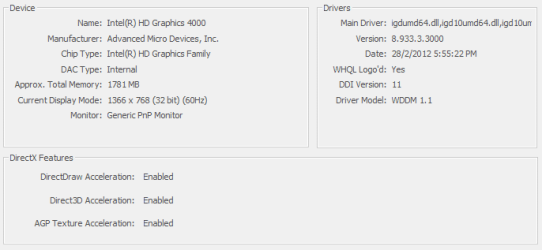
Switch Display Drivers.

zadersonlim

New member
Local time
9:46 AM
Messages
4
I have bought HP Pavilion m6-1006tx almost half year.

It has 2 display drivers. One is the integrated Intel HD Graphics 4000, another one is AMD Radeon HD 7600M Series.

How do I switch to AMD Radeon HD 7600M from Intel HD Graphics 4000?

PS: My bios cannot change those settings.
 

Attachments

  • 1.PNG
    1.PNG
    1.7 KB · Views: 77
  • 2.PNG
    2.PNG
    6.8 KB · Views: 10

My Computer

OS
Selangor
The system is set up to switch between the 2 depending on whether you are on battery or AC power, and depending on the graphics needs of what you are doing. You should have a choice to configure by right clicking on the desktop (see 1st link)

Overview of Switchable Graphics or Dual GPUs HP Pavilion dv6-3113et Entertainment Notebook PC | HP® Support

There also appears to be 2 modes on newer PCs, Fixed Mode or Dynamic Mode.

Switchable Graphics on Notebooks Configured with Dual AMD GPUs HP Pavilion dv6-3113et Entertainment Notebook PC | HP® Support

It seems some models do not have the BIOS setting for fixed/dynamic, but are always Fixed. I cannot find specifically your laptops definitive info. You might want to ask on the HP forums. A Guy
 

My Computer

Computer type
PC/Desktop
OS
Windows 10 Home x64
CPU
INTEL Core i5-750 Quad-Core 3.37GHz
Motherboard
ASUS P7P55D
Memory
HyperX Fury Black Series 8GB (2 x 4GB) 1866Mhz
Graphics Card(s)
EVGA GeForce GTX 750 Superclocked 1GB 128-Bit GDDR5
Monitor(s) Displays
LG 32MA68HY 32" IPS
Screen Resolution
1920 x 1080
Hard Drives
Samsung 840 Evo 120GB, SEAGATE 500GB Barracuda® 7200.12, SATA 3 Gb/s, 7200 RPM, 16MB cache
PSU
ANTEC TruePower New TP-550, 80 PLUS, 550W
Case
ANTEC Three Hundred Illusion
Cooling
COOLER MASTER Hyper 212 Plus, 4 x 120mm 1 x 140mm Noctua's
Internet Speed
85 + Mbps
Antivirus
Avast
Browser
Vivaldi
Back
Top