
Switch to Desktop

whs

New member
Guru
Gold Member
VIP
Local time
4:13 PM
Messages
26,200
Location
Florida in winter, Black Forest/Germany
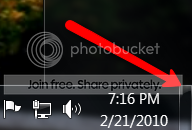
From several posts i gathered that not everybody has discovered this innocent looking little field way yonder in the right bottom corner of your screen. If you click on it, you get to the desktop. The nice thing is, if you click a second time, you get back to where you were before - e.g. if you had several windows open, they will reappear. Thought I pass the information.
2010-02-21_1916.png
 

My Computer

Computer Manufacturer/Model Number
HP, Dell, Gateway, Toshiba - 4 laptops and 2 desktops
OS
Vista, Windows7, Mint Mate, Zorin, Windows 8
CPU
from 1.6GHz Duo to i7
Monitor(s) Displays
2x HP w2207
Hard Drives
5x HDD, 7x SSD, 12x Externals
Keyboard
with trackball - no mices
Mouse
Trackball mice
Internet Speed
DSL 6000
nice its called "Autopeek" :D
 

My Computer

OS
Windows Seven
CPU
AMD antlon x64 Dual core
Motherboard
Asus M3a
Memory
2GB Kingston
Graphics Card(s)
Gefroce 8400 GS 512MV
Sound Card
intergrated
Monitor(s) Displays
ACER 22"
Hard Drives
250GB
PSU
n/a
Case
n/a
Cooling
n/a
Keyboard
Logitech wireless
Mouse
Logictech Wireless
Internet Speed
n/a
Other Info
n/a

My Computer

Computer Manufacturer/Model Number
* BFK Customs *
OS
W 7 64-bit Ultimate
CPU
Intel Q9550 Yorkfield
Motherboard
ASUS P5Q Pro
Memory
8GB Dominator 8500C5D
Graphics Card(s)
ATI : XFX 5870
Sound Card
Realtek HD Audio 7-1
Monitor(s) Displays
1x 47" LCD HDMI & 3x 26" LCD HDMI
Screen Resolution
1920x1080P & 1920x1200
Hard Drives
1x 80GB Intel X25-M G2 SSD : 1x 500GB & 1x 640GB WD Caviar Black(s)
PSU
Corsair 620HX
Case
Cooler Master RC-690
Cooling
Tuniq Tower 120, 2x 140mm and 3x 120mm case fans
Keyboard
Microsoft 500
Mouse
Razer Diamondback 3G
Internet Speed
14 Mb/s
Other Info
1x Koutech 3Gb/s SATA HDD Hot Swap Rack
Sorry for spreading "old news" but a refresh may not hurt because I saw requests for a desktop shortcut.
 

My Computer

Computer Manufacturer/Model Number
HP, Dell, Gateway, Toshiba - 4 laptops and 2 desktops
OS
Vista, Windows7, Mint Mate, Zorin, Windows 8
CPU
from 1.6GHz Duo to i7
Monitor(s) Displays
2x HP w2207
Hard Drives
5x HDD, 7x SSD, 12x Externals
Keyboard
with trackball - no mices
Mouse
Trackball mice
Internet Speed
DSL 6000
Sorry about the goof. I forgot that I had been playing around with a couple of other things before actually replying.

Here's the corrected version:
and if you truly want to "peek" then:
Hold down the WIN key and tap the Spacebar
The "peek" will end when you release the WIN key

and if you want to switch to the Desktop then:
WIN + D

WIN denote that key with the funny looking wavy flag on it.
 

My Computer

Computer Manufacturer/Model Number
Toshiba Satellite S875D-S7239 laptop
OS
MS Windows 7 Ultimate SP1 64-bit
CPU
AMD A10-4600M
Motherboard
AMD Pumori (Socket FT1)
Memory
6.00 GB Dual-Channel DDR3 @ 798MHz (11-11-12-28)
Graphics Card(s)
AMD Radeon HD 7660G
Sound Card
High Definition Audio Device
Monitor(s) Displays
Generic PnP Monitor (1600x900@60Hz)
Screen Resolution
1600x900@60Hz
Hard Drives
SSD 119GB Corsair CSSD-V128GB2 ATA Device
Keyboard
Standard PS/2 Keyboard
Mouse
HP Wireless Optical Mobile Mouse Model FHA-3410
Internet Speed
What the local pub, local coffee shop offers.
Other Info
Optical Drive:MATSHITA BD-CMB UJ160B ATA Device


Also have an Asus ha1002xp netbook with Win 7 Ultimate installed.
Back
Top