switching between user profiles makes wlan disconnect

fANAT1C

New member
Power User
Local time
5:11 PM
Messages
83
Location
Belgium
Hello folks

I always used "switch to other user" when I left my laptop behind for a while (i.e. when I was going to sleep or leaving the house). As I never turn off my laptop (barely never), the point is that I don't want to get people to use my laptop without my permission browsing through my files etc. It's not like I've got something to hide, I just don't want it.

It used to work before, without making the internet disconnect. I made sure that Windows is not configured to turn off the network card when idle for some time.

Any ideas?

Thanks in advance - Joris (my real name)
 

My Computer My Computer

Computer Manufacturer/Model Number
Acer Aspire 8735g
OS
Windows 7 Home Premium 64-bit
CPU
Intel Core 2 Duo T6600 @2.2 GHz
Motherboard
/
Memory
4GB RAM DDR3 so-DIMM
Graphics Card(s)
NVIDIA GeForce GT 240m 1GB
Sound Card
Realtek High Definition Audio
Monitor(s) Displays
18,4 HD+ LCD
Hard Drives
2 x 500 GB @5400 RPM
PSU
/
Case
Acer Aspire 8735g (laptop)
Cooling
/
Keyboard
Logitech Media Keyboard 600
Mouse
Logitech G3
Welcome Joris

Are you using a router?
If so make sure that you have the most current updates.
Are you wireless?
 

My Computer My Computer

Computer type
PC/Desktop
Computer Manufacturer/Model Number
Dell XPS 420
OS
Windows 10, Home Clean Install
CPU
Intel Core2 processsor Q8200(2.33Ghz 1333FSB) Quad Core Tech
Motherboard
Dell
Memory
6 gb
Graphics Card(s)
ATI Radeon 256MB HD3650
Sound Card
Intergrated 7.1 Channel Audio
Monitor(s) Displays
Dell SP2009W 20"
Hard Drives
640 GB Serial ATA Hard drive
Cooling
Fan
Keyboard
Dell USB Keyboard
Mouse
Dell Premium Optical USB
Internet Speed
DSL 2.85
Welcome Joris

Are you using a router?
If so make sure that you have the most current updates.
Are you wireless?
Yes, I have a wireless router and have the most current updates installed.
 

My Computer My Computer

Computer Manufacturer/Model Number
Acer Aspire 8735g
OS
Windows 7 Home Premium 64-bit
CPU
Intel Core 2 Duo T6600 @2.2 GHz
Motherboard
/
Memory
4GB RAM DDR3 so-DIMM
Graphics Card(s)
NVIDIA GeForce GT 240m 1GB
Sound Card
Realtek High Definition Audio
Monitor(s) Displays
18,4 HD+ LCD
Hard Drives
2 x 500 GB @5400 RPM
PSU
/
Case
Acer Aspire 8735g (laptop)
Cooling
/
Keyboard
Logitech Media Keyboard 600
Mouse
Logitech G3
just lock the screen using windows key-L combo
 

My Computer My Computer

Computer Manufacturer/Model Number
HP dv6519tx
OS
Windows 7 Ultimate x64
CPU
1.80 GHz Intel Core 2 Duo processor T7100
Memory
3 gig ddr2
Graphics Card(s)
NVIDIA GeForce 8400M GS
Sound Card
Realtek High Definition Audio
Monitor(s) Displays
15.4” WXGA High Definition BrightView Widescreen
Screen Resolution
1280 x 800
Hard Drives
Hitachi 320 GB (5400 rpm)
PSU
90 W AC Power Adapter
Cooling
Kitchen plate under the lappy
Keyboard
101 key compatible
Mouse
Touch Pad with On/Off button and dedicated vertical Scroll
Internet Speed
Three Wireless internet prepaid using E160G USB dongle
just lock the screen using windows key-L combo
I'll try that, though that's what I did but without the shortkey:

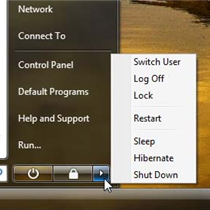
Windows key+L is the same as:

Start > Switch user

Shut-Down-Alternatives-in-Windows-Vista-2.png


but after like 2 minutes of idle, and when I log back in my wireless network was disconnected and I need to reconnect.

It's quite annoying.
 

My Computer My Computer

Computer Manufacturer/Model Number
Acer Aspire 8735g
OS
Windows 7 Home Premium 64-bit
CPU
Intel Core 2 Duo T6600 @2.2 GHz
Motherboard
/
Memory
4GB RAM DDR3 so-DIMM
Graphics Card(s)
NVIDIA GeForce GT 240m 1GB
Sound Card
Realtek High Definition Audio
Monitor(s) Displays
18,4 HD+ LCD
Hard Drives
2 x 500 GB @5400 RPM
PSU
/
Case
Acer Aspire 8735g (laptop)
Cooling
/
Keyboard
Logitech Media Keyboard 600
Mouse
Logitech G3
does nobody know any solution? it's really annoying, like when I go to the kitchen to have a dinner, the WLAN is disconnected.
 

My Computer My Computer

Computer Manufacturer/Model Number
Acer Aspire 8735g
OS
Windows 7 Home Premium 64-bit
CPU
Intel Core 2 Duo T6600 @2.2 GHz
Motherboard
/
Memory
4GB RAM DDR3 so-DIMM
Graphics Card(s)
NVIDIA GeForce GT 240m 1GB
Sound Card
Realtek High Definition Audio
Monitor(s) Displays
18,4 HD+ LCD
Hard Drives
2 x 500 GB @5400 RPM
PSU
/
Case
Acer Aspire 8735g (laptop)
Cooling
/
Keyboard
Logitech Media Keyboard 600
Mouse
Logitech G3
My WLAN doesn't disconnect when I "lock" my account. It does when someone else logs in using another account (Switch User). And sorry, I also don't know how to resolve this.
 

My Computer My Computer

Computer Manufacturer/Model Number
Acer Travelmate 290
OS
Windows 7 Professional x86 RTM
CPU
Intel Pentium M 1.4 GHz
Memory
1024MB DDR333, 256MB DDR333
Graphics Card(s)
Intel 82852/82855 GM/GME
Sound Card
Realtek AC'97
Monitor(s) Displays
14-inch LCD
Screen Resolution
1024 by 768
Hard Drives
Fujitsu MHV2040AT
Here's the solution friends.

I suggest you to first Click Start, Run and enter REGEDIT then Go to: HKEY_LOCAL_MACHINE\Software\Microsoft\Windows NT\CurrentVersion\Winlogon. Come across the right windowpane for a value called Keep RAS Connections. If it exist,it should be set to 1. If not, double click the Keep RAS Connections value and modify it to 1. If it doesn't exist, then right click in a blank area of the right windowpane, select New, DWord value and name it Keep RAS Connections. Set it to 1.

Then, you to go to computer icon right click on it and select Manage. In computer Management window click on the Device Manager option which is on the left side. In the right column after the Network Adapters. Right click on your wireless adapter. When the dialog box appears, click on the Power Management tab in Wireless adapter properties window. Then 'Un-tick' allow computer to turn off.

I hope i solved your problem.

Hussein Abdultayeb
 

My Computer My Computer

OS
Windows 7 32 Bit
Back
Top