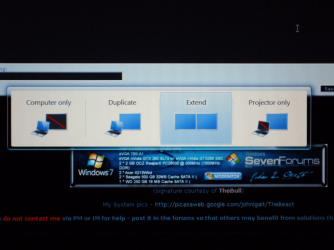
Switching Monitors

sarudia

New member
Local time
8:42 PM
Messages
13
Location
São Paulo, Brasil
This is my situation:
Since I am a musician, I must practice at home and with the modern hardware it became impossible to have total silence in the room, specially a small one. Tried everything an after all, my solution was radical but very effective: My cpu is in my living room with my LCD TV and a keyboard and mouse and, after drilling a wall, I have a LCD monitor, keyboard, mouse, USB hub and a USB CDRom in my studio. This is perfect because I have total silence to practice and a Home Theater PC in the living room. Under windows XP using the NView software I was able to create a hotkeys combination(ctrl+y) that allowed me to switch monitors without any confirmations, right clicks or dropdown menus. Just click those two keys together and that's it. Now, not even a MultiDisplay Wizard is available.

Sorry for writing so much, but here is the question: How can I switch monitors like I use to do? Is it possible to create a shortcut or hot key or, in a worse case, use the usual way in windows seven but in a way that a confirmation is not required? When I change resolution asking to show only in one of the screens I must run to the other room the confirm the change.
This is the main reason I did not install Vista, but I hope it will be a solution in Windows 7.
Thank you for your atention.
 
Last edited:

My Computer

OS
Windows 7 x64
CPU
Core I7 920
Motherboard
Gigabyte GA-UX58-Extreme
Memory
6Gb Kingston HyperX 1866Mhz
Graphics Card(s)
GForce GTX285
Sound Card
Realtek ALC889A
Monitor(s) Displays
LG L226 and Samsung LCD TV 40
Hard Drives
Hitachi 1TB X 3
Seagate 350 GB
PSU
850W
Case
CM Stacker
Cooling
Air
Sorry for posting in the wrong section...looks better now.
 

My Computer

OS
Windows 7 x64
CPU
Core I7 920
Motherboard
Gigabyte GA-UX58-Extreme
Memory
6Gb Kingston HyperX 1866Mhz
Graphics Card(s)
GForce GTX285
Sound Card
Realtek ALC889A
Monitor(s) Displays
LG L226 and Samsung LCD TV 40
Hard Drives
Hitachi 1TB X 3
Seagate 350 GB
PSU
850W
Case
CM Stacker
Cooling
Air

My Computer

Computer Manufacturer/Model Number
Black_Box (homebuilt)
OS
windows 7 RTM x64
CPU
Phenom II 965 Quad Core 3.4Ghz
Motherboard
Asus M4A79T Deluxe
Memory
Mushkin Blackline 8GB (4x2gb)
Graphics Card(s)
XFX Radeon 5970 Black Edition
Sound Card
onboard
Monitor(s) Displays
Dell 2408WPF-main Dell E248WFP-secondary
Screen Resolution
1920x1200-main 1920x1200-secondary
Hard Drives
OCZ Vertex Limited Edition 100GB (OS)
x1 WD Black Edition 500GB drive (Storage)
PSU
XFX 850w Black Edition (Modular)
Case
Mountian Mods H2go
Cooling
CoolITSystems ECO A.L.C.
Keyboard
Logitech MX 5500 wireless keyboard
Mouse
Razor Copperhead
Internet Speed
16Mb down/2Mb up Wowway Cable Internet
Thank you.

Thank you for your answer. I wm trying the script with hotkeys, but I never did something like this...reading the help for now.
Ultramon is not working under windows 7. Sorry for that.
Trying a software called DisplayFusion. Let's see.
 

My Computer

OS
Windows 7 x64
CPU
Core I7 920
Motherboard
Gigabyte GA-UX58-Extreme
Memory
6Gb Kingston HyperX 1866Mhz
Graphics Card(s)
GForce GTX285
Sound Card
Realtek ALC889A
Monitor(s) Displays
LG L226 and Samsung LCD TV 40
Hard Drives
Hitachi 1TB X 3
Seagate 350 GB
PSU
850W
Case
CM Stacker
Cooling
Air
Not working yet...


Well....after trying what I could this is what hapened:
UltraMon...could work on older version, but people do not recomend.
DisplayFusion...doesn't have what I need.
The AutoHotKey seems to be the next good thing, but I really don't know how to make it work. I have a LG L226 22" Monitor and a Samsung 40" LCD TV. Both of them on DVI, the LCD with a VGA adapter. The script on that page you sent me gave me a error message "Problem starting NvCPL.dll Can't find the specified module" translating from portuguese.
Thanks again for your time!!!!
 

My Computer

OS
Windows 7 x64
CPU
Core I7 920
Motherboard
Gigabyte GA-UX58-Extreme
Memory
6Gb Kingston HyperX 1866Mhz
Graphics Card(s)
GForce GTX285
Sound Card
Realtek ALC889A
Monitor(s) Displays
LG L226 and Samsung LCD TV 40
Hard Drives
Hitachi 1TB X 3
Seagate 350 GB
PSU
850W
Case
CM Stacker
Cooling
Air
Saudia, what video card do you have in your computer? If it is not an nVidia based card then that script is certainly not going to work....or, if it *is* nVidia based, you'll probably want to upgrade to the latest driver from nVidia's website.

however, if it is an ATI, then you may already have the functionality built into the Catalyst Control Panel....
 

My Computers

System One System Two

  • Computer type
    PC/Desktop
    Computer Manufacturer/Model Number
    The Beast Model A (homebrew)
    OS
    Windows 11 21H2 Current build
    CPU
    AMD Ryzen 9 3950X
    Motherboard
    MSI MEG X570 GODLIKE
    Memory
    4 * 32 GB - Corsair Vengeance 3600 MHz
    Graphics Card(s)
    EVGA GeForce RTX 3080 Ti XC3 ULTRA GAMING (12G-P5-3955-KR)
    Sound Card
    Realtek® ALC1220 Codec
    Monitor(s) Displays
    2x Eve Spectrum ES07D03 4K Gaming Monitor (Matte) | Eve Spec
    Screen Resolution
    3x 3840 x 2160
    Hard Drives
    3x Samsung 980 Pro NVMe PCIe 4 M.2 2 TB SSD (MZ-V8P2T0B/AM) } 3x Sabrent Rocket NVMe 4.0 1 TB SSD
    PSU
    PC Power & Cooling’s Silencer Series 1050 Watt, 80 Plus Plat
    Case
    Fractal Design Define 7 XL Dark ATX Full Tower Case
    Cooling
    SteelSeries Apex Pro Wired Gaming Keyboard
    Keyboard
    SteelSeries Apex Pro
    Mouse
    Logitech MX Master 3S | MX Master 3 for business
    Internet Speed
    AT&T LightSpeed Gigabit Duplex Ftth
    Antivirus
    Windows Defender + MB 3
    Browser
    Nightly (default) + Firefox (stable),Chrome, Edge
  • Computer type
    PC/Desktop
    System Manufacturer/Model Number
    Dell Latitude E5470
    OS
    ChromeOS Flex Dev Channel (current)
    CPU
    Intel(R) Core(TM) i5-6300U CPU @ 2.40GHz, 2501 Mhz, 2 Core(s), 4 Logical Processor(s)
    Motherboard
    Dell
    Memory
    16 GB
    Graphics Card(s)
    Intel(R) HD Graphics 520
    Sound Card
    Intel(R) HD Graphics 520 + RealTek Audio
    Monitor(s) Displays
    Dell laptop display 15"
    Screen Resolution
    1920 * 1080
    Hard Drives
    Toshiba 128GB M.2 22300 drive
    INTEL Cherryville 520 Series SSDSC2CW180A 180 GB SATA III SSD
    PSU
    Dell
    Case
    Dell
    Cooling
    Dell
    Keyboard
    Dell
    Mouse
    Logitech MX Master 3S (shared w. Sys 1) | Dell TouchPad
    Internet Speed
    AT&T LightSpeed Gigabit Duplex Ftth
Saudia, what video card do you have in your computer? If it is not an nVidia based card then that script is certainly not going to work....or, if it *is* nVidia based, you'll probably want to upgrade to the latest driver from nVidia's website.

however, if it is an ATI, then you may already have the functionality built into the Catalyst Control Panel....

I have a GTX285 and the latest drivers for Win7. I wrote NVidia an they told me to write to Microsoft about NView. They said Windows Vista and Windows 7 no longer suport NView. I can't understand it. It is a functionality that has been there for years...
 

My Computer

OS
Windows 7 x64
CPU
Core I7 920
Motherboard
Gigabyte GA-UX58-Extreme
Memory
6Gb Kingston HyperX 1866Mhz
Graphics Card(s)
GForce GTX285
Sound Card
Realtek ALC889A
Monitor(s) Displays
LG L226 and Samsung LCD TV 40
Hard Drives
Hitachi 1TB X 3
Seagate 350 GB
PSU
850W
Case
CM Stacker
Cooling
Air
A little off topic idf they no longer support NView then that exlains why mine closes when trying to SLI my cards. Which makes no sence that nvidia would say m$ vist and 7 won't support them when multi monitor and SLi are a huge market, and I know people are using Vista with multy monitors and SLI. Oh Well
 

My Computer

Computer Manufacturer/Model Number
Self Built
OS
Windows 7 ultimate 64 bit / XP Home sp3
CPU
intel Core 2 Duo E8400 3.0ghz
Motherboard
Asus P5ND bios 1401
Memory
8 gigs 1066 OCZ Fata1ty
Graphics Card(s)
EVGA GTX 580 Call of Duty Black Ops Edition
Sound Card
Creative Soundblaster Audigy 2zs
Monitor(s) Displays
Asus 24in LCD's 2MS X2
Screen Resolution
1920x1080p @60Hz
Hard Drives
WD Caviar 500 Black/ WD Caviar 200 Blue
PSU
OCZ 700W GameXtreme
Case
NZXT Apollo
Cooling
Corsair H50 CPU/120mm x3 /60mm x2 /Corsair Dominator Ram
Keyboard
Logitech Bluetooth Wireless MX5000
Mouse
Logitech Bluetooth Wireless MX1000
Internet Speed
Download 19.83 Upload 0.97
Other Info
Logitech Z2300 Speakers/ Bose Noise Cancelling Headphones/Avermedia PCI-e Hybrid TV Bravo/Epson NX415 all in one/ 4 Port Powered USB Hub/ LG 10x Bluray Burner /TSST Corp DVDRW External
Actually, the latest drivers allow both SLI *and* multiple monitors.

Previously, when you enabled SLI, one monitor would shut down.

As for changing the screen, there has to be a way - b/c in my laptop it is integrated with the OS (using no HP drivers) to change it to presentation mode to the external monitor.

Let me play a bit.
 

My Computers

System One System Two

  • Computer type
    PC/Desktop
    Computer Manufacturer/Model Number
    The Beast Model A (homebrew)
    OS
    Windows 11 21H2 Current build
    CPU
    AMD Ryzen 9 3950X
    Motherboard
    MSI MEG X570 GODLIKE
    Memory
    4 * 32 GB - Corsair Vengeance 3600 MHz
    Graphics Card(s)
    EVGA GeForce RTX 3080 Ti XC3 ULTRA GAMING (12G-P5-3955-KR)
    Sound Card
    Realtek® ALC1220 Codec
    Monitor(s) Displays
    2x Eve Spectrum ES07D03 4K Gaming Monitor (Matte) | Eve Spec
    Screen Resolution
    3x 3840 x 2160
    Hard Drives
    3x Samsung 980 Pro NVMe PCIe 4 M.2 2 TB SSD (MZ-V8P2T0B/AM) } 3x Sabrent Rocket NVMe 4.0 1 TB SSD
    PSU
    PC Power & Cooling’s Silencer Series 1050 Watt, 80 Plus Plat
    Case
    Fractal Design Define 7 XL Dark ATX Full Tower Case
    Cooling
    SteelSeries Apex Pro Wired Gaming Keyboard
    Keyboard
    SteelSeries Apex Pro
    Mouse
    Logitech MX Master 3S | MX Master 3 for business
    Internet Speed
    AT&T LightSpeed Gigabit Duplex Ftth
    Antivirus
    Windows Defender + MB 3
    Browser
    Nightly (default) + Firefox (stable),Chrome, Edge
  • Computer type
    PC/Desktop
    System Manufacturer/Model Number
    Dell Latitude E5470
    OS
    ChromeOS Flex Dev Channel (current)
    CPU
    Intel(R) Core(TM) i5-6300U CPU @ 2.40GHz, 2501 Mhz, 2 Core(s), 4 Logical Processor(s)
    Motherboard
    Dell
    Memory
    16 GB
    Graphics Card(s)
    Intel(R) HD Graphics 520
    Sound Card
    Intel(R) HD Graphics 520 + RealTek Audio
    Monitor(s) Displays
    Dell laptop display 15"
    Screen Resolution
    1920 * 1080
    Hard Drives
    Toshiba 128GB M.2 22300 drive
    INTEL Cherryville 520 Series SSDSC2CW180A 180 GB SATA III SSD
    PSU
    Dell
    Case
    Dell
    Cooling
    Dell
    Keyboard
    Dell
    Mouse
    Logitech MX Master 3S (shared w. Sys 1) | Dell TouchPad
    Internet Speed
    AT&T LightSpeed Gigabit Duplex Ftth
Use Windows Key + P - and then use right arrows. It has no confirmation - just enabled whichever you select.

I have a dual monitor setup, and when I press Win + P, I get the following:

P1010086.png

With both enabled it is in Extend mode. Selecting Projector only I get only the right monitor on. Selecting Computer only I only get my left monitor on.

(This may be because I have dual video cards, even though they are in SLI mode- YMMV.)

He - I learned something new today - and I figured it out all by myself.
 

My Computers

System One System Two

  • Computer type
    PC/Desktop
    Computer Manufacturer/Model Number
    The Beast Model A (homebrew)
    OS
    Windows 11 21H2 Current build
    CPU
    AMD Ryzen 9 3950X
    Motherboard
    MSI MEG X570 GODLIKE
    Memory
    4 * 32 GB - Corsair Vengeance 3600 MHz
    Graphics Card(s)
    EVGA GeForce RTX 3080 Ti XC3 ULTRA GAMING (12G-P5-3955-KR)
    Sound Card
    Realtek® ALC1220 Codec
    Monitor(s) Displays
    2x Eve Spectrum ES07D03 4K Gaming Monitor (Matte) | Eve Spec
    Screen Resolution
    3x 3840 x 2160
    Hard Drives
    3x Samsung 980 Pro NVMe PCIe 4 M.2 2 TB SSD (MZ-V8P2T0B/AM) } 3x Sabrent Rocket NVMe 4.0 1 TB SSD
    PSU
    PC Power & Cooling’s Silencer Series 1050 Watt, 80 Plus Plat
    Case
    Fractal Design Define 7 XL Dark ATX Full Tower Case
    Cooling
    SteelSeries Apex Pro Wired Gaming Keyboard
    Keyboard
    SteelSeries Apex Pro
    Mouse
    Logitech MX Master 3S | MX Master 3 for business
    Internet Speed
    AT&T LightSpeed Gigabit Duplex Ftth
    Antivirus
    Windows Defender + MB 3
    Browser
    Nightly (default) + Firefox (stable),Chrome, Edge
  • Computer type
    PC/Desktop
    System Manufacturer/Model Number
    Dell Latitude E5470
    OS
    ChromeOS Flex Dev Channel (current)
    CPU
    Intel(R) Core(TM) i5-6300U CPU @ 2.40GHz, 2501 Mhz, 2 Core(s), 4 Logical Processor(s)
    Motherboard
    Dell
    Memory
    16 GB
    Graphics Card(s)
    Intel(R) HD Graphics 520
    Sound Card
    Intel(R) HD Graphics 520 + RealTek Audio
    Monitor(s) Displays
    Dell laptop display 15"
    Screen Resolution
    1920 * 1080
    Hard Drives
    Toshiba 128GB M.2 22300 drive
    INTEL Cherryville 520 Series SSDSC2CW180A 180 GB SATA III SSD
    PSU
    Dell
    Case
    Dell
    Cooling
    Dell
    Keyboard
    Dell
    Mouse
    Logitech MX Master 3S (shared w. Sys 1) | Dell TouchPad
    Internet Speed
    AT&T LightSpeed Gigabit Duplex Ftth
Use Windows Key + P - and then use right arrows. It has no confirmation - just enabled whichever you select.

I have a dual monitor setup, and when I press Win + P, I get the following:

View attachment 28857

With both enabled it is in Extend mode. Selecting Projector only I get only the right monitor on. Selecting Computer only I only get my left monitor on.

(This may be because I have dual video cards, even though they are in SLI mode- YMMV.)

He - I learned something new today - and I figured it out all by myself.

Thank you so much for yout atention.
I found out about the windows+p just yesterday night. Helps a lot and almost solve the preoblem. I still can't do it if the monitor is in my studio and I am in the living room. I must choose which one I want and then switch. Using Nview it was a breeze. Shortcut to switch to next monitor. By the way, this is nothing about SLI. Is about the NView software which is not supported by Windows Vista and Windows 7. Nvidia told me to complain to Microsoft...Maybe I will do that. But thank you again.
 

My Computer

OS
Windows 7 x64
CPU
Core I7 920
Motherboard
Gigabyte GA-UX58-Extreme
Memory
6Gb Kingston HyperX 1866Mhz
Graphics Card(s)
GForce GTX285
Sound Card
Realtek ALC889A
Monitor(s) Displays
LG L226 and Samsung LCD TV 40
Hard Drives
Hitachi 1TB X 3
Seagate 350 GB
PSU
850W
Case
CM Stacker
Cooling
Air
Back
Top