Solved Switching to 64 bit Windows

ish4d0w

New member
Member
VIP
Local time
4:34 AM
Messages
179
Hi

I have an HP notebook that supports Windows Vista and XP. But it appears not Windows 7. Is that possible?
I like the new features and enhancements of Windows 7 so I'd like to upgrade. Do you think I can?
This notebook is designed for Windows Vista, and actually, Vista runs pretty nice on it, I just want 7 because of the new and enhanced features.

Is it possible?

  • The model is HP Compaq 6720s.
  • HP says Windows 7 is not supported on this model and probably wouldn't perform well. (they say only Vista and XP are supported)
  • this notebook is designed for Windows Vista and came with it
  • I thought all computers DESIGNED for Vista could run 7
  • compatibility reports looks OK
  • on HP's driver page, only Vista and XP drivers are offered
  • most Vista drivers for this model seem to work on 7
  • but some do not (SATA controller, graphics), we need to find drivers for those
  • this notebook has an Intel chipset with full official Vista support so that should be easy, who knows maybe it even supports 7
  • its from 2008
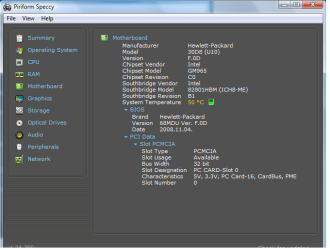
  • Notebook model is HP Compaq 6720s
  • Chipset is Intel 965GME Express
  • See the screenshots


See the screenshots below for technical data
It has the integrated graphics card
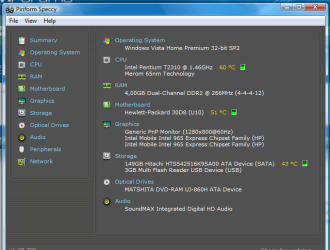
mainpage.png motherboard.png
 

My Computer

Computer type
Laptop
Computer Manufacturer/Model Number
HP Compaq 6720s
OS
Microsoft® Windows 7 Professional 64-bit
CPU
Intel(R) Pentium(R) Dual CPU T2310 @ 1.46GHz
Motherboard
Hewlett-Packard 30D8
Memory
4,00 GB
Graphics Card(s)
(1) Mobile Intel(R) 965 Express Chipset Family (2) Mobile
Sound Card
(1) Bluetooth Hands-free Audio (2) Bluetooth Stereo Audio
Screen Resolution
1280 x 800 x 32 bits (4294967296 colors) @ 59 Hz
Hard Drives
(1) Hitachi HTS542516K9SA00 ATA Device (2) Multi Flash Reader USB Device

My Computer

Computer type
PC/Desktop
Computer Manufacturer/Model Number
Home made Desktop
OS
Windows 10 Pro. 64/ version 1709 Windows 7 Pro/64
CPU
Intel i7-6800K @ 4.3
Motherboard
ASUS X-99 Deluxe II
Memory
Corsair Platinum 16 gig @2400
Graphics Card(s)
EVGA GTX 1070 OC
Monitor(s) Displays
Asus 27" LED LCD/VE278Q
Screen Resolution
1920-1080 or 1280-720 HDMI
Hard Drives
INTEL SSD 730-240 Gb Sata 3.0/
PSU
EVGA Platium 1200W
Case
Phanteks Luxe Tempered Glass 8 fans/ one radiator
Cooling
XSPC/ Water Cooled CPU
Keyboard
Das 4 Professional
Mouse
Logitech M705/MX Anywhere 2-S
Internet Speed
100 mbits
Antivirus
Microsoft Security Essentials/ Malwarebytes Premium 3.0/ SAS
Browser
I.E. 11 default/Firefox/ ISP Time Warner Cable/Spectrum
Other Info
LG BluRay Burner/
Sound system-KLipsch-THX/
Icy Dock ssd Hot Swap bays.
As others have said, the Microsoft upgrade advisor is a good idea to see what (if anything) you have installed that may not work with Windows 7. However, that hardware is 64bit capable, and 4GB of RAM is enough for Windows 7. If you can upgrade the HDD to an SSD, you'll find that the hardware itself is at least quite adequate for good performance (the Hitachi drives that those ship with are 5400RPM drives with a small cache, so they boot quite slowly under Windows 7).
 

My Computer

Computer type
PC/Desktop
Computer Manufacturer/Model Number
Custom
OS
Windows 10 Pro x64
CPU
Intel Core i7 4790K @ 4.5GHz
Motherboard
Asus Maximus Hero VII
Memory
32GB DDR3
Graphics Card(s)
Nvidia GeForce GTX970
Sound Card
Realtek HD Audio
Screen Resolution
1920x1200
Hard Drives
1x Samsung 250GB SSD
4x WD RE 2TB (RAIDZ)
PSU
Corsair AX760i
Case
Fractal Design Define R4
Cooling
Noctua NH-D15
Ya the drive will slow it down, but Windows 7 will run, but your cpu at 1.46 GHz is gonna kill it.
 

My Computer

Computer type
PC/Desktop
Computer Manufacturer/Model Number
Skylake Special #666
OS
Windows 10 Pro x64
CPU
Intel Core i7 6700K
Motherboard
Asus Sabertooth Z170 Mark 1
Memory
GSkill TridentZ RGB 16GB 3600 16-16-16-36
Graphics Card(s)
EVGA GTX 980 Ti SC x2
Sound Card
Realtek High Definition
Monitor(s) Displays
AOC G2460PG
Screen Resolution
1920 x 1080 144Hz
Hard Drives
Samsung 860 Pro 256GB, Seagate Barracuda 4TB x2
PSU
EVGA 1000 P2, EVGA White Custom Braided Cables
Case
Corsair Vengeance C70 Gunmetal Black
Cooling
Corsair H100i v2, Corsair ML120 x2, Thermal Grizzly Kryonaut
Keyboard
Logitech G910 Orion Spectrum
Mouse
Logitech G700s
Internet Speed
Verizon Fios Quantum Gateway 75/75
Antivirus
Windows Defender, Malwarebytes Free 3.8.3
Browser
Chrome
Other Info
Corsair SP120 x4, LG Blu-ray Drive, Durabrand HT-395 100 Watt Dolby Digital Amp, Corsair H2100 Wireless 7.1 Headset
Thanks for your answers everyone! I just updated my system specs as requested.
And I ran the Microsoft upgrade advisor and it seems OK

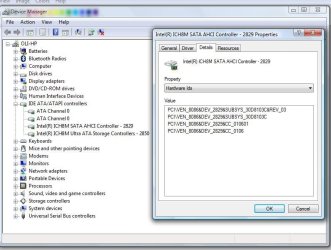
But I do need drivers for graphics and the SATA controller.
The one provided by HP for vista is specifically noted to be x86 and in fact the x64 Windows 7 won't even install it, it says it's not for this platform.

Other drivers provided by HP include both an x86 and x64, these two (graphics and SATA controller) are the exceptions.
I found one for graphics (I just needed to search in the legacy drivers section, Intel made one for Windows 7 even for x64) but I cannot find the SATA controller driver.

Can you help me please?
driver.jpg
 

My Computer

Computer type
Laptop
Computer Manufacturer/Model Number
HP Compaq 6720s
OS
Microsoft® Windows 7 Professional 64-bit
CPU
Intel(R) Pentium(R) Dual CPU T2310 @ 1.46GHz
Motherboard
Hewlett-Packard 30D8
Memory
4,00 GB
Graphics Card(s)
(1) Mobile Intel(R) 965 Express Chipset Family (2) Mobile
Sound Card
(1) Bluetooth Hands-free Audio (2) Bluetooth Stereo Audio
Screen Resolution
1280 x 800 x 32 bits (4294967296 colors) @ 59 Hz
Hard Drives
(1) Hitachi HTS542516K9SA00 ATA Device (2) Multi Flash Reader USB Device
Did you try booting the 64 bit Win7 installation media to do the booted Clean Install Windows 7 ? Lack of SATA drivers is so rare that I doubt you'd really encounter that error, but if so we need to see the exact error message.

I'd definitely use 64 bit Win7 with 4gb RAM as 32 bit will not use all the RAM unless a lot is used by hardware as shown in Resource Monitor>Memory tab.

If you're only working from the Upgrade Advisor's report, please save it and attach using paper clip in reply box, or copy and paste it between the # icon tags.

Did you decide if you want to try a Dual Boot to compare to Vista which would then be easy to delete in Disk Mgmt if you don't want it, and wouldn't need activating for 30 days either way?

In tens of thousands of installs we've helped with here I've never seen one that came up without a SATA or display driver at all. Those that are not in the installer will have most delivered by Windows Updates after you Enable hardware auto-updating via Windows Update (Steps 3 and 6) then any still missing are usually easy to find following the steps in red in Clean Reinstall Windows 7 or asking back here where we have excellent driver detectives who cannot be stumped.
 
Hi.

Just a follow up for people who read this topic later.
Thank you everyone, your suggestions were very helpful! I managed to solve it and I'm running Windows 7.

So here's what I did:
- You were right, no SATA driver was required for install, it detected my hard drive without applying any drivers manually.
- After install, I went to intel.com and manually searched for chipset and graphics drivers. (I looked up the chipset model before). Actually, I did found Windows 7 x64 certified drivers! Great!
- I also used some x64 drivers from the HP Vista Driver DVD that came with the notebook (like Synaptics Touchpad, etc, that are compatible with Win7)
- Windows Update also found some (wifi, wired networking, sound, HP QuickLaunch hotkey buttons driver) - > they ALL work great.

So for those who have a similar (or same model) notebook and want to upgrade to Windows 7: You can, but you need to download ALL the proper drivers. You can use vista drivers for stuff like mouse, wifi, but not for graphics or chipset. You do need Windows 7 drivers for that, in my experience.
It is very important to download the Win7 chipset driver (because of the SATA AHCI controller) if you do not, the system will be slow.
Installing the chipset driver (with the sata driver included) gave me a serious performance boost, making it just as fast as it was with the factory installed Windows Vista.

I have 4 GB of RAM, and I can finally enjoy it all.
 

My Computer

Computer type
Laptop
Computer Manufacturer/Model Number
HP Compaq 6720s
OS
Microsoft® Windows 7 Professional 64-bit
CPU
Intel(R) Pentium(R) Dual CPU T2310 @ 1.46GHz
Motherboard
Hewlett-Packard 30D8
Memory
4,00 GB
Graphics Card(s)
(1) Mobile Intel(R) 965 Express Chipset Family (2) Mobile
Sound Card
(1) Bluetooth Hands-free Audio (2) Bluetooth Stereo Audio
Screen Resolution
1280 x 800 x 32 bits (4294967296 colors) @ 59 Hz
Hard Drives
(1) Hitachi HTS542516K9SA00 ATA Device (2) Multi Flash Reader USB Device
Ya the drive will slow it down, but Windows 7 will run, but your cpu at 1.46 GHz is gonna kill it.

Now all I wonder about is this. Speed is okay, not bad, but not quite fast either.
You are saying my cpu at 1.46Ghz is gonna kill it. Hmm. Do you think I should downgrade to XP?
 

My Computer

Computer type
Laptop
Computer Manufacturer/Model Number
HP Compaq 6720s
OS
Microsoft® Windows 7 Professional 64-bit
CPU
Intel(R) Pentium(R) Dual CPU T2310 @ 1.46GHz
Motherboard
Hewlett-Packard 30D8
Memory
4,00 GB
Graphics Card(s)
(1) Mobile Intel(R) 965 Express Chipset Family (2) Mobile
Sound Card
(1) Bluetooth Hands-free Audio (2) Bluetooth Stereo Audio
Screen Resolution
1280 x 800 x 32 bits (4294967296 colors) @ 59 Hz
Hard Drives
(1) Hitachi HTS542516K9SA00 ATA Device (2) Multi Flash Reader USB Device
Hi,
Yea it's just under powered a bit, 2 Ghz is a good basement of course higher is always better ;)
A good compromise might be to add a ssd which will at least help reads instead of a slower hdd.
100.u.s. would take care of that one nicely.
 

My Computer

Computer type
PC/Desktop
Computer Manufacturer/Model Number
Custom assembled by me :}
OS
Win-7-Pro64bit 7-H-Prem-64bit
CPU
i7-5930K 2nd i9-9940x both water blocked VRM's too
Motherboard
ASUS SABERTOOTH X99 2nd ASUS x299 Apex
Memory
Trident-z 3200C14 2nd Trident-z 3600C16
Graphics Card(s)
EVGA 1080ti ftw3 2nd Titan Xp both water blocked
Sound Card
Built-in Realtek
Monitor(s) Displays
1-AOC G2460PG 24"G-Sync 144Hz/ 2nd 1-ASUS VG248QE 24" 144Hz
Screen Resolution
1920 x 1080 144Hz
Hard Drives
2-Samsung M.2 Evo & Evo Plus
2-Samsung 850 EVO 500GB SSD's/ 3-2.5 W.D. Black 1tb-&3-1tb/3-3.5 WD Black 1tb hdd's
PSU
EVGA SuperNOVA 1000-P2 2nd 1200-P2
Case
2-Corsair Obsidian Series 450D Black ATX Mid Tower
Cooling
Custom water loops
Keyboard
Logitech G710+/ 2nd Logitech G910
Mouse
2-RedDragon M901 Perdition 16400 dpi Gaming mouse = wired
Internet Speed
Comcast Ping 19ms 89.31mbps download speed 6.12mbps upload
Antivirus
Malwarebytes Pro/ Superantispyware Pro
Browser
FireFox & Pale moon
Other Info
2nd ASUS X299 Apex/Intel i9-9940x with Custom water loop/7H-Prem-x64/Corsair 450D case/Ram Trident-z 3600C16 4x8gb / Samsung970Evo plus 500gb SSD/Dual ssd EZ swap evo/PSU EVGA SuperNova 1200w-P2 80+Platinum/GPU Titan Xp /8-ML-140 on push-pull on 2-280GTX rads
Thank you! :)
 

My Computer

Computer type
Laptop
Computer Manufacturer/Model Number
HP Compaq 6720s
OS
Microsoft® Windows 7 Professional 64-bit
CPU
Intel(R) Pentium(R) Dual CPU T2310 @ 1.46GHz
Motherboard
Hewlett-Packard 30D8
Memory
4,00 GB
Graphics Card(s)
(1) Mobile Intel(R) 965 Express Chipset Family (2) Mobile
Sound Card
(1) Bluetooth Hands-free Audio (2) Bluetooth Stereo Audio
Screen Resolution
1280 x 800 x 32 bits (4294967296 colors) @ 59 Hz
Hard Drives
(1) Hitachi HTS542516K9SA00 ATA Device (2) Multi Flash Reader USB Device
One other question: Did you try the chipset delivered by Window Update first as suggested in Clean Reinstall Windows 7?

Or did you jump to the chipset or other downloads and not wait to see which drivers Win7 wanted, test performance with those before importing any others?

You can reclaim some CPU cycles and tighten RAM performance by editing visual effects of fading, sliding, dragging intact and selection rectangle, from Optimize Windows 7 - Windows 7 Forums.
I wouldn't think of running less than 4gb RAM without doing this. There is no noticeable change in visuals.
 
One other question: Did you try the chipset delivered by Window Update first as suggested in Clean Reinstall Windows 7?

Or did you jump to the chipset or other downloads and not wait to see which drivers Win7 wanted, test performance with those before importing any others?

You can reclaim some CPU cycles and tighten RAM performance by editing visual effects of fading, sliding, dragging intact and selection rectangle, from Optimize Windows 7 - Windows 7 Forums.
I wouldn't think of running less than 4gb RAM without doing this. There is no noticeable change in visuals.


Windows update did not offer any chipset downloads. So I had to download it myself from intel.com
But it did offer other useful drivers: Wifi, ethernet, audio and HP QuickLaunch Buttons (those are the special hotkeys on the keyboard). I installed them, and they all work fine.

As for the before-after comparison: well, I didn't run any benchmarks so I won't be able to tell you exact numbers or percentages, but however I did play around a bit with the computer and I can say it was definitely much slower without the chipset driver. Drive speed, to be exact.
It was slower to read and write to the hard drive than it was with the factory installed Windows Vista (which had everything installed). It was like using an old IDE drive.
The chipset driver package included Intel Rapid Storage which is a sata controller driver and I checked device manager to confirm: it is installed and AHCI mode is now enabled, along with queueing.
Copying large files is now faster, so is boot time.

I also grabbed the latest graphics drivers from intel.com, because the one Windows Update offered is wrong. And I also installed the driver for the synaptics touchpad to enable scrolling. But apart from these three drivers, everything else is from windows update and it works great! Way faster than vista.

Thank you everyone for your help!


A note for anybody else who has the HP Compaq 6720s and would like to install Windows 7
I'm leaving this note here because there's controversial information on the internet regarding installing windows 7 on this notebook. And there is a lot of wrong driver advice on other sites. Only listen to this site, I learned a lot here, and got good&working suggestions and driver locations.

Windows 7 is fully working, but you have the job of getting the right drivers. I played around with this. Don't worry it won't take more than 10 mins to get this thing done-

So here's it:
Install Windows 7.
You should have wifi or ethernet working without any drivers. Download the optional updates for your notebook (like HP Quicklaunch buttons, Audio, wifi, ethernet -> they will improve internet speed). These are good and working.

But Do NOT download the Intel Graphics driver from windows update it is wrong! It is Not for your model. It partially works but not perfect.
Instead, go to intel.com and search drivers for Intel 965GME. (Or if you have a different card then make sure to verify the model of it, but I think most 6720s have this one.)
There's a 32bit and a 64bit driver available fo Windows 7.

Now you also gotta look up the chipset driver. I don't have the model number on hand sorry, so look it up using a program like everest or aida64 or speccy. It should have Intel ICH8 in it but you need the exact type. I'll post the exact model here later when I get to that computer.
Install it and REBOOT. It will install the sata controller driver, which, according to my personal experience on this notebook, improves disk performance dramatically.

Then grab the synaptics touchpad driver from either your Vista Driver DVD if you still have it (there is a 64bit driver included too) that works fine with Windows 7, or you can grab it from hp.com, search for compaq 6720s. You can also download other utilities for your notebook from there but those are not required and won't improve performance, just add useful features. Some of those features (like image backup and restore) was not present in vista, so HP made a free program for it for your notebook, but it is present in windows 7 out of the box, so you don't need to download it.
 

My Computer

Computer type
Laptop
Computer Manufacturer/Model Number
HP Compaq 6720s
OS
Microsoft® Windows 7 Professional 64-bit
CPU
Intel(R) Pentium(R) Dual CPU T2310 @ 1.46GHz
Motherboard
Hewlett-Packard 30D8
Memory
4,00 GB
Graphics Card(s)
(1) Mobile Intel(R) 965 Express Chipset Family (2) Mobile
Sound Card
(1) Bluetooth Hands-free Audio (2) Bluetooth Stereo Audio
Screen Resolution
1280 x 800 x 32 bits (4294967296 colors) @ 59 Hz
Hard Drives
(1) Hitachi HTS542516K9SA00 ATA Device (2) Multi Flash Reader USB Device
Did you try the chipset and Display drivers from the HP Support Downloads webpage for your model firs? This is what I would do if chipset elements and/or display driver are missing or dysfunctional after all Windows Updates are done.

As a rule of thumb, you want Windows Update to provide everything it has first, then take account of what is needed based on Device Manager and performance, next import anything missing from the PC maker's Support Downloads webpage, then the Device Maker.
 
Did you try the chipset and Display drivers from the HP Support Downloads webpage for your model firs? This is what I would do if chipset elements and/or display driver are missing or dysfunctional after all Windows Updates are done.
Yes but those two drivers there are completely wrong. They don't work with Windows 7. The graphics driver states it only supports vista and despite it lets you install it on Win7, it has strange issues like youtube video cannot be played in fullscreen and flash (and games) performance is very bad.
Chipset driver seems to install, but doesn't do anything. I checked device manager for the important devices (like sata controller) and it does not swap out their drivers, not even after a reboot.

That's why I went to intel.com, those seem to work.
Apart from these two drivers, the other drivers on windows update and HP Support downloads do work fine.


As a rule of thumb, you want Windows Update to provide everything it has first, then take account of what is needed based on Device Manager and performance, next import anything missing from the PC maker's Support Downloads webpage, then the Device Maker.

I did just that. That's how I figured out what I still needed.


Thank you for the help.:)
 

My Computer

Computer type
Laptop
Computer Manufacturer/Model Number
HP Compaq 6720s
OS
Microsoft® Windows 7 Professional 64-bit
CPU
Intel(R) Pentium(R) Dual CPU T2310 @ 1.46GHz
Motherboard
Hewlett-Packard 30D8
Memory
4,00 GB
Graphics Card(s)
(1) Mobile Intel(R) 965 Express Chipset Family (2) Mobile
Sound Card
(1) Bluetooth Hands-free Audio (2) Bluetooth Stereo Audio
Screen Resolution
1280 x 800 x 32 bits (4294967296 colors) @ 59 Hz
Hard Drives
(1) Hitachi HTS542516K9SA00 ATA Device (2) Multi Flash Reader USB Device
Back
Top