Synaptic touchpad driver configuration

Chethan

New member
Local time
12:01 AM
Messages
5
Hello Everybody,
I am using a HP Pavillion dv6-2123sf laptop with Windows 7 home premium 64bit OS. I have Synaptic touchpad v6.5 driver installed for the touchpad. It gives an option to convert the touchpad configuration into a left-handed one. When selected, the buttons on the touchpad change but not on the USB mouse. Please suggest solutions to convert my USB optical mouse from a right hand to left hand.
Thanks in advance.
 

My Computer

OS
Windows 7 Home Premium 64bit
Hello Everybody,
I am using a HP Pavillion dv6-2123sf laptop with Windows 7 home premium 64bit OS. I have Synaptic touchpad v6.5 driver installed for the touchpad. It gives an option to convert the touchpad configuration into a left-handed one. When selected, the buttons on the touchpad change but not on the USB mouse. Please suggest solutions to convert my USB optical mouse from a right hand to left hand.
Thanks in advance.

Hi Chethan , go to contol panel> devices and printers>mouse from there you can change the order of the L/R buttons ;)
 

My Computer

Computer type
PC/Desktop
Computer Manufacturer/Model Number
self build
OS
win 7 ultimate32bit, Win8.1pro wmc 32bit
CPU
amd phenom x4 9600
Motherboard
asus m2n32-sli deluxe
Memory
corsair twinxs 2x2gb
Graphics Card(s)
2x nvidia 1gb 8500gt
Sound Card
onboard
Monitor(s) Displays
23" PB Viseo 233d
Screen Resolution
1920x1080
Hard Drives
maxtor sata 500gb
maxtor sata 320gb
fujitsu sata200gb
PSU
oryxx tornado 750w
Case
thermaltake xaser lll
Cooling
artic freezer64 pro + 7 case fans
why dont you change it manually
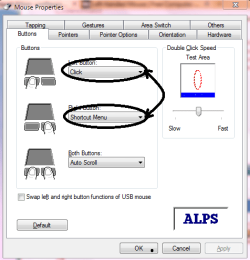
goto control pannel>mouse and then make changes under its button option and interchange the functions they do

pls let me know if i have helped
praveen


or
check the box for left right button
 

Attachments

  • Capture.PNG
    Capture.PNG
    52.4 KB · Views: 20

My Computer

Computer Manufacturer/Model Number
hp pavilion dv-4 1506TX
OS
windows7 home premium
I went to the place you suggested. Previously I had not noticed that there was a drop down menu where I have to select the driver - mouse/ touchpad.
Thank you very much for the reply. I appreciate it.
 

My Computer

OS
Windows 7 Home Premium 64bit
Back
Top