Recently, XP Mode and VMWare Player were installed to both home and office computers. XP Mode runs flawlessly. I am very happy with the combination of XP mode and VMWare (4.01).
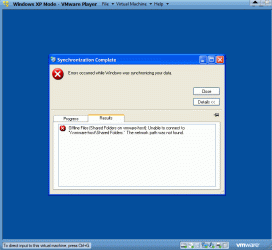
But I am getting an error box while exiting XP Mode (Start>Shutdown) on both computers (see the attachment). It is about synchronizing data. Could someone advise me how to fix this error?
I don't think this is a Windows 7 error so I've posted a help request in the VIP Lounge. There's a few folks here running VMware so maybe they can help. They may be along shortly.
My Computer
Computer type
PC/Desktop
Computer Manufacturer/Model Number
Built 2/11/2011
OS
Windows 7 Pro-x64
CPU
i7-2600 3.4GHz - 3.8GHz Turbo
Motherboard
Intel DH67BL-B3
Memory
8Gb - 2x4GB, Muskin 991770 PC3-1333
Graphics Card(s)
Integrated Intel HD 2000
Sound Card
Integrated Intel 10.1 HD, RealTek ALC892
Monitor(s) Displays
Asus LCD VH222H, Haier HL24XSL2a
Screen Resolution
1920x1080, 1920x1080
Hard Drives
Crucial SSD C300-128Gb,
Western Digital WD5002AALX - 500Gb,
Western Digital WD7501AALS - 750Gb
PSU
Seasonic 650W 80+ Gold Modular
Case
Rosewill Defender
Cooling
Stock CPU, Four 120mm case fans, PCH fan added
Keyboard
Logitech EX100 Y-RBH94 Wireless
Mouse
Logitech EX100 M-RCE95 Wireless
Internet Speed
3.0/1.5 Mbs
Antivirus
Microsoft Security Essentials
Browser
Microsoft Internet Explorer 11
Other Info
Antec Veris Premier-Multimedia IR Station,
Cyber Accoustics-3602 Speakers,
AFT XM-5U Card Reader,
Hauppauge TV-HVR-2250,
Sony LX300 USB Turntable
1*Samsung 840 EVO 120GB SSD;
1*OCZ Vertex 2 60GB SSD;
2*Samsung F3 SpinPoint 1TB in RAID0;
1*Samsung F1 SpinPoint 1TB;
2*Western Digital 1TB External USB 3.0
1*Western Digital 500GB External USB 3.0
1*Seagate 500GB External USB 2.0
PSU
Thermaltake ToughPower QFan 750W
Case
Thermaltake Element S VK60001W2Z
Cooling
Corsair H60 Water Cooling, 2*230mm and 2*80mm case fans
I play around with Vmware Workstation quite a bit but never really mess with vmware player. It's possible the virtual network adapter was disabled by accident. Without seeing the virtual machines settings I really don't know where to start with diag.
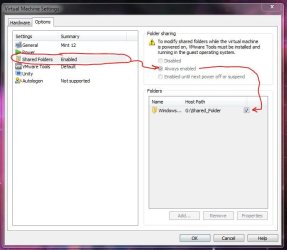
I could not read the line you added. I will try to add the same line to my VM player option. Please post the zoomed in pictuer of your option.
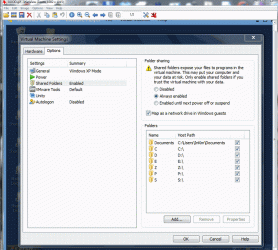
The current option of my VM Player is attached. Currently both host and guest windows share: My Documents, C-drive (C), D-drive (D), Flash drives(E), portable drive connection (Z), P partition and S-Partition. So I can open and read documents, open grashics and play musics. The only error I get is the sync error during exiting XP mode.
I play around with Vmware Workstation quite a bit but never really mess with vmware player. It's possible the virtual network adapter was disabled by accident. Without seeing the virtual machines settings I really don't know where to start with diag.
Network addaptor is "nat". When I selected ""Bridget", I could not connect to Internet. "nat" works just fine because my computer is standalone desktop computer with wireless DSL connection in my office (or wireless Comcast connection at home). Both home and office computer prompt the same exit error.