Syncing New Skydrive from within Explorer

gregrocker

New member
Guru
Local time
2:05 PM
Messages
50,634
It's pretty cool having Skydrive listed on Explorer when you download the new Skydrive utility, just to click on it to see all of your files in the cloud.

But syncing isn't all there yet, since you have to actually keep the sync'ed files in the Skydrive folder to have them sync up to Skydrive and then back down again to your other PC's or devices.

I considered using SyncToy to sync between the User folder and Skydrive folder since it's easy to config but you have to run or schedule it and I'd like the files selected to sync up to Skydrive to be sync'd on the PC in real time.

Perhaps I'm just old school wanting to have a hard copy on the computer but I really don't want to keep my sync'd files in the cloud without a way to sync them from their User folders at the same time. Am I missing something?
 
You are not missing anything.

The present SkyDrive, althouh an order of magnitude improvement over the previous, still leaves much to be desired.

You still have your copy on your harddrive, inconveniently located in a folder named SkyDrive. A concept that ignores all of the power of redirect points. That info gets kept on a Microsoft server farm, called SkyDrive. When you update a file in your SkyDrive folder, then the info gets automatically updated on the MS server farm.

You can access the server farm from anywhere, just as you can access info stored on google servers with Google Drive/cloud/docs (there naming conventions and concepts are undergoing metamorphosis).

SkyDrive is a step, but only a step, in helping you be able to access your files on their servers rather than on you own server(s).
 
Last edited:

My Computer

Computer Manufacturer/Model Number
Toshiba Satellite S875D-S7239 laptop
OS
MS Windows 7 Ultimate SP1 64-bit
CPU
AMD A10-4600M
Motherboard
AMD Pumori (Socket FT1)
Memory
6.00 GB Dual-Channel DDR3 @ 798MHz (11-11-12-28)
Graphics Card(s)
AMD Radeon HD 7660G
Sound Card
High Definition Audio Device
Monitor(s) Displays
Generic PnP Monitor (1600x900@60Hz)
Screen Resolution
1600x900@60Hz
Hard Drives
SSD 119GB Corsair CSSD-V128GB2 ATA Device
Keyboard
Standard PS/2 Keyboard
Mouse
HP Wireless Optical Mobile Mouse Model FHA-3410
Internet Speed
What the local pub, local coffee shop offers.
Other Info
Optical Drive:MATSHITA BD-CMB UJ160B ATA Device


Also have an Asus ha1002xp netbook with Win 7 Ultimate installed.
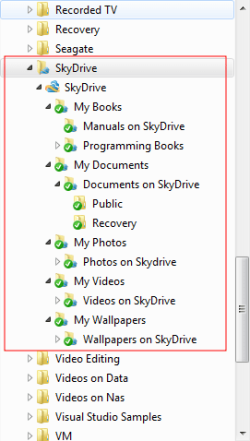
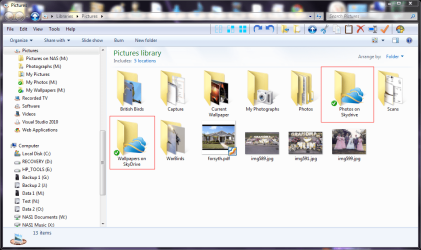
If you design the structure of your SkyDrive folders well you can include them in the appropriate Win 7 libraries. I have a skydrive folder in my documents library, two in my pictures library. one for Photos and the other for Wallpapers. Plus I have a books library that has a SkyDrive folder for any books I have sync'd and two in my Programming library, one for VB .NET books and the other for C# books.

Oh and I shifted the sync'd SkyDrive folder onto an external drive to stop it cluttering up my OS drive.
 

My Computer

Computer type
Laptop
Computer Manufacturer/Model Number
Hewlett-Packard/G62-107SA Notebook
OS
Microsoft Windows 7 Home Premium 64-bit Service Pack 1
CPU
Intel(R) Core(TM) i3 CPU M 330 @ 2.13GHz
Motherboard
Hewlett-Packard 1425
Memory
8 GB DDR3
Graphics Card(s)
Intel(R) HD Graphics
Sound Card
Realtek High Definition Audio
Monitor(s) Displays
Builtin
Screen Resolution
1366 x 768 x 32 bits (4294967296 colors) @ 60 Hz
Hard Drives
250 GB SATA Hard Disk Drive 7200 rpm
2TB Seagate GoFlex USB 2 Drive
1TB Iomega Prestige USB 2 Drive
1.5TB Iomega Prestige USB 2 Drive (Samsung)
2TB WD MyBook Live NAS.
Mouse
Logitech Anywhere MX
Internet Speed
152 Mbs download 10 Mbs upload
Antivirus
Norton 360
Browser
Chrome
folders can be dropped on to the skydrive folder from anywhere.

The SkyDrive concept needs to be fully integrated. MS has made improvements and many remain.
 

My Computer

Computer Manufacturer/Model Number
Toshiba Satellite S875D-S7239 laptop
OS
MS Windows 7 Ultimate SP1 64-bit
CPU
AMD A10-4600M
Motherboard
AMD Pumori (Socket FT1)
Memory
6.00 GB Dual-Channel DDR3 @ 798MHz (11-11-12-28)
Graphics Card(s)
AMD Radeon HD 7660G
Sound Card
High Definition Audio Device
Monitor(s) Displays
Generic PnP Monitor (1600x900@60Hz)
Screen Resolution
1600x900@60Hz
Hard Drives
SSD 119GB Corsair CSSD-V128GB2 ATA Device
Keyboard
Standard PS/2 Keyboard
Mouse
HP Wireless Optical Mobile Mouse Model FHA-3410
Internet Speed
What the local pub, local coffee shop offers.
Other Info
Optical Drive:MATSHITA BD-CMB UJ160B ATA Device


Also have an Asus ha1002xp netbook with Win 7 Ultimate installed.
You still have your copy on your harddrive, inconveniently located in a folder named SkyDrive.

This is the simple truth I was missing: once placed in Skydrive folder, it isn't committed only to the cloud but a copy remains on the HD.

Thanks.:geek: Any other perspectives?
 
You still have your copy on your harddrive, inconveniently located in a folder named SkyDrive.

This is the simple truth I was missing: once placed in Skydrive folder, it isn't committed only to the cloud but a copy remains on the HD.

Thanks.:geek: Any other perspectives?

And on any other devices that are sync'd.
 

My Computer

Computer type
Laptop
Computer Manufacturer/Model Number
Hewlett-Packard/G62-107SA Notebook
OS
Microsoft Windows 7 Home Premium 64-bit Service Pack 1
CPU
Intel(R) Core(TM) i3 CPU M 330 @ 2.13GHz
Motherboard
Hewlett-Packard 1425
Memory
8 GB DDR3
Graphics Card(s)
Intel(R) HD Graphics
Sound Card
Realtek High Definition Audio
Monitor(s) Displays
Builtin
Screen Resolution
1366 x 768 x 32 bits (4294967296 colors) @ 60 Hz
Hard Drives
250 GB SATA Hard Disk Drive 7200 rpm
2TB Seagate GoFlex USB 2 Drive
1TB Iomega Prestige USB 2 Drive
1.5TB Iomega Prestige USB 2 Drive (Samsung)
2TB WD MyBook Live NAS.
Mouse
Logitech Anywhere MX
Internet Speed
152 Mbs download 10 Mbs upload
Antivirus
Norton 360
Browser
Chrome
Kado, how are you able to have Skydrive folders in the various User folders? Are these labeled Skydrive like the standard one?

I wonder why we can't rightclick and add file/folder to Skydrive like we can Library.

Can libraries be involved somehow?
 
Kado, how are you able to have Skydrive folders in the various User folders? Are these labeled Skydrive like the standard one?

I wonder why we can't rightclick and add file/folder to Skydrive like we can Library.

Can libraries be involved somehow?

It is all in the folder structure you set up on SkyDrive. This is the structure I designed as shown after sync on the PC.

screenshot160_2012-05-14.png

The second SkyDrive folder is the Sync point. This structure allows the various elements to be incorporated in libraries and appear as folders. The next shot shows my pictures library with two "SkyDrive" folders.

screenshot161_2012-05-14.png

The pretty folder icons I created myself.
 

My Computer

Computer type
Laptop
Computer Manufacturer/Model Number
Hewlett-Packard/G62-107SA Notebook
OS
Microsoft Windows 7 Home Premium 64-bit Service Pack 1
CPU
Intel(R) Core(TM) i3 CPU M 330 @ 2.13GHz
Motherboard
Hewlett-Packard 1425
Memory
8 GB DDR3
Graphics Card(s)
Intel(R) HD Graphics
Sound Card
Realtek High Definition Audio
Monitor(s) Displays
Builtin
Screen Resolution
1366 x 768 x 32 bits (4294967296 colors) @ 60 Hz
Hard Drives
250 GB SATA Hard Disk Drive 7200 rpm
2TB Seagate GoFlex USB 2 Drive
1TB Iomega Prestige USB 2 Drive
1.5TB Iomega Prestige USB 2 Drive (Samsung)
2TB WD MyBook Live NAS.
Mouse
Logitech Anywhere MX
Internet Speed
152 Mbs download 10 Mbs upload
Antivirus
Norton 360
Browser
Chrome
when you say you set up the folder structure ,do you mean on your skydrive online or on the pc,
 

My Computer

Computer Manufacturer/Model Number
Hewlett packard/p6512uk
OS
Microsoft Windows 7 Home Premium 64-bit 7600
CPU
IIx4 amd athelon 635 processor
Motherboard
FOXCONN 2AA9
Memory
2x2gb
Graphics Card(s)
ati radeon HD 5450
Sound Card
(1) Realtek High Definition Audio (2) AMD High Definition
Monitor(s) Displays
samsung lcd tv 32"
Screen Resolution
1360x 768
Hard Drives
(1) WDC WD10 01FAES-60Z2A0 SATA Disk Device (2) Maxtor OneTouch USB Device (3) ST310003 33AS USB Device (4) WD My Book 1111 USB Device
PSU
?
Cooling
air!
Keyboard
wireless hp
Mouse
wireless Hp,optical
Internet Speed
1.10mb/s
Antivirus
MSE
Browser
Firefox
In fact I already had some documents and pictures on SkyDrive but realized that the folder structure I had would not integrate very well into the library system I have on my PC so I made some initial changes to that on SkyDrive before I set up sync and then extended it on the PC end and let that sync up to SkyDrive because that was the quickest and easiest way to do it. You can easily add folders and move them around on your PC until you get what you want and just let them sync up.
 

My Computer

Computer type
Laptop
Computer Manufacturer/Model Number
Hewlett-Packard/G62-107SA Notebook
OS
Microsoft Windows 7 Home Premium 64-bit Service Pack 1
CPU
Intel(R) Core(TM) i3 CPU M 330 @ 2.13GHz
Motherboard
Hewlett-Packard 1425
Memory
8 GB DDR3
Graphics Card(s)
Intel(R) HD Graphics
Sound Card
Realtek High Definition Audio
Monitor(s) Displays
Builtin
Screen Resolution
1366 x 768 x 32 bits (4294967296 colors) @ 60 Hz
Hard Drives
250 GB SATA Hard Disk Drive 7200 rpm
2TB Seagate GoFlex USB 2 Drive
1TB Iomega Prestige USB 2 Drive
1.5TB Iomega Prestige USB 2 Drive (Samsung)
2TB WD MyBook Live NAS.
Mouse
Logitech Anywhere MX
Internet Speed
152 Mbs download 10 Mbs upload
Antivirus
Norton 360
Browser
Chrome
So if I wanted to Sync my entire Pictures, Documents and Downloads folders to Skydrive, how would I do this besides moving them into Skydrive? If I drag My Documents into Skydrive it uploads only what is in that folder at the moment, not going forward.
 
thanks kado, i guess im asking the same question as greg above.
 

My Computer

Computer Manufacturer/Model Number
Hewlett packard/p6512uk
OS
Microsoft Windows 7 Home Premium 64-bit 7600
CPU
IIx4 amd athelon 635 processor
Motherboard
FOXCONN 2AA9
Memory
2x2gb
Graphics Card(s)
ati radeon HD 5450
Sound Card
(1) Realtek High Definition Audio (2) AMD High Definition
Monitor(s) Displays
samsung lcd tv 32"
Screen Resolution
1360x 768
Hard Drives
(1) WDC WD10 01FAES-60Z2A0 SATA Disk Device (2) Maxtor OneTouch USB Device (3) ST310003 33AS USB Device (4) WD My Book 1111 USB Device
PSU
?
Cooling
air!
Keyboard
wireless hp
Mouse
wireless Hp,optical
Internet Speed
1.10mb/s
Antivirus
MSE
Browser
Firefox
I work differently. I don't use the My.. folders to store my data. I set up data folders on other partitions/drives and use libraries to draw them together. If you use a two folder structure at the root of each included folder they appear in the libraries as folders. You include the top folder and any folders below that appear in the library root. I use a lot of different libraries for different purposes and I find this works for me and keeps the image of my C: drive relatively small. These are my libraries ATM.

screenshot162_2012-05-14.png
 

My Computer

Computer type
Laptop
Computer Manufacturer/Model Number
Hewlett-Packard/G62-107SA Notebook
OS
Microsoft Windows 7 Home Premium 64-bit Service Pack 1
CPU
Intel(R) Core(TM) i3 CPU M 330 @ 2.13GHz
Motherboard
Hewlett-Packard 1425
Memory
8 GB DDR3
Graphics Card(s)
Intel(R) HD Graphics
Sound Card
Realtek High Definition Audio
Monitor(s) Displays
Builtin
Screen Resolution
1366 x 768 x 32 bits (4294967296 colors) @ 60 Hz
Hard Drives
250 GB SATA Hard Disk Drive 7200 rpm
2TB Seagate GoFlex USB 2 Drive
1TB Iomega Prestige USB 2 Drive
1.5TB Iomega Prestige USB 2 Drive (Samsung)
2TB WD MyBook Live NAS.
Mouse
Logitech Anywhere MX
Internet Speed
152 Mbs download 10 Mbs upload
Antivirus
Norton 360
Browser
Chrome
OK I think I've got it:

Place the documents I want uploaded to Skydrive in a Skydrive Documents subfolder in Skydrive folder. Do the same for any other libraries.

Then rightclick that Skydrive Documents subfolder to add it to Documents Library.

Is there any way to channel all Documents into the Skydrive documents folder, perhaps removing My Documents and Public Documents from Documents library? When I click on Documents in Start Menu it then only shows Skydrive Docs.

Any downside except possibly to eliminate duplicates in the original Documents folder?
 
Yes you can do that and make it the default save location. But don't forget the Skydrive storage is limited so you probably don't want all your documents on there just those you want to sync.


You also have to bear in mind the fragility of SkyDrive sync. It is vey easy to delete something that is needed and have that deletion sync to SkyDrive and any other devices you sync. SO DO NOT TREAT IT AS A BACKUP SOLUTION.
 
Last edited:

My Computer

Computer type
Laptop
Computer Manufacturer/Model Number
Hewlett-Packard/G62-107SA Notebook
OS
Microsoft Windows 7 Home Premium 64-bit Service Pack 1
CPU
Intel(R) Core(TM) i3 CPU M 330 @ 2.13GHz
Motherboard
Hewlett-Packard 1425
Memory
8 GB DDR3
Graphics Card(s)
Intel(R) HD Graphics
Sound Card
Realtek High Definition Audio
Monitor(s) Displays
Builtin
Screen Resolution
1366 x 768 x 32 bits (4294967296 colors) @ 60 Hz
Hard Drives
250 GB SATA Hard Disk Drive 7200 rpm
2TB Seagate GoFlex USB 2 Drive
1TB Iomega Prestige USB 2 Drive
1.5TB Iomega Prestige USB 2 Drive (Samsung)
2TB WD MyBook Live NAS.
Mouse
Logitech Anywhere MX
Internet Speed
152 Mbs download 10 Mbs upload
Antivirus
Norton 360
Browser
Chrome
You also have to bear in mind the fragility of SkyDrive sync. It is vey easy to delete something that is needed and have that deletion sync to SkyDrive and any other devices you sync. SO DO NOT TREAT IT AS A BACKUP SOLUTION.

This is reason I am not sold yet. With a sync to the cloud as we have now, a simple "goof" and accidentally removing a file locally deletes it immediately from the cloud. And with Skydrive, unlike others, there is no "previous versions" or "recycle bin" in Skydrive to get the file back. Thus, you are relying on local backups still.

My typical method for backups is to use a utility like robocopy to "synchronize" my files at a time of my choosing to an external hard drive. And then I keep that external hard drive offsite in the case my house burns to the ground, floods or I am robbed. So, a cloud service like "skydrive" is an alternative to having to physically lug around my external hard drive. However, I don't have the ability to robocopy my important data from the couple of places I may already choose to store it on my network. Instead, I have to "duplicate" the data into the C:\skydrive (or whereever) folder locally, and then have it synchronized. Therefore, my 20GB of pictures at home are on my shared server drive, and my local hard drive and also in the cloud. This means that I burn 40GB at home...and while I like having multiple copies of my data so I don't ever lose it, this isn't ideal. Also, since Skydrive (or other cloud services) don't support timestamps of files, robocopy wants to recopy every file every time. And with my very limited upload speeds, this just isn't possible.

I've worked around the issue above my using something like Gladinet desktop client to get a drive letter for SkyDrive. Then, I use a utility like Karen't replicator to synchronize my 3-4 locations for data with Skydrive and tick the box to not rely at all on timestamps. While this technically works, I'm not happy with having to use a 3rd party ulility and would absolutely love to NOT have to have Glainet installed (I'm sure it's a fine app and all, but I keep my boxes as clean and streamlined as possible).
 

My Computer

Computer Manufacturer/Model Number
Self-Built in July 2009
OS
Windows 7 Ultimate x64
CPU
Intel Q9550 2.83Ghz OC'd to 3.40Ghz
Motherboard
Gigabyte GA-EP45-UD3R rev. 1.1, F12 BIOS
Memory
8GB G.Skill PI DDR2-800, 4-4-4-12 timings
Graphics Card(s)
EVGA 1280MB Nvidia GeForce GTX570
Sound Card
Realtek ALC899A 8 channel onboard audio
Monitor(s) Displays
23" Acer x233H
Screen Resolution
1920x1080
Hard Drives
Intel X25-M 80GB Gen 2 SSD
Western Digital 1TB Caviar Black, 32MB cache. WD1001FALS
PSU
Corsair 620HX modular
Case
Antec P182
Cooling
stock
Keyboard
ABS M1 Mechanical
Mouse
Logitech G9 Laser Mouse
Internet Speed
15/2 cable modem
Other Info
Windows and Linux enthusiast. Logitech G35 Headset.
In that case is Live Sync still available to sync with Skydrive, as it keeps a copy of the changed file? I previously thought of this as an annoyance but now see why it is done.

I also get an annoying duplicated file which I can't open when I try to Sync my onboard folders with an existing folder of the same name on Skydrive.

Is there an effective backup strategy for Skydrive?
 
I sync only Three types of data.

1. Things I want to share.
2. Things I might need when my laptop is disconnected from my main data drive which is external.
3. Things I might need to access from another PC in the event of disaster.

This data is also backed up separately.
 

My Computer

Computer type
Laptop
Computer Manufacturer/Model Number
Hewlett-Packard/G62-107SA Notebook
OS
Microsoft Windows 7 Home Premium 64-bit Service Pack 1
CPU
Intel(R) Core(TM) i3 CPU M 330 @ 2.13GHz
Motherboard
Hewlett-Packard 1425
Memory
8 GB DDR3
Graphics Card(s)
Intel(R) HD Graphics
Sound Card
Realtek High Definition Audio
Monitor(s) Displays
Builtin
Screen Resolution
1366 x 768 x 32 bits (4294967296 colors) @ 60 Hz
Hard Drives
250 GB SATA Hard Disk Drive 7200 rpm
2TB Seagate GoFlex USB 2 Drive
1TB Iomega Prestige USB 2 Drive
1.5TB Iomega Prestige USB 2 Drive (Samsung)
2TB WD MyBook Live NAS.
Mouse
Logitech Anywhere MX
Internet Speed
152 Mbs download 10 Mbs upload
Antivirus
Norton 360
Browser
Chrome
In that case is Live Sync still available to sync with Skydrive, as it keeps a copy of the changed file? I previously thought of this as an annoyance but now see why it is done.

I also get an annoying duplicated file which I can't open when I try to Sync my onboard folders with an existing folder of the same name on Skydrive.

Is there an effective backup strategy for Skydrive?

Although SkyDrive has versions, these are only for the Office document types.

I don't understand your duplicate folder problem could you be more clear.

I use FreeFileSync, mirroring with versions to backup the folders on the PC.
 

My Computer

Computer type
Laptop
Computer Manufacturer/Model Number
Hewlett-Packard/G62-107SA Notebook
OS
Microsoft Windows 7 Home Premium 64-bit Service Pack 1
CPU
Intel(R) Core(TM) i3 CPU M 330 @ 2.13GHz
Motherboard
Hewlett-Packard 1425
Memory
8 GB DDR3
Graphics Card(s)
Intel(R) HD Graphics
Sound Card
Realtek High Definition Audio
Monitor(s) Displays
Builtin
Screen Resolution
1366 x 768 x 32 bits (4294967296 colors) @ 60 Hz
Hard Drives
250 GB SATA Hard Disk Drive 7200 rpm
2TB Seagate GoFlex USB 2 Drive
1TB Iomega Prestige USB 2 Drive
1.5TB Iomega Prestige USB 2 Drive (Samsung)
2TB WD MyBook Live NAS.
Mouse
Logitech Anywhere MX
Internet Speed
152 Mbs download 10 Mbs upload
Antivirus
Norton 360
Browser
Chrome
I'll try replicating it when I get home.

Will SysRestore offer previous versions of data placed in Skydrive folder? Just askin.
 
Back
Top