
Syncing Outlook 2010 wth Windows Media DeviceCenter

BSkiLLs

New member
Local time
3:11 PM
Messages
201
Location
The Beach Florida
Syncing Outlook 2010 with Windows Media Device Center.

Ok guy's if you are trying to sync Office 2010 64bit version with (WMDC) Windows Media Device center. You will end up probably getting this error message saying.

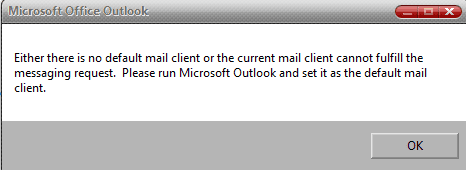
" either there is no default email client or the current mail client cannot fulfill the message request. Please run Microsoft Outlook and set it as the default mail client "

As in this image below

Well do not even waste your time as i did trying to go through MS's beta help section for an answer or workaround nor googling it or whatever or going through and resetting your default profiles and files. As i even tried that doing it on a per file level also. Well there is no workaround and it can not be done. It has been turned into MS and they know about it and it will not be fixed until the final release is out (at least according to what they have said so far)

The only way to do it as the WMDC does not recognize the contacts and will not allow them to be selected in WMDC to be synced. So what you basically have to do is. Just uninstall it as most likely it is the 64bit version and you have to install the 32bit version. For it to work for the time being. :)

That is the only way to get it to sync correctly and recognize the contacts no matter how or what you have set for the default client.

Hope that helps!!
 

Attachments
  • ms-office-error.PNG
    ms-office-error.PNG
    3.3 KB · Views: 15

My Computer My Computer

Computer Manufacturer/Model Number
HP's, Dell's
OS
Win-7HP, VistaHP, XP
CPU
AMD Athlon II 240 dual-core processor 5050E 2,6 GHz
Memory
6GB
Graphics Card(s)
1GB NVIDIA GeForce GT 220 [DVI, HDMI, VGA adapter]
Sound Card
Asus Xonar Essence STX
Monitor(s) Displays
HP 2159m 21.5-inch 16:9 Full LCD HD Widescreen
Screen Resolution
1920x1080
Hard Drives
500GB 7200 rpm SATA 3Gb/s hard drive
Seagate EHD 250gb
Seagate EHD 1T
Internet Speed
16mb
Mod if you want to pin this go ahead. Might be a good idea for now.
 

My Computer My Computer

Computer Manufacturer/Model Number
HP's, Dell's
OS
Win-7HP, VistaHP, XP
CPU
AMD Athlon II 240 dual-core processor 5050E 2,6 GHz
Memory
6GB
Graphics Card(s)
1GB NVIDIA GeForce GT 220 [DVI, HDMI, VGA adapter]
Sound Card
Asus Xonar Essence STX
Monitor(s) Displays
HP 2159m 21.5-inch 16:9 Full LCD HD Widescreen
Screen Resolution
1920x1080
Hard Drives
500GB 7200 rpm SATA 3Gb/s hard drive
Seagate EHD 250gb
Seagate EHD 1T
Internet Speed
16mb
Mod if you want to pin this go ahead. Might be a good idea for now.

I have the same problem and am going to install the x86 version :)

question is by using the x86 version do we lose any functionality ??
 

My Computer My Computer

Computer Manufacturer/Model Number
built my own
OS
win7 ultimate / virtual box
CPU
Intel Core i7 3770K,1155, Ivy Bridge
Motherboard
MSI Z77A-G43
Memory
GSkill Ripjaws Z Series 1600 CL 9.0 16GB
Graphics Card(s)
KFA2 GeForce GTX 670 EX OC 2048MB GDDR5 PCI-E gfx card
Sound Card
onboard Nvidia HDMI audio
Monitor(s) Displays
ASUS VK222H 22" widescreen LCD monitor
Screen Resolution
1680x1050
Hard Drives
Kingston 128gb SSD
OCZ Vertex 90gb SSD
500GB WDCaviar 16mb 5000KS
320GB WDCaviar 16mb 3200AAKS sata 2
1TB Samsung 16mb HD103SJ sata 2
PSU
Corsair HX 750W ATX2.2 Modular
Cooling
Antec 25 Kuhler H2O 620
Keyboard
logitech
Mouse
logitech MX518
Internet Speed
7mb adsl
Mod if you want to pin this go ahead. Might be a good idea for now.

I have the same problem and am going to install the x86 version :)

question is by using the x86 version do we lose any functionality ??

No. Even the speed is pretty good still. As they say basically they only advise people that are messing with word docs and such that are over like 3mb to use the 64bit version. Plus to take advantage of the speed because of it being a 64bit machine and such and using a 64bit program but that the 32bit will run and work the same on a 32 or 64.
 

My Computer My Computer

Computer Manufacturer/Model Number
HP's, Dell's
OS
Win-7HP, VistaHP, XP
CPU
AMD Athlon II 240 dual-core processor 5050E 2,6 GHz
Memory
6GB
Graphics Card(s)
1GB NVIDIA GeForce GT 220 [DVI, HDMI, VGA adapter]
Sound Card
Asus Xonar Essence STX
Monitor(s) Displays
HP 2159m 21.5-inch 16:9 Full LCD HD Widescreen
Screen Resolution
1920x1080
Hard Drives
500GB 7200 rpm SATA 3Gb/s hard drive
Seagate EHD 250gb
Seagate EHD 1T
Internet Speed
16mb
Mod if you want to pin this go ahead. Might be a good idea for now.

I have the same problem and am going to install the x86 version :)

question is by using the x86 version do we lose any functionality ??

No. Even the speed is pretty good still. As they say basically they only advise people that are messing with word docs and such that are over like 3mb to use the 64bit version. Plus to take advantage of the speed because of it being a 64bit machine and such and using a 64bit program but that the 32bit will run and work the same on a 32 or 64.

I am running the 32bit version now and I really don't notice any difference except the problems solved, I did get a crash at the entering license part but it sorted itself out on next prompt, I was also highly impressed that I got a request to fill out a small error webform and the same day had an email request back from a Microsoft rep to help solve the crash, then yesterday i had a bugfix arrive in windows update :party:
 

My Computer My Computer

Computer Manufacturer/Model Number
built my own
OS
win7 ultimate / virtual box
CPU
Intel Core i7 3770K,1155, Ivy Bridge
Motherboard
MSI Z77A-G43
Memory
GSkill Ripjaws Z Series 1600 CL 9.0 16GB
Graphics Card(s)
KFA2 GeForce GTX 670 EX OC 2048MB GDDR5 PCI-E gfx card
Sound Card
onboard Nvidia HDMI audio
Monitor(s) Displays
ASUS VK222H 22" widescreen LCD monitor
Screen Resolution
1680x1050
Hard Drives
Kingston 128gb SSD
OCZ Vertex 90gb SSD
500GB WDCaviar 16mb 5000KS
320GB WDCaviar 16mb 3200AAKS sata 2
1TB Samsung 16mb HD103SJ sata 2
PSU
Corsair HX 750W ATX2.2 Modular
Cooling
Antec 25 Kuhler H2O 620
Keyboard
logitech
Mouse
logitech MX518
Internet Speed
7mb adsl
I have the same problem and am going to install the x86 version :)

question is by using the x86 version do we lose any functionality ??

No. Even the speed is pretty good still. As they say basically they only advise people that are messing with word docs and such that are over like 3mb to use the 64bit version. Plus to take advantage of the speed because of it being a 64bit machine and such and using a 64bit program but that the 32bit will run and work the same on a 32 or 64.

I am running the 32bit version now and I really don't notice any difference except the problems solved, I did get a crash at the entering license part but it sorted itself out on next prompt, I was also highly impressed that I got a request to fill out a small error webform and the same day had an email request back from a Microsoft rep to help solve the crash, then yesterday i had a bugfix arrive in windows update :party:

Yup cool. :)

Yes i am also liking that. They seem to be nailing things down for sure. I also like the smiley report system. Send a smile or a frown. lol That's cool. They always need that even in a non-beta. ;)
 

My Computer My Computer

Computer Manufacturer/Model Number
HP's, Dell's
OS
Win-7HP, VistaHP, XP
CPU
AMD Athlon II 240 dual-core processor 5050E 2,6 GHz
Memory
6GB
Graphics Card(s)
1GB NVIDIA GeForce GT 220 [DVI, HDMI, VGA adapter]
Sound Card
Asus Xonar Essence STX
Monitor(s) Displays
HP 2159m 21.5-inch 16:9 Full LCD HD Widescreen
Screen Resolution
1920x1080
Hard Drives
500GB 7200 rpm SATA 3Gb/s hard drive
Seagate EHD 250gb
Seagate EHD 1T
Internet Speed
16mb
Back
Top