As Dell are withdrawing their online Datasafe backup I've been looking at alternatives and SyncToy seems like a good solution. However when I tried backing up My Documents it backed up some sub folders but missed others. Am I doing something wrong or is this a problem with SyncToy.
Thanks for any help.
1*Samsung 840 EVO 120GB SSD;
1*OCZ Vertex 2 60GB SSD;
2*Samsung F3 SpinPoint 1TB in RAID0;
1*Samsung F1 SpinPoint 1TB;
2*Western Digital 1TB External USB 3.0
1*Western Digital 500GB External USB 3.0
1*Seagate 500GB External USB 2.0
PSU
Thermaltake ToughPower QFan 750W
Case
Thermaltake Element S VK60001W2Z
Cooling
Corsair H60 Water Cooling, 2*230mm and 2*80mm case fans
Thanks for your reply. I previously followed the excellent tutorial and what seems to happen is I have a folder with sub folders which in turn have more sub folders. Some of the sub folders and associated files are copied but others are not. There doesn't appear to be any difference in the sub folders or files that are not copied to those that are. I have tried copying the sub folders on their own and that works OK but I really need them to copy as part of the overall My Documents folder.
Thanks
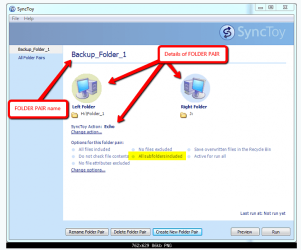
Do you have this option selected (see yellow highlights)?
Can you list the folder structure for us, starting with the topmost folder please? Or use a screencapture image in Windows Explorer to show the structure?
1*Samsung 840 EVO 120GB SSD;
1*OCZ Vertex 2 60GB SSD;
2*Samsung F3 SpinPoint 1TB in RAID0;
1*Samsung F1 SpinPoint 1TB;
2*Western Digital 1TB External USB 3.0
1*Western Digital 500GB External USB 3.0
1*Seagate 500GB External USB 2.0
PSU
Thermaltake ToughPower QFan 750W
Case
Thermaltake Element S VK60001W2Z
Cooling
Corsair H60 Water Cooling, 2*230mm and 2*80mm case fans
Thanks for your reply. The All Sub Folders Included is shown but not highlighted and I haven't selected it.
The file structure is too large to show all but I've attached 2 screen captures which shows the problem. The My Photos is a sub folder of My Documents and Holidays is a sub folder of My Photos. Within Holidays there are a number of other folders and sub folders and if you look at screen1 you will see sub folders such as Caribbean and Hawaii. If you then look at screen2 this shows what has been synced and you will see that Hawaii is missing. If I sync just My Photos and not My Documents Hawaii is then included.