

Hi geeks and geekettes.
I am most probably reaching the moon, trying something impossible, but still this is not giving me peace before I at least know it is not possible.
Scenario: Home office, 5 PCs. Two of the PCs belong to a domain when connected over Cisco AnyConnect VPN client (let's say Domain 1.), one PC belongs to another domain when connected over AT&T Global Network Connect VPN client (Domain 2). One PC is my current favorite laptop, one is our home server.
All three domain PCs running Seven Pro x64, my laptop Eight CP x64 and home server Windows Server 8 Beta x64. Networking OK, all PCs can see others and share when used on local network (VPN connection inactive).
I am using Synergy to seamless share mouse and keyboard. It works flawless EXCEPT this:
Laptop and home server can share mouse & kb with either Domain 1 PCs or Domain 2 PC but not with both. Domain 1 and Domain 2 PCs can share mouse and KB but then not with laptop and home server.
Maybe this explains it better (DEDDXXXXXX PCs = Domain 1, 2522XXXXXX = Domain 2):
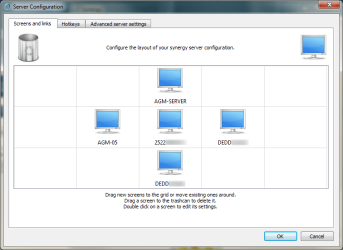
This would be the ideal situation, Domain 2 PC as Synergy server, other PCs clients. ATM I can share mouse & KB with AGM PCs & Domain 1 PCs, or AGM PCs & Domain 2 PC, or Domain 1 PCs & Domain 2 PC. I just simply can not share mouse and kb with all 5. Error message on Synergy server always the same: "Connection refused".
Notice that this happens when domain PCs are not connected to domains i.e. when they are using just my home network, members of the same subnet, workgroup and homegroup. All others wired, laptop wireless connection.
If you have any ideas please share it!
Kari
I am most probably reaching the moon, trying something impossible, but still this is not giving me peace before I at least know it is not possible.
Scenario: Home office, 5 PCs. Two of the PCs belong to a domain when connected over Cisco AnyConnect VPN client (let's say Domain 1.), one PC belongs to another domain when connected over AT&T Global Network Connect VPN client (Domain 2). One PC is my current favorite laptop, one is our home server.
All three domain PCs running Seven Pro x64, my laptop Eight CP x64 and home server Windows Server 8 Beta x64. Networking OK, all PCs can see others and share when used on local network (VPN connection inactive).
I am using Synergy to seamless share mouse and keyboard. It works flawless EXCEPT this:
Laptop and home server can share mouse & kb with either Domain 1 PCs or Domain 2 PC but not with both. Domain 1 and Domain 2 PCs can share mouse and KB but then not with laptop and home server.
Maybe this explains it better (DEDDXXXXXX PCs = Domain 1, 2522XXXXXX = Domain 2):
This would be the ideal situation, Domain 2 PC as Synergy server, other PCs clients. ATM I can share mouse & KB with AGM PCs & Domain 1 PCs, or AGM PCs & Domain 2 PC, or Domain 1 PCs & Domain 2 PC. I just simply can not share mouse and kb with all 5. Error message on Synergy server always the same: "Connection refused".
Notice that this happens when domain PCs are not connected to domains i.e. when they are using just my home network, members of the same subnet, workgroup and homegroup. All others wired, laptop wireless connection.
If you have any ideas please share it!
Kari
My Computer
At a glance
Windows 10 Pro x64 EN-GB1.6 GHz Intel Core i7-720QM Processor6 GBATI Mobility Radeon HD 5850 Graphics
- Computer type
- Laptop
- Computer Manufacturer/Model Number
- HP ENVY 17-1150eg
- OS
- Windows 10 Pro x64 EN-GB
- CPU
- 1.6 GHz Intel Core i7-720QM Processor
- Memory
- 6 GB
- Graphics Card(s)
- ATI Mobility Radeon HD 5850 Graphics
- Sound Card
- Beats sound system with integrated subwoofer
- Monitor(s) Displays
- 17" laptop display, 22" LED and 32" Full HD TV through HDMI
- Screen Resolution
- 1600*900 (1), 1920*1080 (2&3)
- Hard Drives
- Internal: 2 x 500 GB SATA Hard Disk Drive 7200 rpm
External: 2TB for backups, 3TB USB3 network drive for media
- Cooling
- As Envy runs a bit warm, I have it on a Cooler Master pad
- Keyboard
- Logitech diNovo Media Desktop Laser (bluetooth)
- Mouse
- Logitech Performance Mouse MX
- Internet Speed
- 50/10 Mbps VDSL
- Antivirus
- Windows Defender 4.3.9431.0
- Browser
- Maxthon 3.5.2., IE11

 . LogMeIn / TeamViewer etc. are not real alternatives due pointer delay and worse gfx. I'm so bloody tired of keyboards and mouses filling my desk.