Sysprep not working???

blueeagle49

New member
Local time
2:21 PM
Messages
3
I am having a tricky time trying to use sysprep.
I have read documentation that says to put the pc in audit mode first then install all of your software and run it again and I have read to run the sysprep only at the very end of your build?

I am have tried it both ways with the same error: "Windows could not complete the installation. To install Windows on this computer, restart the installation." And underneath this popup it says, " Setup is preparing your computer for the first use"

When I install any MS software then reboot is when this happens or when I join to a domain. I can install 3rd party software with multiple reboots with no problems?

I join it to a domain to install all the software necessary then take it back off.


I am running windows 7 x86 enterprise
Lenovo T410s laptop
2gb ram

Please advise.
Thanks
 

My Computer

Computer Manufacturer/Model Number
Lenovo / T410s
OS
Windows7 x86
CPU
Intel i5
Memory
2gb
sysprep should be ran last (right before booting into an Imaging software). I am not familiar with "Audit" mode - But there are different versions of sysprep (I assume you're using a compatible version with your OS?)


Mind pasting your .inf file to the forum?
 

My Computer

OS
7 Pro
sure. which .inf file are you referring to?

When I run sysprep at the end I receive the same error as stated above?
 

My Computer

Computer Manufacturer/Model Number
Lenovo / T410s
OS
Windows7 x86
CPU
Intel i5
Memory
2gb
Sysprep uses an XML file under Windows 7. (Vista too if I'm not mistaken) XP uses the inf file.

What he's asking for is your "sysprep.inf" or "sysprep.xml" file.

Correction: "unattend.xml" my bad.

Actually sysprep lets you call it by name so you can name it pretty much anything.
 
Last edited:

My Computer

Computer Manufacturer/Model Number
Dell Optiplex
OS
Windows 7 Professional 64 bit
Memory
4096
Are you referring to the unattend.xml file?
because I did a search for the sysprep.xml and couldn't find it?

I install all of my programs then I run sysprep in audit mode with an unattend.xml file.

What is the difference between audit mode and oobe?
Does oobe also strip away the SIDs and make it user ready?
 

My Computer

Computer Manufacturer/Model Number
Lenovo / T410s
OS
Windows7 x86
CPU
Intel i5
Memory
2gb
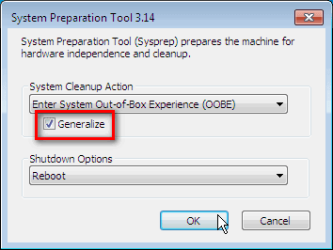
Do you remember to select Generalize when you are done in Audit mode? That option must be selected if you want to deploy the image you made to multiple computers.

Kari

sysprep.png
 

My Computer

Computer type
Laptop
Computer Manufacturer/Model Number
HP ENVY 17-1150eg
OS
Windows 10 Pro x64 EN-GB
CPU
1.6 GHz Intel Core i7-720QM Processor
Memory
6 GB
Graphics Card(s)
ATI Mobility Radeon HD 5850 Graphics
Sound Card
Beats sound system with integrated subwoofer
Monitor(s) Displays
17" laptop display, 22" LED and 32" Full HD TV through HDMI
Screen Resolution
1600*900 (1), 1920*1080 (2&3)
Hard Drives
Internal: 2 x 500 GB SATA Hard Disk Drive 7200 rpm
External: 2TB for backups, 3TB USB3 network drive for media
Cooling
As Envy runs a bit warm, I have it on a Cooler Master pad
Keyboard
Logitech diNovo Media Desktop Laser (bluetooth)
Mouse
Logitech Performance Mouse MX
Internet Speed
50/10 Mbps VDSL
Antivirus
Windows Defender 4.3.9431.0
Browser
Maxthon 3.5.2., IE11
Are you referring to the unattend.xml file?

I am indeed. Mine are named differently, so I recalled incorrectly what the default filename was.

My bad. Sorry for any confusion.
 

My Computer

Computer Manufacturer/Model Number
Dell Optiplex
OS
Windows 7 Professional 64 bit
Memory
4096
Back
Top