System freezing

ROBO731

New member
Member
VIP
Local time
7:38 PM
Messages
223
My computer has been freezing up pretty frequently lately. Please see the following threads first:

This was the original thread which wasn't really about my computer freezing, but still has some relevant information: http://www.sevenforums.com/system-security/294700-trojan-agent-gen-fakealert-6.html

This is the thread about the recent hardware changes I made: http://www.sevenforums.com/hardware-devices/294008-ssd-questions.html

I've since, gotten a 2.5 - 3.5 bracket and I now have the SSD in p1, the HDD in p2, and I still have the Blu-ray drive in p3 and the Hotswap bay in E1.

Also, this is the thread that I was told to make for the 2 BSODs that I got: http://www.sevenforums.com/bsod-help-support/294959-frequent-system-freezing.html#post2444068

This is a real issue as it happens several times throughout the day. I'd really appreciate any help with this issue.
 

My Computer

OS
Windows 7 Home Premium x64
CPU
Intel i7-2600K
Motherboard
ASUS Sabertooth Z77
Memory
G.SKILL Ripjaws (16 GB Total)
Graphics Card(s)
EVGA GeForce GTX 560 Ti
Monitor(s) Displays
ASUS
Screen Resolution
1920x1080 (2 Monitors)
Hard Drives
Hitachi GST Deskstar 2 TB (HDD)
Samsung 840 Pro 256 GB (SSD)
PSU
SeaSonic X Series X650 Gold
Case
Antec DF 85
Keyboard
Microsoft SideWinder X4
Mouse
MadCatz M.M.O. 7 & Logitech G35
Internet Speed
50 down
Antivirus
Avast Free, SuperAntiSpyware Free, Malwarebytes Free
Browser
Mozilla Firefox
Have you done a Clean Reinstall through all of this?

It's often necessary to shake off all of the effects of a serious infection, and essential to troubleshooting hardware problems so that you know the software is cleared because a perfect baseline reinstall has been done.

The steps in the blue link will assure you have a perfect install, even for retail.
 
Is there anything else that I can do before I try a clean install?

I'd like to use it as a last resort since I recently did a clean install just a few months ago.
 

My Computer

OS
Windows 7 Home Premium x64
CPU
Intel i7-2600K
Motherboard
ASUS Sabertooth Z77
Memory
G.SKILL Ripjaws (16 GB Total)
Graphics Card(s)
EVGA GeForce GTX 560 Ti
Monitor(s) Displays
ASUS
Screen Resolution
1920x1080 (2 Monitors)
Hard Drives
Hitachi GST Deskstar 2 TB (HDD)
Samsung 840 Pro 256 GB (SSD)
PSU
SeaSonic X Series X650 Gold
Case
Antec DF 85
Keyboard
Microsoft SideWinder X4
Mouse
MadCatz M.M.O. 7 & Logitech G35
Internet Speed
50 down
Antivirus
Avast Free, SuperAntiSpyware Free, Malwarebytes Free
Browser
Mozilla Firefox
I very closely followed the tutorial. How should drivers be handled in windows 7? I always keep all my drivers up to date.
 

My Computer

OS
Windows 7 Home Premium x64
CPU
Intel i7-2600K
Motherboard
ASUS Sabertooth Z77
Memory
G.SKILL Ripjaws (16 GB Total)
Graphics Card(s)
EVGA GeForce GTX 560 Ti
Monitor(s) Displays
ASUS
Screen Resolution
1920x1080 (2 Monitors)
Hard Drives
Hitachi GST Deskstar 2 TB (HDD)
Samsung 840 Pro 256 GB (SSD)
PSU
SeaSonic X Series X650 Gold
Case
Antec DF 85
Keyboard
Microsoft SideWinder X4
Mouse
MadCatz M.M.O. 7 & Logitech G35
Internet Speed
50 down
Antivirus
Avast Free, SuperAntiSpyware Free, Malwarebytes Free
Browser
Mozilla Firefox
when exactly is the time the freeze usually happens? is it when opening or running certain programs? or using certain devices? or is it just random crashes. knowing this is the first step to do any other steps.
 

My Computer

Computer type
PC/Desktop
OS
Windows 7 Ultimate x86
when exactly is the time the freeze usually happens? is it when opening or running certain programs? or using certain devices? or is it just random crashes. knowing this is the first step to do any other steps.

It happens randomly. Sometimes I'll be watching a youtube video or sometimes I'll just be reading an article. I always have the browser open when it happens, but I don't think that's the cause.

I very closely followed the tutorial. How should drivers be handled in windows 7? I always keep all my drivers up to date.

It explains it in tutorial

I used this tutorial: http://www.sevenforums.com/tutorials/1649-clean-install-windows-7-a.html

There are a lot of errors and some critical errors in event viewer, is there a way for me to export them for you to see?

Also, something that I just remembered and which just happened. Somewhat frequently the NVIDIA driver has been crashing. It usually recovers though. It is fully updated.
 

My Computer

OS
Windows 7 Home Premium x64
CPU
Intel i7-2600K
Motherboard
ASUS Sabertooth Z77
Memory
G.SKILL Ripjaws (16 GB Total)
Graphics Card(s)
EVGA GeForce GTX 560 Ti
Monitor(s) Displays
ASUS
Screen Resolution
1920x1080 (2 Monitors)
Hard Drives
Hitachi GST Deskstar 2 TB (HDD)
Samsung 840 Pro 256 GB (SSD)
PSU
SeaSonic X Series X650 Gold
Case
Antec DF 85
Keyboard
Microsoft SideWinder X4
Mouse
MadCatz M.M.O. 7 & Logitech G35
Internet Speed
50 down
Antivirus
Avast Free, SuperAntiSpyware Free, Malwarebytes Free
Browser
Mozilla Firefox

My Computer

Computer type
PC/Desktop
Computer Manufacturer/Model Number
Skylake Special #666
OS
Windows 10 Pro x64
CPU
Intel Core i7 6700K
Motherboard
Asus Sabertooth Z170 Mark 1
Memory
GSkill TridentZ RGB 16GB 3600 16-16-16-36
Graphics Card(s)
EVGA GTX 980 Ti SC x2
Sound Card
Realtek High Definition
Monitor(s) Displays
AOC G2460PG
Screen Resolution
1920 x 1080 144Hz
Hard Drives
Samsung 860 Pro 256GB, Seagate Barracuda 4TB x2
PSU
EVGA 1000 P2, EVGA White Custom Braided Cables
Case
Corsair Vengeance C70 Gunmetal Black
Cooling
Corsair H100i v2, Corsair ML120 x2, Thermal Grizzly Kryonaut
Keyboard
Logitech G910 Orion Spectrum
Mouse
Logitech G700s
Internet Speed
Verizon Fios Quantum Gateway 75/75
Antivirus
Windows Defender, Malwarebytes Free 3.8.3
Browser
Chrome
Other Info
Corsair SP120 x4, LG Blu-ray Drive, Durabrand HT-395 100 Watt Dolby Digital Amp, Corsair H2100 Wireless 7.1 Headset
The explanation about drivers is in this link I posted earlier which you must have missed, since I took the time to draw your attention to clicking on it.

Have you done a Clean Reinstall through all of this?

It's often necessary to shake off all of the effects of a serious infection, and essential to troubleshooting hardware problems so that you know the software is cleared because a perfect baseline reinstall has been done.

The steps in the blue link will assure you have a perfect install, even for retail.
 
Reinstall the nvidia drivers, make sure you do a custom/clean install.

And run a system file check.

http://www.sevenforums.com/tutorials/1538-sfc-scannow-command-system-file-checker.html

Are you using Microsoft Security Essentials and Malwarebytes Antimalware ?

Microsoft Security Essentials - Microsoft Windows

Malwarebytes : Free anti-malware download

Okay, I did a clean install of the NVIDIA driver. Hopefully that will fix things. I did a system file check right before you posted this post saying to do so. Is it necessary to do one now that I have updated the driver? I currently use AVAST as real-time and I use malwarebytes as a scanner in addition to superantispyware as my other scanner.
 

My Computer

OS
Windows 7 Home Premium x64
CPU
Intel i7-2600K
Motherboard
ASUS Sabertooth Z77
Memory
G.SKILL Ripjaws (16 GB Total)
Graphics Card(s)
EVGA GeForce GTX 560 Ti
Monitor(s) Displays
ASUS
Screen Resolution
1920x1080 (2 Monitors)
Hard Drives
Hitachi GST Deskstar 2 TB (HDD)
Samsung 840 Pro 256 GB (SSD)
PSU
SeaSonic X Series X650 Gold
Case
Antec DF 85
Keyboard
Microsoft SideWinder X4
Mouse
MadCatz M.M.O. 7 & Logitech G35
Internet Speed
50 down
Antivirus
Avast Free, SuperAntiSpyware Free, Malwarebytes Free
Browser
Mozilla Firefox
A System file check has nothing to do with the video driver.
 

My Computer

Computer type
PC/Desktop
Computer Manufacturer/Model Number
Skylake Special #666
OS
Windows 10 Pro x64
CPU
Intel Core i7 6700K
Motherboard
Asus Sabertooth Z170 Mark 1
Memory
GSkill TridentZ RGB 16GB 3600 16-16-16-36
Graphics Card(s)
EVGA GTX 980 Ti SC x2
Sound Card
Realtek High Definition
Monitor(s) Displays
AOC G2460PG
Screen Resolution
1920 x 1080 144Hz
Hard Drives
Samsung 860 Pro 256GB, Seagate Barracuda 4TB x2
PSU
EVGA 1000 P2, EVGA White Custom Braided Cables
Case
Corsair Vengeance C70 Gunmetal Black
Cooling
Corsair H100i v2, Corsair ML120 x2, Thermal Grizzly Kryonaut
Keyboard
Logitech G910 Orion Spectrum
Mouse
Logitech G700s
Internet Speed
Verizon Fios Quantum Gateway 75/75
Antivirus
Windows Defender, Malwarebytes Free 3.8.3
Browser
Chrome
Other Info
Corsair SP120 x4, LG Blu-ray Drive, Durabrand HT-395 100 Watt Dolby Digital Amp, Corsair H2100 Wireless 7.1 Headset
A System file check has nothing to do with the video driver.

If you don't want to try the advice given, well..... that`s fine with me.

Umm, that's not what I was saying. Did you read the part where I said that I had done a system file check moments before you made your post which advised to do so? I was just asking if it was necessary to do another? There's no need to get upset. I'm very appreciative of your help and advice. I was just asking if it was necessary. If you think it is then I have no problem with doing another scan. I'd rather not if I don't have to though as I have a visual style and the sfc scan messes it up.

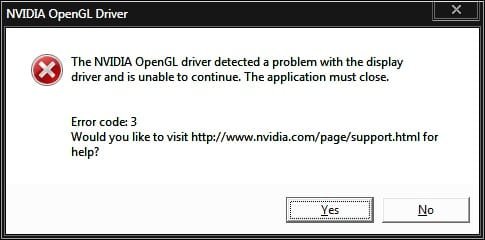
Also, I went to open this Logitech software and I received this message. I'll try and get you an image of the error that happens when it says that the driver has recovered.
 

Attachments

  • NVIDIA OpenGL Driver Error.jpg
    NVIDIA OpenGL Driver Error.jpg
    14.9 KB · Views: 2

My Computer

OS
Windows 7 Home Premium x64
CPU
Intel i7-2600K
Motherboard
ASUS Sabertooth Z77
Memory
G.SKILL Ripjaws (16 GB Total)
Graphics Card(s)
EVGA GeForce GTX 560 Ti
Monitor(s) Displays
ASUS
Screen Resolution
1920x1080 (2 Monitors)
Hard Drives
Hitachi GST Deskstar 2 TB (HDD)
Samsung 840 Pro 256 GB (SSD)
PSU
SeaSonic X Series X650 Gold
Case
Antec DF 85
Keyboard
Microsoft SideWinder X4
Mouse
MadCatz M.M.O. 7 & Logitech G35
Internet Speed
50 down
Antivirus
Avast Free, SuperAntiSpyware Free, Malwarebytes Free
Browser
Mozilla Firefox
What I would do with such an obvious clue pointing to the display driver is uninstall it in Device manager along with all software, including in Control Panel if necessary so that all traces are gone.

Then reboot and run Windows Update to confirm exactly which driver Win7 wants for your display device.
 
You can`t get me upset, I have a family that does that just fine LOL. :D

Greg, downloading the driver from nVidia and doing a custom/clean install should do all those things.
 

My Computer

Computer type
PC/Desktop
Computer Manufacturer/Model Number
Skylake Special #666
OS
Windows 10 Pro x64
CPU
Intel Core i7 6700K
Motherboard
Asus Sabertooth Z170 Mark 1
Memory
GSkill TridentZ RGB 16GB 3600 16-16-16-36
Graphics Card(s)
EVGA GTX 980 Ti SC x2
Sound Card
Realtek High Definition
Monitor(s) Displays
AOC G2460PG
Screen Resolution
1920 x 1080 144Hz
Hard Drives
Samsung 860 Pro 256GB, Seagate Barracuda 4TB x2
PSU
EVGA 1000 P2, EVGA White Custom Braided Cables
Case
Corsair Vengeance C70 Gunmetal Black
Cooling
Corsair H100i v2, Corsair ML120 x2, Thermal Grizzly Kryonaut
Keyboard
Logitech G910 Orion Spectrum
Mouse
Logitech G700s
Internet Speed
Verizon Fios Quantum Gateway 75/75
Antivirus
Windows Defender, Malwarebytes Free 3.8.3
Browser
Chrome
Other Info
Corsair SP120 x4, LG Blu-ray Drive, Durabrand HT-395 100 Watt Dolby Digital Amp, Corsair H2100 Wireless 7.1 Headset
You can`t get me upset, I have a family that does that just fine LOL. :D

Greg, downloading the driver from nVidia and doing a custom/clean install should do all those things.

Lol, I see. Well as Greg said, it seems like it must be the display driver at this point. Is there anything else to try?
 

My Computer

OS
Windows 7 Home Premium x64
CPU
Intel i7-2600K
Motherboard
ASUS Sabertooth Z77
Memory
G.SKILL Ripjaws (16 GB Total)
Graphics Card(s)
EVGA GeForce GTX 560 Ti
Monitor(s) Displays
ASUS
Screen Resolution
1920x1080 (2 Monitors)
Hard Drives
Hitachi GST Deskstar 2 TB (HDD)
Samsung 840 Pro 256 GB (SSD)
PSU
SeaSonic X Series X650 Gold
Case
Antec DF 85
Keyboard
Microsoft SideWinder X4
Mouse
MadCatz M.M.O. 7 & Logitech G35
Internet Speed
50 down
Antivirus
Avast Free, SuperAntiSpyware Free, Malwarebytes Free
Browser
Mozilla Firefox
What happens when you uninstall all traces of the current driver and then ask Windows Updates what driver Win7 wants?

This is what to try next since you missed the steps and likely bollixed your drivers, therefore have not yet gotten a baseline perfect reinstall so that software can be ruled out.
 
Try Greg`s suggestion.
 

My Computer

Computer type
PC/Desktop
Computer Manufacturer/Model Number
Skylake Special #666
OS
Windows 10 Pro x64
CPU
Intel Core i7 6700K
Motherboard
Asus Sabertooth Z170 Mark 1
Memory
GSkill TridentZ RGB 16GB 3600 16-16-16-36
Graphics Card(s)
EVGA GTX 980 Ti SC x2
Sound Card
Realtek High Definition
Monitor(s) Displays
AOC G2460PG
Screen Resolution
1920 x 1080 144Hz
Hard Drives
Samsung 860 Pro 256GB, Seagate Barracuda 4TB x2
PSU
EVGA 1000 P2, EVGA White Custom Braided Cables
Case
Corsair Vengeance C70 Gunmetal Black
Cooling
Corsair H100i v2, Corsair ML120 x2, Thermal Grizzly Kryonaut
Keyboard
Logitech G910 Orion Spectrum
Mouse
Logitech G700s
Internet Speed
Verizon Fios Quantum Gateway 75/75
Antivirus
Windows Defender, Malwarebytes Free 3.8.3
Browser
Chrome
Other Info
Corsair SP120 x4, LG Blu-ray Drive, Durabrand HT-395 100 Watt Dolby Digital Amp, Corsair H2100 Wireless 7.1 Headset
Okay I did that. I guess we'll just wait and see now. I'll let you know if anything happens.
 

My Computer

OS
Windows 7 Home Premium x64
CPU
Intel i7-2600K
Motherboard
ASUS Sabertooth Z77
Memory
G.SKILL Ripjaws (16 GB Total)
Graphics Card(s)
EVGA GeForce GTX 560 Ti
Monitor(s) Displays
ASUS
Screen Resolution
1920x1080 (2 Monitors)
Hard Drives
Hitachi GST Deskstar 2 TB (HDD)
Samsung 840 Pro 256 GB (SSD)
PSU
SeaSonic X Series X650 Gold
Case
Antec DF 85
Keyboard
Microsoft SideWinder X4
Mouse
MadCatz M.M.O. 7 & Logitech G35
Internet Speed
50 down
Antivirus
Avast Free, SuperAntiSpyware Free, Malwarebytes Free
Browser
Mozilla Firefox
No need to wait and see. Keep checking for Updates, run all Important and Optional - another performance Update could affect this too. Reboot and try again.
 
Back
Top