system hang

If you connected two computers via ethernet cable, then a conflict between the two likely created the hang.

This is why a crossover cable is suggested to connect between two machines.

Even when an ethernet cable will work for data transfer between two machines, there are often issues similar to yours as well as networking anomalies that require close management.

Check your Event Viewer and Performance logs at the time to see if errors are revealed which can be remedied to resolve the issue.
 
ohh thanks for replying. i have got one question. does "windows media player with networking service" application be responsible for my system hang?
 

My Computer

OS
windows 7
CPU
intel core 2 duo 2.66 Ghz
Motherboard
MSI
Memory
2GB
Graphics Card(s)
integrated
Hard Drives
250GB
ohh thanks for replying. i have got one question. does "windows media player with networking service" application be responsible for my system hang?

It can. Try turning off the WMPNETWK serivce in task manager, or msconfig.
 

My Computer

Computer Manufacturer/Model Number
HP Pavillion dv-7 1005 Tx
OS
Win 8 Release candidate 8400
CPU
[email protected]
Memory
4 gigs
Graphics Card(s)
Nvidia 9600M
Sound Card
HD built-in
Monitor(s) Displays
17" Wxga
Screen Resolution
1440x900
Cooling
none
Internet Speed
45Mb down 5Mb up
stopping windows media player with networking did not solve the problem. i am getting this log always just before the system hangs..

Log Name: System
Source: Microsoft-Windows-FilterManager
Date: 5/7/2010 9:26:08 PM
Event ID: 6
Task Category: None
Level: Information
Keywords:
User: SYSTEM
Computer: vignesh-PC
Description:
File System Filter 'FileInfo' (6.1, ‎2009‎-‎07‎-‎14T04:51:51.000000000Z) has successfully loaded and registered with Filter Manager.
Event Xml:
<Event xmlns="http://schemas.microsoft.com/win/2004/08/events/event">
<System>
<Provider Name="Microsoft-Windows-FilterManager" Guid="{F3C5E28E-63F6-49C7-A204-E48A1BC4B09D}" />
<EventID>6</EventID>
<Version>0</Version>
<Level>4</Level>
<Task>0</Task>
<Opcode>0</Opcode>
<Keywords>0x8000000000000000</Keywords>
<TimeCreated SystemTime="2010-05-07T15:56:08.093750000Z" />
<EventRecordID>46974</EventRecordID>
<Correlation />
<Execution ProcessID="4" ThreadID="8" />
<Channel>System</Channel>
<Computer>vignesh-PC</Computer>
<Security UserID="S-1-5-18" />
</System>
<EventData>
<Data Name="FinalStatus">0x0</Data>
<Data Name="DeviceVersionMajor">6</Data>
<Data Name="DeviceVersionMinor">1</Data>
<Data Name="DeviceNameLength">8</Data>
<Data Name="DeviceName">FileInfo</Data>
<Data Name="DeviceTime">2009-07-14T04:51:51.000000000Z</Data>
</EventData>
</Event>


Has anyone got any idea?
 

My Computer

OS
windows 7
CPU
intel core 2 duo 2.66 Ghz
Motherboard
MSI
Memory
2GB
Graphics Card(s)
integrated
Hard Drives
250GB
Vignesh,
Could you post a screenshot of the following;
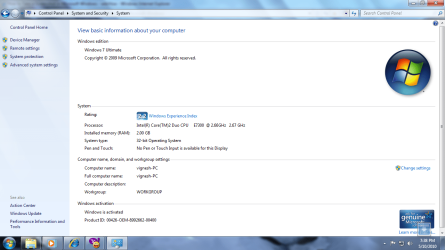
Click the Start Globe, right click Computer, click properties. Open to full screen. Important to show all the details on that page. I feel we must start with the basics to help you solve this problem.
 

My Computer

Computer type
PC/Desktop
OS
Microsoft Windows 7 Home Premium 64-bit 7601 Multiprocessor Free Service Pack 1
CPU
Intel(R) Core(TM) i7-3770 CPU @ 3.40GHz
Motherboard
ASUSTeK COMPUTER INC. P8H77-M
Memory
8.00 GB
Graphics Card(s)
Intel(R) HD Graphics 4000
Sound Card
On Board
Monitor(s) Displays
Dell 24"
Screen Resolution
1920 x 1080
Hard Drives
(1) INTEL SSDSC2CT180A3 ATA Device (2) ST500DM002-1BD142 ATA Device (3) WDC WD3200AAKS-75L9A0 ATA Device (4) Generic- Compact Flash USB Device (5) Generic- MS/MS-Pro USB Device (6) Generic- SD/MMC USB Device (7) Generic- SM/xD-Picture USB
PSU
500w Corsair
Case
Cooler Master
Cooling
3 Fans
Keyboard
Logitech MK300
Mouse
Logitech WOM
Internet Speed
75Mb
Antivirus
Norton 360
Browser
Firefox, Opera, IE
i dont know how to do a screen shot, can u just tell me?
 

My Computer

OS
windows 7
CPU
intel core 2 duo 2.66 Ghz
Motherboard
MSI
Memory
2GB
Graphics Card(s)
integrated
Hard Drives
250GB

My Computer

Computer Manufacturer/Model Number
Toshiba P300
OS
Windows 8 Pro
CPU
Intel Centrino Dual Core P7450 2.13GHz
Memory
4gb
Graphics Card(s)
ATI Mobility Raedon HD3650
Hard Drives
Toshiba MK3252GSX ATA
Internet Speed
Wish it were faster

My Computer

Computer type
PC/Desktop
OS
Microsoft Windows 7 Home Premium 64-bit 7601 Multiprocessor Free Service Pack 1
CPU
Intel(R) Core(TM) i7-3770 CPU @ 3.40GHz
Motherboard
ASUSTeK COMPUTER INC. P8H77-M
Memory
8.00 GB
Graphics Card(s)
Intel(R) HD Graphics 4000
Sound Card
On Board
Monitor(s) Displays
Dell 24"
Screen Resolution
1920 x 1080
Hard Drives
(1) INTEL SSDSC2CT180A3 ATA Device (2) ST500DM002-1BD142 ATA Device (3) WDC WD3200AAKS-75L9A0 ATA Device (4) Generic- Compact Flash USB Device (5) Generic- MS/MS-Pro USB Device (6) Generic- SD/MMC USB Device (7) Generic- SM/xD-Picture USB
PSU
500w Corsair
Case
Cooler Master
Cooling
3 Fans
Keyboard
Logitech MK300
Mouse
Logitech WOM
Internet Speed
75Mb
Antivirus
Norton 360
Browser
Firefox, Opera, IE
hey i have posted my system properties screen. pls have a look
 

Attachments

  • 7.png
    7.png
    80.3 KB · Views: 33

My Computer

OS
windows 7
CPU
intel core 2 duo 2.66 Ghz
Motherboard
MSI
Memory
2GB
Graphics Card(s)
integrated
Hard Drives
250GB
^Seems fine to me;)
 

My Computer

OS
Windows XP - Now Windows 7 Home Premium (64-bit).
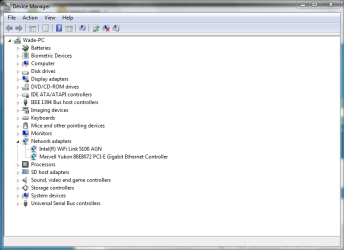
Can you go into Device manager, and expand the Network Adapters category?

Like so...
 

Attachments

  • Capture 5.PNG
    Capture 5.PNG
    21.7 KB · Views: 7

My Computer

Computer Manufacturer/Model Number
Toshiba P300
OS
Windows 8 Pro
CPU
Intel Centrino Dual Core P7450 2.13GHz
Memory
4gb
Graphics Card(s)
ATI Mobility Raedon HD3650
Hard Drives
Toshiba MK3252GSX ATA
Internet Speed
Wish it were faster
will it because of compatibility problem? i have only 128mb integrated graphic card. since i am using windows 7 ultimate version does it cause problems like this??
 

My Computer

OS
windows 7
CPU
intel core 2 duo 2.66 Ghz
Motherboard
MSI
Memory
2GB
Graphics Card(s)
integrated
Hard Drives
250GB
here is my device manager...
 

Attachments

  • Untitled.png
    Untitled.png
    40.2 KB · Views: 14

My Computer

OS
windows 7
CPU
intel core 2 duo 2.66 Ghz
Motherboard
MSI
Memory
2GB
Graphics Card(s)
integrated
Hard Drives
250GB
Hi Vignesh
I see your friend bought you an OEM version of Windows 7 which is a shame because an upgrade fron Vista which I assume you had before is usually only very slightly more expensive than the OEM version.
OEM carries certain conditions among them this (quoted from a software Microsoft Partner:

Please note: This OEM software is intended for system builders only and cannot be transferred to another PC once it is installed. The purchaser of this software is required to comply with the terms of the System Builder license, including the responsibility of providing all end-user support for the software.

This may or may not be part of your problem. Unfortunately you do not have Microsoft support as you would with an upgrade so unless any other members can come up with a better solution I can only suggest that you do a clean install. That's about the limit of my knowledge I'm afraid.
Good luck anyway
 

My Computer

Computer type
PC/Desktop
OS
Microsoft Windows 7 Home Premium 64-bit 7601 Multiprocessor Free Service Pack 1
CPU
Intel(R) Core(TM) i7-3770 CPU @ 3.40GHz
Motherboard
ASUSTeK COMPUTER INC. P8H77-M
Memory
8.00 GB
Graphics Card(s)
Intel(R) HD Graphics 4000
Sound Card
On Board
Monitor(s) Displays
Dell 24"
Screen Resolution
1920 x 1080
Hard Drives
(1) INTEL SSDSC2CT180A3 ATA Device (2) ST500DM002-1BD142 ATA Device (3) WDC WD3200AAKS-75L9A0 ATA Device (4) Generic- Compact Flash USB Device (5) Generic- MS/MS-Pro USB Device (6) Generic- SD/MMC USB Device (7) Generic- SM/xD-Picture USB
PSU
500w Corsair
Case
Cooler Master
Cooling
3 Fans
Keyboard
Logitech MK300
Mouse
Logitech WOM
Internet Speed
75Mb
Antivirus
Norton 360
Browser
Firefox, Opera, IE
Is your computer by any chance an HP?

I would try re-installing your realtek PCI-E ethernet driver.

After doing a quick google search, I see those drivers on HP's driver support pages.
 

My Computer

Computer Manufacturer/Model Number
Toshiba P300
OS
Windows 8 Pro
CPU
Intel Centrino Dual Core P7450 2.13GHz
Memory
4gb
Graphics Card(s)
ATI Mobility Raedon HD3650
Hard Drives
Toshiba MK3252GSX ATA
Internet Speed
Wish it were faster
sorry mine is not HP. my motherboard is MSI
 

My Computer

OS
windows 7
CPU
intel core 2 duo 2.66 Ghz
Motherboard
MSI
Memory
2GB
Graphics Card(s)
integrated
Hard Drives
250GB
Have you activated/validated your copy of Windows on your computer?
 

My Computer

Computer Manufacturer/Model Number
Home built
OS
Windows 7 Ultimate 32 bit
CPU
Intel(R) Pentium(R) 4 CPU 3.00GHz
Motherboard
ASUS P4P800-VM Motherboard Chipset: Intel 865G + ICH5
Memory
2.50 GB RAM
Graphics Card(s)
NVIDIA GeForce 7600 GS
Sound Card
SoundMax Integrated Digital Audio (Chip)
Monitor(s) Displays
ViewSonic VX 1962 wm
Screen Resolution
1680 X 1050
Hard Drives
Seagate Barracuda 7200.10 80 GB
ST380215A ATA Device 18.6 GB
Western Digital "My Book" external hard drive 750 GB
Cooling
Fan based
Keyboard
Microsoft Comfort Curve Keyboard 2000 v10 USB
Mouse
Logitec optic USB
Internet Speed
3.01 Mb/s download 0.64 Mb/s upload
i have done a clean install, because i had no other option. it seems to be working fine for now. but i feel anytime i may get the problem.
 

My Computer

OS
windows 7
CPU
intel core 2 duo 2.66 Ghz
Motherboard
MSI
Memory
2GB
Graphics Card(s)
integrated
Hard Drives
250GB
Sometimes a clean installation takes less time than figuring out a problem. Run Windows Updates to get everything up to date... Now make an image of your drive. Now you have a clean installation to fall back on in case of an emergency. Restoring from an image will have you back to a clean installation in 10 minutes.

Here's a useful tutorial on how to image your hard drive
http://www.sevenforums.com/tutorials/663-backup-complete-computer-create-image-backup.html?filter[2]=Backup
 

My Computer

Computer Manufacturer/Model Number
Toshiba P300
OS
Windows 8 Pro
CPU
Intel Centrino Dual Core P7450 2.13GHz
Memory
4gb
Graphics Card(s)
ATI Mobility Raedon HD3650
Hard Drives
Toshiba MK3252GSX ATA
Internet Speed
Wish it were faster
hello dudes,
 

My Computer

OS
windows 7
CPU
intel core 2 duo 2.66 Ghz
Motherboard
MSI
Memory
2GB
Graphics Card(s)
integrated
Hard Drives
250GB
Back
Top