System hangs when external hard disk is accessed

shwetha

New member
Local time
1:14 AM
Messages
8
I have a 1 TB western digital external portable hard disk (of my passport series).
It was perfectly fine, until now. Whenever I try to access it, my system hangs. And sometimes it does open but it takes a awful lot of time. What maybe the reason for this. Can anyone help me on this matter?
 

My Computer

OS
Microsoft Windows 7 Ultimate 32-bit 7600 Multiprocessor Free
CPU
AMD Athlon(tm) 64 X2 Dual Core Processor 5000+
Motherboard
MICRO-STAR INTERANTIONAL CO.,LTD MS-7373
Memory
2.00 GB
Graphics Card(s)
ATI Radeon X1200 Series (Microsoft Corporation - WDDM)
Sound Card
High Definition Audio Device

My Computer

Computer type
PC/Desktop
Computer Manufacturer/Model Number
Self built custom
OS
64-bit Windows 11 Pro for Workstations
CPU
Intel i7-8700K OC'd to 5 GHz
Motherboard
ASUS ROG Maximus XI Formula Z390
Memory
64 GB (4x16GB) G.SKILL TridentZ RGB DDR4 3600 MHz
Graphics Card(s)
ASUS ROG-STRIX-GTX1080TI-O11G-GAMING
Sound Card
Integrated
Monitor(s) Displays
2 x Samsung Odyssey G7 27"
Screen Resolution
2560x1440
Hard Drives
1TB Samsung 990 PRO M.2,
4TB Samsung 990 PRO PRO M.2,
TerraMaster F8 SSD Plus NAS
PSU
Seasonic Prime Titanium 850W
Case
Thermaltake Core P3
Cooling
Corsair Hydro H115i
Keyboard
Logitech wireless K800
Mouse
Logitech MX Master 4
Internet Speed
2 Gb/s Download and 100 Mb/s Upload
Antivirus
Malwarebyte Anti-Malware Premium
Browser
Google Chrome
Other Info
Logitech Z625 speaker system,
Logitech BRIO 4K Pro webcam,
HP Color LaserJet Pro MFP M477fdn,
APC SMART-UPS RT 1000 XL - SURT1000XLI,
Galaxy S23 Plus phone
Have you installed any software recently that could possibly have an impact on this? I know that ESET security creates this problem. Possibly some other software too.

Suggest you restore the sytem to a point back in time where you think there was no problem.
 

My Computer

OS
Windows 7 Home Premium 32 bit
Thanks Shawn and jumanji for your suggestions.
Shawn, I've changed it to never, but I am not very sure if it was really a problem coz it has worked perfectly fine till now. And the problem cropped up just 2 days back.
Jumanji,I could not restore it to a earlier point of time, since I'd never created a time stamp in System restore.
I will post if i get any positive results. Thanks once again to both of you. Appreciate your help.
 

My Computer

OS
Microsoft Windows 7 Ultimate 32-bit 7600 Multiprocessor Free
CPU
AMD Athlon(tm) 64 X2 Dual Core Processor 5000+
Motherboard
MICRO-STAR INTERANTIONAL CO.,LTD MS-7373
Memory
2.00 GB
Graphics Card(s)
ATI Radeon X1200 Series (Microsoft Corporation - WDDM)
Sound Card
High Definition Audio Device
The icon for the drive does not show up at times when i connect. Or sometimes if I check the properties of the drive it shows 0 bytes everywhere or the window becomes non responsive. I'd just bought it 6 months ago. I am really confused about what might be wrong. Please help me.
 

My Computer

OS
Microsoft Windows 7 Ultimate 32-bit 7600 Multiprocessor Free
CPU
AMD Athlon(tm) 64 X2 Dual Core Processor 5000+
Motherboard
MICRO-STAR INTERANTIONAL CO.,LTD MS-7373
Memory
2.00 GB
Graphics Card(s)
ATI Radeon X1200 Series (Microsoft Corporation - WDDM)
Sound Card
High Definition Audio Device
Try going to Western Digital's web site and downloading their diagnostic program, Data Lifeguard for Windows to check the drive for problems. That should tell you whether there is a problem with the hard drive or whether it is something else.
 

My Computers

System One System Two

  • Computer type
    PC/Desktop
    Computer Manufacturer/Model Number
    ALWAYS UNDER CONSTRUCTION
    OS
    Windows 11 Pro
    CPU
    Ryzen 9 5900X
    Motherboard
    Asus X570 Crosshair Viii Hero
    Memory
    32GB G Skill DDR4-3600
    Graphics Card(s)
    EVGA RTX 3080 FTW 3 Ultra
    Sound Card
    On Board/Sennheiser PC37X Headset
    Monitor(s) Displays
    3 X Asus 27"
    Screen Resolution
    2560x1440
    Hard Drives
    2 X 1 TB NVME drives
    PSU
    EVGA 850
    Case
    Phanteks Eclipse P400A
    Cooling
    EVGA 280 AIO
    Keyboard
    Logitech G510s/ Logitech G13
    Mouse
    Logitech G502
    Internet Speed
    24/1
    Antivirus
    ESET/MBAM Pro/SAS Pro
    Browser
    Chrome/ Firefox/ Edge
  • Computer type
    Laptop
    System Manufacturer/Model Number
    Dell 16 Plus
    OS
    Windows 11 Pro
    CPU
    Intel Ultra 9 288V
    Memory
    32 GB LPDDR5X 8533
    Monitor(s) Displays
    16" Mini-LED HDR600 Touch 90 Hz
    Screen Resolution
    2560X1600
    Hard Drives
    1 TB NVME
Plug your Western Digital into another PC and check whether it exhibits the same problem.

If it does, then check your external as essenbe has suggested above.

To help us help you better, please fill in your System Specifications in the User CP.

http://www.sevenforums.com/tutorials/180324-system-info-see-your-system-specs.html

Do post a screenshot of the Disk Management with the external plugged in.

Right click on Computer > Manage > Disk Management.
 
Last edited:

My Computer

OS
Windows 7 Home Premium 32 bit
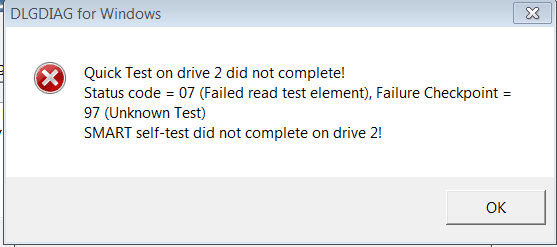
During the quick test i got a message saying that Capture.PNG

Here's the screenshot of Disk Management


Capture.PNG
 
Last edited by a moderator:

My Computer

OS
Microsoft Windows 7 Ultimate 32-bit 7600 Multiprocessor Free
CPU
AMD Athlon(tm) 64 X2 Dual Core Processor 5000+
Motherboard
MICRO-STAR INTERANTIONAL CO.,LTD MS-7373
Memory
2.00 GB
Graphics Card(s)
ATI Radeon X1200 Series (Microsoft Corporation - WDDM)
Sound Card
High Definition Audio Device
OK, Thanks for putting in the system specs and also the screenshot.

The screenshot does not show anything obviously wrong. However it does not mean that nothing is wrong with the drive.

The quick test failure is not a good sign. IMO, the drive may have developed bad sectors and may be in the process of deteriorating.( A repair and reformat in some cases had restored the drive good and arrested any further deterioration)

Now try running the other tests and check whether the bad sectors are repaired.

If the Windows version is unable to repair the bad sectors and throws up an error message, download the DOS version, burn it on to a CD, boot from the CD and run the tests.( Sometimes Windows is not capable of repairing when it is active. Putting it to rest and running DOS may help. :))

And before doing this check to see if you can backup any important data you may have on the drive.

EDIT: If the drive is under warranty, invoke the warranty replacement if the drive cannot be repaired by the software.
 

My Computer

OS
Windows 7 Home Premium 32 bit
Thanks jumanji. I will try doing this :)
It is under warranty, but I wanted to see if there's anything I could do before replacing it. :)
 

My Computer

OS
Microsoft Windows 7 Ultimate 32-bit 7600 Multiprocessor Free
CPU
AMD Athlon(tm) 64 X2 Dual Core Processor 5000+
Motherboard
MICRO-STAR INTERANTIONAL CO.,LTD MS-7373
Memory
2.00 GB
Graphics Card(s)
ATI Radeon X1200 Series (Microsoft Corporation - WDDM)
Sound Card
High Definition Audio Device
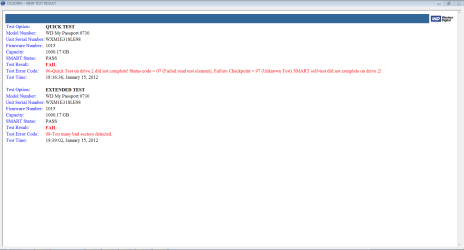
This is the result I got when I ran the quick and extended tests. So now is there no hope that it may work properly? :cry:

Capture.PNG
 

My Computer

OS
Microsoft Windows 7 Ultimate 32-bit 7600 Multiprocessor Free
CPU
AMD Athlon(tm) 64 X2 Dual Core Processor 5000+
Motherboard
MICRO-STAR INTERANTIONAL CO.,LTD MS-7373
Memory
2.00 GB
Graphics Card(s)
ATI Radeon X1200 Series (Microsoft Corporation - WDDM)
Sound Card
High Definition Audio Device
Try to copy as much data from the external as possible and then run a 'clean all' command from diskpart. We can provide instructions if needed. I would then contact Western Digital for an RMA.
 

My Computers

System One System Two

  • Computer type
    PC/Desktop
    Computer Manufacturer/Model Number
    ALWAYS UNDER CONSTRUCTION
    OS
    Windows 11 Pro
    CPU
    Ryzen 9 5900X
    Motherboard
    Asus X570 Crosshair Viii Hero
    Memory
    32GB G Skill DDR4-3600
    Graphics Card(s)
    EVGA RTX 3080 FTW 3 Ultra
    Sound Card
    On Board/Sennheiser PC37X Headset
    Monitor(s) Displays
    3 X Asus 27"
    Screen Resolution
    2560x1440
    Hard Drives
    2 X 1 TB NVME drives
    PSU
    EVGA 850
    Case
    Phanteks Eclipse P400A
    Cooling
    EVGA 280 AIO
    Keyboard
    Logitech G510s/ Logitech G13
    Mouse
    Logitech G502
    Internet Speed
    24/1
    Antivirus
    ESET/MBAM Pro/SAS Pro
    Browser
    Chrome/ Firefox/ Edge
  • Computer type
    Laptop
    System Manufacturer/Model Number
    Dell 16 Plus
    OS
    Windows 11 Pro
    CPU
    Intel Ultra 9 288V
    Memory
    32 GB LPDDR5X 8533
    Monitor(s) Displays
    16" Mini-LED HDR600 Touch 90 Hz
    Screen Resolution
    2560X1600
    Hard Drives
    1 TB NVME
Did you run the DOS version of the tool? As experienced by some users the DOS version was able to repair the bad sectors, when the Windows version failed to.

In any case, as essenbe says, your first priority now is to recover as much data as possible, before trying out anything ( if you consider that you do have some important data you may not like to lose :)).

First use Recuva and check whether it can do the job.

If it fails, the next option I would try is to access the drive with another OS and copy the data if possible.

http://www.sevenforums.com/software...-files-non-bootable-computer.html#post1669991

(In your case the copy process will be from the faulty external drive to your C drive or any other internal partition - space permitting - or to another external drive.)
 

My Computer

OS
Windows 7 Home Premium 32 bit
I am yet to try the DOS version. And I will try my best to copy the important data from it. But the system simply hangs whenever i try. But I will try again. Thanks jumanji and essenbe.
 

My Computer

OS
Microsoft Windows 7 Ultimate 32-bit 7600 Multiprocessor Free
CPU
AMD Athlon(tm) 64 X2 Dual Core Processor 5000+
Motherboard
MICRO-STAR INTERANTIONAL CO.,LTD MS-7373
Memory
2.00 GB
Graphics Card(s)
ATI Radeon X1200 Series (Microsoft Corporation - WDDM)
Sound Card
High Definition Audio Device

My Computers

System One System Two

  • Computer type
    PC/Desktop
    Computer Manufacturer/Model Number
    ALWAYS UNDER CONSTRUCTION
    OS
    Windows 11 Pro
    CPU
    Ryzen 9 5900X
    Motherboard
    Asus X570 Crosshair Viii Hero
    Memory
    32GB G Skill DDR4-3600
    Graphics Card(s)
    EVGA RTX 3080 FTW 3 Ultra
    Sound Card
    On Board/Sennheiser PC37X Headset
    Monitor(s) Displays
    3 X Asus 27"
    Screen Resolution
    2560x1440
    Hard Drives
    2 X 1 TB NVME drives
    PSU
    EVGA 850
    Case
    Phanteks Eclipse P400A
    Cooling
    EVGA 280 AIO
    Keyboard
    Logitech G510s/ Logitech G13
    Mouse
    Logitech G502
    Internet Speed
    24/1
    Antivirus
    ESET/MBAM Pro/SAS Pro
    Browser
    Chrome/ Firefox/ Edge
  • Computer type
    Laptop
    System Manufacturer/Model Number
    Dell 16 Plus
    OS
    Windows 11 Pro
    CPU
    Intel Ultra 9 288V
    Memory
    32 GB LPDDR5X 8533
    Monitor(s) Displays
    16" Mini-LED HDR600 Touch 90 Hz
    Screen Resolution
    2560X1600
    Hard Drives
    1 TB NVME
There was nothing I could do about it. :(:( So I gave it for replacement, since it is under warranty. Thanks a lot for trying to help me out... :)
 

My Computer

OS
Microsoft Windows 7 Ultimate 32-bit 7600 Multiprocessor Free
CPU
AMD Athlon(tm) 64 X2 Dual Core Processor 5000+
Motherboard
MICRO-STAR INTERANTIONAL CO.,LTD MS-7373
Memory
2.00 GB
Graphics Card(s)
ATI Radeon X1200 Series (Microsoft Corporation - WDDM)
Sound Card
High Definition Audio Device
External Hard Drive crashes system

Guys, I used to face one very critical issue with my 320GB external Hard Drive. I am using windows 7.

PROBLEM:
Wheneven I used to connect the drive, the system used to freez completely. Hard reboot used to be the only way out.
Wait, life is not back on track yet. During reboot, the machine keeps on waiting "starting widows" screen. The next option used to be hard reboot again and keep pressing F8 button, select "boot into last known good configuration" and then you take the breath of relief.
Never dare to connect the drive again.

SOLUTION:
Initial guess was Symantec endpoint protection, thinking it starts the scan process and goes into huge data processing loop. Tried to disable but as it was office laptop and was installed with the client version only, not allowed.

The culprit turned out to be a different security software which was installed in this machine. "Bit9", name itself sounds scary. Had to disable the running service "Parity agent" and the smile is back on face. Hard drive is working well.
 

My Computer

OS
Karnataka
Back
Top