System Icons - Enable or Disable

How to Enable or Disable System Icons on Taskbar in Windows 7 and Windows 8

   Information
The notification area is a part of the taskbar that provides a temporary source for notifications and status. It can also be used to display icons for system and program features that are not on the desktop. The notification area was known historically as the system tray or status area.

By default, the only icons that will be visible in this area are some system icons. However, you can select which icons appear on the taskbar, and which icons hide in the overflow section.

This will show you how to enable or disable the Notification Area System Icons for all user accounts on the computer. These are the Clock, Volume, Network, Action Center, and Power (battery) icons in the bottom right corner of the taskbar.

You must be logged in as an administrator to be able to do the steps in this tutorial.

   Note
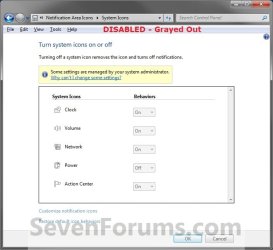
When disabled, these icons are grayed out in System Icons and will no longer appear at the Notification Area.

When enabled, these icons can be turned on and off at will in System Icons and will appear in the Notification Area if turned on.


   Tip

  • Check to make sure that the system icon is turned on.
  • Check to make sure that the system icon is not hidden.
  • Make sure that the drivers and devices that are for the system icons are installed and working properly. They will not work if the device or driver does not.
  • Sometimes to simply log off and log on, or restart the computer, will enable the missing notification icons again. You should try this first.
  • Sometimes resetting the Notification Icons will clear the problem.
  • Sometimes on a laptop, you can shutdown the laptop and remove the battery pack, reconnect it, and power the laptop back up to get the Power (battery) icon back or ungrayed.
EXAMPLE: System Icons
NOTE: When disabled, the system icons will be grayed out and cannot be turned on and off by all users on the computer.
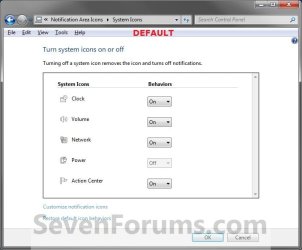
Example1.jpg

Example2.jpg


OPTION ONE

Through Local Group Policy Editor


1. Open the all users, specific users or groups, or all users except administrators Local Group Policy Editor for how you want this policy applied.

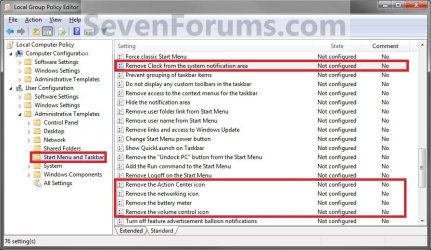
2. In the left pane, click/tap on an expand User Configuration, Administrative Templates, and Start Menu and Taskbar. (See screenshot below)
Group_Policy.jpg
3. For the Clock Icon - In the right pane, double click/tap on Remove Clock from the system notification area to edit it. (See screenshot above)
A) To Disable the Clock Icon - Select (dot) Enabled and click/tap on OK. (See screenshot below step 8)

B) To Enable the Clock Icon - Select (dot) Disabled or Not Configured and click/tap on OK. (See screenshot below step 8)
4. For the Volume Icon - In the right pane, double click/tap on Remove the volume control icon to edit it. (See screenshot below step 2)
A) To Disable the Volume Icon - Select (dot) Enabled and click/tap on OK. (See screenshot below step 8)

B) To Enable the Volume Icon - Select (dot) Disabled or Not Configured and click/tap on OK. (See screenshot below step 8)
5. For the Network Icon - In the right pane, double click/tap on Remove the networking icon to edit it. (See screenshot below step 2)
NOTE: To make sure that this icon works properly you should also have the Network Connections, Network List Service, Network Location Awareness, and Network Store Interface Service Services set to Started and Automatic.
A) To Disable the Network Icon - Select (dot) Enabled and click/tap on OK. (See screenshot below step 8)

B) To Enable the Netwok Icon - Select (dot) Disabled or Not Configured and click/tap on OK. (See screenshot below step 8)
6. For the Power (battery) Icon - In the right pane, double click/tap on Remove the battery meter to edit it. (See screenshot below step 2)
NOTE: This will remain grayed out, even when enabled, unless your computer is a laptop or has a UPS battery backup connected to it.
A) To Disable the Power Icon - Select (dot) Enabled and click/tap on OK. (See screenshot below step 8)

B) To Enable the Power Icon - Select (dot) Disabled or Not Configured and click/tap on OK. (See screenshot below step 8)
7. For the Action Center Icon - In the right pane, double click/tap on Remove the Action Center icon to edit it. (See screenshot below step 2)
A) To Disable the Action Center Icon - Select (dot) Enabled and click/tap on OK. (See screenshot below step 8)

B) To Enable the Action Center Icon - Select (dot) Disabled or Not Configured and click/tap on OK. (See screenshot below step 8)
8. When done, close the Local Group Policy Editor.
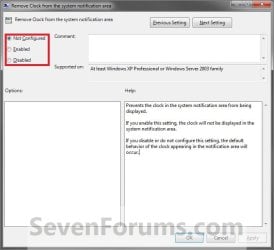
Properties.jpg
9. Log off and log on, or restart the computer to fully apply.


OPTION TWO

Using a REG File Download


1. To Enable the Action Center Icon
A) Click/tap on the Download button below to download the file below.
Enable_Action_Center_Notification_Icon.reg

Download


2. To Disable the Action Center Icon
A) Click/tap on the Download button below to download the file below.
Disable_Action_Center_Notification_Icon.reg

Download


3. To Enable the Clock Icon
A) Click/tap on the Download button below to download the file below.
Enable_Clock_Notification_Icon.reg

Download


4. To Disable the Clock Icon
A) Click/tap on the Download button below to download the file below.
Disable_Clock_Notification_Icon.reg

Download


5. To Enable the Network Icon
A) Click/tap on the Download button below to download the file below.
Enable_Network_Notification_Icon.reg

Download


6. To Disable the Network Icon
A) Click/tap on the Download button below to download the file below.
Enable_Network_Notification_Icon.reg

Download


7. To Enable the Power (battery) Icon
A) Click/tap on the Download button below to download the file below.
Enable_Power_Notification_Icon.reg

Download


8. To Disable the Power (battery) Icon
A) Click/tap on the Download button below to download the file below.
Disable_Clock_Notification_Icon.reg

Download


9. To Enable the Volume Icon
A) Click/tap on the Download button below to download the file below.
Enable_Volume_Notification_Icon.reg

Download


10. To Disable the Volume Icon
A) Click/tap on the Download button below to download the file below.
Disable_Volume_Notification_Icon.reg

Download


11. Save the .reg file to your Desktop.

12. Double click/tap on the downloaded .reg file to merge it.

13. Click/tap on Run, Yes (UAC), Yes, and OK when prompted.

14. Log off and log on, or restart the computer to fully apply.

15. When done, you can delete the downloaded .reg file if you like.
That's it,
Shawn


Attachments

Last edited:
I have Windows 7 Home - all my system icon on/off buttons have been grayed out except for the clock. Weird thing is - ever since the icons disappeared from my taskbar I can only connect to my home wireless network. I cannot connect to public networks that I previously could.
I have tried system restores, virus checks (nothing found) Microsoft fix it download, and manually fixing it per their directions. I saw you said this tutorial will not work for Windows 7 Home - could you direct me to a tutorial for my OS?
Thanks! Hollie
 

My Computer

OS
Windows 7 Home Premium
Hello Hollie, and welcome to Seven Forums.

Only OPTION ONE will not work in Home Premium since Home Premium doesn't include the "Local Group Policy Editor" feature.

However, you will be able to use OPTION TWO to hopefully enable the grayed out system icons instead.
 
Last edited:

My Computer

Computer type
PC/Desktop
Computer Manufacturer/Model Number
Self built custom
OS
64-bit Windows 11 Pro for Workstations
CPU
Intel i7-8700K OC'd to 5 GHz
Motherboard
ASUS ROG Maximus XI Formula Z390
Memory
64 GB (4x16GB) G.SKILL TridentZ RGB DDR4 3600 MHz
Graphics Card(s)
ASUS ROG-STRIX-GTX1080TI-O11G-GAMING
Sound Card
Integrated
Monitor(s) Displays
2 x Samsung Odyssey G7 27"
Screen Resolution
2560x1440
Hard Drives
1TB Samsung 990 PRO M.2,
4TB Samsung 990 PRO PRO M.2,
TerraMaster F8 SSD Plus NAS
PSU
Seasonic Prime Titanium 850W
Case
Thermaltake Core P3
Cooling
Corsair Hydro H115i
Keyboard
Logitech wireless K800
Mouse
Logitech MX Master 4
Internet Speed
2 Gb/s Download and 100 Mb/s Upload
Antivirus
Malwarebyte Anti-Malware Premium
Browser
Google Chrome
Other Info
Logitech Z625 speaker system,
Logitech BRIO 4K Pro webcam,
HP Color LaserJet Pro MFP M477fdn,
APC SMART-UPS RT 1000 XL - SURT1000XLI,
Galaxy S23 Plus phone
Thanks for the quick reply; unfortunatley I forgot to mention that Option 2 was another thing I'd already tried. I did try it again, saving the downloads to the desktop, opening/running them, and restarting my computer. All to no avail. I slightly suspect a virus, except for the fact that my 2 virus scanners have found nothing.
 

My Computer

OS
Windows 7 Home Premium
Hollie,

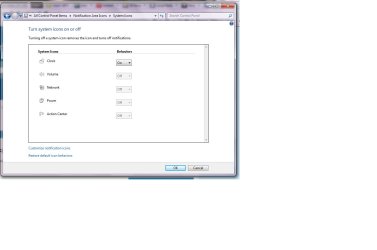
Could you post a screenshot of this window to see if anything may standout as a cause.
 

My Computer

Computer type
PC/Desktop
Computer Manufacturer/Model Number
Self built custom
OS
64-bit Windows 11 Pro for Workstations
CPU
Intel i7-8700K OC'd to 5 GHz
Motherboard
ASUS ROG Maximus XI Formula Z390
Memory
64 GB (4x16GB) G.SKILL TridentZ RGB DDR4 3600 MHz
Graphics Card(s)
ASUS ROG-STRIX-GTX1080TI-O11G-GAMING
Sound Card
Integrated
Monitor(s) Displays
2 x Samsung Odyssey G7 27"
Screen Resolution
2560x1440
Hard Drives
1TB Samsung 990 PRO M.2,
4TB Samsung 990 PRO PRO M.2,
TerraMaster F8 SSD Plus NAS
PSU
Seasonic Prime Titanium 850W
Case
Thermaltake Core P3
Cooling
Corsair Hydro H115i
Keyboard
Logitech wireless K800
Mouse
Logitech MX Master 4
Internet Speed
2 Gb/s Download and 100 Mb/s Upload
Antivirus
Malwarebyte Anti-Malware Premium
Browser
Google Chrome
Other Info
Logitech Z625 speaker system,
Logitech BRIO 4K Pro webcam,
HP Color LaserJet Pro MFP M477fdn,
APC SMART-UPS RT 1000 XL - SURT1000XLI,
Galaxy S23 Plus phone
Here you go. When I click "restore default icon behaviors" nothing happens.
 

Attachments

  • screenshot.jpg
    screenshot.jpg
    94.9 KB · Views: 3,789

My Computer

OS
Windows 7 Home Premium
Hmm, do you have all the drivers for these devices installed?

Do you have a older restore point dated before this started to use?
 

My Computer

Computer type
PC/Desktop
Computer Manufacturer/Model Number
Self built custom
OS
64-bit Windows 11 Pro for Workstations
CPU
Intel i7-8700K OC'd to 5 GHz
Motherboard
ASUS ROG Maximus XI Formula Z390
Memory
64 GB (4x16GB) G.SKILL TridentZ RGB DDR4 3600 MHz
Graphics Card(s)
ASUS ROG-STRIX-GTX1080TI-O11G-GAMING
Sound Card
Integrated
Monitor(s) Displays
2 x Samsung Odyssey G7 27"
Screen Resolution
2560x1440
Hard Drives
1TB Samsung 990 PRO M.2,
4TB Samsung 990 PRO PRO M.2,
TerraMaster F8 SSD Plus NAS
PSU
Seasonic Prime Titanium 850W
Case
Thermaltake Core P3
Cooling
Corsair Hydro H115i
Keyboard
Logitech wireless K800
Mouse
Logitech MX Master 4
Internet Speed
2 Gb/s Download and 100 Mb/s Upload
Antivirus
Malwarebyte Anti-Malware Premium
Browser
Google Chrome
Other Info
Logitech Z625 speaker system,
Logitech BRIO 4K Pro webcam,
HP Color LaserJet Pro MFP M477fdn,
APC SMART-UPS RT 1000 XL - SURT1000XLI,
Galaxy S23 Plus phone
Yes, I've tried restoring it back to a little over a week before I noticed the problem. I must've had the drivers at one time, but I wouldn't know how to find out if I still have them.

I just found the drivers, and they're all working properly. I updated my wireless card driver and restarted my computer, but nothing has changed :0(
 
Last edited by a moderator:

My Computer

OS
Windows 7 Home Premium
An extra step I had to take

Hey there. After running the "enable" registry files above for each of the icons I had to run "gpupdate /force" from an elevated command prompt:

1. Click the Start button.

2. Type CMD in the "Search Programs and Files" box at the bottom of the Start menu and press ctl+shift+enter at the same time. Answer "Yes" when it asks.

3. In the black window that opens type "gpupdate /force" and press enter. This will give you:
"User Policy Refresh Complete"
and
"Computer Policy Refresh Complete"

you may or may not have to restart for it to take affect.

Since you've done a System Restore, I recommend re-running the reg files to enable the icons and then perform the actions I have suggested.


Hope this helps,

Mike
 

My Computer

OS
Windows 7 Home Premium x64
Hello Mike, and welcome to Seven Forums.

That command will only update/refresh group policy for the REG files, restarting the computer or logging off and on at step 14 in the tutorial will update group policy from what the REG files set though.
 

My Computer

Computer type
PC/Desktop
Computer Manufacturer/Model Number
Self built custom
OS
64-bit Windows 11 Pro for Workstations
CPU
Intel i7-8700K OC'd to 5 GHz
Motherboard
ASUS ROG Maximus XI Formula Z390
Memory
64 GB (4x16GB) G.SKILL TridentZ RGB DDR4 3600 MHz
Graphics Card(s)
ASUS ROG-STRIX-GTX1080TI-O11G-GAMING
Sound Card
Integrated
Monitor(s) Displays
2 x Samsung Odyssey G7 27"
Screen Resolution
2560x1440
Hard Drives
1TB Samsung 990 PRO M.2,
4TB Samsung 990 PRO PRO M.2,
TerraMaster F8 SSD Plus NAS
PSU
Seasonic Prime Titanium 850W
Case
Thermaltake Core P3
Cooling
Corsair Hydro H115i
Keyboard
Logitech wireless K800
Mouse
Logitech MX Master 4
Internet Speed
2 Gb/s Download and 100 Mb/s Upload
Antivirus
Malwarebyte Anti-Malware Premium
Browser
Google Chrome
Other Info
Logitech Z625 speaker system,
Logitech BRIO 4K Pro webcam,
HP Color LaserJet Pro MFP M477fdn,
APC SMART-UPS RT 1000 XL - SURT1000XLI,
Galaxy S23 Plus phone
Hey, thanks for all the suggestions! I feel like I'm getting closer to a fix....but still not there yet. My computer is out of warranty by a bit...that probably has something to do with it lol
I'm considering reinstalling my OS. Only problem is, my computer came with a Vista disc, but I was given a free upgrade to Windows 7. So I'll have to revert back to Vista since I'm too cheap to but a 7. Could that possibly fix my problem?
 

My Computer

OS
Windows 7 Home Premium
Hollie,

If it's an illegal copy of Windows 7, then yes you will need to go back to Vista to be legal again.
 

My Computer

Computer type
PC/Desktop
Computer Manufacturer/Model Number
Self built custom
OS
64-bit Windows 11 Pro for Workstations
CPU
Intel i7-8700K OC'd to 5 GHz
Motherboard
ASUS ROG Maximus XI Formula Z390
Memory
64 GB (4x16GB) G.SKILL TridentZ RGB DDR4 3600 MHz
Graphics Card(s)
ASUS ROG-STRIX-GTX1080TI-O11G-GAMING
Sound Card
Integrated
Monitor(s) Displays
2 x Samsung Odyssey G7 27"
Screen Resolution
2560x1440
Hard Drives
1TB Samsung 990 PRO M.2,
4TB Samsung 990 PRO PRO M.2,
TerraMaster F8 SSD Plus NAS
PSU
Seasonic Prime Titanium 850W
Case
Thermaltake Core P3
Cooling
Corsair Hydro H115i
Keyboard
Logitech wireless K800
Mouse
Logitech MX Master 4
Internet Speed
2 Gb/s Download and 100 Mb/s Upload
Antivirus
Malwarebyte Anti-Malware Premium
Browser
Google Chrome
Other Info
Logitech Z625 speaker system,
Logitech BRIO 4K Pro webcam,
HP Color LaserJet Pro MFP M477fdn,
APC SMART-UPS RT 1000 XL - SURT1000XLI,
Galaxy S23 Plus phone
No, I don't think it was illegal; it was a promo through BestBuy - if you bought a certain computer, you could get Windows 7 free when it first came out.
 

My Computer

OS
Windows 7 Home Premium
In that case, it should have came with a product key number and a installation disc for the Windows 7 that you could use to reinstall Windows 7 with. It just depends on what type of Windows 7 installation disc they gave you. For example: full, upgrade, OEM, retail, anytime upgrade, etc......
 

My Computer

Computer type
PC/Desktop
Computer Manufacturer/Model Number
Self built custom
OS
64-bit Windows 11 Pro for Workstations
CPU
Intel i7-8700K OC'd to 5 GHz
Motherboard
ASUS ROG Maximus XI Formula Z390
Memory
64 GB (4x16GB) G.SKILL TridentZ RGB DDR4 3600 MHz
Graphics Card(s)
ASUS ROG-STRIX-GTX1080TI-O11G-GAMING
Sound Card
Integrated
Monitor(s) Displays
2 x Samsung Odyssey G7 27"
Screen Resolution
2560x1440
Hard Drives
1TB Samsung 990 PRO M.2,
4TB Samsung 990 PRO PRO M.2,
TerraMaster F8 SSD Plus NAS
PSU
Seasonic Prime Titanium 850W
Case
Thermaltake Core P3
Cooling
Corsair Hydro H115i
Keyboard
Logitech wireless K800
Mouse
Logitech MX Master 4
Internet Speed
2 Gb/s Download and 100 Mb/s Upload
Antivirus
Malwarebyte Anti-Malware Premium
Browser
Google Chrome
Other Info
Logitech Z625 speaker system,
Logitech BRIO 4K Pro webcam,
HP Color LaserJet Pro MFP M477fdn,
APC SMART-UPS RT 1000 XL - SURT1000XLI,
Galaxy S23 Plus phone
Well, it wasn't on a disc. It was online; I'm pretty sure it was just a one time deal. I remember they gave me a pamphlet with all the info - I don't remember exaclty, but I must've had a code for it.
If reinstalling the OS would definitely work, I think it would be worth the downgrade to Vista to get my connectivity back. (If you recall from my first post, I'm not able to connect wirelessly anywhere except my home.) Do you think installing Vista would fix the problem? Is Vista pretty similar to 7?
 

My Computer

OS
Windows 7 Home Premium
Installing Vista may or may not help. It really depends on what the cause of not be able to connect was, but that's a discussion for a new thread since it's off topic for this one.

In my opinion Windows 7 is much better than Vista. I would recommend to create a new thread in the Network & Sharing forum area with all details about it to see if we may be able to help with this wireless connectivity issue. :)
 

My Computer

Computer type
PC/Desktop
Computer Manufacturer/Model Number
Self built custom
OS
64-bit Windows 11 Pro for Workstations
CPU
Intel i7-8700K OC'd to 5 GHz
Motherboard
ASUS ROG Maximus XI Formula Z390
Memory
64 GB (4x16GB) G.SKILL TridentZ RGB DDR4 3600 MHz
Graphics Card(s)
ASUS ROG-STRIX-GTX1080TI-O11G-GAMING
Sound Card
Integrated
Monitor(s) Displays
2 x Samsung Odyssey G7 27"
Screen Resolution
2560x1440
Hard Drives
1TB Samsung 990 PRO M.2,
4TB Samsung 990 PRO PRO M.2,
TerraMaster F8 SSD Plus NAS
PSU
Seasonic Prime Titanium 850W
Case
Thermaltake Core P3
Cooling
Corsair Hydro H115i
Keyboard
Logitech wireless K800
Mouse
Logitech MX Master 4
Internet Speed
2 Gb/s Download and 100 Mb/s Upload
Antivirus
Malwarebyte Anti-Malware Premium
Browser
Google Chrome
Other Info
Logitech Z625 speaker system,
Logitech BRIO 4K Pro webcam,
HP Color LaserJet Pro MFP M477fdn,
APC SMART-UPS RT 1000 XL - SURT1000XLI,
Galaxy S23 Plus phone
Okay will do. But I might still be bridging the two threads, since I'm pretty sure the problems are related, because they happened simultaneously. But we'll see if anyone has any better ideas...
 

My Computer

OS
Windows 7 Home Premium
I'm hoping you can help me. A short time ago I became infected with Win 7 security 2012. I've slowly deleted this scourge and have my system back better than ever. You can trust me when I say it has been fully removed. I had a couple of residual effects to fix. One is the windows firewall. I now have restored that function. There is one item I just can't seem to fix or find anybody to help me with. The tech support at Malwarebytes has been great. He has tried about 20 or so different ideas to fix this problem. I came across your site and this board during my searches for a cure. In fact I downloaded and installed your reg file to enable the action center icon. That is the problem I have. It is grayed out and there seems to be no way to get it back on. That virus turned it off somewhere but can't find out where and how. Running your reg fix didn't do it. I really need that icon and to get it running. I can get windows updates but only manually. Without that running on my system I don't receive any notifications or auto updates. Just wondering if you have any suggestions?
 

My Computer

OS
Windows 7 home premium x64
Hello Chunker, and welcome to Seven Forums.

You might see if using the Find and Find next feature in regedit to search for all instances of a HideSCAHealth string value, and delete any that are found may help when finished and restarting the computer.

Hope this helps,
Shawn
 

My Computer

Computer type
PC/Desktop
Computer Manufacturer/Model Number
Self built custom
OS
64-bit Windows 11 Pro for Workstations
CPU
Intel i7-8700K OC'd to 5 GHz
Motherboard
ASUS ROG Maximus XI Formula Z390
Memory
64 GB (4x16GB) G.SKILL TridentZ RGB DDR4 3600 MHz
Graphics Card(s)
ASUS ROG-STRIX-GTX1080TI-O11G-GAMING
Sound Card
Integrated
Monitor(s) Displays
2 x Samsung Odyssey G7 27"
Screen Resolution
2560x1440
Hard Drives
1TB Samsung 990 PRO M.2,
4TB Samsung 990 PRO PRO M.2,
TerraMaster F8 SSD Plus NAS
PSU
Seasonic Prime Titanium 850W
Case
Thermaltake Core P3
Cooling
Corsair Hydro H115i
Keyboard
Logitech wireless K800
Mouse
Logitech MX Master 4
Internet Speed
2 Gb/s Download and 100 Mb/s Upload
Antivirus
Malwarebyte Anti-Malware Premium
Browser
Google Chrome
Other Info
Logitech Z625 speaker system,
Logitech BRIO 4K Pro webcam,
HP Color LaserJet Pro MFP M477fdn,
APC SMART-UPS RT 1000 XL - SURT1000XLI,
Galaxy S23 Plus phone
Thanks for the suggestion. I gave it a try and the search came back negative, no entries. I think I've done about a few dozen things these last two weeks with still no success.
 

My Computer

OS
Windows 7 home premium x64
Back
Top