System Icons - Enable or Disable

How to Enable or Disable System Icons on Taskbar in Windows 7 and Windows 8

   Information
The notification area is a part of the taskbar that provides a temporary source for notifications and status. It can also be used to display icons for system and program features that are not on the desktop. The notification area was known historically as the system tray or status area.

By default, the only icons that will be visible in this area are some system icons. However, you can select which icons appear on the taskbar, and which icons hide in the overflow section.

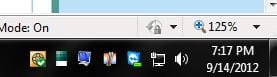
This will show you how to enable or disable the Notification Area System Icons for all user accounts on the computer. These are the Clock, Volume, Network, Action Center, and Power (battery) icons in the bottom right corner of the taskbar.

You must be logged in as an administrator to be able to do the steps in this tutorial.

   Note
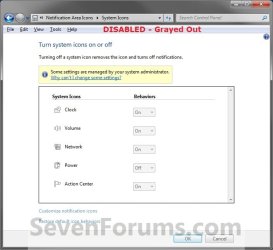
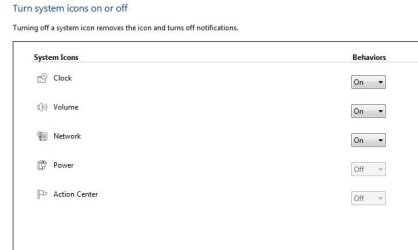
When disabled, these icons are grayed out in System Icons and will no longer appear at the Notification Area.

When enabled, these icons can be turned on and off at will in System Icons and will appear in the Notification Area if turned on.


   Tip

  • Check to make sure that the system icon is turned on.
  • Check to make sure that the system icon is not hidden.
  • Make sure that the drivers and devices that are for the system icons are installed and working properly. They will not work if the device or driver does not.
  • Sometimes to simply log off and log on, or restart the computer, will enable the missing notification icons again. You should try this first.
  • Sometimes resetting the Notification Icons will clear the problem.
  • Sometimes on a laptop, you can shutdown the laptop and remove the battery pack, reconnect it, and power the laptop back up to get the Power (battery) icon back or ungrayed.
EXAMPLE: System Icons
NOTE: When disabled, the system icons will be grayed out and cannot be turned on and off by all users on the computer.
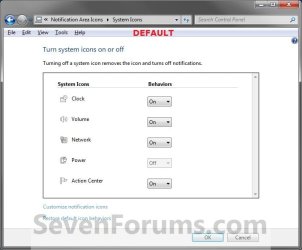
Example1.jpg

Example2.jpg


OPTION ONE

Through Local Group Policy Editor


1. Open the all users, specific users or groups, or all users except administrators Local Group Policy Editor for how you want this policy applied.

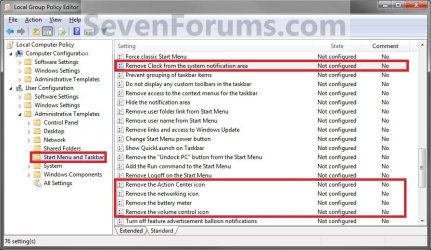
2. In the left pane, click/tap on an expand User Configuration, Administrative Templates, and Start Menu and Taskbar. (See screenshot below)
Group_Policy.jpg
3. For the Clock Icon - In the right pane, double click/tap on Remove Clock from the system notification area to edit it. (See screenshot above)
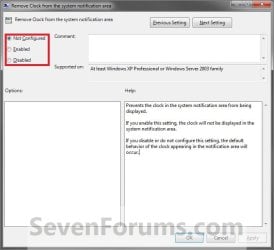
A) To Disable the Clock Icon - Select (dot) Enabled and click/tap on OK. (See screenshot below step 8)

B) To Enable the Clock Icon - Select (dot) Disabled or Not Configured and click/tap on OK. (See screenshot below step 8)
4. For the Volume Icon - In the right pane, double click/tap on Remove the volume control icon to edit it. (See screenshot below step 2)
A) To Disable the Volume Icon - Select (dot) Enabled and click/tap on OK. (See screenshot below step 8)

B) To Enable the Volume Icon - Select (dot) Disabled or Not Configured and click/tap on OK. (See screenshot below step 8)
5. For the Network Icon - In the right pane, double click/tap on Remove the networking icon to edit it. (See screenshot below step 2)
NOTE: To make sure that this icon works properly you should also have the Network Connections, Network List Service, Network Location Awareness, and Network Store Interface Service Services set to Started and Automatic.
A) To Disable the Network Icon - Select (dot) Enabled and click/tap on OK. (See screenshot below step 8)

B) To Enable the Netwok Icon - Select (dot) Disabled or Not Configured and click/tap on OK. (See screenshot below step 8)
6. For the Power (battery) Icon - In the right pane, double click/tap on Remove the battery meter to edit it. (See screenshot below step 2)
NOTE: This will remain grayed out, even when enabled, unless your computer is a laptop or has a UPS battery backup connected to it.
A) To Disable the Power Icon - Select (dot) Enabled and click/tap on OK. (See screenshot below step 8)

B) To Enable the Power Icon - Select (dot) Disabled or Not Configured and click/tap on OK. (See screenshot below step 8)
7. For the Action Center Icon - In the right pane, double click/tap on Remove the Action Center icon to edit it. (See screenshot below step 2)
A) To Disable the Action Center Icon - Select (dot) Enabled and click/tap on OK. (See screenshot below step 8)

B) To Enable the Action Center Icon - Select (dot) Disabled or Not Configured and click/tap on OK. (See screenshot below step 8)
8. When done, close the Local Group Policy Editor.
Properties.jpg
9. Log off and log on, or restart the computer to fully apply.


OPTION TWO

Using a REG File Download


1. To Enable the Action Center Icon
A) Click/tap on the Download button below to download the file below.
Enable_Action_Center_Notification_Icon.reg

Download


2. To Disable the Action Center Icon
A) Click/tap on the Download button below to download the file below.
Disable_Action_Center_Notification_Icon.reg

Download


3. To Enable the Clock Icon
A) Click/tap on the Download button below to download the file below.
Enable_Clock_Notification_Icon.reg

Download


4. To Disable the Clock Icon
A) Click/tap on the Download button below to download the file below.
Disable_Clock_Notification_Icon.reg

Download


5. To Enable the Network Icon
A) Click/tap on the Download button below to download the file below.
Enable_Network_Notification_Icon.reg

Download


6. To Disable the Network Icon
A) Click/tap on the Download button below to download the file below.
Enable_Network_Notification_Icon.reg

Download


7. To Enable the Power (battery) Icon
A) Click/tap on the Download button below to download the file below.
Enable_Power_Notification_Icon.reg

Download


8. To Disable the Power (battery) Icon
A) Click/tap on the Download button below to download the file below.
Disable_Clock_Notification_Icon.reg

Download


9. To Enable the Volume Icon
A) Click/tap on the Download button below to download the file below.
Enable_Volume_Notification_Icon.reg

Download


10. To Disable the Volume Icon
A) Click/tap on the Download button below to download the file below.
Disable_Volume_Notification_Icon.reg

Download


11. Save the .reg file to your Desktop.

12. Double click/tap on the downloaded .reg file to merge it.

13. Click/tap on Run, Yes (UAC), Yes, and OK when prompted.

14. Log off and log on, or restart the computer to fully apply.

15. When done, you can delete the downloaded .reg file if you like.
That's it,
Shawn


Attachments

Last edited:
Chunker,

If you haven't already, then you might run a sfc /scannow command to see if that may help. If not, then you might consider a repair install.

Personally since a virus was involved, I would recommend to format and do a clean install of Windows 7 to be safe.
 

My Computer

Computer type
PC/Desktop
Computer Manufacturer/Model Number
Self built custom
OS
64-bit Windows 11 Pro for Workstations
CPU
Intel i7-8700K OC'd to 5 GHz
Motherboard
ASUS ROG Maximus XI Formula Z390
Memory
64 GB (4x16GB) G.SKILL TridentZ RGB DDR4 3600 MHz
Graphics Card(s)
ASUS ROG-STRIX-GTX1080TI-O11G-GAMING
Sound Card
Integrated
Monitor(s) Displays
2 x Samsung Odyssey G7 27"
Screen Resolution
2560x1440
Hard Drives
1TB Samsung 990 PRO M.2,
4TB Samsung 990 PRO PRO M.2,
TerraMaster F8 SSD Plus NAS
PSU
Seasonic Prime Titanium 850W
Case
Thermaltake Core P3
Cooling
Corsair Hydro H115i
Keyboard
Logitech wireless K800
Mouse
Logitech MX Master 4
Internet Speed
2 Gb/s Download and 100 Mb/s Upload
Antivirus
Malwarebyte Anti-Malware Premium
Browser
Google Chrome
Other Info
Logitech Z625 speaker system,
Logitech BRIO 4K Pro webcam,
HP Color LaserJet Pro MFP M477fdn,
APC SMART-UPS RT 1000 XL - SURT1000XLI,
Galaxy S23 Plus phone
I believe I've already done your latest suggestion. I totally agree with the restore and I do have a system image saved on an external drive that was about 2 and a half months before the virus hit. If all else fails I can always do that. But right now I'm still looking for a quick fix. Since the virus I've done so many changes and improved my security I would hate to lose those and start all over again rebuilding. From Google searches on this subject I see where it is a widespread problem. I'm hoping somewhere someone had an answer.
 

My Computer

OS
Windows 7 home premium x64
Something that I have given some thought on. Maybe you can tell me if it's a far out possibility or not? During the fix period I've been given a few registry entries to merge into registry. Let's just say the one you provide in this forum. I've done that one a couple of times. Now that I know how to find certain things within the registry I know how to search it for items. Well, another person gave me a couple of files that should have fixed my problem. It was two entries both containing the words "HideSCAHealth". I merged that some time ago. Now when I do a find within my registry that term is not found. However when I merged I got the message that it was merged successfully. The same with your reg fix, I got the answer back that it merged successfully. Could it be this virus has done something whereas I'm unable to add items to the registry? I used your file but don't know the word or phrase within it to do a find on it. Maybe it didn't merge either? Could this be possible?
 

My Computer

OS
Windows 7 home premium x64
Chunker,

By default the HideSCAHealth string value is not in the registry. It's only added with a data value of 1 when Action Center is disabled. Deleting HideSCAHealth, or changing it data value to 0 (zero) would normally enable Action Center again. The REG files and group policy do the same thing for this registry setting.

Since the find and find next didn't find any HideSCAHealth entries in your registry, I'm thinking that there's got to me some other unknown item affecting this than the normal group policy setting for this. Unfortunately, I'm not sure what else it may be yet.
 

My Computer

Computer type
PC/Desktop
Computer Manufacturer/Model Number
Self built custom
OS
64-bit Windows 11 Pro for Workstations
CPU
Intel i7-8700K OC'd to 5 GHz
Motherboard
ASUS ROG Maximus XI Formula Z390
Memory
64 GB (4x16GB) G.SKILL TridentZ RGB DDR4 3600 MHz
Graphics Card(s)
ASUS ROG-STRIX-GTX1080TI-O11G-GAMING
Sound Card
Integrated
Monitor(s) Displays
2 x Samsung Odyssey G7 27"
Screen Resolution
2560x1440
Hard Drives
1TB Samsung 990 PRO M.2,
4TB Samsung 990 PRO PRO M.2,
TerraMaster F8 SSD Plus NAS
PSU
Seasonic Prime Titanium 850W
Case
Thermaltake Core P3
Cooling
Corsair Hydro H115i
Keyboard
Logitech wireless K800
Mouse
Logitech MX Master 4
Internet Speed
2 Gb/s Download and 100 Mb/s Upload
Antivirus
Malwarebyte Anti-Malware Premium
Browser
Google Chrome
Other Info
Logitech Z625 speaker system,
Logitech BRIO 4K Pro webcam,
HP Color LaserJet Pro MFP M477fdn,
APC SMART-UPS RT 1000 XL - SURT1000XLI,
Galaxy S23 Plus phone
Then I might be on to something? I don't see those entries at all, at least they can't be found. I'm also pretty sure your icon fix reg file isn't in there either even though I've merged it 2 or 3 times. Thank you for your insight.
 

My Computer

OS
Windows 7 home premium x64
When my REG file is merged, it deletes the HideSCAHealth string value from the normal locations in the registry that group policy places it to usually enable Action Center after restarting the computer. That's why you do not see it in the registry. ;)
 

My Computer

Computer type
PC/Desktop
Computer Manufacturer/Model Number
Self built custom
OS
64-bit Windows 11 Pro for Workstations
CPU
Intel i7-8700K OC'd to 5 GHz
Motherboard
ASUS ROG Maximus XI Formula Z390
Memory
64 GB (4x16GB) G.SKILL TridentZ RGB DDR4 3600 MHz
Graphics Card(s)
ASUS ROG-STRIX-GTX1080TI-O11G-GAMING
Sound Card
Integrated
Monitor(s) Displays
2 x Samsung Odyssey G7 27"
Screen Resolution
2560x1440
Hard Drives
1TB Samsung 990 PRO M.2,
4TB Samsung 990 PRO PRO M.2,
TerraMaster F8 SSD Plus NAS
PSU
Seasonic Prime Titanium 850W
Case
Thermaltake Core P3
Cooling
Corsair Hydro H115i
Keyboard
Logitech wireless K800
Mouse
Logitech MX Master 4
Internet Speed
2 Gb/s Download and 100 Mb/s Upload
Antivirus
Malwarebyte Anti-Malware Premium
Browser
Google Chrome
Other Info
Logitech Z625 speaker system,
Logitech BRIO 4K Pro webcam,
HP Color LaserJet Pro MFP M477fdn,
APC SMART-UPS RT 1000 XL - SURT1000XLI,
Galaxy S23 Plus phone
Ok, that makes a lot of sense. How can I verify that your entry has really been merged into my registry. What can I do a search for to see if it is indeed in there? Sorry to be so bothersome.
 

My Computer

OS
Windows 7 home premium x64
It's no problem mate. I think you are just misunderstanding the REG files a bit. That's all.

My REG file doesn't add anything to the registry. It deletes the HideSCAHealth string value from the two locations specified in the REG file from the registry if there.

If you right click on the REG file and click on Edit, you will see what it does to help.
 

My Computer

Computer type
PC/Desktop
Computer Manufacturer/Model Number
Self built custom
OS
64-bit Windows 11 Pro for Workstations
CPU
Intel i7-8700K OC'd to 5 GHz
Motherboard
ASUS ROG Maximus XI Formula Z390
Memory
64 GB (4x16GB) G.SKILL TridentZ RGB DDR4 3600 MHz
Graphics Card(s)
ASUS ROG-STRIX-GTX1080TI-O11G-GAMING
Sound Card
Integrated
Monitor(s) Displays
2 x Samsung Odyssey G7 27"
Screen Resolution
2560x1440
Hard Drives
1TB Samsung 990 PRO M.2,
4TB Samsung 990 PRO PRO M.2,
TerraMaster F8 SSD Plus NAS
PSU
Seasonic Prime Titanium 850W
Case
Thermaltake Core P3
Cooling
Corsair Hydro H115i
Keyboard
Logitech wireless K800
Mouse
Logitech MX Master 4
Internet Speed
2 Gb/s Download and 100 Mb/s Upload
Antivirus
Malwarebyte Anti-Malware Premium
Browser
Google Chrome
Other Info
Logitech Z625 speaker system,
Logitech BRIO 4K Pro webcam,
HP Color LaserJet Pro MFP M477fdn,
APC SMART-UPS RT 1000 XL - SURT1000XLI,
Galaxy S23 Plus phone
Thank your for your explanation. I've also read where that HideScaHealth has a value of 0 to turn it on, and a value of 1 to turn it off, so that is where I'm getting a little confused. I feel like I'm batting my head against a wall dealing with this issue. Guess I'm going to end up having to live with it as long as I live.

Guess I got my last post backwards, 1 to turn it off and 0 to turn it on.
 

My Computer

OS
Windows 7 home premium x64
Yeah, you have it right with that example then. You could delete it or have 0 for the value to enable it. I just preferred to delete it instead to keep the registry cleaner, and since that's what it does when done from within group policy. That's all.
 

My Computer

Computer type
PC/Desktop
Computer Manufacturer/Model Number
Self built custom
OS
64-bit Windows 11 Pro for Workstations
CPU
Intel i7-8700K OC'd to 5 GHz
Motherboard
ASUS ROG Maximus XI Formula Z390
Memory
64 GB (4x16GB) G.SKILL TridentZ RGB DDR4 3600 MHz
Graphics Card(s)
ASUS ROG-STRIX-GTX1080TI-O11G-GAMING
Sound Card
Integrated
Monitor(s) Displays
2 x Samsung Odyssey G7 27"
Screen Resolution
2560x1440
Hard Drives
1TB Samsung 990 PRO M.2,
4TB Samsung 990 PRO PRO M.2,
TerraMaster F8 SSD Plus NAS
PSU
Seasonic Prime Titanium 850W
Case
Thermaltake Core P3
Cooling
Corsair Hydro H115i
Keyboard
Logitech wireless K800
Mouse
Logitech MX Master 4
Internet Speed
2 Gb/s Download and 100 Mb/s Upload
Antivirus
Malwarebyte Anti-Malware Premium
Browser
Google Chrome
Other Info
Logitech Z625 speaker system,
Logitech BRIO 4K Pro webcam,
HP Color LaserJet Pro MFP M477fdn,
APC SMART-UPS RT 1000 XL - SURT1000XLI,
Galaxy S23 Plus phone
Still Missing

Shawn I have tried this post and this post http://www.sevenforums.com/tutorials/13102-notification-area-icons-reset.html and it's still not bring back the Action Center Flag.

Also did SFC/SCANNOW and nothing.

Still missing in the taskbar

attachment.php


and not able to turn it on.

attachment.php


Any help will do thanks again...

Kevin
 

Attachments

  • Capture.JPG
    Capture.JPG
    13.3 KB · Views: 5,691
  • Capture2.JPG
    Capture2.JPG
    27.5 KB · Views: 5,329

My Computer

Computer Manufacturer/Model Number
HP Pavilion p6140f / Modifications
OS
Windows 7 Ultimate x64-bit SP1
CPU
Intel Core 2 Quad Q9650 3.00GHz
Motherboard
ASUS IPIBL-LB
Memory
8GB PC2-6400 DDR2 Copper Heat Spreaders
Graphics Card(s)
XFX GeForce 9400GT 1GB DDR2 PCI Express 2.0
Sound Card
High Definition Audio
Monitor(s) Displays
Acer 22" x223w, Acer 19" G205H
Screen Resolution
1680 x 1050, 1600 x 900
Hard Drives
128 GB Crucial RealSSD C300 (OS)
750 GB WD Caviar Black 7200RPM Serial ATA HDD
2 TB WD Caviar Green Serial ATA HDD
2 X 1 TB WD Caviar Green Serial ATA HDD
2 X 1.5 TB Seagate FreeAgent USB 2.0 7200RPM
500 GB Seagate FreeAgent USB 2.0 7200RPM
PSU
Sunbeam 650W ATX12V V2.3
Case
HP Case
Keyboard
Microsoft SideWinder X6 Black Keyboard
Mouse
Microsoft SideWinder X8 Black 2.4GHz Wireless 4000
Internet Speed
http://www.speedtest.net/result/951887022.png
Hello Kevin,

You might see if doing a system restore using a restore point (if available) dated before this happened may be able to undo and fix this for you.
 

My Computer

Computer type
PC/Desktop
Computer Manufacturer/Model Number
Self built custom
OS
64-bit Windows 11 Pro for Workstations
CPU
Intel i7-8700K OC'd to 5 GHz
Motherboard
ASUS ROG Maximus XI Formula Z390
Memory
64 GB (4x16GB) G.SKILL TridentZ RGB DDR4 3600 MHz
Graphics Card(s)
ASUS ROG-STRIX-GTX1080TI-O11G-GAMING
Sound Card
Integrated
Monitor(s) Displays
2 x Samsung Odyssey G7 27"
Screen Resolution
2560x1440
Hard Drives
1TB Samsung 990 PRO M.2,
4TB Samsung 990 PRO PRO M.2,
TerraMaster F8 SSD Plus NAS
PSU
Seasonic Prime Titanium 850W
Case
Thermaltake Core P3
Cooling
Corsair Hydro H115i
Keyboard
Logitech wireless K800
Mouse
Logitech MX Master 4
Internet Speed
2 Gb/s Download and 100 Mb/s Upload
Antivirus
Malwarebyte Anti-Malware Premium
Browser
Google Chrome
Other Info
Logitech Z625 speaker system,
Logitech BRIO 4K Pro webcam,
HP Color LaserJet Pro MFP M477fdn,
APC SMART-UPS RT 1000 XL - SURT1000XLI,
Galaxy S23 Plus phone
Already did a Repair Install everything is fixed now thanks Shawn

Kevin
 

My Computer

Computer Manufacturer/Model Number
HP Pavilion p6140f / Modifications
OS
Windows 7 Ultimate x64-bit SP1
CPU
Intel Core 2 Quad Q9650 3.00GHz
Motherboard
ASUS IPIBL-LB
Memory
8GB PC2-6400 DDR2 Copper Heat Spreaders
Graphics Card(s)
XFX GeForce 9400GT 1GB DDR2 PCI Express 2.0
Sound Card
High Definition Audio
Monitor(s) Displays
Acer 22" x223w, Acer 19" G205H
Screen Resolution
1680 x 1050, 1600 x 900
Hard Drives
128 GB Crucial RealSSD C300 (OS)
750 GB WD Caviar Black 7200RPM Serial ATA HDD
2 TB WD Caviar Green Serial ATA HDD
2 X 1 TB WD Caviar Green Serial ATA HDD
2 X 1.5 TB Seagate FreeAgent USB 2.0 7200RPM
500 GB Seagate FreeAgent USB 2.0 7200RPM
PSU
Sunbeam 650W ATX12V V2.3
Case
HP Case
Keyboard
Microsoft SideWinder X6 Black Keyboard
Mouse
Microsoft SideWinder X8 Black 2.4GHz Wireless 4000
Internet Speed
http://www.speedtest.net/result/951887022.png
That was quick, but great news. :)
 

My Computer

Computer type
PC/Desktop
Computer Manufacturer/Model Number
Self built custom
OS
64-bit Windows 11 Pro for Workstations
CPU
Intel i7-8700K OC'd to 5 GHz
Motherboard
ASUS ROG Maximus XI Formula Z390
Memory
64 GB (4x16GB) G.SKILL TridentZ RGB DDR4 3600 MHz
Graphics Card(s)
ASUS ROG-STRIX-GTX1080TI-O11G-GAMING
Sound Card
Integrated
Monitor(s) Displays
2 x Samsung Odyssey G7 27"
Screen Resolution
2560x1440
Hard Drives
1TB Samsung 990 PRO M.2,
4TB Samsung 990 PRO PRO M.2,
TerraMaster F8 SSD Plus NAS
PSU
Seasonic Prime Titanium 850W
Case
Thermaltake Core P3
Cooling
Corsair Hydro H115i
Keyboard
Logitech wireless K800
Mouse
Logitech MX Master 4
Internet Speed
2 Gb/s Download and 100 Mb/s Upload
Antivirus
Malwarebyte Anti-Malware Premium
Browser
Google Chrome
Other Info
Logitech Z625 speaker system,
Logitech BRIO 4K Pro webcam,
HP Color LaserJet Pro MFP M477fdn,
APC SMART-UPS RT 1000 XL - SURT1000XLI,
Galaxy S23 Plus phone
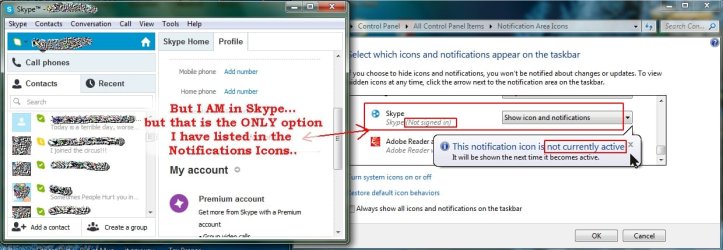
I came to this thread because I am having an odd thing .. both my anti-virus and my Skype icons are no longer showing up and I did everything except system restore. I did run Malware Bytes and I have no malware (I have the valid Pro version I paid for and I updated it just before scanning even though I have it set to always update). Both the anti-virus and Skype are running. Take a look at the screenshot showing Skype and the Icons option.
 

Attachments

  • Skype_Task_bar_Notification_icon_not_showing_up_suddenly.jpg
    Skype_Task_bar_Notification_icon_not_showing_up_suddenly.jpg
    269.1 KB · Views: 616

My Computer

Computer type
PC/Desktop
Computer Manufacturer/Model Number
HP-Pavilion-a6000-Desktop-PC
OS
Microsoft Windows 7 Professional Edition Service Pack 1 (build 7601), 64-bit
CPU
Intel(R) Core(TM)2 Quad Q9550 @2.83GHz (Xeon) Socket 775 LGA
Motherboard
ASUSTeK Computer INC. Benicia (P35/G33/G31)
Memory
4095 MB (4 x 1024 MBytes DDR2 Dual Symmetric)
Graphics Card(s)
Sapphire HD 7770 GHz Edition (shows Radeon R7 200)
Sound Card
Realtek High Definition Audio Driver Version 6.0.1.6662
Monitor(s) Displays
HP w19b 18.6" 5:3 (SN: CNC703PN1G)
Screen Resolution
1440 x 900
Hard Drives
1080 GB total
C: (320Gb): WDC WD3200AAKS-75L9A0 ATA
D: (Optical Drive): ATAPI DVD A DH16A6S ATA Device
E: (1Tb): WDC WD10EARS-00S8B1 ATA
F: (Backup 2 Tb): Clikfree Backup Drive USB
PSU
GX750
Case
Black/Blue APEVIA X-Hermes
Cooling
2 Top , 1 back, 1 front fan all 180 mm & side 200mm
Keyboard
Logitech G110
Mouse
Logitech G500s
Internet Speed
High speed cable
Antivirus
Avast! Internet Security 2014.9.0.2021
Browser
Firefox 44 (x86 en-US)
Other Info
BIOS American Megatrends
Date:
09/10/09 10:25:18 Ver: 5.43
Hello kabo0m,

This tutorial is for the default system icons instead, and wouldn't apply to your issue. You might see if resetting the notification area icons may help.

Otherwise, you might see if uninstalling and reinstalling the affected programs may fix this.

Hope this helps, :)
Shawn
 

My Computer

Computer type
PC/Desktop
Computer Manufacturer/Model Number
Self built custom
OS
64-bit Windows 11 Pro for Workstations
CPU
Intel i7-8700K OC'd to 5 GHz
Motherboard
ASUS ROG Maximus XI Formula Z390
Memory
64 GB (4x16GB) G.SKILL TridentZ RGB DDR4 3600 MHz
Graphics Card(s)
ASUS ROG-STRIX-GTX1080TI-O11G-GAMING
Sound Card
Integrated
Monitor(s) Displays
2 x Samsung Odyssey G7 27"
Screen Resolution
2560x1440
Hard Drives
1TB Samsung 990 PRO M.2,
4TB Samsung 990 PRO PRO M.2,
TerraMaster F8 SSD Plus NAS
PSU
Seasonic Prime Titanium 850W
Case
Thermaltake Core P3
Cooling
Corsair Hydro H115i
Keyboard
Logitech wireless K800
Mouse
Logitech MX Master 4
Internet Speed
2 Gb/s Download and 100 Mb/s Upload
Antivirus
Malwarebyte Anti-Malware Premium
Browser
Google Chrome
Other Info
Logitech Z625 speaker system,
Logitech BRIO 4K Pro webcam,
HP Color LaserJet Pro MFP M477fdn,
APC SMART-UPS RT 1000 XL - SURT1000XLI,
Galaxy S23 Plus phone
Thanks that seemed to help. :)
 

My Computer

Computer type
PC/Desktop
Computer Manufacturer/Model Number
HP-Pavilion-a6000-Desktop-PC
OS
Microsoft Windows 7 Professional Edition Service Pack 1 (build 7601), 64-bit
CPU
Intel(R) Core(TM)2 Quad Q9550 @2.83GHz (Xeon) Socket 775 LGA
Motherboard
ASUSTeK Computer INC. Benicia (P35/G33/G31)
Memory
4095 MB (4 x 1024 MBytes DDR2 Dual Symmetric)
Graphics Card(s)
Sapphire HD 7770 GHz Edition (shows Radeon R7 200)
Sound Card
Realtek High Definition Audio Driver Version 6.0.1.6662
Monitor(s) Displays
HP w19b 18.6" 5:3 (SN: CNC703PN1G)
Screen Resolution
1440 x 900
Hard Drives
1080 GB total
C: (320Gb): WDC WD3200AAKS-75L9A0 ATA
D: (Optical Drive): ATAPI DVD A DH16A6S ATA Device
E: (1Tb): WDC WD10EARS-00S8B1 ATA
F: (Backup 2 Tb): Clikfree Backup Drive USB
PSU
GX750
Case
Black/Blue APEVIA X-Hermes
Cooling
2 Top , 1 back, 1 front fan all 180 mm & side 200mm
Keyboard
Logitech G110
Mouse
Logitech G500s
Internet Speed
High speed cable
Antivirus
Avast! Internet Security 2014.9.0.2021
Browser
Firefox 44 (x86 en-US)
Other Info
BIOS American Megatrends
Date:
09/10/09 10:25:18 Ver: 5.43
You're most welcome kabo0m. I'm glad to hear you got it sorted. :)
 

My Computer

Computer type
PC/Desktop
Computer Manufacturer/Model Number
Self built custom
OS
64-bit Windows 11 Pro for Workstations
CPU
Intel i7-8700K OC'd to 5 GHz
Motherboard
ASUS ROG Maximus XI Formula Z390
Memory
64 GB (4x16GB) G.SKILL TridentZ RGB DDR4 3600 MHz
Graphics Card(s)
ASUS ROG-STRIX-GTX1080TI-O11G-GAMING
Sound Card
Integrated
Monitor(s) Displays
2 x Samsung Odyssey G7 27"
Screen Resolution
2560x1440
Hard Drives
1TB Samsung 990 PRO M.2,
4TB Samsung 990 PRO PRO M.2,
TerraMaster F8 SSD Plus NAS
PSU
Seasonic Prime Titanium 850W
Case
Thermaltake Core P3
Cooling
Corsair Hydro H115i
Keyboard
Logitech wireless K800
Mouse
Logitech MX Master 4
Internet Speed
2 Gb/s Download and 100 Mb/s Upload
Antivirus
Malwarebyte Anti-Malware Premium
Browser
Google Chrome
Other Info
Logitech Z625 speaker system,
Logitech BRIO 4K Pro webcam,
HP Color LaserJet Pro MFP M477fdn,
APC SMART-UPS RT 1000 XL - SURT1000XLI,
Galaxy S23 Plus phone
my system notifications are grayed out in the customization menu of th

I HAVE TRIED ALL UR STEP BUT STILL BRINK MY SYSTEM ICONS ARE GRAYED OUT ..THE FOLLOWING ICONS R GRAYED OUT ACTION CENTRE ICON,NETWORK ICON,VOLUME ICON ,,,,,,I AM BADLY IN NEED OF THOSE ICON ....SO KINDLY COULD U PROVIDE ME WITH A SOLUTION TO THIS PROBLEM.......
I USE A LAPTOP WITH WINDOWS 7 ULTIMATE .64 BIT.SP 1....I TRIED TO RESET THE NOTIICATION ICON ,,THE CMD RESTORE THE DOWNLOAD REG FILES ...AND ALL THE STEPS GIV BUT STILL NO USE......
I LOOK FORWARD TO HEAR FROM U SOON.....IF POSSIBLE WITH AN HOUR.......
 

My Computer

Computer type
Laptop
Computer Manufacturer/Model Number
samsung/R510
OS
windows 7 ultimate 64bit sp1
CPU
Pentium dual core 2.00ghz and 2gb ram
Motherboard
no idea
Memory
221gb
Graphics Card(s)
no
Hard Drives
no
Antivirus
kaspersky 2013
Browser
google chrome
Hello Aakash, and welcome to Seven Forums. :)

Please go ahead and post a screenshot showing all of your "System Icons" settings window to see if it may help reveal a cause.

Just to clarify, you did already try the "Enable" .reg files in OPTION TWO and restarted the computer afterwards?

Are you logged in to an administrator account?
 

My Computer

Computer type
PC/Desktop
Computer Manufacturer/Model Number
Self built custom
OS
64-bit Windows 11 Pro for Workstations
CPU
Intel i7-8700K OC'd to 5 GHz
Motherboard
ASUS ROG Maximus XI Formula Z390
Memory
64 GB (4x16GB) G.SKILL TridentZ RGB DDR4 3600 MHz
Graphics Card(s)
ASUS ROG-STRIX-GTX1080TI-O11G-GAMING
Sound Card
Integrated
Monitor(s) Displays
2 x Samsung Odyssey G7 27"
Screen Resolution
2560x1440
Hard Drives
1TB Samsung 990 PRO M.2,
4TB Samsung 990 PRO PRO M.2,
TerraMaster F8 SSD Plus NAS
PSU
Seasonic Prime Titanium 850W
Case
Thermaltake Core P3
Cooling
Corsair Hydro H115i
Keyboard
Logitech wireless K800
Mouse
Logitech MX Master 4
Internet Speed
2 Gb/s Download and 100 Mb/s Upload
Antivirus
Malwarebyte Anti-Malware Premium
Browser
Google Chrome
Other Info
Logitech Z625 speaker system,
Logitech BRIO 4K Pro webcam,
HP Color LaserJet Pro MFP M477fdn,
APC SMART-UPS RT 1000 XL - SURT1000XLI,
Galaxy S23 Plus phone
Back
Top