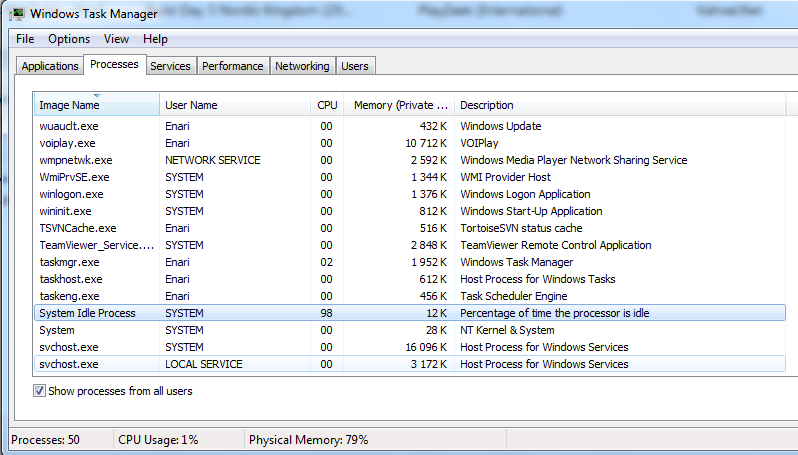
System idle process uses alot of CPU

Enari

New member
Local time
5:37 AM
Messages
2
Dont know why but System idle process is randomly using so much CPU !
wtf.png

Anyone know what mabye the problem that causes so much CPU usage .
 

My Computer My Computer

At a glance

Windows 7 Ultimate 32bit
OS
Windows 7 Ultimate 32bit
This is a joke right? System Idle Process is when the CPU is idle not doing anything. The higher System Idle Process is the more unused your CPU is. Your CPU is idle 98% of the time of that screenshot.
 

My Computer My Computer

At a glance

Windows 10 Pro (x64)Intel Core i7-3930K (3.2GHz - 4.5GHz)4x Samsung 4GB PC3-12800 DDR3 (16GB 1600MHz)Nvidia Geforce GTX 690
Computer type
PC/Desktop
Computer Manufacturer/Model Number
Alienware Aurora ALX R4
OS
Windows 10 Pro (x64)
CPU
Intel Core i7-3930K (3.2GHz - 4.5GHz)
Motherboard
Alienware Aurora-R4 x79
Memory
4x Samsung 4GB PC3-12800 DDR3 (16GB 1600MHz)
Graphics Card(s)
Nvidia Geforce GTX 690
Sound Card
SteelSeries Siberia Elite
Monitor(s) Displays
Dell UltraSharp U3011
Screen Resolution
2560x1600
Hard Drives
Samsung 850 Pro 256 GB, Seagate 1TB Desktop Hybrid HDD, 2x Western Digital 4TB Green HDD
PSU
875W Some Dell PSU <.<
Case
Alienware Aurora ALX
Cooling
Custom Liquid Cooling (EK CPU & GPU blocks) dual EK 480RAD
Keyboard
Logitech G710+ Mechanical
Mouse
Logitech G700s
Internet Speed
Verizon Fios (50 mbps average)
Other Info
Server: Intel NUC D54250WYK: i5-4250U, 16GB, 256 GB mSATA, Windows Server 2012 R2
From start till it is shut down, the CPU is continuously running processes. Each process takes part of the CPU cycles. If the CPU is fully loaded then the System Idle Process will be fluctuating around 0-10%.


Once the running processes finish, the CPU will be freed and doing nothing. This is indicated by the System Idle Process (a null process) with more % usage. In this state CPU is running less processes and idle most of the time.

 

My Computer My Computer

At a glance

MS Windows 7 Ultimate 64-bit SP1i5-2410M 2.3GHz (2.9GHz Turbo-Boost) Sandy Br...4GB+4GB Samsung DDR3 PC3-10700 (1333 MHz)Video Intel(R) HD Graphics Family, 1696MB ava...
Computer Manufacturer/Model Number
Toshiba Satellite P775-S7232
OS
MS Windows 7 Ultimate 64-bit SP1
CPU
i5-2410M 2.3GHz (2.9GHz Turbo-Boost) Sandy Bridge 32nm
Motherboard
Toshiba PHRAA ver. PSBY1U-00F003
Memory
4GB+4GB Samsung DDR3 PC3-10700 (1333 MHz)
Graphics Card(s)
Video Intel(R) HD Graphics Family, 1696MB available memory
Sound Card
Realtek High Definition Audio version=6.0.1.6323
Monitor(s) Displays
17.3 " Trubrite TFT LCD, LED Backlit
Screen Resolution
1600x900 32 bit, Native support for 720P content
Hard Drives
TOSHIBA MK6476GSXN
580.614 [GB] partitioned C: 80GB and D: 500GB with hidden recovery partitons.

Spare bay for 2nd HDD but no SATA connector :-(
PSU
Toshiba AC/DC Adapter
Case
Notebook
Cooling
Built-in Fan
Keyboard
Premium Raised Tile keyboard
Mouse
Logitech M215 wireless mouse
Internet Speed
Not fast enough
Other Info
Built-in Harman Kardon speakers with Dolby Advanced Audio, Waves MaxxAudio® 3. HDMI, 1xUSB3+3xUSB2 ports, WebCam, Battery life 4hrs 11mins, 4GB Readyboost SDHC card, WD My Book Essential Ext HDDs 2 TB, 2x1TB, My Passport SE 1TB and WDTV 1st Gen for Multimedia playing on a Sony Wega 32" LCD.
Recent addition to my toys are Asus Transformer Pad TF300T with 32GB onboard sd card + 32GB microsd card.
But my pc is so slow and lagging alltime and some Wmi process-es are new dont know what they are but yeh
 

My Computer My Computer

At a glance

Windows 7 Ultimate 32bit
OS
Windows 7 Ultimate 32bit
Back
Top