System Image and Ghost?

Happpy

New member
Local time
8:59 PM
Messages
45
Location
Pakistan
Hello, All!

What's the difference between a System Image in Windows 7 and a usual Ghost?

Are these two same things?

When our Windows gets corrupt, then we just run Ghost in Command Prompt and it installs a new Windows in just 5 to 10 minutes and also deletes older OS and Windows then runs normally without having its installation disc and repairing. So the System Image (built-in program) created by Windows 7 Ultimate also does same work or different?

I hope for the answer.

Regards,
 

My Computer My Computer

At a glance

Windows 7 Ultimate.1 GBIntel Standard Gaphic Adapter 82865g
Computer Manufacturer/Model Number
Fujitsu Siemens.
OS
Windows 7 Ultimate.
Memory
1 GB
Graphics Card(s)
Intel Standard Gaphic Adapter 82865g
Sound Card
SoundMAX Integrated Digital Audio
Monitor(s) Displays
LG 15"
Screen Resolution
1024 X 768
Keyboard
HP.
Mouse
Microsoft.
Internet Speed
PTCL DSL 1MB Connection.
Basically, yes. Both will overwrite the current OS and all files with the backed up image. Windows 7 uses the built in Shadow Copy. You can do a restore from within windows.

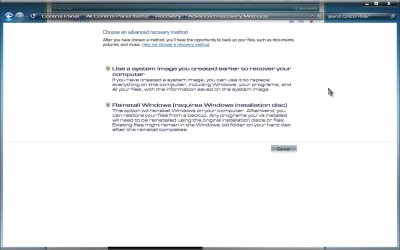
Control Panel> All Control Panel Items> Recovery

Recovery.jpg

Choose Advanced recovery options

Advanced.jpg

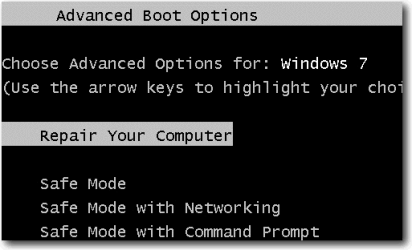
If system won't boot, you can boot to safe mode and select Repair Your Computer on the Advanced Boot Options.

Advanced Boot Options.png

If you can't get into safe mode, you can boot from a a Windows 7 system repair disc (not to be confused with a recovery disk) which can be created from within Windows 7 (while your system is still working obviously) or you can download a ISO image from here:

Download Windows 7 System Recovery Discs — The NeoSmart Files

And choose the System Image Recovery.

System Recovery Options.png

I personally have Acronis True Image, AND Windows images. Better safe than sorry. Obviously it's better to have your images on a 2nd hard drive. I haven't had to restore from either (yet, knock wood). A Guy
 

My Computer My Computer

At a glance

Windows 10 Home x64INTEL Core i5-750 Quad-Core 3.37GHzHyperX Fury Black Series 8GB (2 x 4GB) 1866MhzEVGA GeForce GTX 750 Superclocked 1GB 128-Bit...
Computer type
PC/Desktop
OS
Windows 10 Home x64
CPU
INTEL Core i5-750 Quad-Core 3.37GHz
Motherboard
ASUS P7P55D
Memory
HyperX Fury Black Series 8GB (2 x 4GB) 1866Mhz
Graphics Card(s)
EVGA GeForce GTX 750 Superclocked 1GB 128-Bit GDDR5
Monitor(s) Displays
LG 32MA68HY 32" IPS
Screen Resolution
1920 x 1080
Hard Drives
Samsung 840 Evo 120GB, SEAGATE 500GB Barracuda® 7200.12, SATA 3 Gb/s, 7200 RPM, 16MB cache
PSU
ANTEC TruePower New TP-550, 80 PLUS, 550W
Case
ANTEC Three Hundred Illusion
Cooling
COOLER MASTER Hyper 212 Plus, 4 x 120mm 1 x 140mm Noctua's
Internet Speed
85 + Mbps
Antivirus
Avast
Browser
Vivaldi
Thanks A Guy! for your detailed tutorial. I really have understand.
 

My Computer My Computer

At a glance

Windows 7 Ultimate.1 GBIntel Standard Gaphic Adapter 82865g
Computer Manufacturer/Model Number
Fujitsu Siemens.
OS
Windows 7 Ultimate.
Memory
1 GB
Graphics Card(s)
Intel Standard Gaphic Adapter 82865g
Sound Card
SoundMAX Integrated Digital Audio
Monitor(s) Displays
LG 15"
Screen Resolution
1024 X 768
Keyboard
HP.
Mouse
Microsoft.
Internet Speed
PTCL DSL 1MB Connection.
Back
Top