Solved System Image backup seems to have stalled after 36 hours

mangoa

New member
Local time
1:44 AM
Messages
11
After restoring my computer for 3 days (lots of software) due to a bad sector on the C harddisk, I decided to create a System Image using Windows (I have Windows Home Premium x64). First I encountered the problem with the boot partition being full (100MB - 100% used) and thus not allowing to create the volume shadow copy. I managed to solve this (thanks to info on forums) with Easeus Partition Manager - increased the size of the partition to 300MB- about 75% free space.
Then I started the System Image Backup on Thursday night around 11:30pm. By the next morning the backup still wasn't finished (I think it did about 40%) and the free space on the external hard disk on which I am making the backup reads 118GB free of 931GB. The backup is about 230GB and when I started there was about 330GB free on this disk.
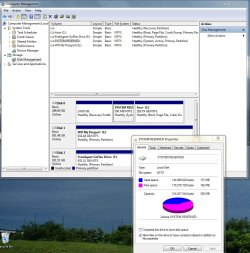
On Friday night 9pm and the backup seems to be at about 55%. Harddisk still reads 118GB free of 931GB.Boot partition is still 137MB used - 162MB free. Size of the backup on the external drive is 214GB.
Next day Saturday at 1pm (or 36hours after launching the backup) progress seems to show about 75% but the external drive still reads 118GB free of 931GB.Boot partition is still 137MB used - 162MB free. Size of the backup on the external drive is still 214GB.I abort the backup since it does not seem to write anything. I would appreciate if somebody from Microsoft would tell me what I did wrong and how to make a succesful system image backup. Attached are screenshots of the eventviewer and the boot partition status, as well as a txt file with VSS log data.
 

Attachments

  • vsswriters.txt
    vsswriters.txt
    2.5 KB · Views: 4
  • Eventviewer.jpg
    Eventviewer.jpg
    132.3 KB · Views: 10
  • boot partition status.jpg
    boot partition status.jpg
    155.4 KB · Views: 8

My Computer My Computer

At a glance

Windows 7 Home Premium x64
OS
Windows 7 Home Premium x64
I would appreciate if somebody from Microsoft would tell me what I did wrong and how to make a succesful system image backup.

Nobody here is from Microsoft. We are all volunteers.

There are other free imaging applications that are known to be less fussy than the built-in imaging tool. I'd use one of them unless I had an strong and over-riding reason to use the built-in tool.
 

My Computer My Computer

At a glance

Windows 7 Home Premium SP1, 64-bitIntel Skylake i5-6600K, not overclocked8 GB HyperX DDR4-2666 (2 x 4 GB)none; graphics are integrated on CPU
Computer type
PC/Desktop
Computer Manufacturer/Model Number
Ignatz Special; 4 speed manual gearbox; factory air conditioning; one of one
OS
Windows 7 Home Premium SP1, 64-bit
CPU
Intel Skylake i5-6600K, not overclocked
Motherboard
AsRock Z170M Extreme 4, micro ATX
Memory
8 GB HyperX DDR4-2666 (2 x 4 GB)
Graphics Card(s)
none; graphics are integrated on CPU
Sound Card
onboard: Realtek ALC1150; external: USB Behringer UF0-202
Monitor(s) Displays
Dell S2340M 23 inch IPS
Screen Resolution
1600 x 900
Hard Drives
System: Crucial MX100 series SSD, 128 GB;
Data: Samsung Spinpoint 103SJ, 1 TB;
Backup: WD Caviar Green WD30EZRX-00D8PB0, 3 TB
PSU
Rosewill SilentNight 500 watt fanless, semi-modular
Case
Antec Solo II
Cooling
Noctua NH-U12S; Noctua F12 intake, Noctua S12A exhaust
Keyboard
Microsoft 200 6JH-00001 USB
Mouse
Dell or Microsoft optical wired; USB
Antivirus
Microsoft Security Essentials and Malwarebytes Premium
Browser
Pale Moon
Other Info
All fans PWM; speeds at idle: CPU circa 500 rpm; intake circa 600 rpm; exhaust circa 600 rpm; CPU temps 27 idle and 47 C load in a warm room (27 C/81 F) when running Intel Extreme Tuning Utility stress test.
As stated, we are all volunteers who give their time to help others and who have no connection to Microsoft.

Many people use third-party apps such as Acronis True Image because they appear to be more reliable than the Windows built-in utility.

http://www.acronis.co.uk/promo/ATIH2011/ATISpecific/index.html?source=uk_googleATI_b&ad=ati&c=11026665952&k=acronis%20true%20image&gclid=CI6Ais3Dn6kCFQEY4QodOyVktA

Also, you shouldn't be using the 100 MB System Reserved partition for shadow copies and I've no doubt that's where your problem lies. The System Reserved partition does what it says on the tin - it is a container for the operating system's master boot record and shouldn't be used for anything else.

System restore is configured to use a percentage of your hard drive for shadow copies.
 

My Computer My Computer

At a glance

Windows 7 Ultimate SP1 64-BitIntel Core i7 870 @ 2.93GHz8Gb Dual-Channel DDR3 @ 664MHznVidia GeForce GTX 460 1024MB dedicated RAM
Computer Manufacturer/Model Number
HP Pavilion Elite 495UK
OS
Windows 7 Ultimate SP1 64-Bit
CPU
Intel Core i7 870 @ 2.93GHz
Motherboard
MSI 2A9C (CPU1)
Memory
8Gb Dual-Channel DDR3 @ 664MHz
Graphics Card(s)
nVidia GeForce GTX 460 1024MB dedicated RAM
Sound Card
Realtek HD Audio
Monitor(s) Displays
HP2310i
Screen Resolution
1920 x 1080
Hard Drives
1x1954GB Hitachi HDS22020ALA 330 (RAID), 1x1954GB Hitachi External for backup and storage
PSU
460W
Case
HP Elite
Cooling
Air cooled
Keyboard
Logitech K750 solar-powered keyboard
Mouse
Logitech Wireless M180 mouse
Internet Speed
2Mb
Other Info
Pure Avanti Flow Internet Radio with iPod Dock, 64Gb iPod, HP USB Speakers, Sony MDR-V500 Headphones, Sony Vaio F-Series Laptop
It's probably easy for a newcomer to the forum to think we are MS employees because the people give so much of their free time - don't worry.

Some people do have problems with the inbuilt Windows Imaging. I use it all the time and it hasn't let me down. I also use Macrium Reflect (free) as a safeguard. This is excellent software and highly regarded on this forum. Give it a go.

Suggestion: Don't make big images. Try to keep your OS and installed programs (including page file) on one partition. Put your data on a separate partition.
Make sure you have a backup strategy for your data partition of course BUT your OS partition will be the one most likely to get fouled up and require a reimage. This will typically be ~50GB or less and imaging/reimaging times on a USB2 external ~40 min. This is a convenient timeframe to keep multiple images and easily get yourself out of trouble quickly.

You can make a 4th primary data partition and a useful tool is Partition Wizard (see free program list). DON'T try to make more than 4 primaries.
 

My Computer My Computer

At a glance

Windows 7x64 Home Premium SP1Intel i7 2600kG.Skill Ripjaws (DDR3-1600) 2x4GBNvidia GeForce GTS 450; Intel HD Graphics 300...
Computer type
PC/Desktop
Computer Manufacturer/Model Number
Own build
OS
Windows 7x64 Home Premium SP1
CPU
Intel i7 2600k
Motherboard
ASUS P8Z68 Deluxe
Memory
G.Skill Ripjaws (DDR3-1600) 2x4GB
Graphics Card(s)
Nvidia GeForce GTS 450; Intel HD Graphics 3000(GT2+)
Monitor(s) Displays
Dell Ultrasharp IPS panel U2311H, Samsung SyncMaster P2350
Screen Resolution
1920x1080
Hard Drives
Samsung 850 Pro SSD 256GB, Samsung SSD 840 120GB, Seagates 1TB Barracuda ST31000528AS x2
PSU
Seasonic M12II 520W
Case
Lian Li Lancool PC-K60
Cooling
Case: 1x120mm, 3x140mm CPU: Hyper 212+
Keyboard
Logitech MK520 (wireless)
Mouse
Logitech MK520
Internet Speed
6-7 Mbps
Antivirus
Norton Security Premium, Malwarebytes on 2 (MSE on 3rd PC)
Browser
FireFox
Other Info
Audio: Logitech Z523 2.1
Thank you to all of you for the excellent suggestions. I have started using Macrium in the meantime. I like mjf's suggestion to create a seperate partition for the data. I keep most of my data on an external drive but still keep some on the C drive for when I want to use the computer without an external drive attached. This is mainly for music applications when I need the USB ports for controllers. I will create a seperate data partition which I then can exclude from the Macrium system backup.
To Seavixen32: the problem with the shadow copy was actually debated elsewhere on this forum and the only simple solution seemed to be to extend the system reserved partition. As far as I can see, there is no setting that allows you to define where the shadow copy is being made. This being said I will shrink it again to close to 100MB since I have no intention of using windows system image backup again.
Just for general information: I used Genie backup manager before and while it is good for data backups it has failed me now twice with the System Recovery.

This is a nice first experience with this forum. You guys are better than MS support and certainy a hell of a lot faster! I hope I will be able to contribute a little too.
 

My Computer My Computer

At a glance

Windows 7 Home Premium x64
OS
Windows 7 Home Premium x64
You're very welcome mangoa, and thanks for the positive comments about WSF.

We do take pride in what we do and we do our best to get it right, although sometimes we don't.

Your comments and opinions will be valued, as are those of everyone else, so please don't hesitate to contribute when you can.
 

My Computer My Computer

At a glance

Windows 7 Ultimate SP1 64-BitIntel Core i7 870 @ 2.93GHz8Gb Dual-Channel DDR3 @ 664MHznVidia GeForce GTX 460 1024MB dedicated RAM
Computer Manufacturer/Model Number
HP Pavilion Elite 495UK
OS
Windows 7 Ultimate SP1 64-Bit
CPU
Intel Core i7 870 @ 2.93GHz
Motherboard
MSI 2A9C (CPU1)
Memory
8Gb Dual-Channel DDR3 @ 664MHz
Graphics Card(s)
nVidia GeForce GTX 460 1024MB dedicated RAM
Sound Card
Realtek HD Audio
Monitor(s) Displays
HP2310i
Screen Resolution
1920 x 1080
Hard Drives
1x1954GB Hitachi HDS22020ALA 330 (RAID), 1x1954GB Hitachi External for backup and storage
PSU
460W
Case
HP Elite
Cooling
Air cooled
Keyboard
Logitech K750 solar-powered keyboard
Mouse
Logitech Wireless M180 mouse
Internet Speed
2Mb
Other Info
Pure Avanti Flow Internet Radio with iPod Dock, 64Gb iPod, HP USB Speakers, Sony MDR-V500 Headphones, Sony Vaio F-Series Laptop
@Mangoa
I doubt that you will have problems with Macrium.
Other suggestions:
Test the Macrium recovery disc linux and pe disks.
Hirens Boot CD is a very extensive utility package which also includes a Macrium pe capability in the mini XP environment. Download and look at it is the best way.

I'd tend to leave your system reserved at its current 300MB setting rather than reduce it again.

You're more likely to get different approaches to a problem on this forum rather than wrong advice.
 

My Computer My Computer

At a glance

Windows 7x64 Home Premium SP1Intel i7 2600kG.Skill Ripjaws (DDR3-1600) 2x4GBNvidia GeForce GTS 450; Intel HD Graphics 300...
Computer type
PC/Desktop
Computer Manufacturer/Model Number
Own build
OS
Windows 7x64 Home Premium SP1
CPU
Intel i7 2600k
Motherboard
ASUS P8Z68 Deluxe
Memory
G.Skill Ripjaws (DDR3-1600) 2x4GB
Graphics Card(s)
Nvidia GeForce GTS 450; Intel HD Graphics 3000(GT2+)
Monitor(s) Displays
Dell Ultrasharp IPS panel U2311H, Samsung SyncMaster P2350
Screen Resolution
1920x1080
Hard Drives
Samsung 850 Pro SSD 256GB, Samsung SSD 840 120GB, Seagates 1TB Barracuda ST31000528AS x2
PSU
Seasonic M12II 520W
Case
Lian Li Lancool PC-K60
Cooling
Case: 1x120mm, 3x140mm CPU: Hyper 212+
Keyboard
Logitech MK520 (wireless)
Mouse
Logitech MK520
Internet Speed
6-7 Mbps
Antivirus
Norton Security Premium, Malwarebytes on 2 (MSE on 3rd PC)
Browser
FireFox
Other Info
Audio: Logitech Z523 2.1
One last question: when I did the system image backup with Macrium, I backed up the PQSERVICE partition, the system reserved partition and the C partition which now only contains Windows and programs. Next I time I have to restore my system, do I restore all three of these partitions? Or do I leave out the PQSERVICE partition which seems to contain a clean factory set-up for my laptop?
 

My Computer My Computer

At a glance

Windows 7 Home Premium x64
OS
Windows 7 Home Premium x64
You definitely should leave out the PQService for routine reimages since this is the factory restore partition. Very good to keep one or two copies of this partition image. You do not want or need to routinely image it or replace it to a working HDD.
BUT when you replace your HDD (eg it fails) then you include PQService when you reimage to the new HDD.
 

My Computer My Computer

At a glance

Windows 7x64 Home Premium SP1Intel i7 2600kG.Skill Ripjaws (DDR3-1600) 2x4GBNvidia GeForce GTS 450; Intel HD Graphics 300...
Computer type
PC/Desktop
Computer Manufacturer/Model Number
Own build
OS
Windows 7x64 Home Premium SP1
CPU
Intel i7 2600k
Motherboard
ASUS P8Z68 Deluxe
Memory
G.Skill Ripjaws (DDR3-1600) 2x4GB
Graphics Card(s)
Nvidia GeForce GTS 450; Intel HD Graphics 3000(GT2+)
Monitor(s) Displays
Dell Ultrasharp IPS panel U2311H, Samsung SyncMaster P2350
Screen Resolution
1920x1080
Hard Drives
Samsung 850 Pro SSD 256GB, Samsung SSD 840 120GB, Seagates 1TB Barracuda ST31000528AS x2
PSU
Seasonic M12II 520W
Case
Lian Li Lancool PC-K60
Cooling
Case: 1x120mm, 3x140mm CPU: Hyper 212+
Keyboard
Logitech MK520 (wireless)
Mouse
Logitech MK520
Internet Speed
6-7 Mbps
Antivirus
Norton Security Premium, Malwarebytes on 2 (MSE on 3rd PC)
Browser
FireFox
Other Info
Audio: Logitech Z523 2.1
Thanks mjf. I made 3 versions of system images with Macrium: one PQservice only, one system reserved partition plus C: (windows+programs), and one PQservice plus system reserved + C:. That should cover all scenarios I would think.
 

My Computer My Computer

At a glance

Windows 7 Home Premium x64
OS
Windows 7 Home Premium x64
Back
Top