Solved System image includes extra game drive

Mathis

New member
Local time
9:06 PM
Messages
15
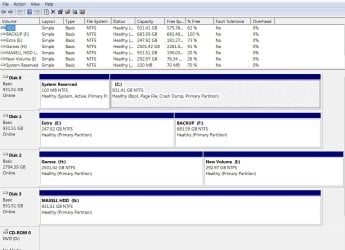
Hello, I moved all my games to a separate physical drive. Now, when I want a system image backup it includes the new game drive H (it is grayed out and now considered a system drive). I only want the C: drive imaged. I checked the other thread out but some things are not clear. The suggestion was to find dll that could make windows 7 include the extra drive. I do not know what dll files to even look for.

I have:

Uplay
Steam
Origin
Guild Wars 1 and 2
Older Id Games (Doom 3, Quake 4)
Older EA games loaded separate from Origin (Alice, BF2 Bad Company, Crysis Warhead)
And a bunch of videos

Do I move one file at a time? Do I uninstall Uplay, etc.? to determine what is confusing windows 7?

thanks,
 

My Computer

Computer type
PC/Desktop
Computer Manufacturer/Model Number
custom
OS
win 7 64bit
CPU
i7 3770
Motherboard
msi
Memory
8gb
Graphics Card(s)
gtx 660
Hard Drives
1tb
Antivirus
win 7
Browser
ie 9, chrome
Windows will by default include any drive that contains system files

The most common scenario in your situation is that your other drive contains boot files reqd to start windows

Please post a snip of your disk management maximised
Start>diskmgmt.msc>enter
 

My Computer

Computer type
PC/Desktop
Computer Manufacturer/Model Number
Pauly Special
OS
Win7 Ultimate X64
CPU
Intel i5 3570K
Motherboard
Gigabyte Z77X-DS3H
Memory
8GB DDR3 1600
Graphics Card(s)
Onboard
Sound Card
Onboard
Screen Resolution
1280x1024
Hard Drives
Samsung 840 Evo SSD (OS)
1TB Spinner (Data)
PSU
800W Arctic
Case
Cooler Master
Cooling
3x120mm Fans
Keyboard
MS Wireless
Mouse
MS Wireless
Internet Speed
20M
Here you go attached. BTW: I did find origin client launcher in services as coming from the H drive. So I disabled it in msconfig. That did nothing. So I moved it back to C; restarted. Origin loaded at startup. But the services still show Origin from H drive although disabled.

I have moved all the programs to the I: drive I created. But left much of the games there.
 

Attachments

  • Computer Drives Picture.jpg
    Computer Drives Picture.jpg
    106.8 KB · Views: 2

My Computer

Computer type
PC/Desktop
Computer Manufacturer/Model Number
custom
OS
win 7 64bit
CPU
i7 3770
Motherboard
msi
Memory
8gb
Graphics Card(s)
gtx 660
Hard Drives
1tb
Antivirus
win 7
Browser
ie 9, chrome
For Windows imaging, that is normal behavior. It images everything that is related to the OS. If you want to image only the OS partitions, use free Macrium. But do not forget to include the 100MB system partition which contains your bootmgr.
 

My Computer

Computer Manufacturer/Model Number
HP, Dell, Gateway, Toshiba - 4 laptops and 2 desktops
OS
Vista, Windows7, Mint Mate, Zorin, Windows 8
CPU
from 1.6GHz Duo to i7
Monitor(s) Displays
2x HP w2207
Hard Drives
5x HDD, 7x SSD, 12x Externals
Keyboard
with trackball - no mices
Mouse
Trackball mice
Internet Speed
DSL 6000
Fixed it: it was the origin steam client. My "disabling" it in services after moving it (cut/paste) from H: to I: masked the problem. I needed to uninstall the client. Reinstall (not cut/paste it). Then the service was no longer from H: but from the C:. Then I had to reboot for windows to "see" this change.

For the future reader: look up the services and find the one that is *not* originating from your standard drive (usually c:).
 

My Computer

Computer type
PC/Desktop
Computer Manufacturer/Model Number
custom
OS
win 7 64bit
CPU
i7 3770
Motherboard
msi
Memory
8gb
Graphics Card(s)
gtx 660
Hard Drives
1tb
Antivirus
win 7
Browser
ie 9, chrome
Back
Top