
Solved system image restore not working

aliyesami

New member
Local time
12:52 AM
Messages
19
hi !

I have two partitions on my boot disk one 93gb and other 600gb.
I made an system image backup . and now I am trying to restore to an other 150gb drive but it says it cant restore to that drive .

I know you cant restore to a disk smaller in size of boot disk . but what I want to know is that in my case when I made a system image backup did he backup the whole C drive or only the 93Gb partition where windows is installed.
btw my OS is win7-64bit.
 

My Computer

Computer type
PC/Desktop
Computer Manufacturer/Model Number
custom build
OS
win7-64 bit
CPU
Intel core i5-750
Motherboard
ASUS P7H55-M PROD
Memory
16Gb
Graphics Card(s)
ATI RADEAON HD4670
Hard Drives
C:\ partition 1 : 100gb partition 2: 600 gb
Hello Aliyesami, and welcome to Seven Forums. :)

It sounds like both partitions on the drive may have been included in the system image, and you may not have enough space on the 150GB drive to restore them to.

To help be more certain, please post back with the exact full error message with error number that it gave you to see what it says is the issue.
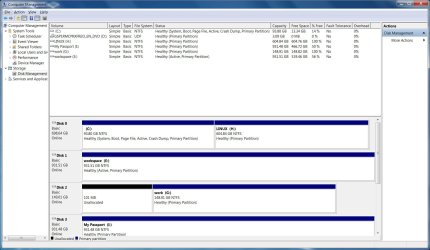
In addition, post a screenshot showing the full layout of your Disk Management screen.
 

My Computer

Computer type
PC/Desktop
Computer Manufacturer/Model Number
Self built custom
OS
64-bit Windows 11 Pro for Workstations
CPU
Intel i7-8700K OC'd to 5 GHz
Motherboard
ASUS ROG Maximus XI Formula Z390
Memory
64 GB (4x16GB) G.SKILL TridentZ RGB DDR4 3600 MHz
Graphics Card(s)
ASUS ROG-STRIX-GTX1080TI-O11G-GAMING
Sound Card
Integrated
Monitor(s) Displays
2 x Samsung Odyssey G7 27"
Screen Resolution
2560x1440
Hard Drives
1TB Samsung 990 PRO M.2,
4TB Samsung 990 PRO PRO M.2,
TerraMaster F8 SSD Plus NAS
PSU
Seasonic Prime Titanium 850W
Case
Thermaltake Core P3
Cooling
Corsair Hydro H115i
Keyboard
Logitech wireless K800
Mouse
Logitech MX Master 4
Internet Speed
2 Gb/s Download and 100 Mb/s Upload
Antivirus
Malwarebyte Anti-Malware Premium
Browser
Google Chrome
Other Info
Logitech Z625 speaker system,
Logitech BRIO 4K Pro webcam,
HP Color LaserJet Pro MFP M477fdn,
APC SMART-UPS RT 1000 XL - SURT1000XLI,
Galaxy S23 Plus phone
hi Brink !
thanks for prompt reply.
it does not give me any numbers just a msg saying this drive can not be restored .
attaching the diskmap

regards
 

Attachments

  • diskmap.jpg
    diskmap.jpg
    156.5 KB · Views: 13

My Computer

Computer type
PC/Desktop
Computer Manufacturer/Model Number
custom build
OS
win7-64 bit
CPU
Intel core i5-750
Motherboard
ASUS P7H55-M PROD
Memory
16Gb
Graphics Card(s)
ATI RADEAON HD4670
Hard Drives
C:\ partition 1 : 100gb partition 2: 600 gb
If you are trying to restore the image to the your Disk 2 G: drive, then the unallocated space on it may be causing the issue.

Delete the G: partition to make Disk 2 unallocated. Next, format Disk 2 to create a new simple volume to only have one partition on Disk 2 with a drive letter. Afterwards, disconnect Disk 0, and see if you are able to restore the system image to that drive.
 

My Computer

Computer type
PC/Desktop
Computer Manufacturer/Model Number
Self built custom
OS
64-bit Windows 11 Pro for Workstations
CPU
Intel i7-8700K OC'd to 5 GHz
Motherboard
ASUS ROG Maximus XI Formula Z390
Memory
64 GB (4x16GB) G.SKILL TridentZ RGB DDR4 3600 MHz
Graphics Card(s)
ASUS ROG-STRIX-GTX1080TI-O11G-GAMING
Sound Card
Integrated
Monitor(s) Displays
2 x Samsung Odyssey G7 27"
Screen Resolution
2560x1440
Hard Drives
1TB Samsung 990 PRO M.2,
4TB Samsung 990 PRO PRO M.2,
TerraMaster F8 SSD Plus NAS
PSU
Seasonic Prime Titanium 850W
Case
Thermaltake Core P3
Cooling
Corsair Hydro H115i
Keyboard
Logitech wireless K800
Mouse
Logitech MX Master 4
Internet Speed
2 Gb/s Download and 100 Mb/s Upload
Antivirus
Malwarebyte Anti-Malware Premium
Browser
Google Chrome
Other Info
Logitech Z625 speaker system,
Logitech BRIO 4K Pro webcam,
HP Color LaserJet Pro MFP M477fdn,
APC SMART-UPS RT 1000 XL - SURT1000XLI,
Galaxy S23 Plus phone
hi formatted the G drive and disconnected all drives and tried the system restore again but it failed again with same error "no disk that can be used for recovering the system data can be found" .

in BIOS it did list the disk as first boot disk . and in DISKPART its listed as available DISK 0

do you think its because the system image backup made the whole physical drive C backup and not just the C logical partition ?

here is the new disk map

sorry forgot to attach
 

Attachments

  • diskmap.jpg
    diskmap.jpg
    155.2 KB · Views: 4
Last edited by a moderator:

My Computer

Computer type
PC/Desktop
Computer Manufacturer/Model Number
custom build
OS
win7-64 bit
CPU
Intel core i5-750
Motherboard
ASUS P7H55-M PROD
Memory
16Gb
Graphics Card(s)
ATI RADEAON HD4670
Hard Drives
C:\ partition 1 : 100gb partition 2: 600 gb
Ok. Before we continue, please clarify if you are wanting to do a System Image Recovery with an image backup, or a System Restore with a restore point.

You used both terms, and each are completely different from the other.


I'm assuming a System Image Recovery. In addition to your now F drive (?), you will need to have the drive that the system image was saved to connected as well.
 

My Computer

Computer type
PC/Desktop
Computer Manufacturer/Model Number
Self built custom
OS
64-bit Windows 11 Pro for Workstations
CPU
Intel i7-8700K OC'd to 5 GHz
Motherboard
ASUS ROG Maximus XI Formula Z390
Memory
64 GB (4x16GB) G.SKILL TridentZ RGB DDR4 3600 MHz
Graphics Card(s)
ASUS ROG-STRIX-GTX1080TI-O11G-GAMING
Sound Card
Integrated
Monitor(s) Displays
2 x Samsung Odyssey G7 27"
Screen Resolution
2560x1440
Hard Drives
1TB Samsung 990 PRO M.2,
4TB Samsung 990 PRO PRO M.2,
TerraMaster F8 SSD Plus NAS
PSU
Seasonic Prime Titanium 850W
Case
Thermaltake Core P3
Cooling
Corsair Hydro H115i
Keyboard
Logitech wireless K800
Mouse
Logitech MX Master 4
Internet Speed
2 Gb/s Download and 100 Mb/s Upload
Antivirus
Malwarebyte Anti-Malware Premium
Browser
Google Chrome
Other Info
Logitech Z625 speaker system,
Logitech BRIO 4K Pro webcam,
HP Color LaserJet Pro MFP M477fdn,
APC SMART-UPS RT 1000 XL - SURT1000XLI,
Galaxy S23 Plus phone
sorry yes I meant system image recovery. I want to move to a smaller disk that's the whole idea.
and the disk where the system image was made is connected , its my drive that you see in the list as passport.

I think we need to identify if the system image backup backs up the whole physical disk or just the logical partition.
 

My Computer

Computer type
PC/Desktop
Computer Manufacturer/Model Number
custom build
OS
win7-64 bit
CPU
Intel core i5-750
Motherboard
ASUS P7H55-M PROD
Memory
16Gb
Graphics Card(s)
ATI RADEAON HD4670
Hard Drives
C:\ partition 1 : 100gb partition 2: 600 gb

My Computer

Computer type
PC/Desktop
Computer Manufacturer/Model Number
Self built custom
OS
64-bit Windows 11 Pro for Workstations
CPU
Intel i7-8700K OC'd to 5 GHz
Motherboard
ASUS ROG Maximus XI Formula Z390
Memory
64 GB (4x16GB) G.SKILL TridentZ RGB DDR4 3600 MHz
Graphics Card(s)
ASUS ROG-STRIX-GTX1080TI-O11G-GAMING
Sound Card
Integrated
Monitor(s) Displays
2 x Samsung Odyssey G7 27"
Screen Resolution
2560x1440
Hard Drives
1TB Samsung 990 PRO M.2,
4TB Samsung 990 PRO PRO M.2,
TerraMaster F8 SSD Plus NAS
PSU
Seasonic Prime Titanium 850W
Case
Thermaltake Core P3
Cooling
Corsair Hydro H115i
Keyboard
Logitech wireless K800
Mouse
Logitech MX Master 4
Internet Speed
2 Gb/s Download and 100 Mb/s Upload
Antivirus
Malwarebyte Anti-Malware Premium
Browser
Google Chrome
Other Info
Logitech Z625 speaker system,
Logitech BRIO 4K Pro webcam,
HP Color LaserJet Pro MFP M477fdn,
APC SMART-UPS RT 1000 XL - SURT1000XLI,
Galaxy S23 Plus phone
yes I do but the issue is that the drive I am restoring to is only 150gb and the C drive of the system image backup was made is 750gb , I read from forums that that is not possible , or you think I should be able to restore just the partition where windows is installed to this 150G drive?
 

My Computer

Computer type
PC/Desktop
Computer Manufacturer/Model Number
custom build
OS
win7-64 bit
CPU
Intel core i5-750
Motherboard
ASUS P7H55-M PROD
Memory
16Gb
Graphics Card(s)
ATI RADEAON HD4670
Hard Drives
C:\ partition 1 : 100gb partition 2: 600 gb
Sorry, but no. You will not be able to restore an image from a larger drive to a smaller drive. :(
 

My Computer

Computer type
PC/Desktop
Computer Manufacturer/Model Number
Self built custom
OS
64-bit Windows 11 Pro for Workstations
CPU
Intel i7-8700K OC'd to 5 GHz
Motherboard
ASUS ROG Maximus XI Formula Z390
Memory
64 GB (4x16GB) G.SKILL TridentZ RGB DDR4 3600 MHz
Graphics Card(s)
ASUS ROG-STRIX-GTX1080TI-O11G-GAMING
Sound Card
Integrated
Monitor(s) Displays
2 x Samsung Odyssey G7 27"
Screen Resolution
2560x1440
Hard Drives
1TB Samsung 990 PRO M.2,
4TB Samsung 990 PRO PRO M.2,
TerraMaster F8 SSD Plus NAS
PSU
Seasonic Prime Titanium 850W
Case
Thermaltake Core P3
Cooling
Corsair Hydro H115i
Keyboard
Logitech wireless K800
Mouse
Logitech MX Master 4
Internet Speed
2 Gb/s Download and 100 Mb/s Upload
Antivirus
Malwarebyte Anti-Malware Premium
Browser
Google Chrome
Other Info
Logitech Z625 speaker system,
Logitech BRIO 4K Pro webcam,
HP Color LaserJet Pro MFP M477fdn,
APC SMART-UPS RT 1000 XL - SURT1000XLI,
Galaxy S23 Plus phone
can I say MS sucks ?
probably the only OS where you cant migrate a partition .

anyway thanks for your help you been patient.
 

My Computer

Computer type
PC/Desktop
Computer Manufacturer/Model Number
custom build
OS
win7-64 bit
CPU
Intel core i5-750
Motherboard
ASUS P7H55-M PROD
Memory
16Gb
Graphics Card(s)
ATI RADEAON HD4670
Hard Drives
C:\ partition 1 : 100gb partition 2: 600 gb
I'm sure that you may be able to use some 3rd party software to do so, but it's just not included in the built-in features of Windows.

However, if there's not enough space on the smaller drive from the bigger drive's image, then it's just not going to work. :(
 

My Computer

Computer type
PC/Desktop
Computer Manufacturer/Model Number
Self built custom
OS
64-bit Windows 11 Pro for Workstations
CPU
Intel i7-8700K OC'd to 5 GHz
Motherboard
ASUS ROG Maximus XI Formula Z390
Memory
64 GB (4x16GB) G.SKILL TridentZ RGB DDR4 3600 MHz
Graphics Card(s)
ASUS ROG-STRIX-GTX1080TI-O11G-GAMING
Sound Card
Integrated
Monitor(s) Displays
2 x Samsung Odyssey G7 27"
Screen Resolution
2560x1440
Hard Drives
1TB Samsung 990 PRO M.2,
4TB Samsung 990 PRO PRO M.2,
TerraMaster F8 SSD Plus NAS
PSU
Seasonic Prime Titanium 850W
Case
Thermaltake Core P3
Cooling
Corsair Hydro H115i
Keyboard
Logitech wireless K800
Mouse
Logitech MX Master 4
Internet Speed
2 Gb/s Download and 100 Mb/s Upload
Antivirus
Malwarebyte Anti-Malware Premium
Browser
Google Chrome
Other Info
Logitech Z625 speaker system,
Logitech BRIO 4K Pro webcam,
HP Color LaserJet Pro MFP M477fdn,
APC SMART-UPS RT 1000 XL - SURT1000XLI,
Galaxy S23 Plus phone
Back
Top