System Interrupts high CPU usage windows 7 64 bit...

Amandrix

New member
Local time
8:59 PM
Messages
6
Hi there, I've seen some posts about this, but nothing helped me.
I'm really asking for help here as my last resort.
I got an Asus laptop K53SC, intel core i7-2670QM with nvidia 520MX.
Problem is System Interrupts starts randomly eating up 1 core to 100%.
I've tried everything, I've contacted Asus support, but their technical level is below 0 (I'm surprised they haven't told me to buy another laptop).
All my drivers are from asus website, windows 7 is 64 bits Dream Spark edition.
Interrupts really start randomly and whenever they want (usually if I play a movie / play games / because of flash player etc...). The thing is sometimes they start after 5 min of movie play, others they did not start after 3 hours of movie play, which is making things harder. You got the ideea.

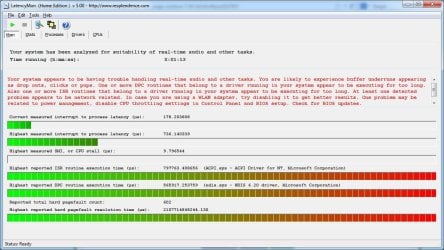
Technical informations. Ofcourse I've installed latency monitor / windows xperf.
Found out that acpi.sys / ntoskrnl.exe / hall.dll / I don't remember last 1, are causing highest DPC / Interrupts. The amazing thing is that only 1 is triggered at a time. Once is acpi.sys, once is hall.dll, once is tcpip.sys and so on.

I would appreciate really any real help that I might get here, because these interrupts drive me crazy. I've tried all versions of bios, I've tried to dissable audio HD, I've tried almost everything I saw on the internet but with no success. I don't even know what's causing it, I've heard it may be the audio / graphics / usbport (yes, I've remembered, sometimes usb.sys is causing it).

If you need logs, I could try and make System Interrupts pop and run latency / xperf to record them.

Thank you so much,
Kindest regards,
Alin.
 

My Computer

Computer type
Laptop
Computer Manufacturer/Model Number
Asus
OS
Windows 7 Dream Spark x64
CPU
i7-2670QM
Graphics Card(s)
520MX
Antivirus
BitDefender
Browser
Firefox

My Computer

Computer type
PC/Desktop
Computer Manufacturer/Model Number
Own build (new) Desk1 / Asus ROG Win 7 / Desk2 1st build
OS
Desk1 7 Home Prem / Desk2 10 Pro / Main lap Asus ROG 10 Pro 2 laptop Toshiba 7 Pro Asus P2520 7 & 10
CPU
Desk1 i5 3750K / Laptop i7 GTX 860M / Desk2 i5 2500
Motherboard
Desk1 Asus P877-V / Desk2 Gigabyte H67 UD3H / Laptop ?
Memory
Desk1 8GB (1866) / Desk2 16GB (1333) / Laptop 8Gb DDR3
Graphics Card(s)
Desk 1& 2NVidia GTX 650 & Laptops on board Intel
Sound Card
Desk 1 & 2 -XONAR DG Realtek High Def audio Laptop
Monitor(s) Displays
Desk 1 Benq HD 2450 / Desk2 Philips 24" / Laptop 17.5"
Screen Resolution
1920x1080 D1 & D2 & Laptop 1
Hard Drives
Desk1 Samsung 120GB 830 SSD
Asus ROG 256GB 850 Pro SSD
Desk2 Samsung 840 256 SSD
Toshiba 120GB EVO
PSU
Desk 1 Corsair HX 1050/ Laptop ? / Desk 2 Corsair HX 650
Case
Desk 1 Cooler HAF XM ? Toshiba laptop / Desk2 Coolermaster
Cooling
Fans on all Desk1 -2 Desk2 - all Coolermasters 5 Laptop ?
Keyboard
Desk 1 MS Sidewinder X6 Desk 2 MS Sidewinder X 4
Mouse
Desk 1&2 - Gigabyte MS 900 gamer - laptop - Logitec wireless
Internet Speed
ADSL2+
Other Info
One other Desktop (tester) and spare Toshba laptop both with SSD's
Running Kaspersky 2016 ISS on all machines config'd identically
Logitec audio stereo systems on each machine (x3)
Canon MG5250MFC
Router/modem TP-Link running WPA2SK
Ok, thank you, any help is appreciate, I will try those things :)
 

My Computer

Computer type
Laptop
Computer Manufacturer/Model Number
Asus
OS
Windows 7 Dream Spark x64
CPU
i7-2670QM
Graphics Card(s)
520MX
Antivirus
BitDefender
Browser
Firefox
No probs Alin they are really the very basic sort of stuff that I use and there is more to be done if these come up blank:)
 

My Computer

Computer type
PC/Desktop
Computer Manufacturer/Model Number
Own build (new) Desk1 / Asus ROG Win 7 / Desk2 1st build
OS
Desk1 7 Home Prem / Desk2 10 Pro / Main lap Asus ROG 10 Pro 2 laptop Toshiba 7 Pro Asus P2520 7 & 10
CPU
Desk1 i5 3750K / Laptop i7 GTX 860M / Desk2 i5 2500
Motherboard
Desk1 Asus P877-V / Desk2 Gigabyte H67 UD3H / Laptop ?
Memory
Desk1 8GB (1866) / Desk2 16GB (1333) / Laptop 8Gb DDR3
Graphics Card(s)
Desk 1& 2NVidia GTX 650 & Laptops on board Intel
Sound Card
Desk 1 & 2 -XONAR DG Realtek High Def audio Laptop
Monitor(s) Displays
Desk 1 Benq HD 2450 / Desk2 Philips 24" / Laptop 17.5"
Screen Resolution
1920x1080 D1 & D2 & Laptop 1
Hard Drives
Desk1 Samsung 120GB 830 SSD
Asus ROG 256GB 850 Pro SSD
Desk2 Samsung 840 256 SSD
Toshiba 120GB EVO
PSU
Desk 1 Corsair HX 1050/ Laptop ? / Desk 2 Corsair HX 650
Case
Desk 1 Cooler HAF XM ? Toshiba laptop / Desk2 Coolermaster
Cooling
Fans on all Desk1 -2 Desk2 - all Coolermasters 5 Laptop ?
Keyboard
Desk 1 MS Sidewinder X6 Desk 2 MS Sidewinder X 4
Mouse
Desk 1&2 - Gigabyte MS 900 gamer - laptop - Logitec wireless
Internet Speed
ADSL2+
Other Info
One other Desktop (tester) and spare Toshba laptop both with SSD's
Running Kaspersky 2016 ISS on all machines config'd identically
Logitec audio stereo systems on each machine (x3)
Canon MG5250MFC
Router/modem TP-Link running WPA2SK
First two scans came out empty. I'm on the last scans now, they would probably came out dry as well.
I have a question, can this possibly be a hardware related problem ? My laptop is still under guaranty and Asus support told me to bring it to their guaranty center. But if it's not a hardware related problem, what they could possibly do to my laptop there then ?
PS: after 45 minutes of superspyware scanning (and nothing else, computer was idle), system interrupts pooped up.
SI.jpg
 

My Computer

Computer type
Laptop
Computer Manufacturer/Model Number
Asus
OS
Windows 7 Dream Spark x64
CPU
i7-2670QM
Graphics Card(s)
520MX
Antivirus
BitDefender
Browser
Firefox
I have a question, can this possibly be a hardware related problem ?

I would suggest it probably is hardware related.
 

My Computer

Computer type
PC/Desktop
Computer Manufacturer/Model Number
HP
OS
Windows 7 Pro 64 bit
CPU
Xeon W3520
Memory
8 GB
Graphics Card(s)
Nvidia Geforce 210
But why it's behavior is totally random ? I did not managed to reproduce System Interrupts for more times in exactly the same circumstances. Internal temperature has no role in this. So is my last option the asus warranty center ?
 

My Computer

Computer type
Laptop
Computer Manufacturer/Model Number
Asus
OS
Windows 7 Dream Spark x64
CPU
i7-2670QM
Graphics Card(s)
520MX
Antivirus
BitDefender
Browser
Firefox
But why it's behavior is totally random ?

This is precisely what would be expected with failing hardware. Hardware failures do not follow any rules about consistency, repeatability, or what the symptoms will be. Temperature or other external conditions may or may not influence results. The results are largely unpredictable. Software failures tend to be less random.
 

My Computer

Computer type
PC/Desktop
Computer Manufacturer/Model Number
HP
OS
Windows 7 Pro 64 bit
CPU
Xeon W3520
Memory
8 GB
Graphics Card(s)
Nvidia Geforce 210
All tests suggested by ICit2lol came out empty. So my only option will be to use the warranty and I will do so. Thank you everyone for helping.
And yeah, you are right LMiller7, thank you :)
 

My Computer

Computer type
Laptop
Computer Manufacturer/Model Number
Asus
OS
Windows 7 Dream Spark x64
CPU
i7-2670QM
Graphics Card(s)
520MX
Antivirus
BitDefender
Browser
Firefox
All tests suggested by ICit2lol came out empty. So my only option will be to use the warranty and I will do so. Thank you everyone for helping.
And yeah, you are right LMiller7, thank you :)
Absolutely Alin and that is what warranties are for my friend. Yep LMiller has it in a nutshell just because it's new doesn't mean it is perfect and free from failure of any part hard or software. :)
 

My Computer

Computer type
PC/Desktop
Computer Manufacturer/Model Number
Own build (new) Desk1 / Asus ROG Win 7 / Desk2 1st build
OS
Desk1 7 Home Prem / Desk2 10 Pro / Main lap Asus ROG 10 Pro 2 laptop Toshiba 7 Pro Asus P2520 7 & 10
CPU
Desk1 i5 3750K / Laptop i7 GTX 860M / Desk2 i5 2500
Motherboard
Desk1 Asus P877-V / Desk2 Gigabyte H67 UD3H / Laptop ?
Memory
Desk1 8GB (1866) / Desk2 16GB (1333) / Laptop 8Gb DDR3
Graphics Card(s)
Desk 1& 2NVidia GTX 650 & Laptops on board Intel
Sound Card
Desk 1 & 2 -XONAR DG Realtek High Def audio Laptop
Monitor(s) Displays
Desk 1 Benq HD 2450 / Desk2 Philips 24" / Laptop 17.5"
Screen Resolution
1920x1080 D1 & D2 & Laptop 1
Hard Drives
Desk1 Samsung 120GB 830 SSD
Asus ROG 256GB 850 Pro SSD
Desk2 Samsung 840 256 SSD
Toshiba 120GB EVO
PSU
Desk 1 Corsair HX 1050/ Laptop ? / Desk 2 Corsair HX 650
Case
Desk 1 Cooler HAF XM ? Toshiba laptop / Desk2 Coolermaster
Cooling
Fans on all Desk1 -2 Desk2 - all Coolermasters 5 Laptop ?
Keyboard
Desk 1 MS Sidewinder X6 Desk 2 MS Sidewinder X 4
Mouse
Desk 1&2 - Gigabyte MS 900 gamer - laptop - Logitec wireless
Internet Speed
ADSL2+
Other Info
One other Desktop (tester) and spare Toshba laptop both with SSD's
Running Kaspersky 2016 ISS on all machines config'd identically
Logitec audio stereo systems on each machine (x3)
Canon MG5250MFC
Router/modem TP-Link running WPA2SK
I have same laptop, same problem!

What did they say the problem was at asus?! My warranty just finished and i have the exact same issue you described! I've been googling but i cant find a solution and asus support don't know nothing.. Please get back to me

many thanks !!
 

My Computer

Computer type
Laptop
Computer Manufacturer/Model Number
asus
OS
Windows 7 Home Premium 64 bit
CPU
i7
Memory
8gb
Graphics Card(s)
nvidia gforce 520mx 1gb
Hard Drives
750gb
Antivirus
norton
Browser
chrome
Now I am not criticizing but a quicker way to get your problem sorted is to start a new thread and quote the thread you have seen your problem in because it only comes up when you post a reply in this thread and I and the others get a mail letting us know you have a problem.


But it's ok you were not to know that so in future just start a thread and say what the problem is then copy / paste the address of the thread you saw a similar problem in and it will pop up in new posts where it will be seen much quicker and by a much larger number of members / audience:)


Oh don't forget always - always include all the system specs you can
http://www.sevenforums.com/tutorials/180324-system-info-see-your-system-specs.html

Now you can do that now or just trail along here and I see there is no motherboard listed on the specs mate most important.
 

My Computer

Computer type
PC/Desktop
Computer Manufacturer/Model Number
Own build (new) Desk1 / Asus ROG Win 7 / Desk2 1st build
OS
Desk1 7 Home Prem / Desk2 10 Pro / Main lap Asus ROG 10 Pro 2 laptop Toshiba 7 Pro Asus P2520 7 & 10
CPU
Desk1 i5 3750K / Laptop i7 GTX 860M / Desk2 i5 2500
Motherboard
Desk1 Asus P877-V / Desk2 Gigabyte H67 UD3H / Laptop ?
Memory
Desk1 8GB (1866) / Desk2 16GB (1333) / Laptop 8Gb DDR3
Graphics Card(s)
Desk 1& 2NVidia GTX 650 & Laptops on board Intel
Sound Card
Desk 1 & 2 -XONAR DG Realtek High Def audio Laptop
Monitor(s) Displays
Desk 1 Benq HD 2450 / Desk2 Philips 24" / Laptop 17.5"
Screen Resolution
1920x1080 D1 & D2 & Laptop 1
Hard Drives
Desk1 Samsung 120GB 830 SSD
Asus ROG 256GB 850 Pro SSD
Desk2 Samsung 840 256 SSD
Toshiba 120GB EVO
PSU
Desk 1 Corsair HX 1050/ Laptop ? / Desk 2 Corsair HX 650
Case
Desk 1 Cooler HAF XM ? Toshiba laptop / Desk2 Coolermaster
Cooling
Fans on all Desk1 -2 Desk2 - all Coolermasters 5 Laptop ?
Keyboard
Desk 1 MS Sidewinder X6 Desk 2 MS Sidewinder X 4
Mouse
Desk 1&2 - Gigabyte MS 900 gamer - laptop - Logitec wireless
Internet Speed
ADSL2+
Other Info
One other Desktop (tester) and spare Toshba laptop both with SSD's
Running Kaspersky 2016 ISS on all machines config'd identically
Logitec audio stereo systems on each machine (x3)
Canon MG5250MFC
Router/modem TP-Link running WPA2SK
It could possibly be a busy spinlock, they usually appear as 100% CPU usage.
 

My Computer

Computer type
Laptop
Absolutely no problem... laptop was passed through a complete hardware testing, and no problems were detected... only problem was dust and overheating which was normal after 2 years of use... but I had this problem with interrupts when overheating was no problem at all (when it was brand new, no dust in it)...

I really have no logical explanation for why System Interrupts stopped after the dust cleanup... all I did was a format and a fresh windows install, which I did before taking it to the warranty service with no results (after first restart with fresh windows installed, System Interrupts 100%).

I must say I used the same live USB with windows 7 which I used before, nothing different, but interrupts stopped by magic...
So yeah... it's a miracle I must say....
 

My Computer

Computer type
Laptop
Computer Manufacturer/Model Number
Asus
OS
Windows 7 Dream Spark x64
CPU
i7-2670QM
Graphics Card(s)
520MX
Antivirus
BitDefender
Browser
Firefox
So?

So the cleaning will do the trick?

Or is it really miracles? :)

I have an Asus K53 SV and i had the exact problem right from when i bought this notebook and i really wonder if cleaning will help me
:cool:
 

My Computer

Computer type
Laptop
Computer Manufacturer/Model Number
Asus K53 SV
OS
Windows 7 Home Premium X64
Hello and welcome rainer to both last posts yes cleaning especially in laptops is an essential because of the confined space within and therefore the airflow over the board lye alone out through the "radiator".

Rainer also maybe the laptop was not that well put together from day one mate not every machine comes off the line squeaky clean so to speak.
If you want to see the state of the rad just shine a very bright light into the air intake aperture and then look in through the side outlet vent slots you will be able to access the amount of rubbish if ant there is there. Cleaning that is another matter and we can guide you through that if and when necessary.

Personally I tape a piece of sheer net curtain over the intake aperture on my machines to stop the ingress of particulates and hair etc. Any dust and rubbish can over time build up on the board and other surfaces and cause overheating and / or conduction of current between circuit components.
 

My Computer

Computer type
PC/Desktop
Computer Manufacturer/Model Number
Own build (new) Desk1 / Asus ROG Win 7 / Desk2 1st build
OS
Desk1 7 Home Prem / Desk2 10 Pro / Main lap Asus ROG 10 Pro 2 laptop Toshiba 7 Pro Asus P2520 7 & 10
CPU
Desk1 i5 3750K / Laptop i7 GTX 860M / Desk2 i5 2500
Motherboard
Desk1 Asus P877-V / Desk2 Gigabyte H67 UD3H / Laptop ?
Memory
Desk1 8GB (1866) / Desk2 16GB (1333) / Laptop 8Gb DDR3
Graphics Card(s)
Desk 1& 2NVidia GTX 650 & Laptops on board Intel
Sound Card
Desk 1 & 2 -XONAR DG Realtek High Def audio Laptop
Monitor(s) Displays
Desk 1 Benq HD 2450 / Desk2 Philips 24" / Laptop 17.5"
Screen Resolution
1920x1080 D1 & D2 & Laptop 1
Hard Drives
Desk1 Samsung 120GB 830 SSD
Asus ROG 256GB 850 Pro SSD
Desk2 Samsung 840 256 SSD
Toshiba 120GB EVO
PSU
Desk 1 Corsair HX 1050/ Laptop ? / Desk 2 Corsair HX 650
Case
Desk 1 Cooler HAF XM ? Toshiba laptop / Desk2 Coolermaster
Cooling
Fans on all Desk1 -2 Desk2 - all Coolermasters 5 Laptop ?
Keyboard
Desk 1 MS Sidewinder X6 Desk 2 MS Sidewinder X 4
Mouse
Desk 1&2 - Gigabyte MS 900 gamer - laptop - Logitec wireless
Internet Speed
ADSL2+
Other Info
One other Desktop (tester) and spare Toshba laptop both with SSD's
Running Kaspersky 2016 ISS on all machines config'd identically
Logitec audio stereo systems on each machine (x3)
Canon MG5250MFC
Router/modem TP-Link running WPA2SK

My Computer

Computer type
PC/Desktop
Computer Manufacturer/Model Number
Custom Built
OS
Windows 10 Pro
CPU
AMD Ryzen 5 2400G Processor with Radeon RX Vega 11 Graphics
Motherboard
ASRock X470 Master SLI/AC AM4 AMD Promontory X470 SATA 6Gb/s
Memory
G.SKILL Ripjaws V Series 16GB (2 x 8GB) 288-Pin DDR4 SDRAM D
Graphics Card(s)
2047MB NVIDIA GeForce GTX 1060 6GB (EVGA)
Sound Card
Motherboard Built in
Monitor(s) Displays
Acer R240HY bidx 23.8-Inch IPS HDMI DVI VGA (1920 x 1080) Wi
Screen Resolution
1920 x 1080
Hard Drives
1TB Sandisk SSD PLUS (Main drive)
500 GB Seagate 7200 RPM (Games)
500 GB Western Digital 7200 RPM (Virtual Machines)
PSU
CORSAIR TX Series TX650M 650W 80+ Gold Modular Power Supply
Case
CORSAIR CARBIDE SPEC-02 Mid-Tower Gaming Case, Red LED Fan
Cooling
220mm, two 120mm, and four 60mm fans
Keyboard
Wired Dell keyboard
Mouse
Wireless Logitech mouse
Internet Speed
250mb down, 30mb up
Antivirus
Panda Cloud Antivirus
Browser
Chrome-ish x64
Other Info
Your awesome for reading this.

My Computer

Computer type
PC/Desktop
Computer Manufacturer/Model Number
Own build (new) Desk1 / Asus ROG Win 7 / Desk2 1st build
OS
Desk1 7 Home Prem / Desk2 10 Pro / Main lap Asus ROG 10 Pro 2 laptop Toshiba 7 Pro Asus P2520 7 & 10
CPU
Desk1 i5 3750K / Laptop i7 GTX 860M / Desk2 i5 2500
Motherboard
Desk1 Asus P877-V / Desk2 Gigabyte H67 UD3H / Laptop ?
Memory
Desk1 8GB (1866) / Desk2 16GB (1333) / Laptop 8Gb DDR3
Graphics Card(s)
Desk 1& 2NVidia GTX 650 & Laptops on board Intel
Sound Card
Desk 1 & 2 -XONAR DG Realtek High Def audio Laptop
Monitor(s) Displays
Desk 1 Benq HD 2450 / Desk2 Philips 24" / Laptop 17.5"
Screen Resolution
1920x1080 D1 & D2 & Laptop 1
Hard Drives
Desk1 Samsung 120GB 830 SSD
Asus ROG 256GB 850 Pro SSD
Desk2 Samsung 840 256 SSD
Toshiba 120GB EVO
PSU
Desk 1 Corsair HX 1050/ Laptop ? / Desk 2 Corsair HX 650
Case
Desk 1 Cooler HAF XM ? Toshiba laptop / Desk2 Coolermaster
Cooling
Fans on all Desk1 -2 Desk2 - all Coolermasters 5 Laptop ?
Keyboard
Desk 1 MS Sidewinder X6 Desk 2 MS Sidewinder X 4
Mouse
Desk 1&2 - Gigabyte MS 900 gamer - laptop - Logitec wireless
Internet Speed
ADSL2+
Other Info
One other Desktop (tester) and spare Toshba laptop both with SSD's
Running Kaspersky 2016 ISS on all machines config'd identically
Logitec audio stereo systems on each machine (x3)
Canon MG5250MFC
Router/modem TP-Link running WPA2SK
When ever I am brought a system with the same issues, I always use the Microsoft Sysinternals Suite Process Explorer. I find that it allows me to pinpoint issues quickly. I was using these tools before they were bought by Microsoft. They are a great set of tools. Just a suggestion.

As for the information regarding the dirt and dust the inhabits all laptops, you are correct, they must be clean on a regular basis to keep from overheating, odd things from happening.
 

My Computer

Computer type
Laptop
Computer Manufacturer/Model Number
Toshiba
OS
Windows 7 Home Premium 64-bit
When ever I am brought a system with the same issues, I always use the Microsoft Sysinternals Suite Process Explorer. I find that it allows me to pinpoint issues quickly. I was using these tools before they were bought by Microsoft. They are a great set of tools. Just a suggestion.

As for the information regarding the dirt and dust the inhabits all laptops, you are correct, they must be clean on a regular basis to keep from overheating, odd things from happening.

Bought by Microsoft? Mark Russinovich designed and developed most of the tools, and he used to work for Microsoft, so he more carried them over with him.
 

My Computer

Computer type
Laptop
Back
Top