System Interupts

kev121

New member
Local time
11:28 PM
Messages
10
Can any one please help me with this problem

I have a compaq c500 . I am having problems with High Cpu Usage around 70 to 100% all the time this only occurs when i switch the wireless on, on the Laptop .
I have tried fresh Installs of Xp , Vista and windows 7 with the exact same results . I have tried many different Broadcom Drivers all that leave me with the same problem . System Interrupts is taking up 70 odd percent of the Cpu .

Could this be a faulty Motherboard , Faulty Broadcom wireless card or a software fault . I just dont know whats going on . As soon as i switch the wireless off the cpu usage returns to normal . Can anyone with a little more knowledge help me out here .
Thank you for taking the time to read this post .
Kevin
 

My Computer

OS
windows 7
Can any one please help me with this problem

I have a compaq c500 . I am having problems with High Cpu Usage around 70 to 100% all the time this only occurs when i switch the wireless on, on the Laptop .
I have tried fresh Installs of Xp , Vista and windows 7 with the exact same results . I have tried many different Broadcom Drivers all that leave me with the same problem . System Interrupts is taking up 70 odd percent of the Cpu .

Could this be a faulty Motherboard , Faulty Broadcom wireless card or a software fault . I just dont know whats going on . As soon as i switch the wireless off the cpu usage returns to normal . Can anyone with a little more knowledge help me out here .
Thank you for taking the time to read this post .
Kevin


Could we get a screen shot of task managers process tab?
 

My Computer

Computer Manufacturer/Model Number
HP Pavillion dv-7 1005 Tx
OS
Win 8 Release candidate 8400
CPU
[email protected]
Memory
4 gigs
Graphics Card(s)
Nvidia 9600M
Sound Card
HD built-in
Monitor(s) Displays
17" Wxga
Screen Resolution
1440x900
Cooling
none
Internet Speed
45Mb down 5Mb up
Yes i will sort a screen shot of the process tab not sure how to do that but i will give it a try .
although it dosent show anything using The Cpu apart from perfmon.exe which is using 5 % .
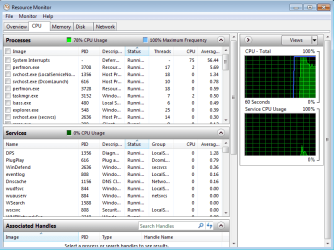
The resource moniter shows system interrupts at over 70 percent of the cpu.
 

My Computer

OS
windows 7
Go to your start menu and type in snipping tools. You should open the program. It allows you to make images of your screen. Make one of your task manager.

Im going to guess that your wlan driver isn't updated for windows 7. It is either this, or something is consuming a huge amount of your network resources.
 

My Computer

OS
Windows 7
Check the show processes from all users and do a good screenshot of which process seems to be consuming your resources most of the time. It should be in the cpu column.
 

My Computer

OS
Windows 7
There is nothing to show that the Cpu is being used in process explorer including processes from all users . Help
 

My Computer

OS
windows 7
If the task manager doesn't show cpu usage, now, then you should post a screenshot of when there is such a problem. Otherwise, how would you have known that some process was taking 70 to 100 percent of your cpu? Just wait for the problem and take a snipshot of its effects on your system. Otherwise, you could describe your problem in better detail. :)
 

My Computer

OS
Windows 7
The Cpu usage in task manager is always over 70% but it dosent show any processes taking it up although the resource moniter shows system interrupts using most of the processor

image1.png
 

My Computer

OS
windows 7
If the task manager doesn't show cpu usage, now, then you should post a screenshot of when there is such a problem. Otherwise, how would you have known that some process was taking 70 to 100 percent of your cpu? Just wait for the problem and take a snipshot of its effects on your system. Otherwise, you could describe your problem in better detail. :)

Sorry . I will try to be a little more clear
The task manager show cpu usage at over 70% . But there are no processes in task manager using the Cpu . although resource moniter shows system interrupts using over 70% of the Cpu.

The system interrputs drops to 10% and less once the wireless is switched off and the laptop works fine but as soon as the wireless is turned back on system interrupts shoots backup to 70% +
 
Last edited:

My Computer

OS
windows 7
Back
Top