System lock

darkhorse

New member
Power User
Local time
5:51 PM
Messages
514
Location
Denmark
Hi.

I run Windows 7 Ultimate 32bit.

I have encountered in the past, that my computer locks. Suddenly I canot use even the Keyboard nor the mouse, and I have then to do a hard reset.

I have tried to start up in safemode, where I have run Dr Web Cureit, the viruscan with my Bullguard, and also with Superantispyware.

There was nothing at all to notice.

I then think it could be a hardware issue.

Anyone, that can tell me what to do ?.

BTW this is written in Linux :D
 

My Computer

Computer type
PC/Desktop
Computer Manufacturer/Model Number
Homemade
OS
Windows 7 Ultimate
CPU
E7300
Motherboard
ASUS P5Q DeLuxe
Memory
4g
Graphics Card(s)
NVIDIA GeForce 7300 LE
Sound Card
N/A
Monitor(s) Displays
Acer
Screen Resolution
1600x1200
Hard Drives
Samsung HD503HI ATA Device
PSU
Seasonic
Case
ATX
Cooling
FAN
Keyboard
Logitech
Mouse
HP
Internet Speed
20/2
Antivirus
MSE
Browser
IE9, Chrome, Firefox
It happens to me from time to time. The way I get out of it is to press CTRL-ALT-DLET and then cancel the dialog. It seems to then free it up.
 

My Computer

Computer type
Laptop
Computer Manufacturer/Model Number
Hewlett-Packard/G62-107SA Notebook
OS
Microsoft Windows 7 Home Premium 64-bit Service Pack 1
CPU
Intel(R) Core(TM) i3 CPU M 330 @ 2.13GHz
Motherboard
Hewlett-Packard 1425
Memory
8 GB DDR3
Graphics Card(s)
Intel(R) HD Graphics
Sound Card
Realtek High Definition Audio
Monitor(s) Displays
Builtin
Screen Resolution
1366 x 768 x 32 bits (4294967296 colors) @ 60 Hz
Hard Drives
250 GB SATA Hard Disk Drive 7200 rpm
2TB Seagate GoFlex USB 2 Drive
1TB Iomega Prestige USB 2 Drive
1.5TB Iomega Prestige USB 2 Drive (Samsung)
2TB WD MyBook Live NAS.
Mouse
Logitech Anywhere MX
Internet Speed
152 Mbs download 10 Mbs upload
Antivirus
Norton 360
Browser
Chrome
I forgot to mention that.

But I try it every time, but that does not get the life back
 

My Computer

Computer type
PC/Desktop
Computer Manufacturer/Model Number
Homemade
OS
Windows 7 Ultimate
CPU
E7300
Motherboard
ASUS P5Q DeLuxe
Memory
4g
Graphics Card(s)
NVIDIA GeForce 7300 LE
Sound Card
N/A
Monitor(s) Displays
Acer
Screen Resolution
1600x1200
Hard Drives
Samsung HD503HI ATA Device
PSU
Seasonic
Case
ATX
Cooling
FAN
Keyboard
Logitech
Mouse
HP
Internet Speed
20/2
Antivirus
MSE
Browser
IE9, Chrome, Firefox
Have you tried running sfc /scannow from an elevated command prompt. It should detect and hopefully repair any corrupted windows modules.
 

My Computer

Computer type
Laptop
Computer Manufacturer/Model Number
Hewlett-Packard/G62-107SA Notebook
OS
Microsoft Windows 7 Home Premium 64-bit Service Pack 1
CPU
Intel(R) Core(TM) i3 CPU M 330 @ 2.13GHz
Motherboard
Hewlett-Packard 1425
Memory
8 GB DDR3
Graphics Card(s)
Intel(R) HD Graphics
Sound Card
Realtek High Definition Audio
Monitor(s) Displays
Builtin
Screen Resolution
1366 x 768 x 32 bits (4294967296 colors) @ 60 Hz
Hard Drives
250 GB SATA Hard Disk Drive 7200 rpm
2TB Seagate GoFlex USB 2 Drive
1TB Iomega Prestige USB 2 Drive
1.5TB Iomega Prestige USB 2 Drive (Samsung)
2TB WD MyBook Live NAS.
Mouse
Logitech Anywhere MX
Internet Speed
152 Mbs download 10 Mbs upload
Antivirus
Norton 360
Browser
Chrome
When it happens again, if you have a USB mouse/keyboard, try unplugging them and plugging them back in to see if that gives you functionality back. My Dell at work suffers from this problem with the mouse (random freezing), and unplugging it and plugging it back in again gets it working again.
 

My Computer

Computer type
PC/Desktop
Computer Manufacturer/Model Number
Dwarf Dwf/11/2012 r09/2013
OS
Windows 8.1 Pro RTM x64
CPU
Intel Core-i5-3570K 4-core @ 3.4GHz (Ivy Bridge) (OC 4.4GHz)
Motherboard
ASRock Z77 Extreme4-M
Memory
4 x 4GB DDR3-1600 Corsair Vengeance CMZ8GX3M2A1600C9B (16GB)
Graphics Card(s)
MSI GeForce GTX770 Gaming OC 2GB
Sound Card
Realtek High Definition on board solution (ALC 898)
Monitor(s) Displays
ViewSonic VA1912w Widescreen (VGA)
Screen Resolution
1440x900
Hard Drives
OCZ Agility 3 SSD 120GB SATA III x2 (RAID 0)
Samsung HD501LJ 500GB SATA II x2
Hitachi HDS721010CLA332 1TB SATA II
Iomega 1.5TB Ext USB 2.0
WD 2.0TB Ext USB 3.0
PSU
XFX Pro Series 850W Semi-Modular
Case
Gigabyte IF233
Cooling
1 x 120mm Front Inlet 1 x 120mm Rear Exhaust
Keyboard
Microsoft Comfort Curve Keyboard 3000 (USB)
Mouse
Microsoft Comfort Mouse 3000 for Business (USB)
Internet Speed
NetGear DG834Gv3 ADSL Modem/Router (Ethernet) ~4.0 Mb/s (O2)
Antivirus
Avast! 8.0.1497
Browser
IE 11
Other Info
Optical Drive: HL-DT-ST BD-RE BH10LS30 SATA Bluray
Lexmark S305 Printer/Scanner/Copier (USB)
WEI Score: 8.1/8.1/8.5/8.5/8.25
Asus Eee PC 1011PX Netbook (Windows 7 x86 Starter)
I have, but not at the moment.

I'm doing it now.

But when I would do it, I had the cmd up, and would enter it, the computer locked.
I had to do a hard restart, and so far it's running now -50%- for the moment.

Will see what's going on
 

My Computer

Computer type
PC/Desktop
Computer Manufacturer/Model Number
Homemade
OS
Windows 7 Ultimate
CPU
E7300
Motherboard
ASUS P5Q DeLuxe
Memory
4g
Graphics Card(s)
NVIDIA GeForce 7300 LE
Sound Card
N/A
Monitor(s) Displays
Acer
Screen Resolution
1600x1200
Hard Drives
Samsung HD503HI ATA Device
PSU
Seasonic
Case
ATX
Cooling
FAN
Keyboard
Logitech
Mouse
HP
Internet Speed
20/2
Antivirus
MSE
Browser
IE9, Chrome, Firefox
When it happens again, if you have a USB mouse/keyboard, try unplugging them and plugging them back in to see if that gives you functionality back. My Dell at work suffers from this problem with the mouse (random freezing), and unplugging it and plugging it back in again gets it working again.

I will, and I'm nearly sure the issue persists.

I have a PS/2 mouse and the keyboard is USB.

Did you find out where your issue came from ?
 

My Computer

Computer type
PC/Desktop
Computer Manufacturer/Model Number
Homemade
OS
Windows 7 Ultimate
CPU
E7300
Motherboard
ASUS P5Q DeLuxe
Memory
4g
Graphics Card(s)
NVIDIA GeForce 7300 LE
Sound Card
N/A
Monitor(s) Displays
Acer
Screen Resolution
1600x1200
Hard Drives
Samsung HD503HI ATA Device
PSU
Seasonic
Case
ATX
Cooling
FAN
Keyboard
Logitech
Mouse
HP
Internet Speed
20/2
Antivirus
MSE
Browser
IE9, Chrome, Firefox
The SFC /SCANNOW did not find any integrit violations.

Good enough, but what the Sherlok ? :-)
 

My Computer

Computer type
PC/Desktop
Computer Manufacturer/Model Number
Homemade
OS
Windows 7 Ultimate
CPU
E7300
Motherboard
ASUS P5Q DeLuxe
Memory
4g
Graphics Card(s)
NVIDIA GeForce 7300 LE
Sound Card
N/A
Monitor(s) Displays
Acer
Screen Resolution
1600x1200
Hard Drives
Samsung HD503HI ATA Device
PSU
Seasonic
Case
ATX
Cooling
FAN
Keyboard
Logitech
Mouse
HP
Internet Speed
20/2
Antivirus
MSE
Browser
IE9, Chrome, Firefox
Are all your drivers up to date?
 

My Computer

Computer type
Laptop
Computer Manufacturer/Model Number
Hewlett-Packard/G62-107SA Notebook
OS
Microsoft Windows 7 Home Premium 64-bit Service Pack 1
CPU
Intel(R) Core(TM) i3 CPU M 330 @ 2.13GHz
Motherboard
Hewlett-Packard 1425
Memory
8 GB DDR3
Graphics Card(s)
Intel(R) HD Graphics
Sound Card
Realtek High Definition Audio
Monitor(s) Displays
Builtin
Screen Resolution
1366 x 768 x 32 bits (4294967296 colors) @ 60 Hz
Hard Drives
250 GB SATA Hard Disk Drive 7200 rpm
2TB Seagate GoFlex USB 2 Drive
1TB Iomega Prestige USB 2 Drive
1.5TB Iomega Prestige USB 2 Drive (Samsung)
2TB WD MyBook Live NAS.
Mouse
Logitech Anywhere MX
Internet Speed
152 Mbs download 10 Mbs upload
Antivirus
Norton 360
Browser
Chrome
Yes they are
 

My Computer

Computer type
PC/Desktop
Computer Manufacturer/Model Number
Homemade
OS
Windows 7 Ultimate
CPU
E7300
Motherboard
ASUS P5Q DeLuxe
Memory
4g
Graphics Card(s)
NVIDIA GeForce 7300 LE
Sound Card
N/A
Monitor(s) Displays
Acer
Screen Resolution
1600x1200
Hard Drives
Samsung HD503HI ATA Device
PSU
Seasonic
Case
ATX
Cooling
FAN
Keyboard
Logitech
Mouse
HP
Internet Speed
20/2
Antivirus
MSE
Browser
IE9, Chrome, Firefox
Mmm I'm not sure where to go here either. I have put in a request for someone else to pick this up.
 

My Computer

Computer type
Laptop
Computer Manufacturer/Model Number
Hewlett-Packard/G62-107SA Notebook
OS
Microsoft Windows 7 Home Premium 64-bit Service Pack 1
CPU
Intel(R) Core(TM) i3 CPU M 330 @ 2.13GHz
Motherboard
Hewlett-Packard 1425
Memory
8 GB DDR3
Graphics Card(s)
Intel(R) HD Graphics
Sound Card
Realtek High Definition Audio
Monitor(s) Displays
Builtin
Screen Resolution
1366 x 768 x 32 bits (4294967296 colors) @ 60 Hz
Hard Drives
250 GB SATA Hard Disk Drive 7200 rpm
2TB Seagate GoFlex USB 2 Drive
1TB Iomega Prestige USB 2 Drive
1.5TB Iomega Prestige USB 2 Drive (Samsung)
2TB WD MyBook Live NAS.
Mouse
Logitech Anywhere MX
Internet Speed
152 Mbs download 10 Mbs upload
Antivirus
Norton 360
Browser
Chrome

My Computer

Computer type
Laptop
Computer Manufacturer/Model Number
Sony Vaio VPCEB47GM Laptop
OS
Win 7 Pro 64-bit
CPU
Intel i5 2.4 Ghz
Memory
8GB DDR3
Graphics Card(s)
Intel HD 3000
Sound Card
IDT High Definition
Monitor(s) Displays
15.6 WGXA Anti-Glare LED
Screen Resolution
1280x800
Hard Drives
640Gb 7200rpm
Antivirus
MSE
Browser
Opera (primary) with IE9 backup
Could be a driver issue. Have you got updated drivers for your keyboard/mouse from the manufacturer's website?

As for my issue with the mouse, I'm not sure what's causing it, and it doesn't really bother me as I know how to get it working again (other than the hassle of bending now and fiddling with its USB plug at the back of the computer).
 

My Computer

Computer type
PC/Desktop
Computer Manufacturer/Model Number
Dwarf Dwf/11/2012 r09/2013
OS
Windows 8.1 Pro RTM x64
CPU
Intel Core-i5-3570K 4-core @ 3.4GHz (Ivy Bridge) (OC 4.4GHz)
Motherboard
ASRock Z77 Extreme4-M
Memory
4 x 4GB DDR3-1600 Corsair Vengeance CMZ8GX3M2A1600C9B (16GB)
Graphics Card(s)
MSI GeForce GTX770 Gaming OC 2GB
Sound Card
Realtek High Definition on board solution (ALC 898)
Monitor(s) Displays
ViewSonic VA1912w Widescreen (VGA)
Screen Resolution
1440x900
Hard Drives
OCZ Agility 3 SSD 120GB SATA III x2 (RAID 0)
Samsung HD501LJ 500GB SATA II x2
Hitachi HDS721010CLA332 1TB SATA II
Iomega 1.5TB Ext USB 2.0
WD 2.0TB Ext USB 3.0
PSU
XFX Pro Series 850W Semi-Modular
Case
Gigabyte IF233
Cooling
1 x 120mm Front Inlet 1 x 120mm Rear Exhaust
Keyboard
Microsoft Comfort Curve Keyboard 3000 (USB)
Mouse
Microsoft Comfort Mouse 3000 for Business (USB)
Internet Speed
NetGear DG834Gv3 ADSL Modem/Router (Ethernet) ~4.0 Mb/s (O2)
Antivirus
Avast! 8.0.1497
Browser
IE 11
Other Info
Optical Drive: HL-DT-ST BD-RE BH10LS30 SATA Bluray
Lexmark S305 Printer/Scanner/Copier (USB)
WEI Score: 8.1/8.1/8.5/8.5/8.25
Asus Eee PC 1011PX Netbook (Windows 7 x86 Starter)

My Computer

Computer type
PC/Desktop
Computer Manufacturer/Model Number
Homemade
OS
Windows 7 Ultimate
CPU
E7300
Motherboard
ASUS P5Q DeLuxe
Memory
4g
Graphics Card(s)
NVIDIA GeForce 7300 LE
Sound Card
N/A
Monitor(s) Displays
Acer
Screen Resolution
1600x1200
Hard Drives
Samsung HD503HI ATA Device
PSU
Seasonic
Case
ATX
Cooling
FAN
Keyboard
Logitech
Mouse
HP
Internet Speed
20/2
Antivirus
MSE
Browser
IE9, Chrome, Firefox
Could be a driver issue. Have you got updated drivers for your keyboard/mouse from the manufacturer's website?

As for my issue with the mouse, I'm not sure what's causing it, and it doesn't really bother me as I know how to get it working again (other than the hassle of bending now and fiddling with its USB plug at the back of the computer).

I have not got update there recently, but both the keyboard and the mouse has worked since very long time.

But maybe it's an issue there.

Will look for updates.
 

My Computer

Computer type
PC/Desktop
Computer Manufacturer/Model Number
Homemade
OS
Windows 7 Ultimate
CPU
E7300
Motherboard
ASUS P5Q DeLuxe
Memory
4g
Graphics Card(s)
NVIDIA GeForce 7300 LE
Sound Card
N/A
Monitor(s) Displays
Acer
Screen Resolution
1600x1200
Hard Drives
Samsung HD503HI ATA Device
PSU
Seasonic
Case
ATX
Cooling
FAN
Keyboard
Logitech
Mouse
HP
Internet Speed
20/2
Antivirus
MSE
Browser
IE9, Chrome, Firefox
Had the issue again.

I throw out the keyboard and the mouse. Took a cup of coffee and after plugged them in again.

Same issue!
 

My Computer

Computer type
PC/Desktop
Computer Manufacturer/Model Number
Homemade
OS
Windows 7 Ultimate
CPU
E7300
Motherboard
ASUS P5Q DeLuxe
Memory
4g
Graphics Card(s)
NVIDIA GeForce 7300 LE
Sound Card
N/A
Monitor(s) Displays
Acer
Screen Resolution
1600x1200
Hard Drives
Samsung HD503HI ATA Device
PSU
Seasonic
Case
ATX
Cooling
FAN
Keyboard
Logitech
Mouse
HP
Internet Speed
20/2
Antivirus
MSE
Browser
IE9, Chrome, Firefox
The other day, I recognized a very loud bang from the room here.

I could not see anything when I came in here after the bang.

But now I get the idea, that maybe my issues should be addressed to the power supply in the computer.

Which voltages takes care of keyboard and mouse ?
 

My Computer

Computer type
PC/Desktop
Computer Manufacturer/Model Number
Homemade
OS
Windows 7 Ultimate
CPU
E7300
Motherboard
ASUS P5Q DeLuxe
Memory
4g
Graphics Card(s)
NVIDIA GeForce 7300 LE
Sound Card
N/A
Monitor(s) Displays
Acer
Screen Resolution
1600x1200
Hard Drives
Samsung HD503HI ATA Device
PSU
Seasonic
Case
ATX
Cooling
FAN
Keyboard
Logitech
Mouse
HP
Internet Speed
20/2
Antivirus
MSE
Browser
IE9, Chrome, Firefox
Well, the voltages seems to be all ok.

I would isolate the issue to not be the installation.

Then I installed W7 on another HD.

But the issue persists!.

Maybe it is the graphics card. I have had several BSOD's with it.

But the main goal now is to be sure what adn where the culprit is.

Any ideas ?
 

My Computer

Computer type
PC/Desktop
Computer Manufacturer/Model Number
Homemade
OS
Windows 7 Ultimate
CPU
E7300
Motherboard
ASUS P5Q DeLuxe
Memory
4g
Graphics Card(s)
NVIDIA GeForce 7300 LE
Sound Card
N/A
Monitor(s) Displays
Acer
Screen Resolution
1600x1200
Hard Drives
Samsung HD503HI ATA Device
PSU
Seasonic
Case
ATX
Cooling
FAN
Keyboard
Logitech
Mouse
HP
Internet Speed
20/2
Antivirus
MSE
Browser
IE9, Chrome, Firefox
Hi folks.

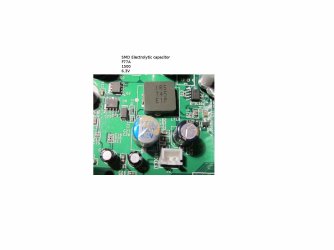
I'm sure I got it now. The big bang I heard came from an electrolutic capacitor -i'm sure-.

It is placed on the graphics card NVIDIA E7300

I'm sure it is an electrolytic capacitor.

For help to determine it is true, I ask you to help me have a look at the photo I have attached.

What say ?
 

Attachments

  • NVIDIA_E7300.jpg
    NVIDIA_E7300.jpg
    47.2 KB · Views: 9

My Computer

Computer type
PC/Desktop
Computer Manufacturer/Model Number
Homemade
OS
Windows 7 Ultimate
CPU
E7300
Motherboard
ASUS P5Q DeLuxe
Memory
4g
Graphics Card(s)
NVIDIA GeForce 7300 LE
Sound Card
N/A
Monitor(s) Displays
Acer
Screen Resolution
1600x1200
Hard Drives
Samsung HD503HI ATA Device
PSU
Seasonic
Case
ATX
Cooling
FAN
Keyboard
Logitech
Mouse
HP
Internet Speed
20/2
Antivirus
MSE
Browser
IE9, Chrome, Firefox
I changed the ely, and it is running ok now.

Many thanks to you all for tips and advices
 

My Computer

Computer type
PC/Desktop
Computer Manufacturer/Model Number
Homemade
OS
Windows 7 Ultimate
CPU
E7300
Motherboard
ASUS P5Q DeLuxe
Memory
4g
Graphics Card(s)
NVIDIA GeForce 7300 LE
Sound Card
N/A
Monitor(s) Displays
Acer
Screen Resolution
1600x1200
Hard Drives
Samsung HD503HI ATA Device
PSU
Seasonic
Case
ATX
Cooling
FAN
Keyboard
Logitech
Mouse
HP
Internet Speed
20/2
Antivirus
MSE
Browser
IE9, Chrome, Firefox
Back
Top