System Not Shutting Down

svk558

New member
Local time
6:01 AM
Messages
5
My System not shutting down.When I shut it down it says Configuring Windows,Please donot unplug your system.It is struck for hours.I have to force shutdown.Can anyone helpme.

OS:Windows 7 Ultimate 32bit

Antivirus:Eset Nod 32

Intel P4 3.06Ghz

:confused:
 

My Computer

OS
Windows 7 Ultimate 32bit
CPU
Intel 3.0Ghz Pentium 4
Motherboard
Intel D102GGC2
Memory
1.5 GB
Graphics Card(s)
Inbuilt
Monitor(s) Displays
LG
Case
Zebronics

My Computer

Computer type
Laptop
Computer Manufacturer/Model Number
Sony Vaio VPCEB47GM Laptop
OS
Win 7 Pro 64-bit
CPU
Intel i5 2.4 Ghz
Memory
8GB DDR3
Graphics Card(s)
Intel HD 3000
Sound Card
IDT High Definition
Monitor(s) Displays
15.6 WGXA Anti-Glare LED
Screen Resolution
1280x800
Hard Drives
640Gb 7200rpm
Antivirus
MSE
Browser
Opera (primary) with IE9 backup
I had a similar problem however I think mine was related to System Images, don't remember if it was Windows System Backup scheduled or Acronis Software. I think it finished after like 10 hours or something around there. All i know is i had a similar message that involved Windows Backups. I just turn scheduling off on both
 

My Computer

Computer type
PC/Desktop
Computer Manufacturer/Model Number
Gateway / Slight Modifications
OS
Windows 8 64 bit PRO
CPU
AMD Phenom X4 9100e
Motherboard
Gateway RS780
Memory
2GB X2 DDR2
Graphics Card(s)
Sapphire HD 6850
Sound Card
Integrated
Monitor(s) Displays
Gateway 19" + Dell 19"
Screen Resolution
1440X900 sometimes 2880 by 900
Hard Drives
WD 80GB
WD 640GB
WD 1,000GB
PSU
Antec BP 550watts
Case
Antec 300
Cooling
Stock Cooling
Keyboard
Saitek Eclipse II
Mouse
Gigabyte GM-M6800
Internet Speed
D: 30Mbps U:4Mbps
Antivirus
Avast version 8
Browser
Internet Explorer ver 10 64 bit
Other Info
This is my work computer.
I have another laptop running Windows 7 64 bit.
Another PC running Windows 8 64 bit pro.
Total of 3

My Computer

Computer type
PC/Desktop
Computer Manufacturer/Model Number
Custom Built PC
OS
Windows 7 Ultimate 64 bit SP1
CPU
Intel(R) Core(TM) i5-2500K
Motherboard
Gigabyte Technology Co., Ltd. Z68X-UD3-B3
Memory
12GB Kingston Hyperx 1600MHz
Graphics Card(s)
Asus GTS 450
PSU
500W Coolink
Other Info
Genius G-Pen F610 (PenPad)
Hello svk558 and welcome to Seven Forums.

Couple of things you can try. See if you have a Restore Point going back to before the shut down problem began.

http://www.sevenforums.com/tutorials/700-system-restore.html

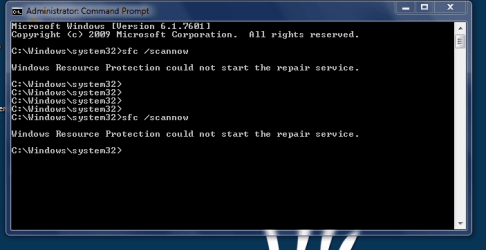
You could also try running a System File Checker scan to see if you have any damaged or corrupt system files. If any problems are noted, run the scan 3 times rebooting in between each scan.

http://www.sevenforums.com/tutorials/1538-sfc-scannow-command-system-file-checker.html

Their is no system restore point in my system.
 

My Computer

OS
Windows 7 Ultimate 32bit
CPU
Intel 3.0Ghz Pentium 4
Motherboard
Intel D102GGC2
Memory
1.5 GB
Graphics Card(s)
Inbuilt
Monitor(s) Displays
LG
Case
Zebronics
Did you run the SFC? What were the results?
 

My Computer

Computer type
Laptop
Computer Manufacturer/Model Number
Sony Vaio VPCEB47GM Laptop
OS
Win 7 Pro 64-bit
CPU
Intel i5 2.4 Ghz
Memory
8GB DDR3
Graphics Card(s)
Intel HD 3000
Sound Card
IDT High Definition
Monitor(s) Displays
15.6 WGXA Anti-Glare LED
Screen Resolution
1280x800
Hard Drives
640Gb 7200rpm
Antivirus
MSE
Browser
Opera (primary) with IE9 backup

My Computer

OS
Windows 7 Ultimate 32bit
CPU
Intel 3.0Ghz Pentium 4
Motherboard
Intel D102GGC2
Memory
1.5 GB
Graphics Card(s)
Inbuilt
Monitor(s) Displays
LG
Case
Zebronics
Back
Top