system optimisation: assistance with deleting vista

biggles11

New member
Local time
3:39 PM
Messages
20
When I bought my new computer I had the HDD from my old computer (which ran vista) installed into the casing of my new system and used as a backup drive. it works fine, the only problem is the drive still contains vista which is taking up valuable space. My main question is, what process should I use to eradicate vista from the drive, without harming any of the files or games I have a run off that drive (but still through win 7 on my main HDD).
 

My Computer My Computer

OS
Windows 7 64 bit
CPU
Intel core i3 @3.1 GHz
Motherboard
MCI
Memory
8Gb DDR3 1066Hz
Graphics Card(s)
Asus HD6670
Sound Card
Standard
Monitor(s) Displays
Acer P&P display
Screen Resolution
1650x1080
Hard Drives
1x 250Gb HDD (main drive)
1x 320Gb HDD (spare internal drive)
PSU
450 watt
Internet Speed
~0.5Mb/s
If the Vista installation is on a separate partition on that drive, you can get rid of it just by formatting the partition. But that's probably not the case.
Have you tried taking ownership of the Windows folder and then deleting it?
 
Last edited:

My Computer My Computer

Computer Manufacturer/Model Number
Dell Inspiron 580
OS
7 Ultimate x64/7 Home Premium x64
CPU
Intel i3 550 3.2 GHz
Motherboard
Dell/Intel H57
Memory
Corsair 16 GB DDR3 (4 X 4GB)
Graphics Card(s)
Intel HD Graphics
Sound Card
Intel P55 HD Audio
Monitor(s) Displays
LG E2360 LED
Screen Resolution
1920 X 1080
Hard Drives
Seagate 1TB X 2 Internal,
Seagate 1TB eSATA (Backup)
PSU
Dell 300W
Case
Dell Inspiron
Cooling
Dell/Intel
Keyboard
Microsoft Wireless Comfort Keyboard 5000
Mouse
Microsoft Wireless Mouse 5000
Internet Speed
4,000 Mbit DSL
Other Info
Custom Installation -
OS separate on C:
Pagefile Separate on P:
Program Files Separate on U:
Users and ProgramData separate on V:
In Windows 7: Go to start, then right click on comnputer and click manage. Once Computer Management comes up, click on disk management in the left pane. Now, right click on the Windows Vista Partition and select delete. Once it has deleted, right click on your Windows 7 partition and select expand. Click ok on the dialog boxes that pop up.
 

My Computer My Computer

Computer type
PC/Desktop
Computer Manufacturer/Model Number
HP Pavilion P7-1010
OS
Windows 7 Professional x64 Service Pack 1
CPU
AMD Athlon X4 645
Motherboard
Foxxcon N-Alvorix RS880
Memory
6GB DDR3 1066
Graphics Card(s)
Sapphire Radeon HD 5670 512MB GDDR5
Sound Card
Realtek Integrated Audio
Monitor(s) Displays
HP 2011x
Screen Resolution
1600x900
Hard Drives
1. Crucial M4 128GB SSD
2. 1TB Seagate Barracuda 7200.12 RPM
3. 1TB Western Digital Caviar Green 5400RPM
PSU
Seasonic S12 II Bronze 380 Watt
Case
HP OEM
Cooling
Coolermaster Heatsink, AVC Case Fan
Keyboard
HP OEM- Made by Chicony
Mouse
HP OEM- Made by Logitech
Internet Speed
20MBit Down/4 Up
Antivirus
Microsoft Security Essentials
Browser
Internet Explorer 10
In Windows 7: Go to start, then right click on comnputer and click manage. Once Computer Management comes up, click on disk management in the left pane. Now, right click on the Windows Vista Partition and select delete. Once it has deleted, right click on your Windows 7 partition and select expand. Click ok on the dialog boxes that pop up.

The OP stated this is an old drive used as a backup in his new system, so he won't see a Vista Partition on the drive with Windows 7. Additionally, if it were located on the same disk as Windows 7 and he deleted the partition he would lose his other files as well; since he asked:
"what process should I use to eradicate vista from the drive, without harming any of the files or games I have a run off that drive"
that doesn't sould like it would work out very well.

Maybe I am missing something in your reply. Please let me know if that's the case.
 

My Computer My Computer

Computer type
PC/Desktop
Computer Manufacturer/Model Number
Custom Built
OS
Windows 7 Professional x64
CPU
Intel i5 quad processor
Motherboard
DP67BG
Memory
16 GB
Graphics Card(s)
Radeon HD 5770
Sound Card
Realtek High Definition Audio
Monitor(s) Displays
Samsung SyncMaster
Screen Resolution
1920X1080
Hard Drives
WD 2TB (SATA Internal)
WD 1TB (USB External)
PSU
Corsair GS800
Case
Tower (Generic)
Cooling
3 Internal Fans
Keyboard
MS Wireless
Mouse
MS Optical Wired
Internet Speed
54 mbps
Antivirus
Emsisoft
Browser
IE-Version 9, Palemoon-Version 24.2.0
In Windows 7: Go to start, then right click on comnputer and click manage. Once Computer Management comes up, click on disk management in the left pane. Now, right click on the Windows Vista Partition and select delete. Once it has deleted, right click on your Windows 7 partition and select expand. Click ok on the dialog boxes that pop up.

The OP stated this is an old drive used as a backup in his new system, so he won't see a Vista Partition on the drive with Windows 7. Additionally, if it were located on the same disk as Windows 7 and he deleted the partition he would lose his other fiels as well; since he asked:
"what process should I use to eradicate vista from the drive, without harming any of the files or games I have a run off that drive"
that doesn't sould like it would work out very well.

Maybe I am missing something in your reply. Please let me know if that's the case.
Oh. Whoops! Yea DEFINATELY don't want to do that:o
 

My Computer My Computer

Computer type
PC/Desktop
Computer Manufacturer/Model Number
HP Pavilion P7-1010
OS
Windows 7 Professional x64 Service Pack 1
CPU
AMD Athlon X4 645
Motherboard
Foxxcon N-Alvorix RS880
Memory
6GB DDR3 1066
Graphics Card(s)
Sapphire Radeon HD 5670 512MB GDDR5
Sound Card
Realtek Integrated Audio
Monitor(s) Displays
HP 2011x
Screen Resolution
1600x900
Hard Drives
1. Crucial M4 128GB SSD
2. 1TB Seagate Barracuda 7200.12 RPM
3. 1TB Western Digital Caviar Green 5400RPM
PSU
Seasonic S12 II Bronze 380 Watt
Case
HP OEM
Cooling
Coolermaster Heatsink, AVC Case Fan
Keyboard
HP OEM- Made by Chicony
Mouse
HP OEM- Made by Logitech
Internet Speed
20MBit Down/4 Up
Antivirus
Microsoft Security Essentials
Browser
Internet Explorer 10
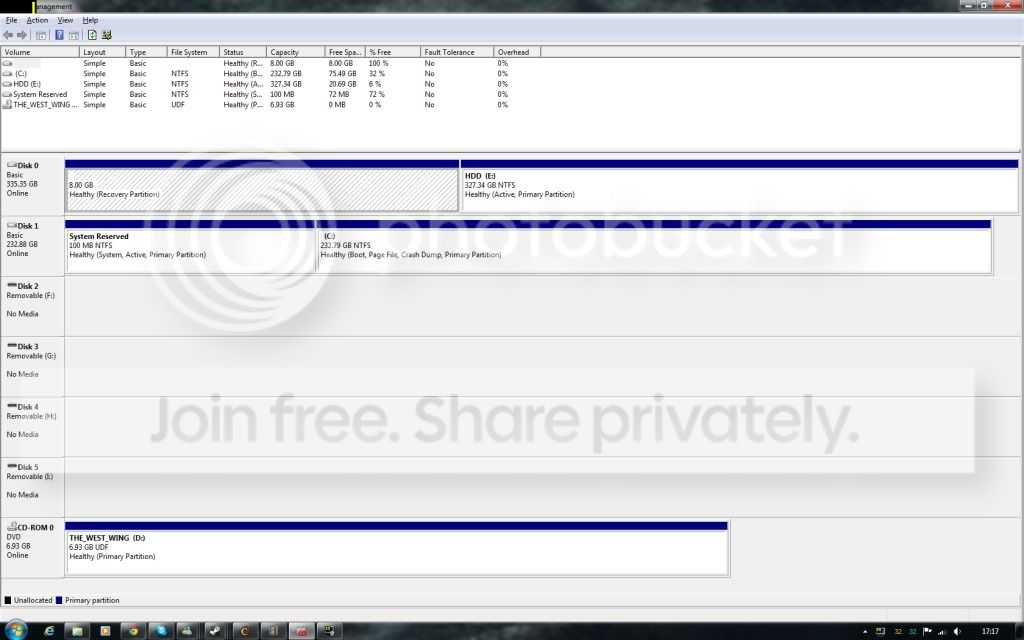
Please post back a screenshot of your maxmized Disk Management drive map with listings, using the Snipping Tool in Start Menu. Screen Shots

We can advise you best once we see this on how to delete Vista partition after moving its files off which you want to sav.
 
Please post back a screenshot of your maxmized Disk Management drive map with listings, using the Snipping Tool in Start Menu. Screen Shots

We can advise you best once we see this on how to delete Vista partition after moving its files off which you want to sav.
THAT's what I meant lol:D
 

My Computer My Computer

Computer type
PC/Desktop
Computer Manufacturer/Model Number
HP Pavilion P7-1010
OS
Windows 7 Professional x64 Service Pack 1
CPU
AMD Athlon X4 645
Motherboard
Foxxcon N-Alvorix RS880
Memory
6GB DDR3 1066
Graphics Card(s)
Sapphire Radeon HD 5670 512MB GDDR5
Sound Card
Realtek Integrated Audio
Monitor(s) Displays
HP 2011x
Screen Resolution
1600x900
Hard Drives
1. Crucial M4 128GB SSD
2. 1TB Seagate Barracuda 7200.12 RPM
3. 1TB Western Digital Caviar Green 5400RPM
PSU
Seasonic S12 II Bronze 380 Watt
Case
HP OEM
Cooling
Coolermaster Heatsink, AVC Case Fan
Keyboard
HP OEM- Made by Chicony
Mouse
HP OEM- Made by Logitech
Internet Speed
20MBit Down/4 Up
Antivirus
Microsoft Security Essentials
Browser
Internet Explorer 10
My guess is OP has the files/games on secondary HD on another partition, or should.

If not then I'd back up files to Primary, external or shift them to another partition shrunk out of Vista so that Vista can be properly deleted in Disk Mgmt, then created into a data partition or added to an existing HD data partition.

Games if on the Vista partition would need to be reinstalled.

Only as a last resort would I delete the Vista Windows folder as it is problematic to do and leaves residue.
 
Only as a last resort would I delete the Vista Windows folder as it is problematic to do and leaves residue.
I agree, it is messy. I haven't worked a lot in Vista, but most of the OEM installations I have dealt with had only two partitions, a recovery partition, and the rest of the drive was the Vista partition.
 

My Computer My Computer

Computer Manufacturer/Model Number
Dell Inspiron 580
OS
7 Ultimate x64/7 Home Premium x64
CPU
Intel i3 550 3.2 GHz
Motherboard
Dell/Intel H57
Memory
Corsair 16 GB DDR3 (4 X 4GB)
Graphics Card(s)
Intel HD Graphics
Sound Card
Intel P55 HD Audio
Monitor(s) Displays
LG E2360 LED
Screen Resolution
1920 X 1080
Hard Drives
Seagate 1TB X 2 Internal,
Seagate 1TB eSATA (Backup)
PSU
Dell 300W
Case
Dell Inspiron
Cooling
Dell/Intel
Keyboard
Microsoft Wireless Comfort Keyboard 5000
Mouse
Microsoft Wireless Mouse 5000
Internet Speed
4,000 Mbit DSL
Other Info
Custom Installation -
OS separate on C:
Pagefile Separate on P:
Program Files Separate on U:
Users and ProgramData separate on V:
sorry I wasn't around, I had school and sleep to catch up on :)

wow lots of interest taken in me, I feel special ^_^

in any case, moving files to another HDD would be very difficult and time consuming, as our only external HDD is too small to contain the files I would need to move.

What do you mean by "on a seperate partition"? All I know is that my old PC came with windows vista installed, I then installed my own games and stuff onto it, before plugging it into my new computer. (over several years of course)

Also greg, what exactly do you want a screenshot of? my disk manager?
 

My Computer My Computer

OS
Windows 7 64 bit
CPU
Intel core i3 @3.1 GHz
Motherboard
MCI
Memory
8Gb DDR3 1066Hz
Graphics Card(s)
Asus HD6670
Sound Card
Standard
Monitor(s) Displays
Acer P&P display
Screen Resolution
1650x1080
Hard Drives
1x 250Gb HDD (main drive)
1x 320Gb HDD (spare internal drive)
PSU
450 watt
Internet Speed
~0.5Mb/s
Also greg, what exactly do you want a screenshot of? my disk manager?

Hit Windows key+ R, type diskmgmt.msc , maximize the window and post its screenshot.

PS: Windows key is the key between Ctrl and Alt with a wavy flag on it.
 

My Computer My Computer

Computer Manufacturer/Model Number
HCL
OS
Winbdows 7 ultimate x64 | Ubuntu 12.04 x64 LTS
CPU
Core 2 Duo e7400 @ 2.90GHz
Motherboard
Gigabyte G31M-ES2L
Memory
3GB DDR2
Graphics Card(s)
Asus Nvidia GTX 560Ti 1GB
Sound Card
On-board
Monitor(s) Displays
HCL eZeeBee 18.5" LCD
Screen Resolution
1366x768 @ 60Hz
Hard Drives
Western Digital 320GB
PSU
Corsair CX500 V2 500W
Cooling
Stock
Keyboard
Stock
Mouse
Stock
Internet Speed
15-25kBps D/L | 10kBps U/L | Hey Don't laugh
What do you mean by "on a seperate partition"? All I know is that my old PC came with windows vista installed, I then installed my own games and stuff onto it, before plugging it into my new computer.

It isn't clear from any of your posts if you have 1 hard drive or 2.

Not to be confused with 2 partitions on the same hard drive.

That's why we need to see the pic of Disk Management.

If you have 2 separate hard drives, with Vista on one and Windows 7 on the other, it's a simple fix. If you have 1 hard drive with multiple partitions, it's a little more complicated.
 

My Computer My Computer

Computer type
PC/Desktop
Computer Manufacturer/Model Number
Ignatz Special; 4 speed manual gearbox; factory air conditioning; one of one
OS
Windows 7 Home Premium SP1, 64-bit
CPU
Intel Skylake i5-6600K, not overclocked
Motherboard
AsRock Z170M Extreme 4, micro ATX
Memory
8 GB HyperX DDR4-2666 (2 x 4 GB)
Graphics Card(s)
none; graphics are integrated on CPU
Sound Card
onboard: Realtek ALC1150; external: USB Behringer UF0-202
Monitor(s) Displays
Dell S2340M 23 inch IPS
Screen Resolution
1600 x 900
Hard Drives
System: Crucial MX100 series SSD, 128 GB;
Data: Samsung Spinpoint 103SJ, 1 TB;
Backup: WD Caviar Green WD30EZRX-00D8PB0, 3 TB
PSU
Rosewill SilentNight 500 watt fanless, semi-modular
Case
Antec Solo II
Cooling
Noctua NH-U12S; Noctua F12 intake, Noctua S12A exhaust
Keyboard
Microsoft 200 6JH-00001 USB
Mouse
Dell or Microsoft optical wired; USB
Antivirus
Microsoft Security Essentials and Malwarebytes Premium
Browser
Pale Moon
Other Info
All fans PWM; speeds at idle: CPU circa 500 rpm; intake circa 600 rpm; exhaust circa 600 rpm; CPU temps 27 idle and 47 C load in a warm room (27 C/81 F) when running Intel Extreme Tuning Utility stress test.
Waiting for the Disk Mgmt screenshot. Tell us what is on each partition or HD.

Also answer these questions: Are you running programs/games or accessing files which reside on the Vista partition or Hard Drive from Win7?

What exactly on the Vista partition or Hard Drive to you want to save?
 
aaah I see lol.

I have two physical hard drives.

a 250gb one which is running windows 7 (main HDD)
a 320gb one from my old computer with the defunct vista and many of my files on. (second HDD)

As for the disk management, I'll take a pic in a moment and upload. Shouldn't be more than 5 minutes.
 

My Computer My Computer

OS
Windows 7 64 bit
CPU
Intel core i3 @3.1 GHz
Motherboard
MCI
Memory
8Gb DDR3 1066Hz
Graphics Card(s)
Asus HD6670
Sound Card
Standard
Monitor(s) Displays
Acer P&P display
Screen Resolution
1650x1080
Hard Drives
1x 250Gb HDD (main drive)
1x 320Gb HDD (spare internal drive)
PSU
450 watt
Internet Speed
~0.5Mb/s
Dwm2012-04-1617-17-34-46.jpg
 

My Computer My Computer

OS
Windows 7 64 bit
CPU
Intel core i3 @3.1 GHz
Motherboard
MCI
Memory
8Gb DDR3 1066Hz
Graphics Card(s)
Asus HD6670
Sound Card
Standard
Monitor(s) Displays
Acer P&P display
Screen Resolution
1650x1080
Hard Drives
1x 250Gb HDD (main drive)
1x 320Gb HDD (spare internal drive)
PSU
450 watt
Internet Speed
~0.5Mb/s
Waiting for the Disk Mgmt screenshot. Tell us what is on each partition or HD.

Also answer these questions: Are you running programs/games or accessing files which reside on the Vista partition or Hard Drive from Win7?

What exactly on the Vista partition or Hard Drive to you want to save?

just saw this question

Yes I am running games and accessing files on the vista HDD
 

My Computer My Computer

OS
Windows 7 64 bit
CPU
Intel core i3 @3.1 GHz
Motherboard
MCI
Memory
8Gb DDR3 1066Hz
Graphics Card(s)
Asus HD6670
Sound Card
Standard
Monitor(s) Displays
Acer P&P display
Screen Resolution
1650x1080
Hard Drives
1x 250Gb HDD (main drive)
1x 320Gb HDD (spare internal drive)
PSU
450 watt
Internet Speed
~0.5Mb/s
How are you accessing your data now from Win7 which resides on the Vista HD? Is it organized into User folders or random folders linked via Library - Include a Folder - Windows 7 Forums?

How are you running Programs which are installed to Vista from Win7? Those programs would normally need to be reinstalled to Win7.

Answer these questions to proceed.

Although it is not the cleanest uninstall we can help you delete Vista Windows folder and link the remaining User folders and data folders to Win7 libraries as shown in the blue tutorial above. Organizing data better by sorting into User folders would make it easier, then any remaining files can linked via Library if you want easy access from Win7, or considered storage.
 
I'm not entirely sure, After both HDD's were installed in my new PC I booted it up and I could access both HDD's and all the files/games on them as normal.
 

My Computer My Computer

OS
Windows 7 64 bit
CPU
Intel core i3 @3.1 GHz
Motherboard
MCI
Memory
8Gb DDR3 1066Hz
Graphics Card(s)
Asus HD6670
Sound Card
Standard
Monitor(s) Displays
Acer P&P display
Screen Resolution
1650x1080
Hard Drives
1x 250Gb HDD (main drive)
1x 320Gb HDD (spare internal drive)
PSU
450 watt
Internet Speed
~0.5Mb/s
Are you saying you're able to play games installed to Vista from Windows 7? This will not be possible if you delete Vista. They should be installed to Win7 anyway. Is this a problem for you?

Exactly how are you accessing your files from Win7? Do you browse into E to find them, or do you have them linked to the Documents, Pictures, Music, etc Libraries? Is this how you'd want to organize them now if you'd delete the Vista OS?

The cleanest way to do this is to move the files off of Vista and delete the partition. If it's not possible then you can delete the Windows folder after taking ownership of it, but it requires patience and sometimes drilling down into the sub-folders/files to take ownership using a Take Ownership Shortcut, or by full permissioning Everyone on the File's Property Box Security tab. We can help you do this as you go.

But you should have an idea of how you want to link your files from the remaining Vista partition, and will need to reinstall all of your programs.
 
Back
Top